Simple ways to do hard things
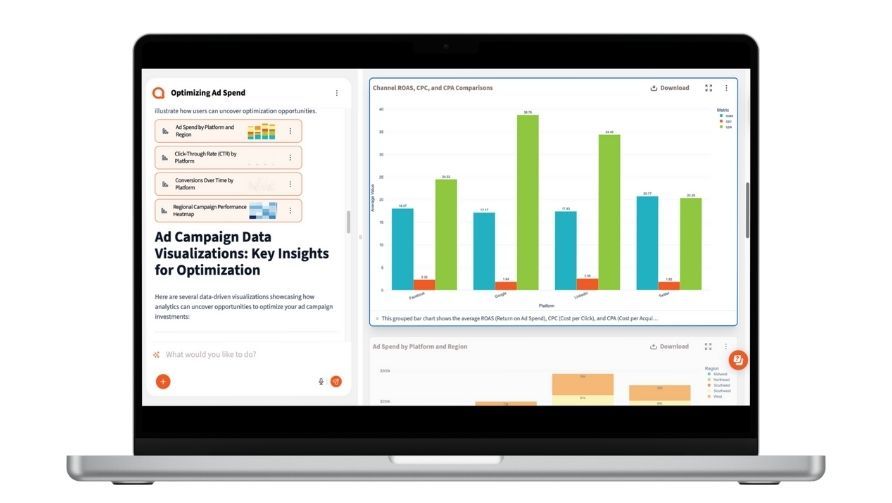
Talk to your data through a chat interface and watch it transform in a spreadsheet view.
Component Preview
Add @example to JSDoc for live preview
No @example found in JSDoc
Stop drowning in spreadsheets and start making data-driven decisions with confidence
Our AI-powered analytics platform turns complex data into clear, actionable insights that drive business growth.
Get answers to your business questions in seconds, not hours, with natural language queries that anyone can use.
Ask questions in plain English
Get insights as they happen
Build views that matter to your business
Transform your data analysis workflow with our AI-powered platform that makes insights accessible to everyone
Ask questions in plain English and get instant insights from your data.
Designed for humans, powered by AI. Anyone can become data-driven.
Unify data from all sources into one intelligent platform.
Clean campaign naming across platforms makes cross-channel analysis dramatically easier. Standardize before you analyze.
A great report explains why metrics changed and what to do next. Let Querri generate the narrative, then add your strategic insight.
Create one strong prompt that covers your standard KPIs and save it. Each week, just update the data and run.
Explore these helpful resources.
Find help and how-to, frequently asked questions, reference guides, tips and best practices in the Querri knowledge base.
Ask for help, learn best practices, and find examples posted by fellow community members.
Watch step-by-step video guides to master Querri's features and workflows.
New to Querri? Follow our quick start guide to get up and running in minutes.
Need personalized help? Reach out to our support team for assistance.

Connect your spreadsheet, CSV, or cloud source in seconds
Our AI scans and identifies patterns, issues, and opportunities
Set up automated rules that match your business needs
See all changes before they're applied - you stay in control
Download clean data or set up ongoing automation

Component Not Available
Logos not found in registry
Found in: content • src/components/content/Logos.astro
Perfect for individuals getting started
Great for small teams and growing businesses
Perfect for growing teams and businesses
For large organizations with complex data needs
With Querri, there's no months-long implementation, no waiting on IT, and no steep learning curve. Just connect your data, ask a question in plain language, and get clean, visual answers in seconds. Unlike traditional BI tools that require complex builds and training, Querri delivers instant clarity from day one.
Bring all your scattered spreadsheets, files, and systems into one place. Querri connects and cleans data across platforms, breaking down silos so every team has a single source of truth. No complex integrations or technical setup—just seamless access to the insights you need, when you need them.
Reduce administrative overhead by enabling business users to build solutions independently without constant IT support, minimizing the burden on system administrators, and driving efficiency and innovation across the organization.
Confidently scale your data work with Querri—manage growing workloads seamlessly, streamline processes, keep teams aligned, and unlock greater efficiency to drive better outcomes on a platform designed for growth.
Component Not Available
QuoteSection not found in registry
Found in: content • src/components/content/QuoteSection.astro

Component Not Available
SolutionsPageAlternating not found in registry
Found in: content • src/components/content/SolutionsPageAlternating.astro
Component Not Available
SolutionsPageAlternatinglonger not found in registry
Found in: content • src/components/content/SolutionsPageAlternatinglonger.astro
Talk to your data through a chat interface and watch it transform in a spreadsheet view.
Clean, merge, and analyze once. Then set up your data workflows to run on your schedule.
It's not a black box. See an explanation of the data workflows behind every Querri.
No example data found in JSDoc @example
Add an @example block to enable interactive editing
Name: AlternatingProblemSolution
Category: content
Path: src/components/content/AlternatingProblemSolution.astro
Description: AlternatingProblemSolution - Problem and solution sections with alternating layouts
problem: object - Problem section with title, content, and image (required)
solution: object - Solution section with title, content, and image (required)
additionalSolution?: object - Optional third section (title, content, image)
For detailed usage instructions, props, and examples, check the JSDoc comments in the component file or see the complete component documentation.