Querri for Visual Storytelling Turn reports into stories that show what happened and why it matters
A table of figures rarely changes anyone's mind. Querri turns connected or uploaded data into annotated charts, live dashboards and presentation-ready decks, built from plain-English questions. The example on this page follows a finance team preparing a leadership report, and the same approach works for sales, marketing and operations.
See a Dashboard Edited by Chat
In this short clip, a dashboard is restyled and one of its charts is changed just by asking in plain language.
"Due to the volume of day-to-day operational tasks, I only spend about 10% of my time on financial analysis, though I would like to spend more."— Controller
Why Reports Fall Short
Most leaders work across several systems: accounting, CRM, ERP, time tracking and spreadsheets. To prepare a management report, their teams spend hours exporting, cleaning and stitching data together, then more hours building charts by hand.
Even after all that work, reports often raise more questions than they answer:
- Dashboards show trends but miss the context behind them.
- The chart in the deck is a screenshot, out of date the day after it was pasted.
- Executives ask follow-up questions that take days of extra work.
- Reports cover "what happened" but rarely "why it happened" or "what comes next".
Teams end up formatting numbers when they should be explaining them.

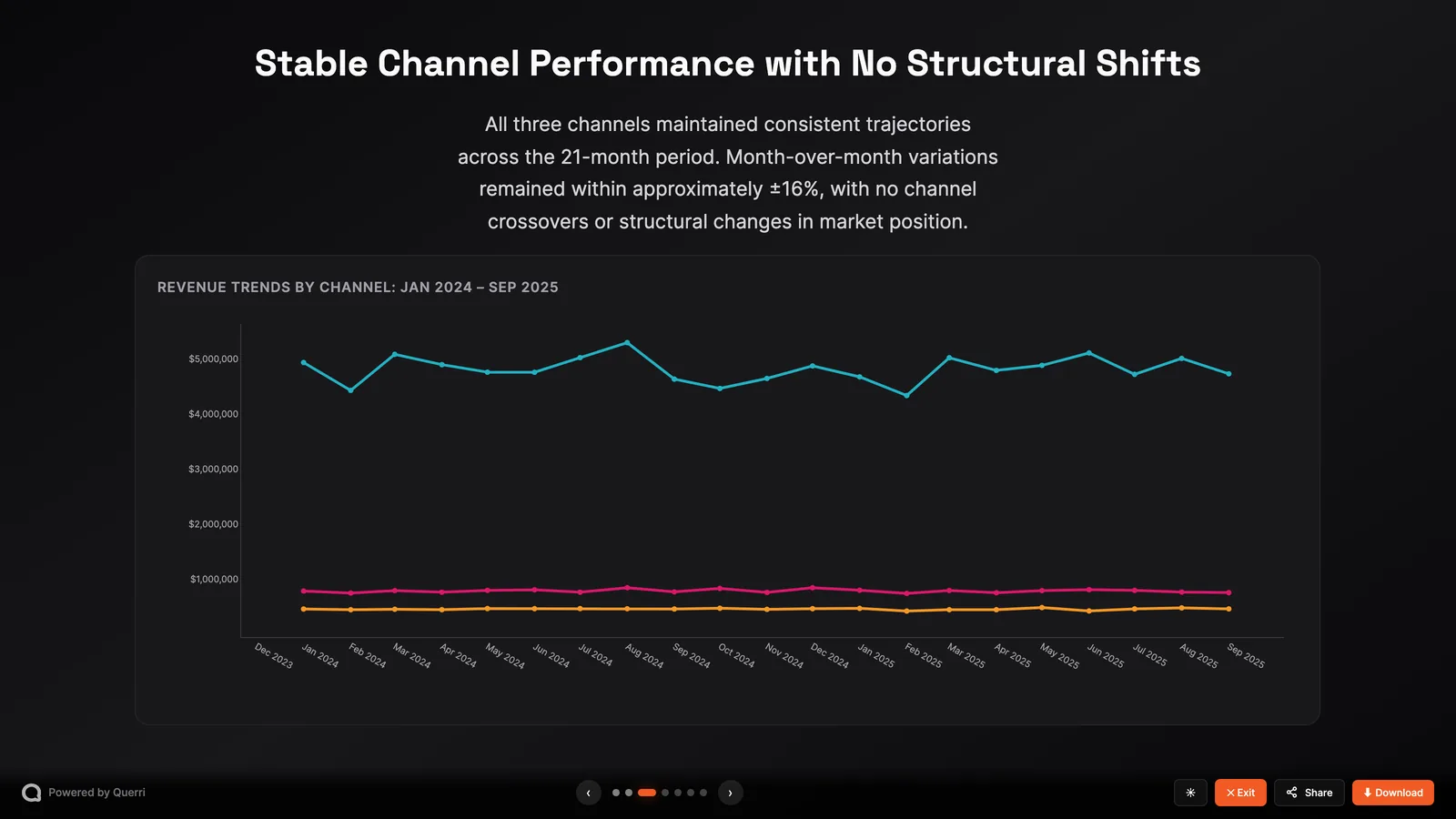
From a Question to a Story Leaders Can Follow
Connect your systems or upload your data, and ask questions in plain English. Querri cleans and joins the data and builds the visuals with you.
You can:
- Try many charts quickly to find the one that makes the point.
- Add annotations, such as reference lines and notes, to mark the events behind a change.
- Refine a single chart, for example "show it as a percentage", without redoing the analysis.
- Pin charts to a dashboard that refreshes on schedule.
- Ask for a presentation deck built from your charts and tables, ready to present, share or download.
- Rebuild a dashboard from a screenshot of the one you already use, on your own data.
Because every chart comes from a saved analysis, the visuals update when the data does. You don't paste new screenshots into last month's slides.
Business Impact of Better Visuals
Clarity in reporting: show the full picture, not isolated metrics
Time saved each month: hours back from chart building and manual pivots
Charts that update with the data, not screenshots
Context on the chart, so the "why" travels with the number
Decks and dashboards ready to share without redesign
Leadership confidence: clearer reports lead to faster decisions
How-To: Tell the Story in Querri
1 Connect Your Data
Connect QuickBooks, your CRM, Google Drive or a warehouse from 125+ connectors, or upload Excel and CSV files.
2 Clean and Join Data
Prompt: "Join sales by branch from the CRM with revenue from QuickBooks. Fix date formats and remove duplicates." Querri checks every table as it arrives, so the charts are built on clean data.
3 Explore Anomalies and Trends
Prompt: "Show me sales by branch and highlight anomalies compared to last quarter."
4 Visualize the Story
Prompt: "Chart the revenue trend by branch. Annotate the branch closure and highlight increases elsewhere."
5 Share It as a Dashboard or Deck
Prompt: "Turn this into a presentation for the leadership team." Or add the charts to a dashboard and schedule it to refresh before the Monday meeting. Share it with your team's workspace, and colleagues can open the same charts and ask their own follow-ups.

Best Practices for Visual Storytelling
Use Multiple Sources Together
A single dataset rarely tells the whole story. Joining accounting with CRM or HR data shows the context behind the numbers.
One Chart, One Point
Decide what you want the reader to take away before you choose the chart. If a chart needs a paragraph to explain it, split it in two.
Aim for Consistency
Make sure categories like branch, region and department are standardized. Inconsistent labels show up as extra bars and broken legends.
Go Beyond Static Dashboards
Dashboards are useful, and leaders will always ask a new question. With Querri you can answer it live from the same data.
Put the Context on the Chart
Mark branch closures, promotions or a change in strategy on the chart itself. That turns a line into an explanation.
Show What Comes Next
Historical numbers are the start. Add a forecast with its range so the chart shows where things are heading.
FAQs
What kinds of visuals can Querri create?
Do I need design or BI skills?
What if my data is incomplete or has gaps?
Can I build reports that combine finance with other functions?
Can I share these reports with my leadership team?
Do the charts update when the data changes?
Can I recreate a dashboard I already have in another tool?
Can I show these dashboards inside my own product?

Step-by-Step Playbooks for This Job
Each playbook walks through one real report: the data to connect, the prompts to use and a recording of the result.
How to Build a QBR Deck from Current Customer Data in Minutes
Build a polished, data-rich QBR presentation with usage trends, health indicators, support history, and renewal context, without manually pulling data from multiple systems.
Read playbookMarketingHow to Build Client-Ready Marketing Performance Reports in Minutes
Build professional, narrative-driven client marketing reports in minutes with cross-channel data, performance insights, and strategic recommendations using Querri's conversational AI.
Read playbookRevOpsHow to Automate Your Weekly Pipeline Coverage Report
Build an accurate, trustworthy weekly pipeline coverage report using Querri, covering CRM data connection, data cleaning, coverage analysis, and executive presentation.
Read playbookKeep the Story Current
A good chart is worth building once. These pieces keep it up to date and in front of the right people.
Live dashboards
Pin charts to a dashboard anyone on the team can open, and schedule it to refresh before each meeting.
See dashboardsStart from a screenshot
Paste a picture of a dashboard from any tool and Querri rebuilds it on your own data in minutes.
Screenshot to dashboardDecks and reports on schedule
Querri reruns the analysis and sends it as an email, an Excel workbook or a branded deck.
Automated reportsEmbed it in your product
Put dashboards and AI chat inside your own product, with each customer seeing only their own data.
Embedded analytics