QUERRI FOR CUSTOMER SUPPORT
Less Ticket Triaging. More Customer Impact.
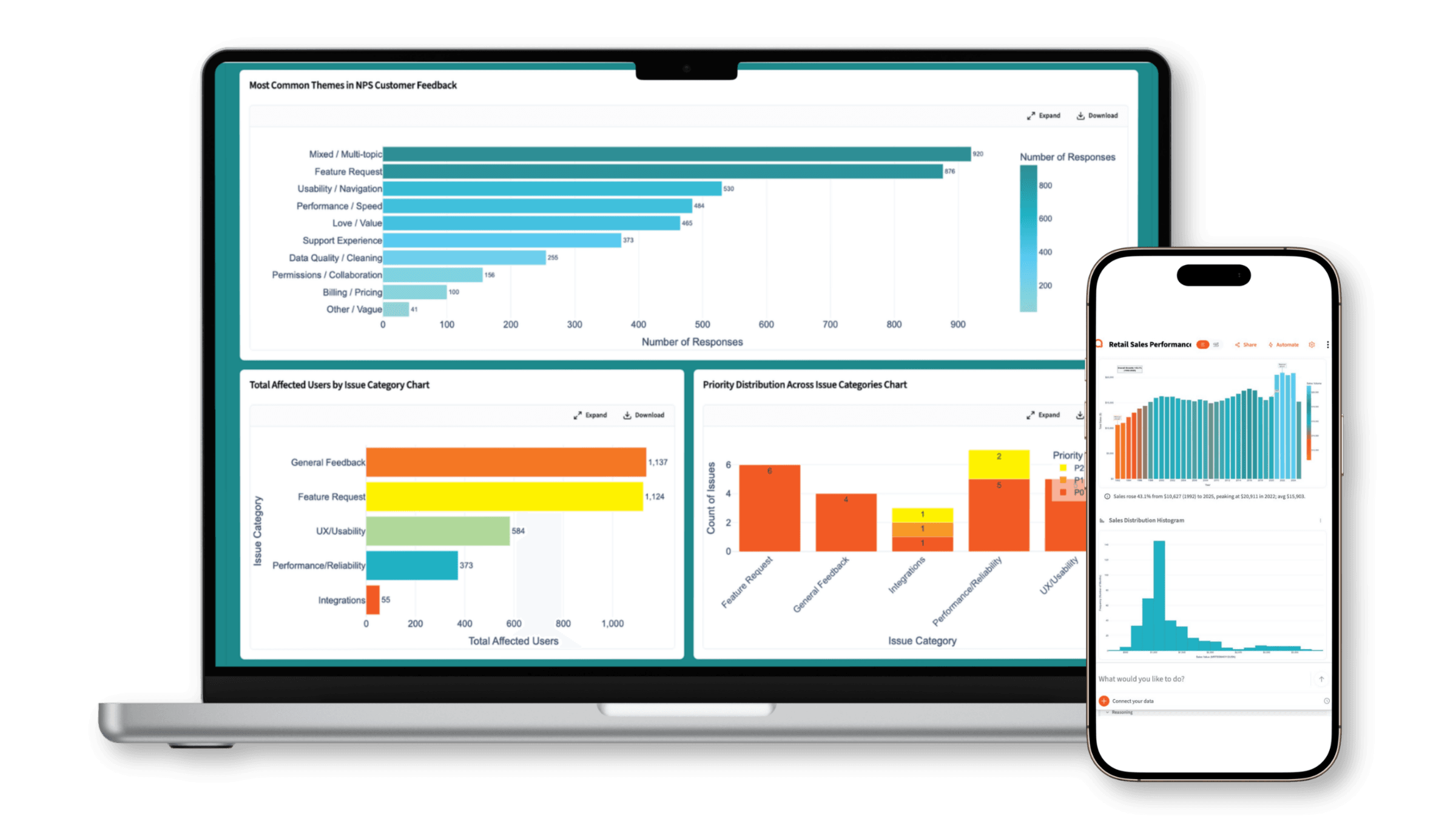
What Customer Support teams use Querri for
Every support workflow. One platform.
From conversation analysis to agent performance reviews — every analysis your team runs, in one place.
Ticket Text & Conversation Analysis
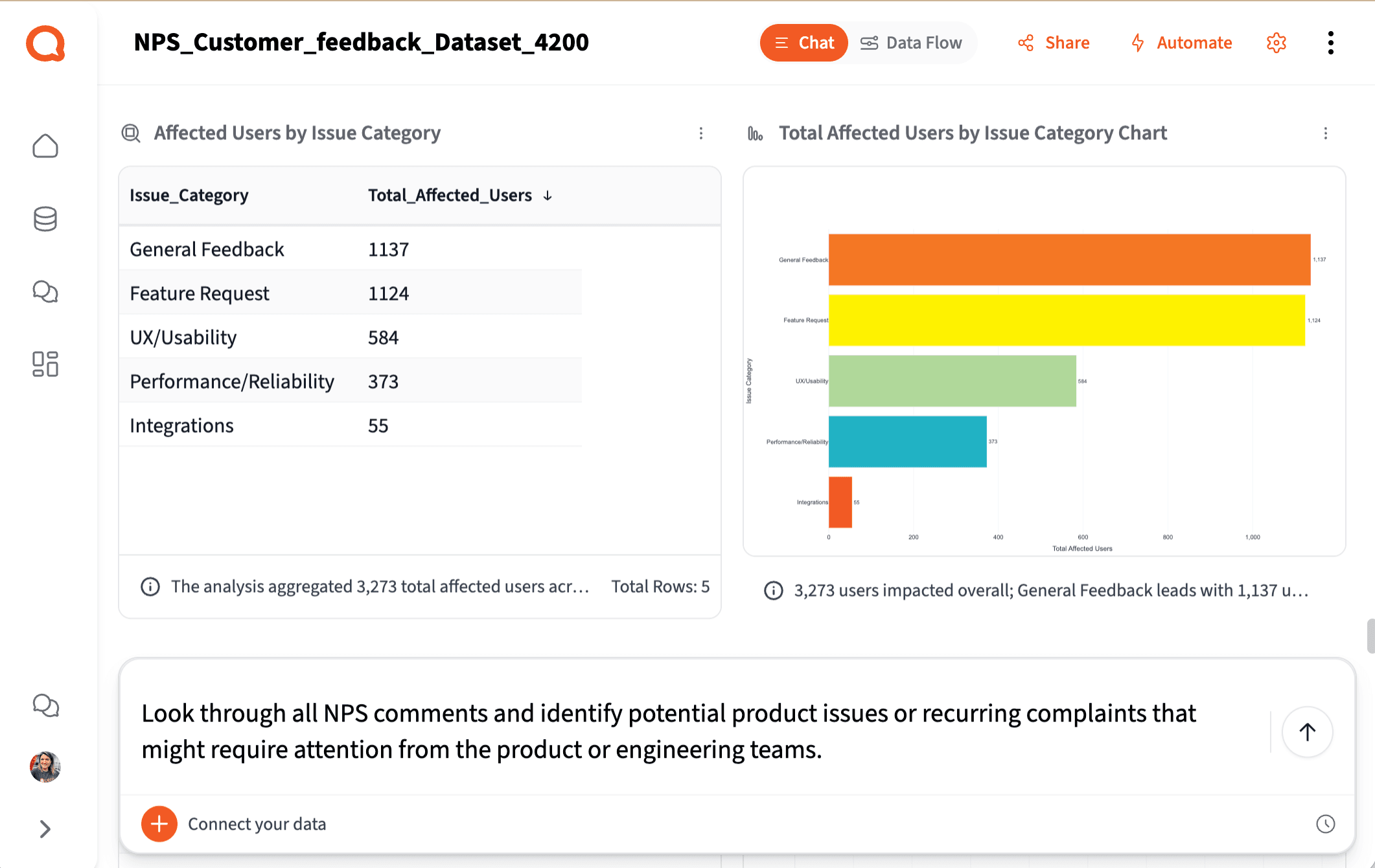
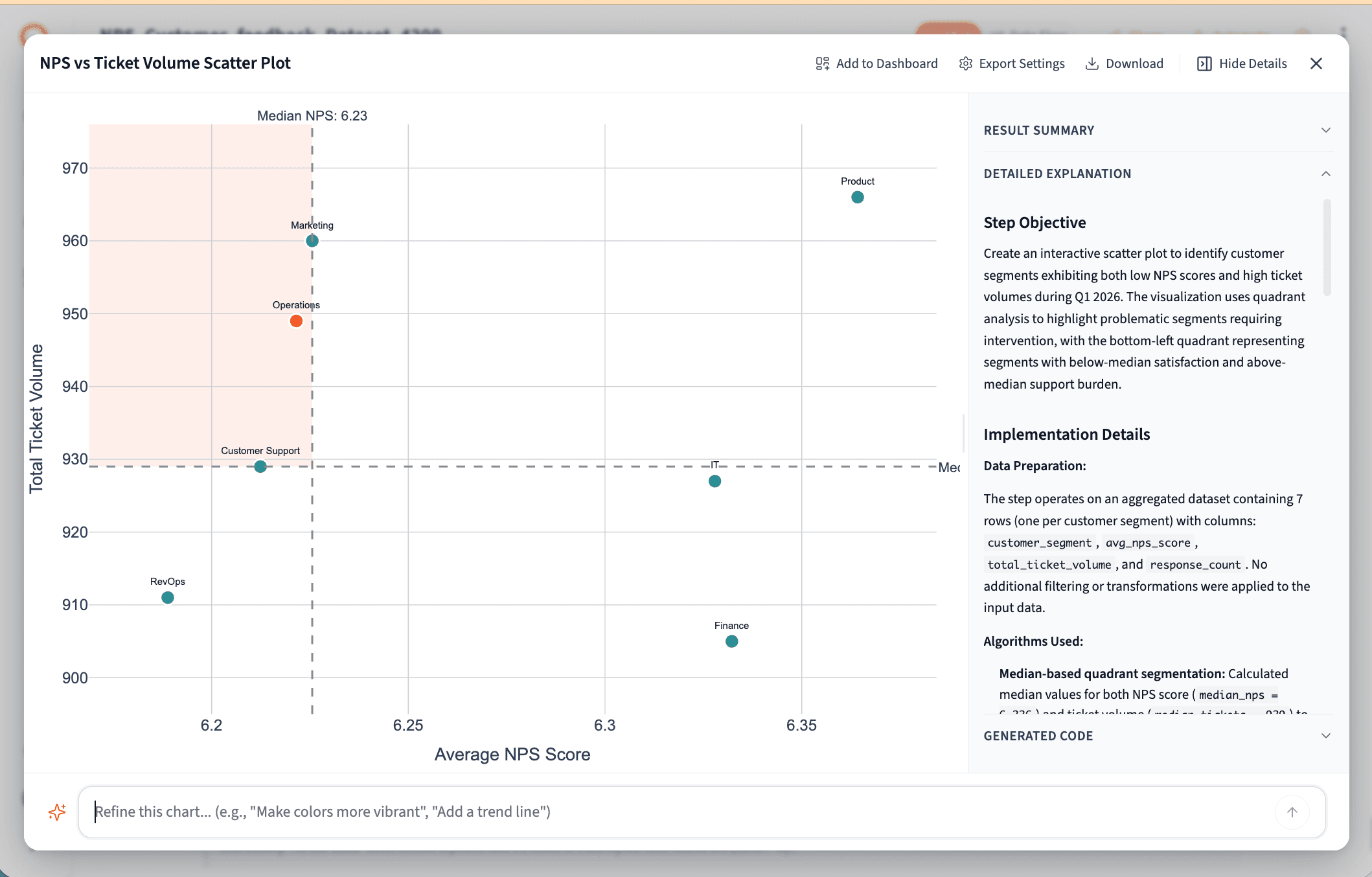
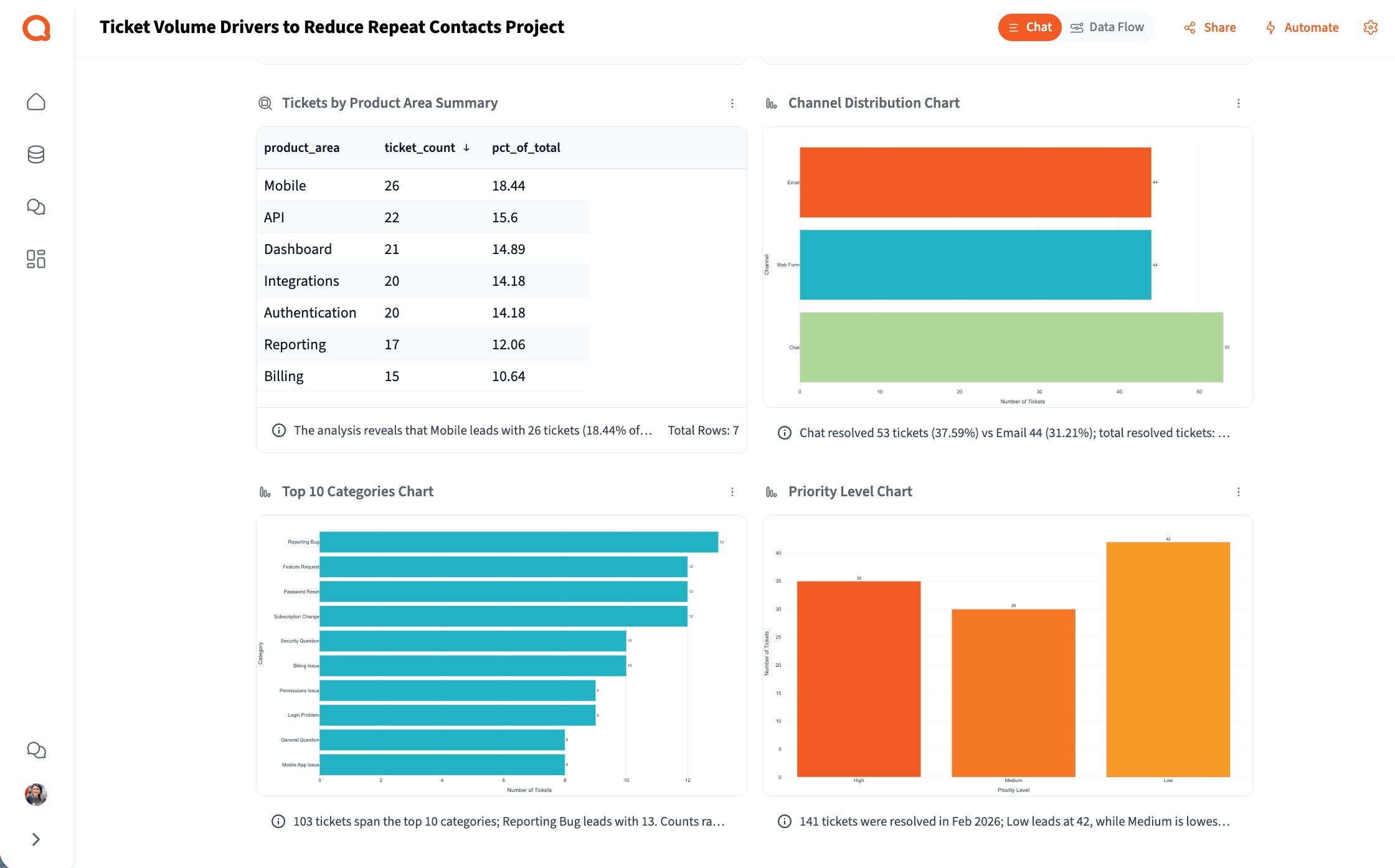
Your team generates thousands of support conversations every week — but most tools only count them. Querri reads the text and tells you what customers are actually saying: recurring themes, sentiment patterns, urgent issues, and the topics that keep coming back.
Learn how to analyze unstructured text data →Try asking
How it works
How Querri Works for Customer Support
Step 1 — Connect
Connect Your Entire Support Data Stack
Step 2 — Clean
Clean the Mess That's Been Hiding Your True Support Picture
How it works
From messy helpdesk export to leadership-ready output in four steps
Any support manager can run this workflow. No SQL, no data engineering ticket, no waiting in a queue.
Connect
Upload helpdesk exports or connect to HubSpot, Salesforce, BigQuery, and Google Drive with a native integration.
Clean
Querri automatically normalizes ticket status labels, removes duplicates, fixes timestamp formats, and resolves mismatches across helpdesk and CRM sources.
Analyze
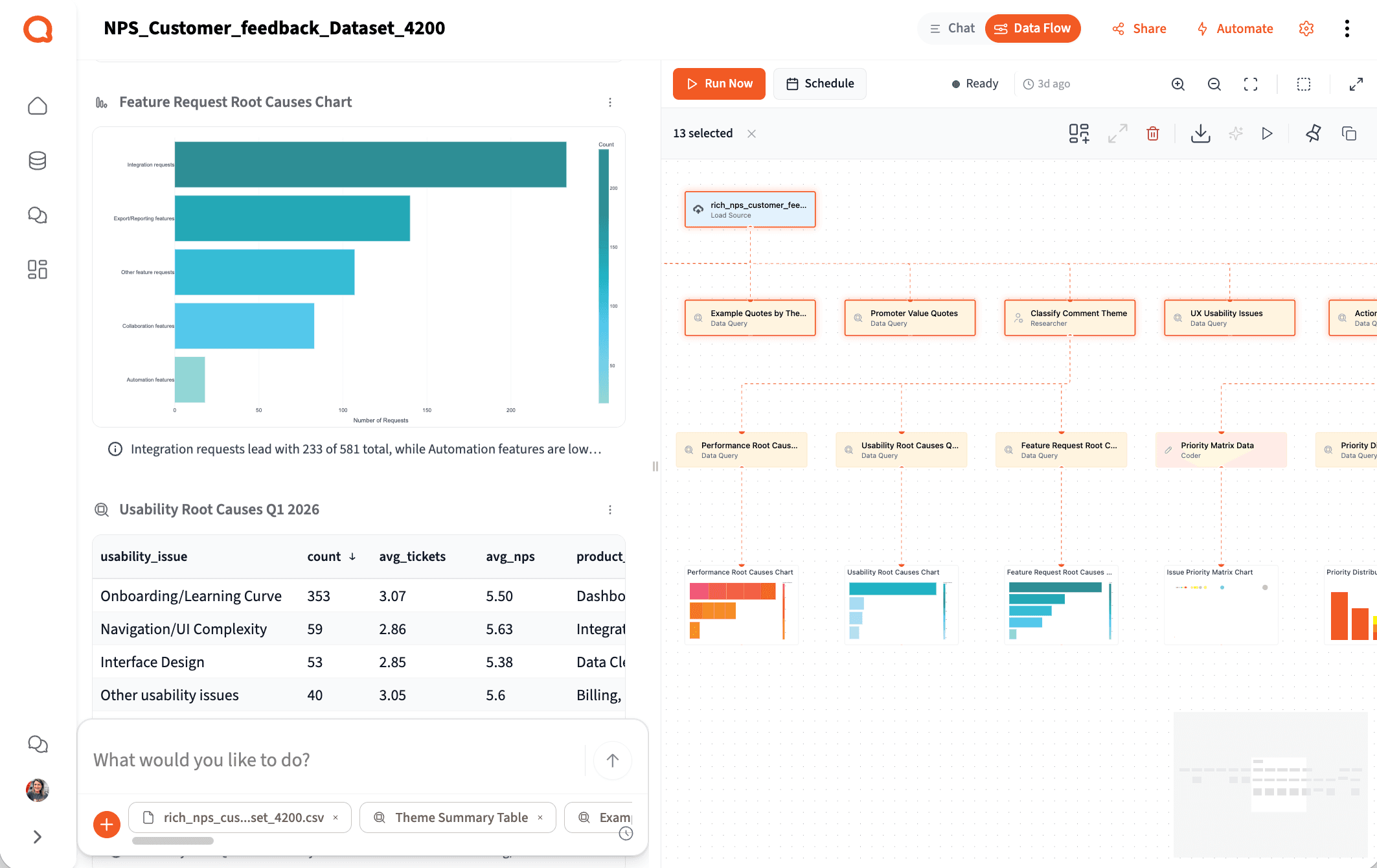
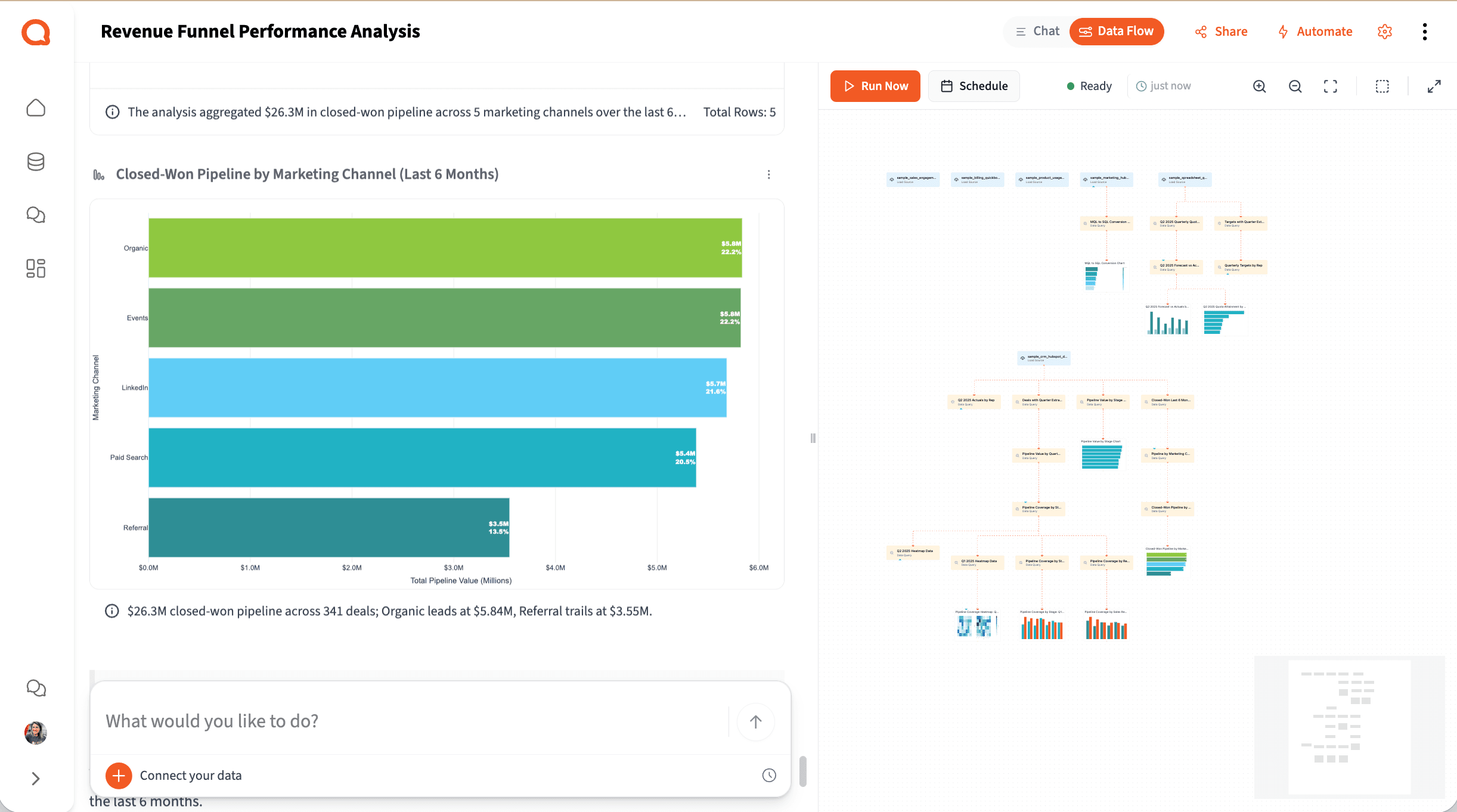
Ask your question in plain English. Querri runs multi-step analysis — ticket volume, CSAT trends, agent performance, customer health — and shows its reasoning in explicit, inspectable steps.
Share
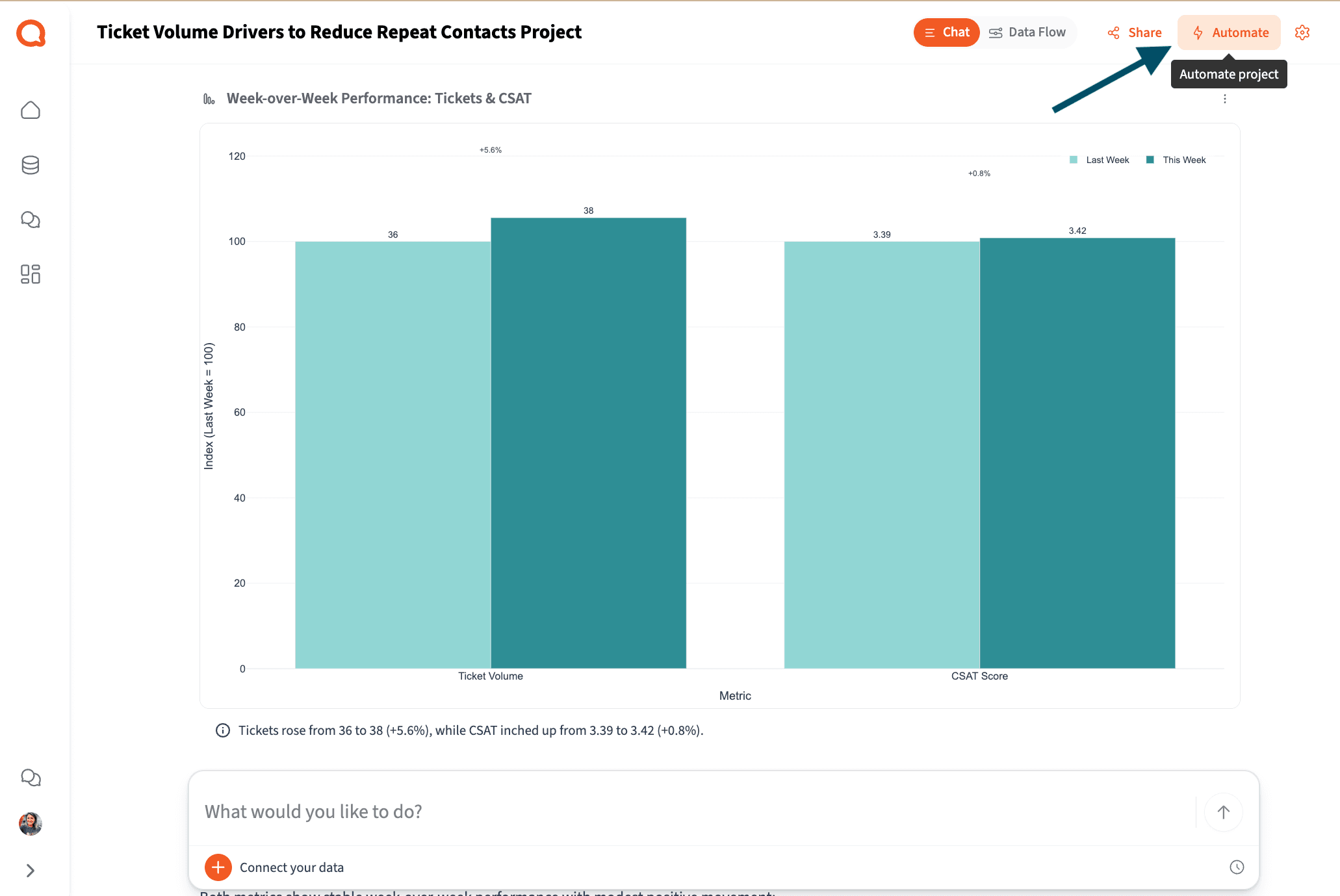
Export to Excel, PowerPoint, or PDF. Build a live support dashboard. Or schedule the whole workflow to run automatically every week.
See each step in action with our playbooks
Step-by-step walkthroughs for real support workflows — from connecting your first export to building an automated weekly report.
Step 3 — Analyze
Answer Support Questions Without a Ticket to Engineering
The reality for most support teams
You're sitting on thousands of customer conversations. Most tools just count them.
Based on research across customer support and customer success teams at software SMBs.
54%
Of a support rep's time is non-customer-facing
Administrative work, manual reporting, and data wrangling — not problem solving. The insight is in the tickets, but getting to it takes too long.
4+
Disconnected systems support teams manage
Helpdesk for tickets, CRM for accounts, survey tool for CSAT, spreadsheets to stitch them together — each with its own export, none telling the same story.
Hours
To manually find what's driving ticket volume
Exporting tickets, cleaning tags, grouping categories, writing the narrative — before you even start the diagnosis that actually helps customers.
Step 4 — Share & Automate
Automate Weekly Support Reports and Performance Reviews
The value support ops creates is in diagnosing why CSAT is dropping — not in being the human data pipeline between every team that needs a number.
Customer Support Operations Manager
B2B SaaS, 150-person company
New — Querri Wrapped
You ran the analysis.
Querri builds the support review deck.
The best use of support ops time isn't formatting slides — it's knowing what the ticket data means and what to do about it. Querri Wrapped closes the loop: once your analysis is done, Querri's agentic pipeline turns it into a complete, branded support performance presentation in seconds.
25 slide templates. Interactive Plotly charts. Fullscreen 16:9 presentation mode. Export to PowerPoint or PDF. Ticket volume, CSAT trends, agent performance, and narrative — all in one output ready for the leadership review.
Ready to see Querri in action for your specific support workflows?
Explore our library of step-by-step support playbooks — each one built around a real customer support job-to-be-done.
Why Querri
Built differently — so support teams can actually use it.
It reads the text, not just the ticket count.
Most tools report on metadata — volume, status, SLA. Querri analyzes the actual conversation text to find themes, sentiment, and recurring issues your dashboards can't see.
Every analysis is transparent and defensible.
Step-by-step logic you can inspect before you share it with the VP of CS. No black box, no numbers you can't explain.
Self-serve, without the wait.
Ask support questions in plain English, get answers in minutes — not a two-week BI ticket. Issue themes, CSAT drivers, volume trends — all from the same project, no analyst required.
The complete support analytics workflow. One platform. Any support manager can run it.
Try it freeSecurity & Privacy
Your customer data stays yours.
Customer support data is among the most sensitive data in the organization. Querri is built for teams that can't afford a data security incident — enterprise-grade protection, full auditability, and a strict zero-training policy from day one.
SOC 2 Type II Certified
Independently audited →
Encryption in transit and at rest →
All customer support data is encrypted end-to-end. Tenant isolation, RBAC, SSO/MFA, and full audit logging are included at every tier.
Transparent, step-by-step analysis — not a black box →
Every step Querri takes is visible and reviewable. See exactly how a CSAT score or resolution time was calculated and validate the answer before you share it with leadership.
Zero data training policy →
Your customer data is never used to train AI models. Customer data is isolated per tenant and never shared or commingled across accounts.
Why Customer Support Teams Choose Querri
Simple ways to do hard things
Talk to your data through a chat interface and watch it transform in a spreadsheet view.
Reliable, repeatable data workflows
Clean, merge, and analyze once. Then set up your data workflows to run on your schedule.
Designed for humans, not machines
It’s not a black box. See an explanation of the data workflows behind every Querri.
Frequently Asked Questions
Why is it so hard to understand what's actually driving our support volume?
Which data sources does Querri work with for Customer Support?
How is Querri different from built-in reporting in Zendesk or Freshdesk?
Can Querri analyze the text inside support tickets, not just counts and categories?
How long does it take to build a weekly support performance report?
Can support managers without SQL skills actually use this?
Is Querri secure enough for customer support data?
How does Querri handle messy exports from support platforms?
What is customer support analytics and why does it matter?
Resources
Go deeper on support analytics
Step-by-step playbooks and practical guides for the workflows support teams run every day.
Playbooks
How to Analyze Ticket Volume Drivers to Reduce Repeat Contacts
Identify the root causes behind high ticket volume and recurring contact reasons — so your team can fix the issues driving them, not just respond faster.
Read the playbookHow to Track and Improve First Response Time by Channel and Agent
A walkthrough for analyzing FRT across your support channels, identifying breach patterns, and surfacing the agent-level data your SLA reviews need.
Read the playbookArticles
How to Reduce Repeat Contacts: A Support Leader's Guide
Why repeat contacts are an organizational diagnosis problem — not a content or chatbot problem — and what structural changes actually reduce contact volume.
Read article11 First Response Time Reporting Mistakes CS Teams Make
The most common FRT measurement errors — from calendar-time miscalculations to bot-inflated averages — and how to fix each one.
Read articleFrom Survey Chaos to Clear Themes: Analyzing NPS Responses at Scale
Turn hundreds of open-ended NPS verbatims into structured themes, sentiment trends, and account-level signals that matter for retention.
Read articleHow to Actually Make Sense of Unstructured Text Data
A practical guide to extracting structured insight from tickets, call notes, and survey verbatims — the customer signals most tools can't read.
Read articleHow to Turn Dashboards into Decision Systems (Not Just Displays)
Why most support dashboards don't drive action — and how to design views that connect signals to next steps your team can act on.
Read articleThe Power of Clear, Concise, and Actionable Leadership Reporting
How to build the support performance summaries your leadership team will actually use — for QBRs, board reviews, and weekly health check-ins.
Read articleYour customers are telling you what's wrong. Querri helps you hear it.
Upload a ticket export, ask a question, and find out what's actually driving support volume — before the next leadership review.