Teach Querri once.Use it forever.
Skills are reusable analysis recipes. Capture the terminology, business rules, and steps that get you the right answer, and Querri can reuse that recipe when the question comes back.

Create and manage reusable skills that guide the AI agent’s approach.
Upcoming Account Renewals Window
Identifies accounts with renewal dates within a configurable upcoming time window and returns the full account list sorted by renewal date so teams can prioritize near-term renewals.
Prioritize At-Risk Accounts by Usage Decline and Open Support Tickets
Produces a prioritized list of customer accounts by combining usage-decline metrics with open support ticket counts, then generates a ranked visualization and an Excel export for CSM triage.
Renewal Account Health Dashboard From Usage, Support, and CSM Touchpoints
Computes a renewal health summary per account by combining upcoming renewal dates with recent product usage, support ticket volume, and CSM engagement recency, then produces charts to surface at-risk renewals by low activity, stale touchpoints, or high…
Cross-Channel Paid Ads WoW Performance With ROAS
Unifies paid ad performance from multiple platforms, joins it to web analytics sessions and CRM revenue, then computes week-over-week changes in spend, conversions, CPA, and ROAS by channel with variance flags and a companion visualization dataset.
Re-explaining the same analysis every month is how answers drift. Capture it once as a Skill, and the methodology stays consistent.


“We spent months trying to get these answers… With Querri, we got the same thing in minutes.”
“Querri has revolutionized how Digital Ignite organizes and utilizes data… we can ask deeper, more strategic questions.”
“Querri cut analysis time by 75%, from 6 hours to 30 minutes.”
The same questions keep coming back. So should the same method.
Most teams have two ways to handle recurring analysis today. Both leave you re-explaining the same recipe to the same people every month.
Re-explain it every time
Walk the AI (or a new analyst) through the same steps every month. Which data source. Which filters. Which accounts to exclude. All of it lives in one person’s head.
- Every monthly close, board prep, or KPI rollup starts from scratch
- Answers drift. Different analysts get different numbers from the same question.
- Onboarding a new teammate means pairing on the same five-step recipe again
- The expert leaves, and the methodology goes with them
Document it in a wiki nobody reads
Write up the methodology in Notion, Confluence, or a Google Doc. It goes stale within a quarter, and the AI agent doesn’t read it anyway.
- Docs lag the actual practice. The wiki says one thing, the team does another.
- The AI agent still needs the rules spelled out every chat. No continuity.
- No way to test that the documented recipe actually produces the right answer
- Sharing means “here’s a link,” not “the agent will use it automatically”
Capture the recipe once as a Skill, and Querri can apply the same business logic the next time you need it.
No re-explaining. No stale wiki. One tested recipe your agent applies automatically, and your whole team shares the same source of truth. Here’s why prompts alone fall short →
Build your SkillFrom recurring question to reusable recipe in four steps.
Refine
Add a title, description, and any edge-case instructions, the things you’d tell a new teammate.
This is the moment a skill is born.
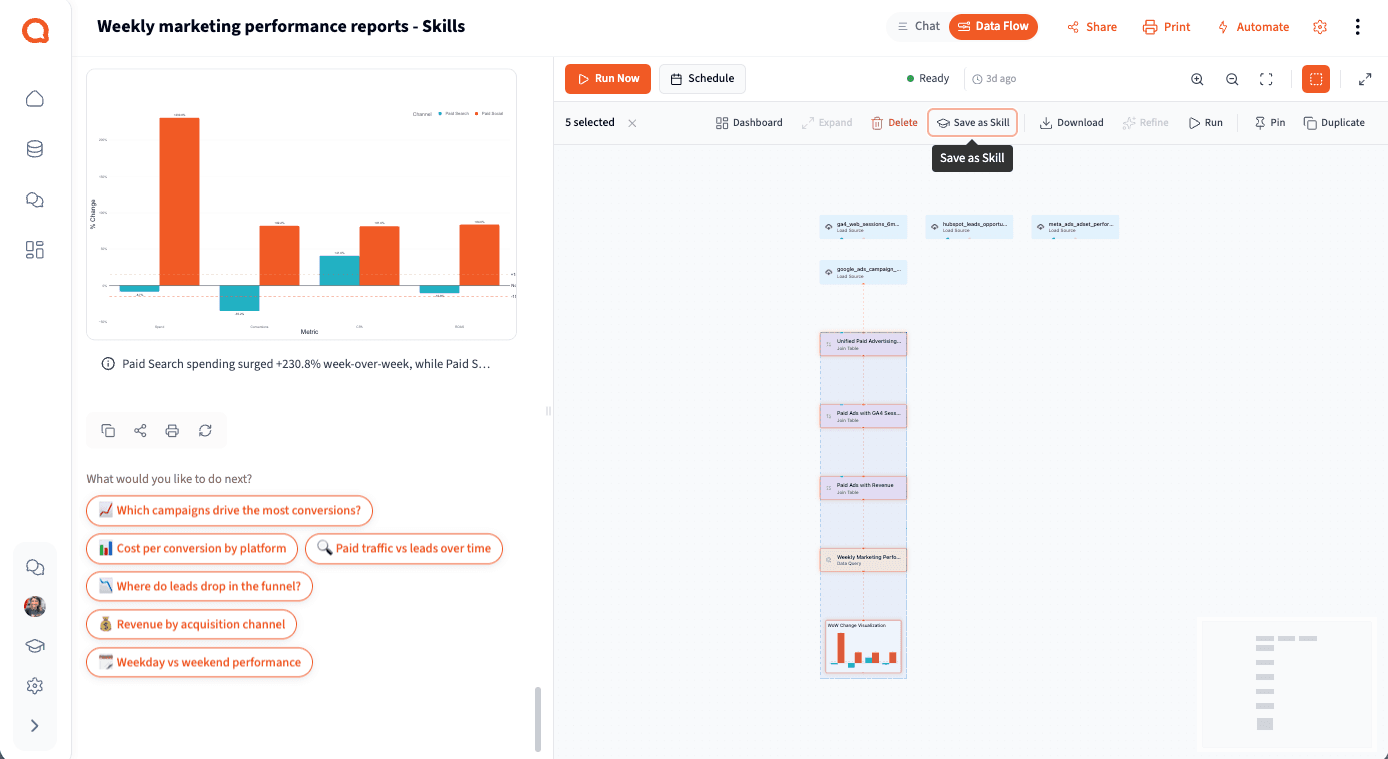
Right in the Data Flow, select the steps behind a good answer and save them. No setup, no re-typing. The skill captures exactly what ran.
 Watch the walkthrough →
Three kinds of guidance, one reusable recipe.
A skill bundles the things you’d tell a new analyst: which data to use, what to call things, what edge cases to watch for, and the steps that produce the right answer. You don’t have to provide all three. Instruction-only skills work for high-level guidance. Plan-only skills work for narrow deterministic questions. The most useful skills combine both.
Title & description
The human-readable name and a short summary. The agent uses these to decide whether the skill is relevant to the question on the table.
Advanced instructions
Free-form natural-language guidance: which data source to use, how to interpret edge cases, what to call things, what to avoid.
Example plan
An optional ordered list of analysis steps (filter, group, join, transform, visualize) with the columns each step needs.
Pre-filled from real work
Build a skill from a project’s Data Flow and the plan is populated from the actual steps you ran. No guessing.

account_id, account_name, arr, renewal_date, csm_owner. Exclude or handle NULL renewal dates.WHERE renewal_date >= DATE '2026-04-10'
AND renewal_date <= DATE '2026-07-09'
ORDER BY renewal_date ASC
Personal & org-shared
Every skill starts personal. Admins promote useful ones org-wide so the whole team benefits from one person’s work.
Load up to five per chat
Mix and match skills in a single conversation. The agent reaches for the right one as questions evolve.
Strong hint, not a hard script
The agent adapts the plan to the actual question. You get repeatable answers without losing the ability to ask follow-ups.
Portable across orgs
Export skills as .qskill files. Move them between workspaces, share with partners, or version-control them.
Every team has recipes. These are the ones that compound fastest.
Skills work for any team that runs the same analysis more than once. Here are the patterns we see most often.
Finance & FP&A
Month-end close, board-deck KPI summaries, variance analysis, net revenue retention. The structure is fixed; only the time window changes. Skills lock the methodology so every close matches the last.
- ✓Trial, internal, and test accounts excluded automatically. Same rules every month.
- ✓Fiscal-year calendars and timezone-corrected dates baked in
- ✓One skill becomes the team’s source of truth for “what is MRR?”
Revenue Operations
Pipeline hygiene, sales-cycle velocity, lead-to-opp conversion, territory coverage. Skills encode your stage definitions and qualification rules so reports stop disagreeing with each other.
- ✓Your stage definitions, your “qualified” criteria, encoded once
- ✓Pipeline weighted by stage probability or conversion history. Your call.
- ✓Same numbers in every team meeting, every QBR, every board update
Customer Success
Health scoring, QBR prep, renewal-risk analysis, usage cohorts. Skills encode the weights and signals that define “healthy” for your business, so every CSM works from the same playbook.
- ✓Your health-score formula, consistent across every account review
- ✓QBR-deck rollups: usage, adoption, ROI. Same shape every quarter.
- ✓New CSMs run the org skill on day one. No shadowing required.
Product Analytics
Cohort retention, activation funnels, feature adoption, churn analysis. Your definition of “activated” or “engaged” isn’t obvious. Encode it as a skill so every analysis uses the same one.
- ✓Activation criteria, cohort boundaries, and retention buckets encoded once
- ✓Cross-source joins (product events, billing, support) pre-defined
- ✓Same retention shape in every executive readout. Trends become legible.
Skills earn their keep where consistency matters.
Recurring reporting
Month-end close, board decks, weekly KPI rollups. The structure is fixed and only the dates change, so the methodology stays locked, quarter after quarter.
Shared definitions
What counts as “qualified,” how cohorts and revenue attribution are defined, which accounts to exclude. Pin it once so every view across the team agrees.
Tricky data & onboarding
Bridge-table joins, timezone fixes, test-account filters. Encode them once, and when someone new joins, the recipe walks them through it.
Skills are one of three paths. Pick the one that fits.
Skills are reusable recipes that flex across datasets and time windows (you still trigger them, the agent adapts to the data). Automated projects rerun the exact same pipeline on a schedule with fresh data, no variation, no manual step. And for the rest, just ask.
| Skills vs. automated projects vs. asking | Reach for a skill | Automate the project | Just ask directly |
|---|---|---|---|
| One-off question | Faster to type the question | ||
| Exact same pipeline, fresh data, runs on a schedule | Set the cadence and walk away. Same steps every run. | ||
| Same recipe across different datasets, time windows, or segments | The agent flexes the recipe to whatever data you point it at | ||
| Dashboard or email needs to refresh every morning | Schedule the project. It pushes to the dashboard automatically. | ||
| Onboarding a new analyst | Share the org-wide skill. Methodology travels. | ||
| Open-ended exploration | Let the agent stay curious | ||
| Business rules change every quarter | Skip. Updating the skill costs more than it saves. | Skip. The pipeline goes stale fast. | Ask directly until the rules settle |
| “What’s interesting in this dataset?” | Open-ended works best uncomplicated |
The shorthand: skills flex, automated projects don’t. When the same pipeline needs to rerun on a schedule with fresh data, automate the project. For a recipe that needs to handle variation across data, use a skill. Anything one-off? Just ask.
Skills aren’t a feature. They’re how your team scales.
Consistency
The same question gets the same answer, whether your VP, your new hire, or your CEO asks it. No more “why does my number disagree with yours?”
Faster time-to-answer
The methodology is already encoded. Monthly close, weekly KPIs, board prep. What used to take a meeting takes a single question.
Institutional knowledge that stays
When your best analyst goes on vacation, or leaves, the team’s methodology stays. The recipe lives in the workspace, not in one person’s head.
Save from a project, or build from scratch.
Both paths produce the same kind of skill. Pick the one that fits how you got to the answer.
See both paths
Save as Skill from a project
- ✓Open the Data Flow in a project where you’ve already done the analysis
- ✓Select the steps that produced the result you liked
- ✓Click Save as Skill in the selection toolbar. Example plan auto-fills.
- ✓Add a title, description, and any extra instructions
Author a skill in the Skills section
- ✓Write the title, description, and advanced instructions the agent should follow
- ✓Build the example plan step-by-step, or leave it out for instruction-only skills
- ✓Test against real questions by loading the skill into a chat
- ✓Import a
.qskillfile from another org as a starting point
One person figures it out. The whole team picks it up.
Every skill starts personal. When it earns its keep, an admin promotes it org-wide, so the methodology stops living in one analyst’s head.
Personal
You create, edit, and delete freely. Only you can see your own recipes.
An admin promotes it
When a skill proves itself, an admin shares it org-wide. Promotion is admin-gated. Full model →
Org-wide
The whole team inherits it, and new teammates get the playbook on day one.
Capture your team’s first skill today.
Walk through how a skill is built, from a project’s Data Flow to org-wide adoption, with someone from our team. Or dive straight into the docs.