Which retailer deductions match a promo we agreed to?
Match every retailer deduction to a line on your promo calendar. See which are trade you agreed to, which match nothing, and which accounts the unmatched ones come from.
Open QuerriWhat you'll need
Querri (Free trial) to match deductions to promos
NetSuite, SPS Commerce remittances and your promo calendar: Step 1 says what each adds
Your matching rules: so every deduction is matched the same way
Free resources
Start your free trial here →Sample data sets
Synthetic data for Curio Supply, a made-up home goods brand. Not real customer, retailer or marketplace data.
Need help?
If you have any questions, you can request a demo or email our team.
Before we begin
Retailers pay short and say why in a remittance file. Most of those deductions are promotions you agreed to; the work is finding the few that aren't. The deduction is in SPS Commerce, the short payment in NetSuite and the promo on a spreadsheet, and retailers use their own references and reason codes, so matching them is a monthly afternoon of lookups.
This playbook lists every deduction, matches each to the promo calendar in three passes, and ages the ones nothing explains.
How it works:
- • Connect NetSuite and upload remittances and the promo calendar
- • List every deduction by retailer, reason and age
- • Match deductions to promo calendar lines
- • Sort the deductions no promo explains
- • Build the monthly deduction review
Follow the steps
Connect NetSuite and upload remittances and the promo calendar
Three sources, one project:
- •
NetSuite: invoices, customer payments and the short paid on each invoice.
- •
SPS Commerce remittance export (upload): each deduction with its reason code and the retailer's promo reference.
- •
Promo calendar (Excel, upload): what you committed to, by retailer, SKU, dates and amount.
NetSuite connects directly and syncs on a schedule. The remittance export and the promo calendar come in as files; upload next month's over the old ones and every view rebuilds.
Tip: Pull remittances from at least three months back, so deductions still open from earlier checks are aged too.
-
 NetSuite payments and sales
-
 SPS Commerce remittances
- Promo calendar
 One project
List every deduction by retailer, reason and age
Start with what was taken, and check NetSuite agrees:
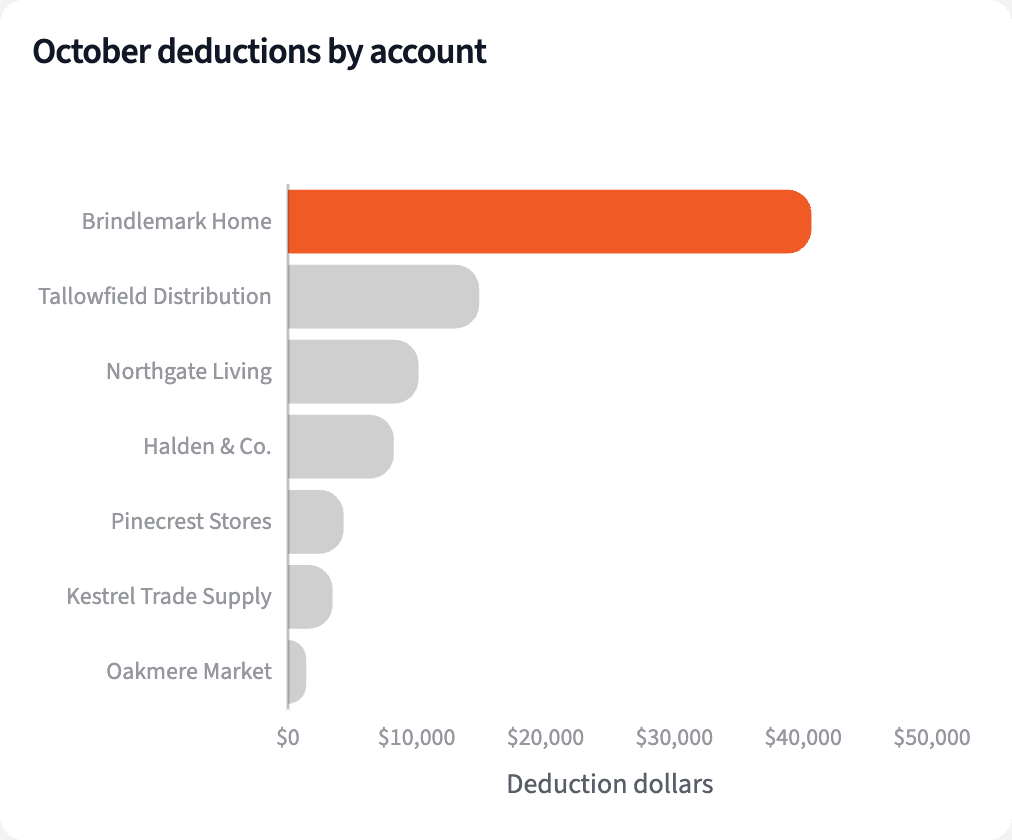
"List October's retailer deductions by account and by reason, and check NetSuite's short pays agree."
114 deductions on October checks, $83,098.53, across 7 accounts. Brindlemark Home took $40,641.92 of it. NetSuite's short paid equals the SPS deductions on every invoice.
| Account | Deductions | Amount |
|---|---|---|
| Brindlemark Home | 31 | $40,641.92 |
| Tallowfield Distribution | 21 | $14,852.88 |
| Northgate Living | 29 | $10,140.62 |
| Four other accounts | 33 | $17,463.11 |
| All accounts | 114 | $83,098.53 |
Deductions on retailer checks dated October 2026, by account.
Match deductions to promo calendar lines
Match each deduction to the calendar, the strictest way first:
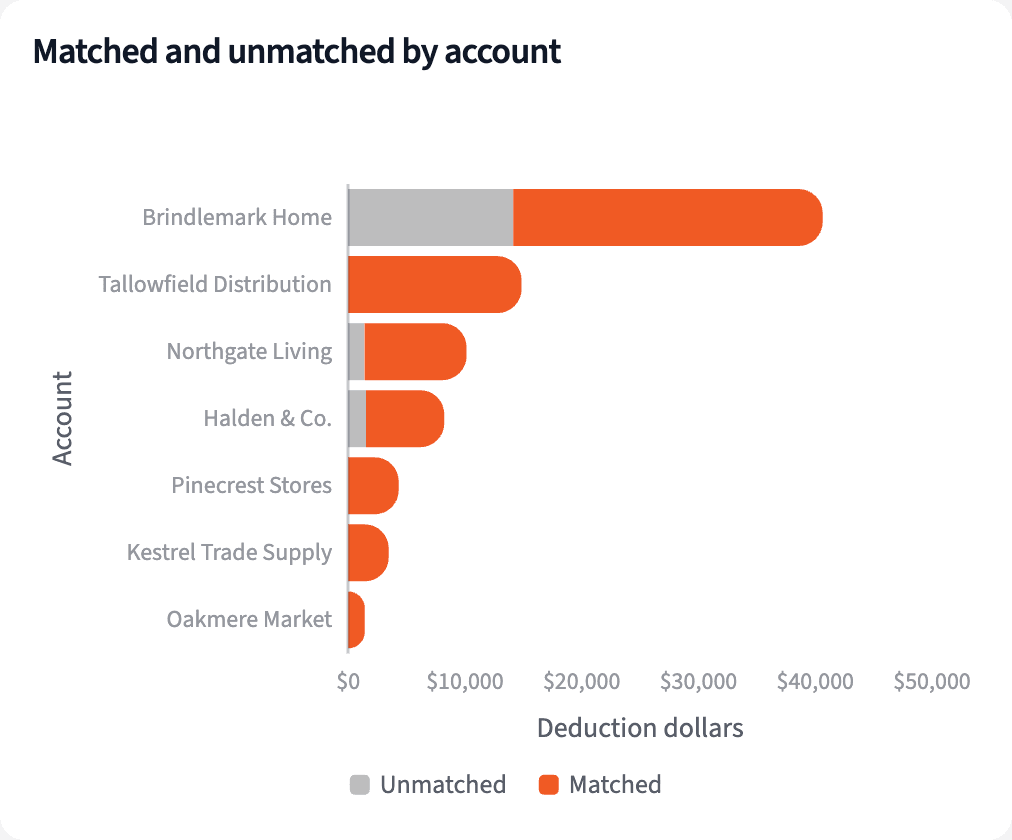
"Match each deduction to a line on our promo calendar, by reference first, then by SKU and dates, then by type and amount."
106 of October's 114 deductions match a promo, 79.4% of the dollars. Every Tallowfield Distribution deduction matched. The 8 that didn't come to $17,080.94.
| Match | Deductions | Amount |
|---|---|---|
| Promo reference | $44,079.27 | |
| SKU and promo dates | $16,858.32 | |
| Promo type and amount | $5,080.00 | |
| All matched | 106 | $66,017.59 |
| Unmatched | 8 | $17,080.94 |
October 2026 deductions by how they matched the promo calendar.
Sort the deductions no promo explains
Then sort what nothing explains, by account, reason and age:
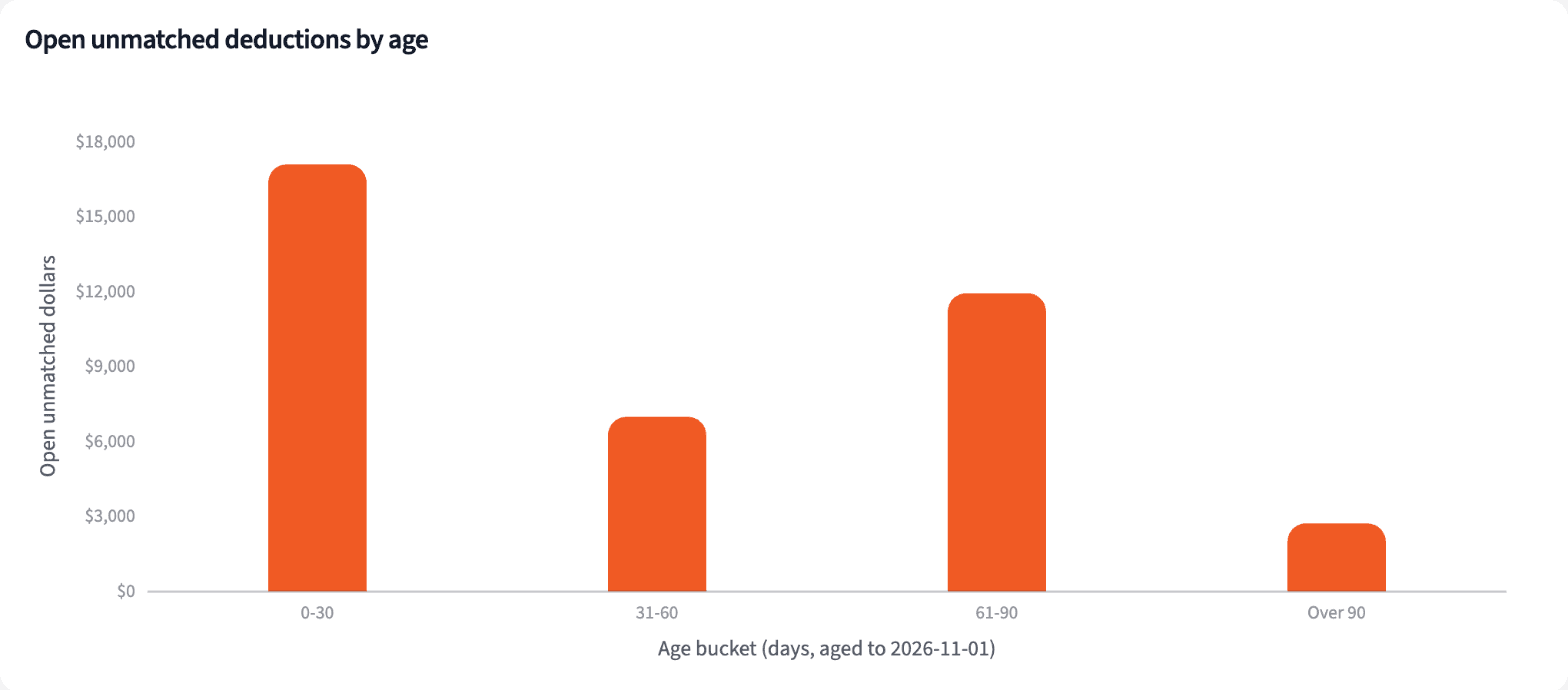
"Which deductions from July to October matched nothing, and how old are they? Group by account, reason and age."
$38,698 of unmatched deductions from July to October remains open, 27 deductions including October's $17,081. Brindlemark Home holds 55.8% of it, including a $5,200 co-op charge with no calendar line.
| Account | Deductions | Amount |
|---|---|---|
| Brindlemark Home | 10 | $21,591.51 |
| Halden & Co. | 3 | $5,110.02 |
| Northgate Living | 6 | $4,873.88 |
| Pinecrest Stores | 4 | $4,534.71 |
| Oakmere Market | 4 | $2,588.05 |
| Total | 27 | $38,698.17 |
Unmatched deductions still open at 2026-11-01, checks dated July to October 2026, by account.
Build the monthly deduction review
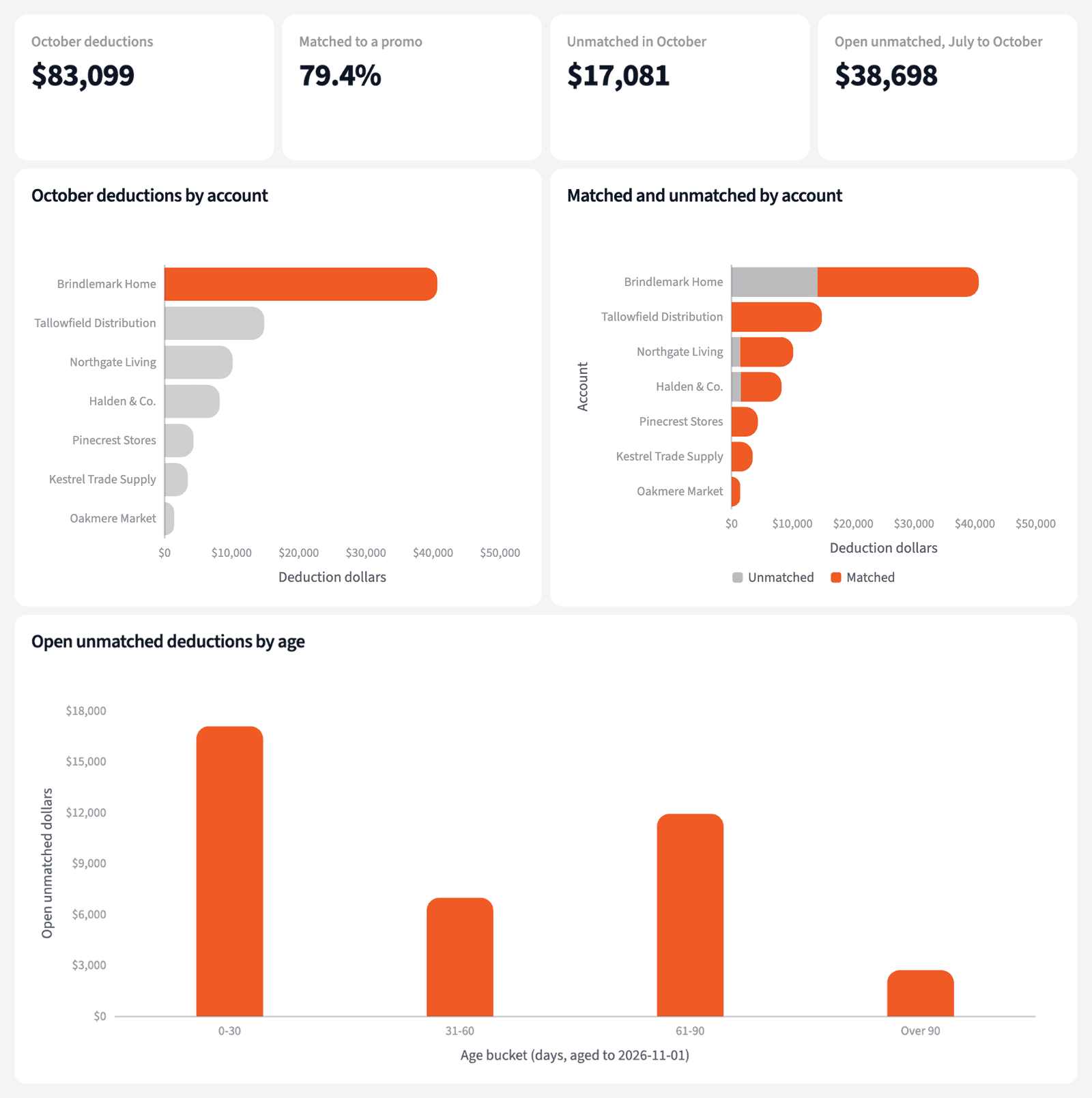
Four numbers for the review, and where the unmatched dollars sit.
The narrative Querri writes:
Four in five October deduction dollars match a promo on the calendar, and most of the rest is one account: Brindlemark Home.
What you can create or export:
- The table, to Excel, CSV or Google Sheets
- A live dashboard that refreshes with each sync and upload
- A presentation for the meeting, to PDF or PowerPoint
| Account | Unmatched | Next step |
|---|---|---|
| Brindlemark Home | $14,140.09 | Review with the retailer |
| Halden & Co. | $1,529.60 | Review with the retailer |
| Northgate Living | $1,411.25 | Review with the retailer |
Unmatched October 2026 deductions, by account.
Spend dispute time on the deductions no promo explains.
Try it on your own dataTips for a deduction review people trust
Match the strictest way first
A retailer's promo reference beats SKU and dates, which beats type and amount. Matching in that order keeps a loose match from claiming a deduction a tighter one explains.
Treat unmatched as a question
A deduction with no promo line needs a review, not a dispute letter. Check the calendar and the retailer's backup before deciding what it is.
Teach Querri your rules once. Every answer after that follows them.
Which reason codes mean what, how a deduction matches a promo, how old is too old: say each rule once and Querri applies it to every question on that data.
Show me how
Say it in chat
Settle a rule in conversation and the Librarian records it as a fact under Facts & Rules, attached to the table it governs. Every later question on that data applies it, whoever asks, and every view built afterwards carries it.
"A deduction matches a promo when the retailer's promo reference equals the calendar's retailer reference. Save that as a rule for the SPS remittances table."
Or bring the document that already says it
Upload your trade promotion policy or deduction procedure like any other file. Querri files a From a document card in the Inbox with the statements it found, each with its page and exact words; tick the ones to keep and they become facts. The rules this playbook depends on:
- Match first by the retailer's promo reference
- Then by SKU, with the invoice date inside the promo dates
- Then by promo type and amount, for the same retailer
- Brindlemark codes: PR promotional, CO co-op, LS late shipment, SH shortage
- Open: unmatched and not yet resolved, aged from the check date
- Trade rate: matched deductions over retail and distributor invoices
"Read our deduction procedure and propose the rules it states about matching and aging. I'll review them in the Inbox."
Where the rules reach
A rule is attached to the data, not to one person's chat, so it follows the data everywhere:
- • Every question asked in chat, by anyone on the finance team
- • Every view the Librarian builds on that data
- • Every step of a project, including the code it writes
- • Dashboards and scheduled runs, each time they refresh
- • Claude and ChatGPT, when they ask Querri
You stay in control
Every rule is listed under Facts & Rules next to the data it governs, where you can edit or remove it. Rules from a document wait for your tick in the Inbox, and a Worth remembering card is how Querri offers one it noticed itself. Workspaces and roles decide who can change what. Company-wide rules go in Settings → Customize; the Library is where the rest lives.
The payoff at month end
The review opens on one account and eight deductions. Adding a retailer's codes is a sentence.
Frequently asked questions
What does matched mean?
Does unmatched mean the retailer is wrong?
Why do reason codes need a rule?
Why age deductions from earlier months?
What is the trade rate?
Do I need an SPS Commerce connector?
Does Querri dispute anything?
How often should this run?
Other popular resources
Playbook
SKU margin by channel
Which SKUs lost margin last month, and in which channel?
Playbook
Payouts against the books
Do Shopify payouts and Amazon settlements match the books?
Demo
Request a walkthrough
See Querri in action with your own data.
Pricing
Compare plans
Find the right plan for individuals, teams, or enterprise.