Advertising analytics for brands and agencies
ROAS from every ad platform,checked against what you actually sold.
Querri reads the ad platforms you run, such as Meta Ads, Google Ads and Amazon Ads, next to sales from your store and marketplaces, like Shopify and Amazon Seller Central. Each platform's reported revenue sits beside the revenue your store recorded, and blended ROAS, MER and TACoS come from your own sales. Built for in-house growth teams and the agencies that run ads for them.
Querri only reads your data. It never changes a campaign, bid, budget or audience. SOC 2 Type II, HIPAA and ISO 27001:2022 certified, and your data is never used to train a model.
Connect where you advertise and where you sell
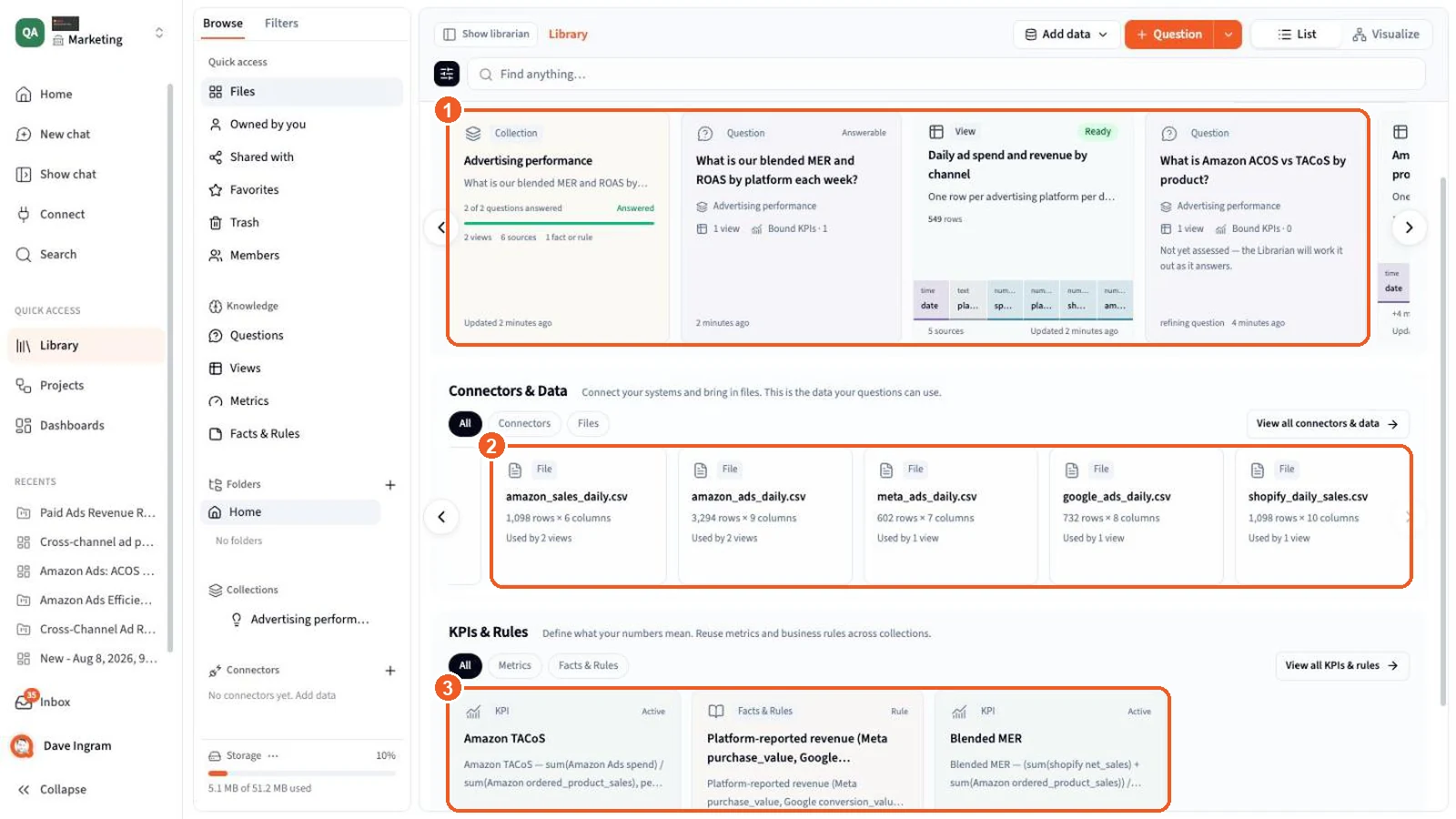
Your ad platforms and the places you sell, in one Library
The connectors below are examples, and the list keeps growing. Each connection signs in on the vendor's own page and copies the data into Querri on a schedule you set, and a channel without a connector can come in as a spreadsheet or file. Ad and sales data land in the same Library, so one question can read both.
Ad platforms



Sales and traffic



Why cross-channel ad reporting breaks
Every ad console grades its own homework
Each platform counts the sales it thinks it caused, with its own rules. Put the reports side by side and one order can show up in more than one of them, so nobody can say which number to plan on.
Different windows, different counts
Meta and Google each credit a sale inside their own attribution window, counted their own way. The same week looks different depending on which console you open.
Two platforms claim one order
A shopper clicks a Google ad, sees a Meta ad, then buys. Both platforms report the purchase, so adding up the consoles counts that order twice.
Amazon ad sales aren't Amazon sales
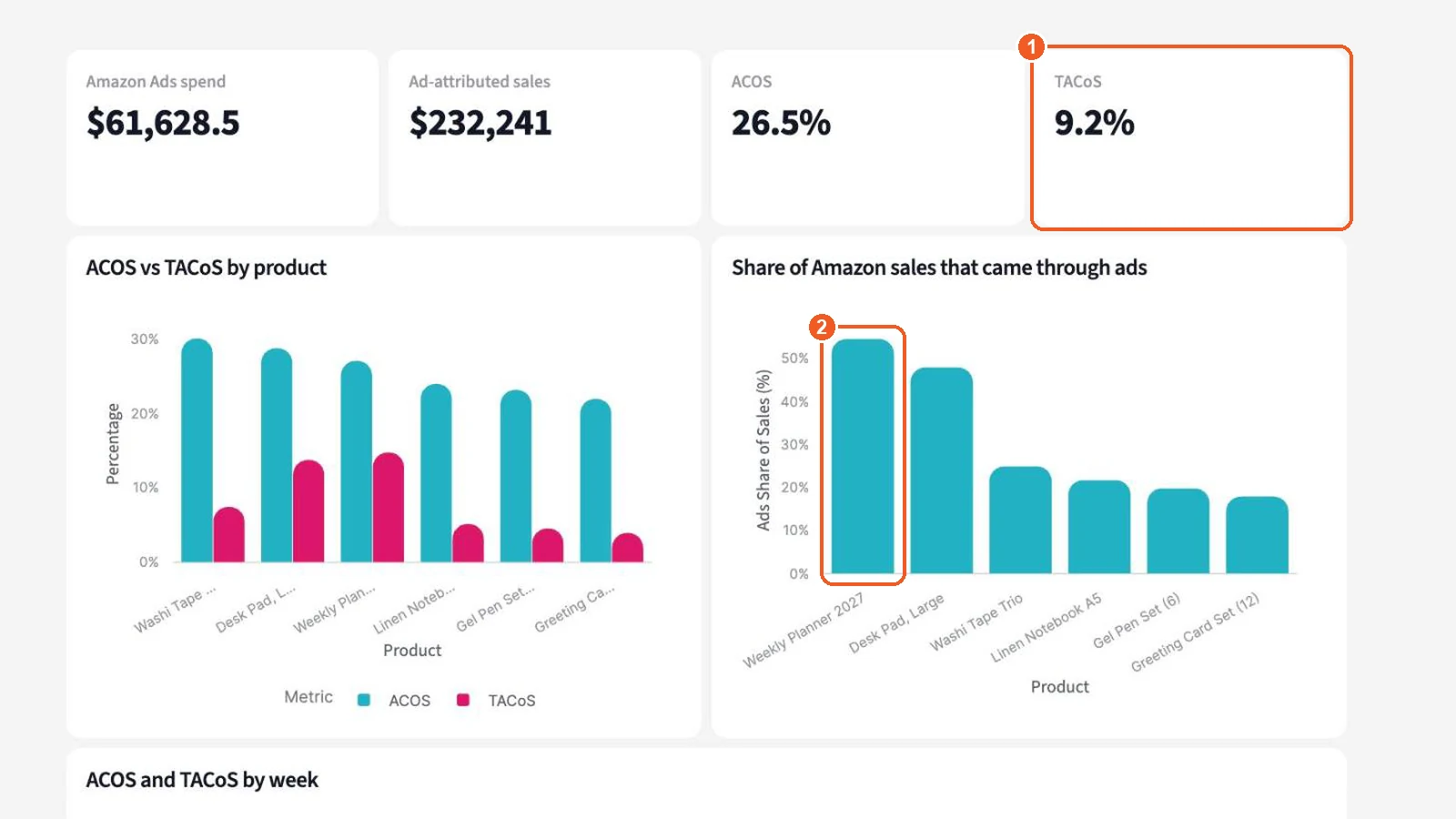
ACOS only counts the sales Amazon credits to ads. How much of a product's Amazon revenue leans on ads takes its total sales from Seller Central too.
ROAS stops at revenue
A 3.0 ROAS on a product with thin margin can still lose money. Product cost, fees and shipping live in other systems, so the ad report never shows what a sale left behind.
The Monday spreadsheet
Someone exports every ad console and the store, pastes them into a workbook and fixes the formulas that broke. By the time the numbers are ready, the week's budget is already spent.
Agencies do it once per client
An agency running ads for twelve brands rebuilds the same report twelve times, from twelve sets of logins, in twelve slightly different templates.
What Querri does
Spend from every platform. Revenue from your own sales.
Querri copies your ad and sales data into one Library, learns how your business counts things, and answers in plain English with a chart and the query behind it.
Read-only connections
Sign in to each ad platform, such as Meta, Google or Amazon, on its own page. Querri reads campaign settings and results and changes nothing, so campaigns, bids and budgets stay exactly as you set them.
All connectorsQuestions in plain English
Ask for ROAS by platform by week, or search terms that spent with no sales, and get a chart, a table and a short note on what stands out.
ChatBlended metrics from your own sales
MER, blended ROAS, TACoS, ad spend as a share of revenue, contribution after ad spend, and new versus returning customers when your order history has it.
KPIsDashboards and scheduled reports
Ask for a cross-channel dashboard and change it by asking. Schedule a weekly report to land in inboxes on Monday morning.
DashboardsMonitors on ROAS, CPA and ACOS
A monitor checks each campaign or product against its own history whenever the data rebuilds, and tells you which one drifted.
MonitorsYour definitions, saved once
Tell Querri what counts as a conversion, which campaigns are brand and which ASIN is which SKU. Every answer after that uses it.
Facts & rulesSee it in the product
Real Querri screens, on a demo brand's ad data
These are screens from Querri with six months of sample data for Curio, a demo brand that sells on Shopify and Amazon and advertises on Meta, Google and Amazon. The data is made up; the product is real.
Questions you can ask
Six questions that need more than one console
Each one crosses platforms, or crosses ads and sales. Type it the way you'd say it.
-
“Compare Meta, Google and Amazon ROAS by week over the last four weeks.”
Reads Meta Ads, Google Ads, Amazon Ads
-
“Which Amazon search terms spent over $50 last month with no sales?”
Reads Amazon Ads search term report
-
“What is our TACoS by product?”
Reads Amazon Ads, Amazon Seller Central
-
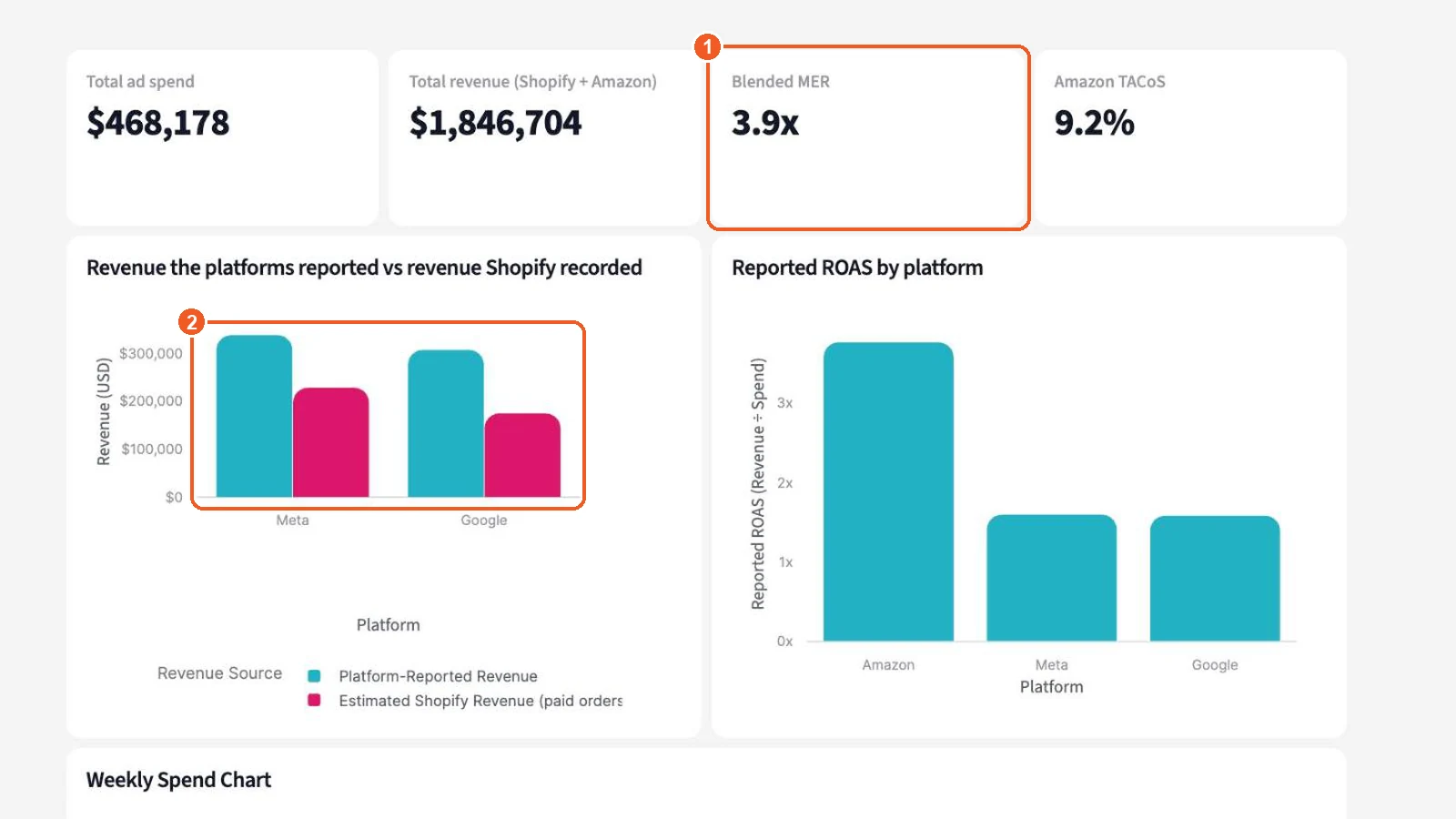
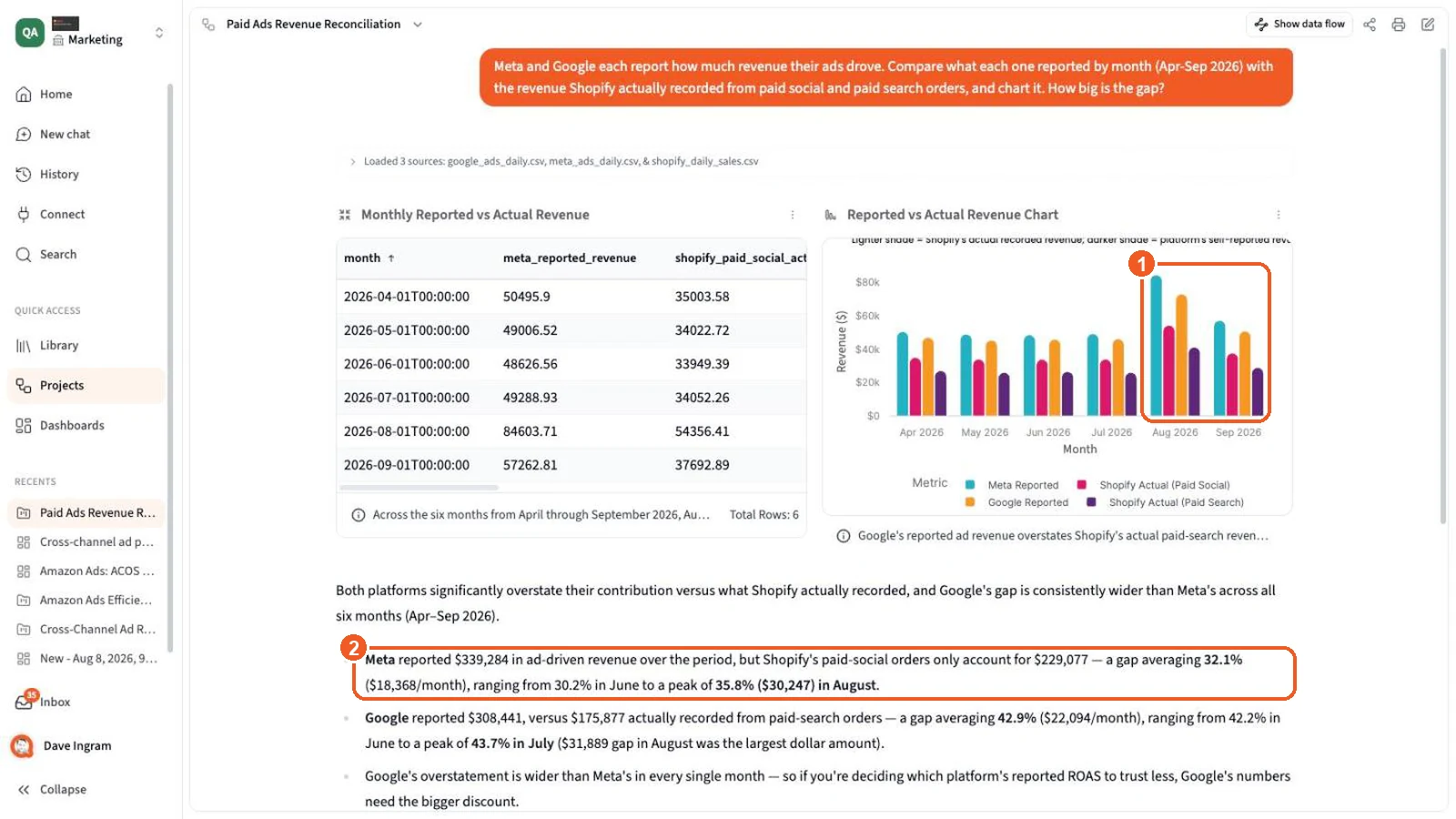
“How much revenue did each platform claim versus what Shopify recorded?”
Reads Meta Ads, Google Ads, Shopify
-
“Which campaigns' CPA rose more than 20% against their 4-week average?”
Reads Meta Ads, Google Ads, Amazon Ads
-
“Show contribution margin after ad spend by product.”
Reads Ad platforms, Shopify, Amazon, product cost
Your rules, not the platform's
Teach Querri how you count, once
Every account has its own conventions. Campaign names that mark brand search, the conversion event that means a real purchase, the SKU that sells as three different ASINs. Say it once in chat and it's saved as a Fact & rule in your Library. For a long SKU list, upload the map as a file and point the rule at it. Chat, dashboards and reports all read from it.
Catch drift early
Know which campaign slipped before the month closes
Ask Querri to keep an eye on ROAS, CPA or ACOS by campaign, ad set or product. Each time the data rebuilds, a monitor compares every slice with its own history, using statistics rather than a fixed threshold, and the ones that moved show up in your Inbox and by email.
The metrics, and where they come from
Platform numbers as reported. Blended numbers from your sales.
Querri keeps each platform's own figures exactly as the platform reports them. The blended metrics divide the revenue your store and marketplaces recorded by total spend, so no order is counted twice.
Querri doesn't attribute sales to ads or build a media mix model. It puts what each platform says next to what you sold, and lets you see the gap.
For agencies
Every client's ads and sales, reported under your name
Agencies that run ads for many brands can keep each client separate and still build the work once. For example, Meta's business permissions show the client ad accounts you manage, and one Amazon Ads login can sync every advertiser profile it can see in a region, or only the ones you pick.
A workspace per client
Each brand gets its own workspace with its own connections, data, dashboards and monitors, and each client sees only its own.
White-label dashboards
Put your domain, logo and colors on Querri with white label, available on the Scale plan.
Client reports on a schedule
Build a weekly performance report once, and send each client its own copy on the day you choose.
Viewers don't cost extra
Dashboard viewers are unlimited on every plan, so a client's whole team can look. See pricing.
Data and security
Querri reads your ad data. It never touches your ads.
Querri only sends read requests to each platform, and runs every question on its own copy of the data, so nothing it does can reach your accounts.
- Reads campaign settings and reporting data from the ad platforms you connect.
- Never creates, edits, pauses or deletes a campaign, ad, bid, budget, target or audience.
- Disconnect a platform at any time, from Querri or from the platform's own settings.
- SOC 2 Type II, HIPAA and ISO 27001:2022 certified. Your data is never used to train a model.
Keep exploring
The features behind this page
Advertising FAQ
Questions about advertising analytics in Querri
Does Querri change anything in my ad accounts?
No. Querri only reads campaign settings and reporting data from the ad platforms you connect, such as Meta Ads, Google Ads and Amazon Ads. It never creates, edits, pauses or deletes a campaign, ad, bid, budget, target or audience.
Which ad platforms can I connect?
Ad platforms with a connector today include Meta Ads, Google Ads, Amazon Ads and Taboola, and more are added regularly. They sit alongside sales from your store and marketplaces, such as Shopify and Amazon Seller Central, and traffic from tools like Google Analytics. See every connector. For a platform without a connector, bring its report in as a CSV or Excel file, or from Google Sheets.
Does Querri do ad attribution?
No. Querri doesn't do multi-touch attribution or media mix modeling, and it doesn't track pixels. It shows each platform's reported revenue next to the revenue your store recorded, and works out blended metrics such as MER, blended ROAS and TACoS from your own sales.
What Amazon Ads data does Querri read?
Sponsored Products, Sponsored Brands and Sponsored Display. That covers profiles, advertiser accounts, campaigns, ad groups, ads and targets, plus daily performance by campaign, ad group, advertised product, target and search term.
Which Amazon Ads regions are supported?
North America, Europe and the Far East. Each connection is one Amazon login in one region, and it syncs every advertiser profile that login can see there, or only the ones you choose. Connect each region you advertise in.
How far back does the data go?
Meta Ads and Amazon Ads load the last 90 days by default, and you can change that window. Google Ads loads the last 30 days. Meta Ads and Amazon Ads tables reload in full on each sync, so conversions the platforms add or restate later are picked up instead of counted twice.
What do I get from Meta Ads?
Ad accounts, campaigns, ad sets, ads and creatives, daily results per ad, a row per conversion type, and daily campaign results by age and gender, by country and by placement.
Can agencies use Querri for client accounts?
Yes. Give each client its own workspace, connect the ad accounts you manage for them, and send each client its own scheduled report. With white label, clients see your brand instead of ours.
What about TikTok or other platforms without a connector?
Export the report from that platform's ads manager as a CSV or Excel file, or keep it in Google Sheets, and Querri reads it alongside the rest. Replace the file each week and your saved reports pick up the new numbers.
How does Querri handle different currencies?
Amounts keep the currency each account reports in. When an answer would add up more than one currency, Querri says so, and you can ask for one currency when you need a single total.
Can I see new versus returning customers?
Yes, when your order history has it. Querri reads each customer's first order from your store, such as Shopify, so ad spend can sit beside first-time buyers and repeat buyers by week or by month.
How is Querri priced?
On usage, in monthly credits for the work Querri does, not on your ad spend or revenue. Dashboard viewers are unlimited on every plan. See pricing.
See what your ads actually sold.
Connect your ad platforms and your store, and ask your first cross-channel question today. Querri only reads your data; your campaigns stay exactly as they are.