AI answers in your product shouldn't become a second product to maintain.Querri's capabilities, inside what you're already building.
The same API that runs the Querri app, MCP and embeds, with a Python SDK, a CLI your coding agent can drive, and three calls to bring a customer in, filtered to their own rows.
One backend. Each customer gets AI answers on their own data.
Skip the in-house build.
An LLM API plus your own glue demos well, then becomes a second product to maintain. The Library, the analysis engine and row-level rules on every answer are the part that takes a team a year. Call them instead.
- Three calls from your backend, and your customer is in.
- Their row filter applies to AI answers, projects and dashboards.
- The same Library and definitions as the Querri app.
Anything the app does with your data, a script can do.
The Querri app, MCP and embeds all run on one API. Projects and chats with streamed answers, sources, views, dashboards, the Library, sharing, users, row-level access policies and embed sessions are all there, including AI analysis, not just exports.
- About 200 endpoints, with the same scopes and row-level rules for every kind of caller.
- Push rows from your pipeline: append to a source or replace it.
- Row-level security applies to data read through a key, just as in the app.
Three calls from your backend, and your customer is in.
get_session finds or creates the person by your own user ID, attaches their row filter as a real access policy and returns a short-lived token. as_user then acts as that person.
- The same filter applies to AI answers, projects and dashboards.
- Pair it with the embed to put Querri inside your product.
- The answers come from the same Library, under the customer's own access.
Keep what the business decided in code.
Create questions, record a fact, define a KPI, build a view, ask and run evals from the SDK or a terminal. What the business has decided lives in code you can version and repeat.
- Add a question, record a rule and build a view from the terminal.
- Ask again, and the answer uses the rule you just recorded.
- The same Library every person and AI assistant in your company reads from.
Your coding agent can use Querri today.
The CLI speaks JSON, signs in through the browser without holding a secret, and ships with a Claude Code skill that teaches an agent how to drive it.
- Add --json for parseable output and --no-interactive for scripts and agents.
- pip install querri for the Python SDK. pip install 'querri[cli]' adds the command line.
- Version 2.1.0, MIT licensed.
Every key expires. Every use is logged.
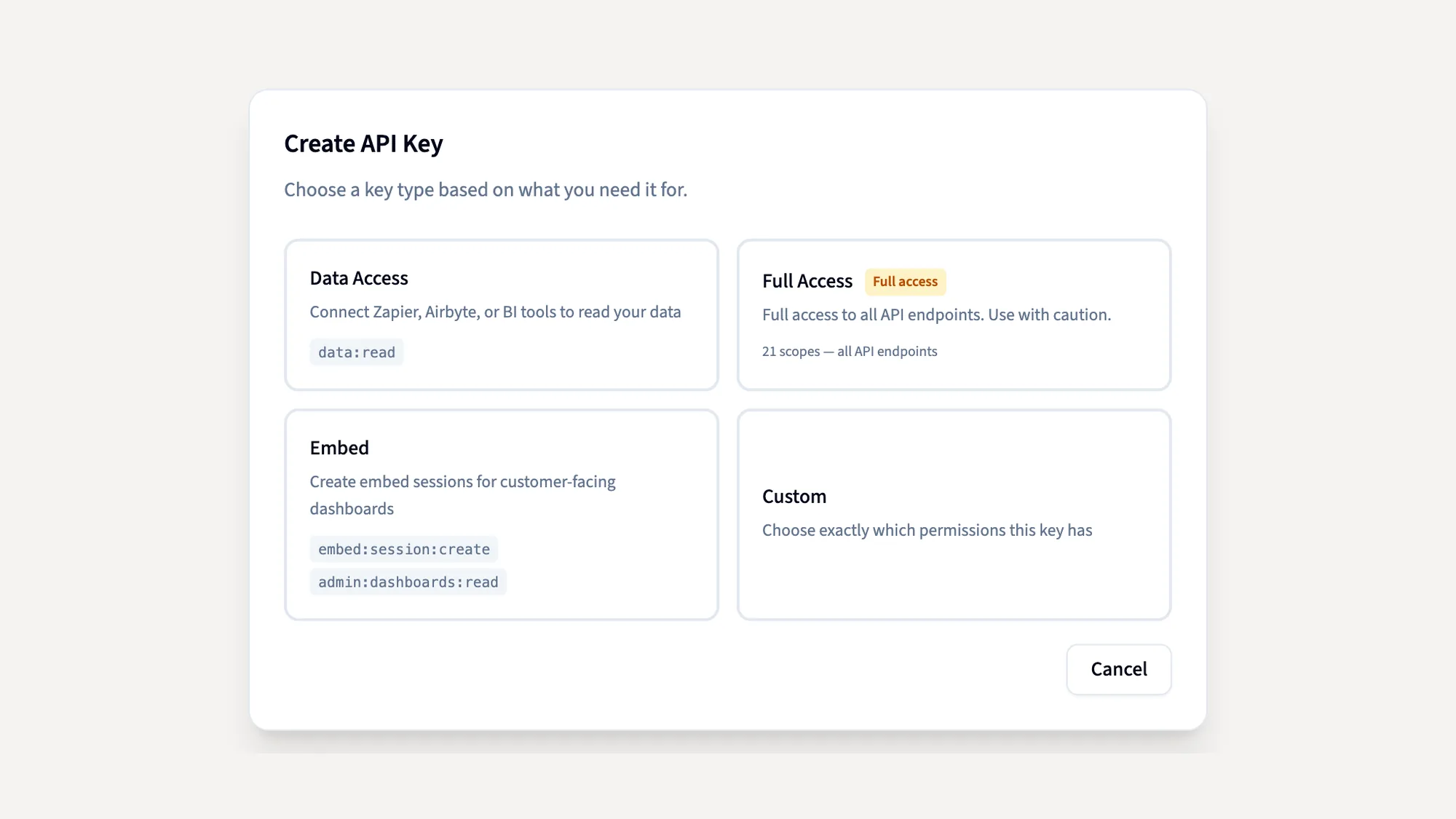
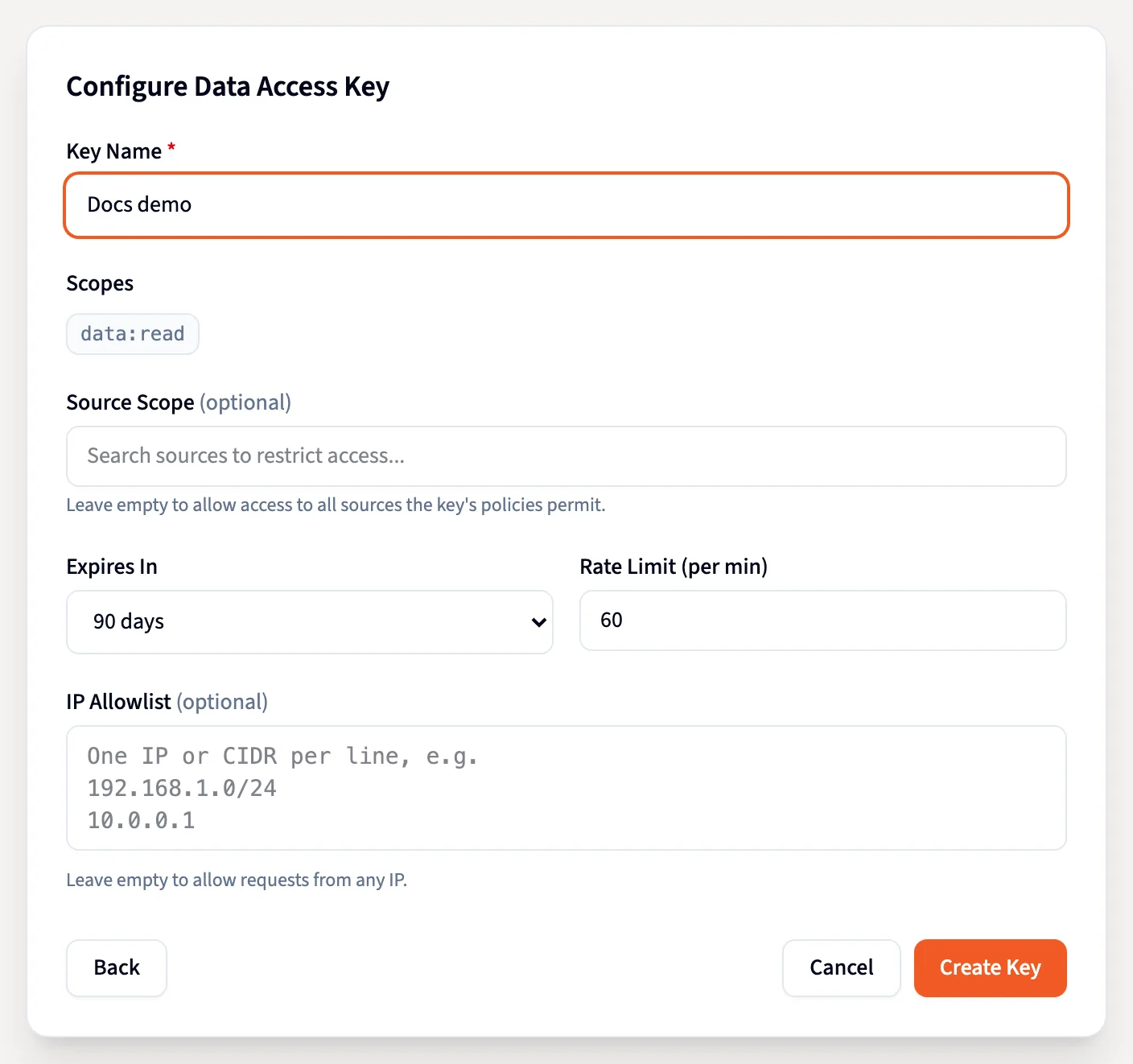
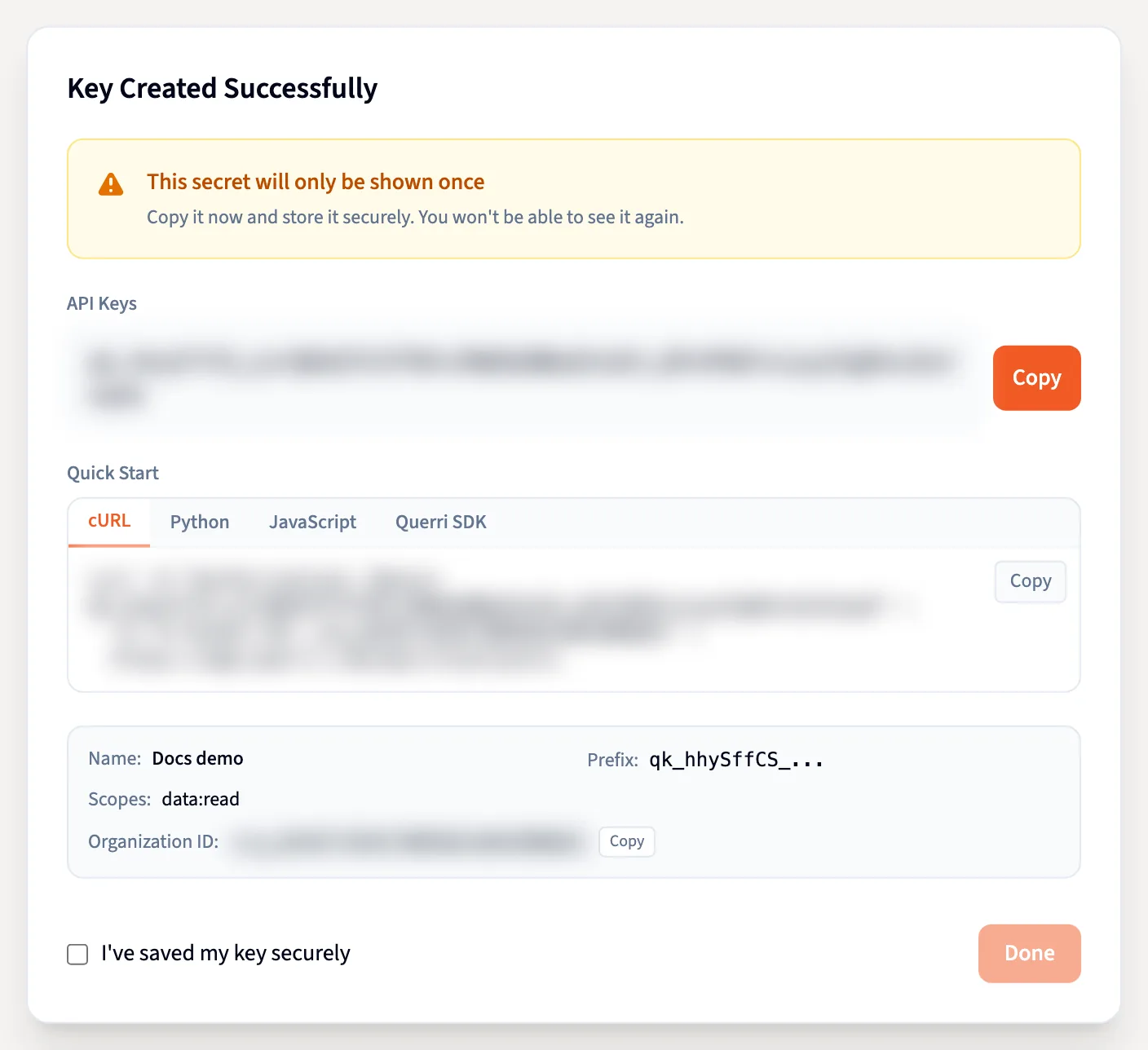
Each key from Settings → API Keys carries its own scopes, rate limit, expiry and optional IP allowlist. The secret is shown once and stored hashed, and every use lands in the audit log with an IP.
In the app
A key with its own scopes, limits and expiry.
These are screenshots of Querri with a demo company's data: creating a key from Settings → API Keys, from choosing its type to copying the secret.
Install, sign in, call it.
Install
pip install querri for the Python SDK, or pip install 'querri[cli]' for the command line too.
Sign in
querri auth login signs you in through the browser. Scripts use an API key from Settings → API Keys.
Call it
Ask a question and stream the answer, push rows from a pipeline, script the Library, or start a session for a customer.
MCP brings Querri into your AI tools. The SDK brings it into what you build.
Data consumers
The answers inside your company's own tools and products come from the same Library, under your own access.
Data owners
Push data in from a pipeline, run the weekly analysis from a script, and keep the Library's rules in code alongside everything else.
Data team and IT
One API with scopes and rate limits per key. Every key expires within a year, its secret is shown once and stored hashed, and every use is logged with an IP.
Questions engineers ask
What can I do with the Querri API?
Anything the app does with your data: projects and chats with streamed answers, sources, views, dashboards, the Library, sharing, users, row-level access policies and embed sessions. The Querri app, MCP and embeds run on this same API.
Do row-level access rules apply to API calls?
Yes. Row-level security applies to data read through a key just as in the app. For your customers, get_session attaches each person's row filter as a real access policy, and it applies to AI answers, projects and dashboards.
How do I install the SDK and CLI?
pip install querri installs the Python SDK, and pip install 'querri[cli]' adds the querri command-line tool. Sign in with querri auth login or an API key.
Can a coding agent like Claude Code drive Querri?
Yes. The CLI speaks JSON with --json and --no-interactive, signs in through the browser without holding a secret, and ships with a Claude Code skill that teaches an agent how to use it.
How are API keys secured?
Every key has scopes, a rate limit, an optional IP allowlist and an expiry of one year at most. The secret is shown once and stored hashed, and every use is in the audit log with an IP.
When should I use MCP instead of the API?
MCP brings Querri into AI tools like Claude and ChatGPT. The API and SDK bring it into the products, pipelines and agents you build. Both read from the same Library.
Is our data used to train AI models?
No. Querri is SOC 2 Type II, HIPAA and ISO 27001:2022 certified, and your data, prompts and results never train any model.
Keep exploring
MCP and CLI
Bring Querri into Claude, ChatGPT and your coding tools.
Embed
Put Querri inside your product, filtered to each customer's rows.
The Library
Your company's shared understanding of its data, which every call reads from.
Workspaces and row access
Set each person's filter once. It holds in the API too.