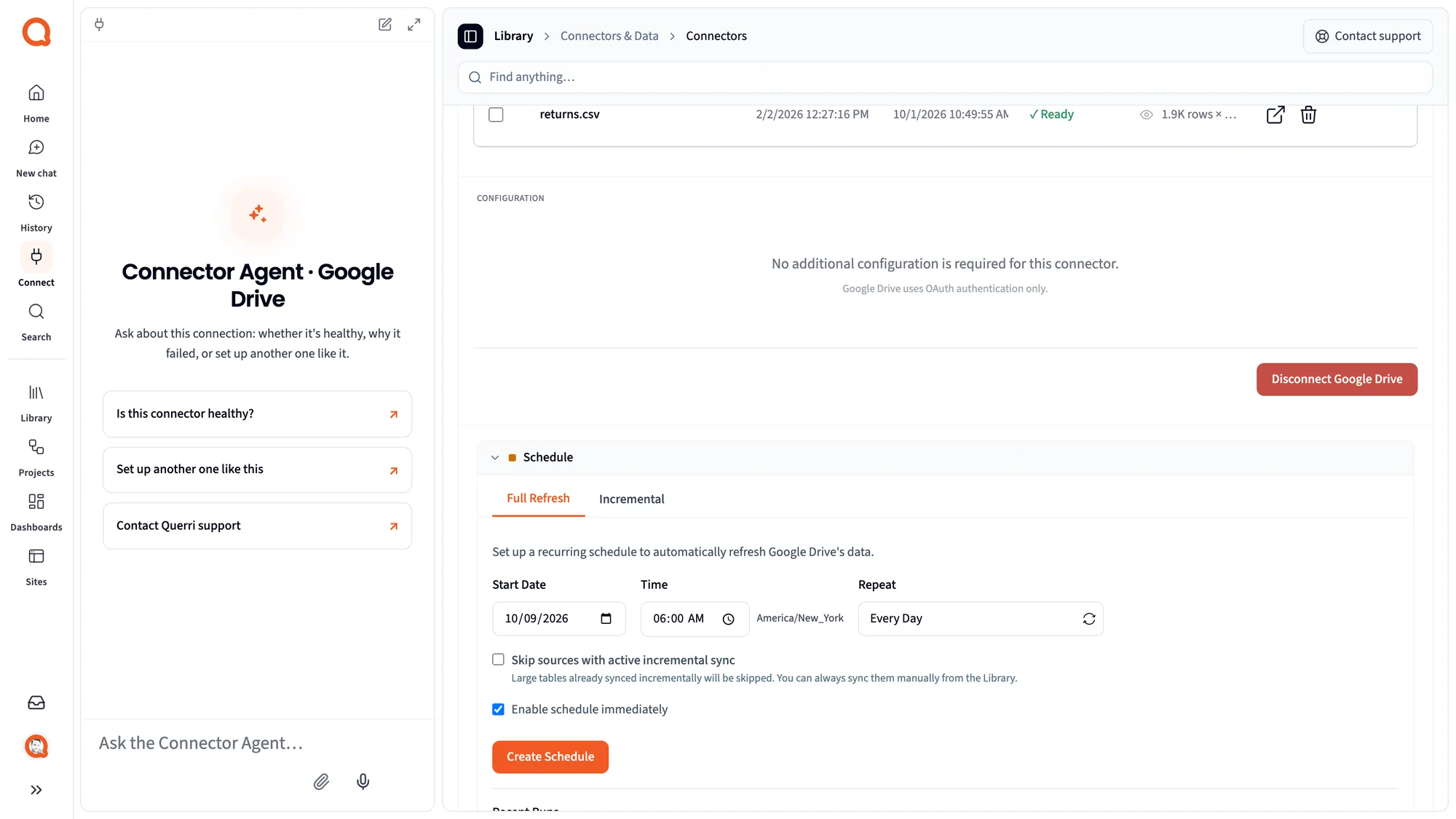
How do I connect Google Drive to Querri?
Ask the Connector Agent in Querri's Connect page to connect Google Drive, or choose it in the catalog. You sign in through Google, select files in Google's own picker, and approve the first load and a schedule. Your Google password never reaches Querri.
Which Google Drive files can Querri read?
CSV and text files, Excel workbooks (.xlsx and .xls), JSON, Parquet and Google Sheets. Every tab of a Google Sheet comes over as its own table; an Excel file picked from Drive brings in its first sheet. Google Docs, Google Slides and PDFs aren't supported through the Drive connector.
Can Querri see everything in my Google Drive?
No. Querri uses Google's drive.file scope, so it can open only the files you choose in Google's own file picker. It can't browse, list or search the rest of your Drive, and a file you never picked stays invisible to it.
How often does Google Drive data sync?
Each Google Drive connection runs a full refresh daily, weekly or monthly, and you can sync by hand at any time. There's no incremental mode: every sync reads the picked files again in full, so edits and deleted rows show up after the next sync.
Does Querri change the files in my Google Drive?
No. Querri only reads your files and never changes them on its own. It writes to Drive only when you choose to export a project's results, as CSV, Excel, Parquet, PNG or SVG, and only to the place you pick.
How do Google Drive sharing permissions carry over to Querri?
They don't carry over file by file. Querri can open only the files the connected Google account picked. Inside Querri, who sees which rows is set by Querri's own sharing and row-level access, so connect with an account that holds the files you want, then set access in Querri.
Does Querri pick up new files I add to a Drive folder?
Not on its own. Because Querri can open only files you've picked, a new file needs to be picked in the file picker once. Files you've already picked are read again on every sync, so changes inside them come through automatically.
Is there a separate Google Sheets connector?
No. Google Sheets come in through the Google Drive connector, with every tab kept as its own table. The Google Sheets page covers what that means for teams that live in Sheets.
How do I combine Google Drive spreadsheets with QuickBooks data?
Connect both, and Querri brings the spreadsheet and the QuickBooks data into the same Library. Tell it once how budget lines map to accounts, or how a customer in the sheet matches one in QuickBooks, and every answer and report uses that mapping.
How do I combine Google Drive files with Salesforce or HubSpot?
Connect the CRM next to Drive, and Querri joins the quota sheet, territory plan or ad platform export to the CRM records, matched on account, rep or email. When a match could be wrong, for example a name spelled two ways, the answer says so.
How do I get a budget vs. actual report from a Google Sheet?
Connect the budget sheet from Drive and the system that holds actuals, such as QuickBooks or NetSuite. Define the variance as a KPI, and Querri measures it on every sync and keeps its history, so month-over-month changes are a question rather than a rebuild.
How do I get one P&L from several Excel workbooks in Google Drive?
Keep them as Google Sheets, or upload the Excel files, and pick them all. Each tab comes in as a table, and the Library combines them into one view you can ask about. Ask for the roll-up, and it can come back as a formatted Excel workbook.
Can I export Google Drive data to Excel automatically?
Yes. Turn the report into a project and put it on a schedule. Every run uses the most recent sync of your Drive files and emails a formatted Excel workbook, either one shared copy or a separate copy for each manager or client, with only their rows.
Can I build custom dashboards from Google Drive files?
Yes. Describe what you want to see, or paste a screenshot of a dashboard your team already relies on, then adjust it in plain words. One dashboard can draw on every picked file plus your other connected systems, with rows limited per person.
Can I ask ChatGPT or Claude about my Google Drive data?
Yes. Once Querri is linked to Claude or ChatGPT, the assistant works from the Drive files synced into your Library rather than a one-off upload, with your definitions applied and each person's Querri access respected, so its numbers agree with your dashboards.
My spreadsheets are messy. Will Querri still read them?
Usually, yes. Each tab is read with its first row as the header. If a tab has title rows or several tables on it, ask in the Library to tidy it, or upload the Excel file, where Querri's workbook reader handles those layouts. Answers say what was cleaned.
Can each person see only their own rows from a shared spreadsheet?
Yes. Keep one spreadsheet in Drive and set a row filter per person in Querri once. The filter follows that person into chat, dashboards, Claude, ChatGPT and the API, so you no longer need a separate copy of the file for each manager.
Is my Google Drive data secure in Querri?
Querri is SOC 2 Type II, HIPAA and ISO 27001:2022 certified, and your data is never used to train a model. You sign in through Google, Querri sees only the files you pick, and the Connector Agent never handles your password.
 Google Drive + Querri