Skip to content

Salesforce + Querri

Salesforce reporting,without the report builder.

Ask about your pipeline in plain language and get an answer that also knows your quotas, your invoices and your definitions. Querri brings Salesforce into one place with the rest of your business and keeps it in sync.

Querri only ever reads from Salesforce. It never sees your password. SOC 2 Type II, HIPAA and ISO 27001:2022 certified.

Why Salesforce reporting gets hard

Salesforce runs the pipeline. Reporting on it is another job.

Every RevOps team knows these walls. None of them is a Salesforce bug; they're what happens when the questions reach past one report.

01

The question crosses objects, or leaves Salesforce

A report sees what its report type sees. Joined reports stop at five blocks, and quotas, invoices and product usage usually live somewhere else entirely.

02

History is thin

Field history tracks up to 20 fields per object and keeps them for 18 months, unless you buy Field Audit Trail. "What changed since last week?" turns into a snapshot project.

03

Big answers get cut off

Reports display at most 2,000 rows, and a dashboard holds 20 components. Past that, someone exports to a spreadsheet and the numbers start to drift.

04

The data drifts

Stages get renamed, lead source is typed six ways, and the same customer exists as three accounts. Win rate by source is only as good as the cleanup someone did by hand.

05

Every new view is a ticket

A new report type, a formula field, a dashboard for one team: each waits for an admin, and the question is old by the time it's answered.

What you can finally answer

Eight Salesforce questions that used to take a project

Each one is a real request RevOps, finance and sales leaders make, the reason it's hard today, and what Querri does with it.

What's our pipeline coverage against quota, by region and rep?

Why it's hard

Quota usually lives in a spreadsheet or a planning tool, not on the opportunity, so coverage means an export and a VLOOKUP every week.

With Querri

Connect Salesforce and the quota sheet once. Querri joins them in the Library, measures coverage as a KPI and keeps it current on every sync. The pipeline coverage playbook walks through it.

What changed in the pipeline since last week?

Why it's hard

Salesforce shows the pipeline as it is now. Comparing to last week takes tracked field history or reporting snapshots set up in advance.

With Querri

Track pipeline as a KPI and Querri keeps its history from the day you start, so "versus last week" is a question, not a project. Nightly insights flags the moves worth a look before Monday's meeting.

How much of what we closed has actually been invoiced?

Why it's hard

Salesforce knows what was booked; NetSuite or QuickBooks knows what was billed and paid. Sales and finance each bring a number, and both are defensible.

With Querri

Querri joins closed-won opportunities to invoices and payments, and you say once what a booking means in Facts & rules. Every answer after that uses the same definition, and the gaps come back as a list you can act on.

What's our win rate by lead source, really?

Why it's hard

Lead source is free text in half the org: "Webinar", "webinar ", "Web-inar". Duplicate accounts double-count wins.

With Querri

Querri checks the columns before it writes the query: values spelled many ways, duplicates, blanks that aren't blank. It tells you how much the cleanup moved the number, so nothing changes quietly. See data cleansing and how Querri checks its work.

Which big deals have stalled, and whose?

Why it's hard

A stalled deal looks fine in every report until someone sorts by last activity, and nobody does that for every rep every day.

With Querri

Monitors judge each rep and region against its own history every night, with arithmetic rather than a model's guess. What's worth a look waits in your Inbox in the morning. See Nightly insights and monitors.

Can every rep get their own forecast every Monday?

Why it's hard

One report per rep means one filter per rep, kept up by hand, and the formatting breaks the moment someone opens it in Excel.

With Querri

Build the forecast once as a project. A schedule reruns it on fresh Salesforce data and sends each rep their own version as email or a formatted workbook. See reports and automation.

Which marketing sources turn into closed revenue?

Why it's hard

Campaigns live in HubSpot or ad platforms, revenue lives in Salesforce, and the join between them is a person's email address that doesn't always match.

With Querri

Querri brings HubSpot and your ad platforms into the same Library, matches contacts across systems and says how it matched them, with a caveat when a match could be off.

Can I ask about Salesforce from Claude or ChatGPT and trust the answer?

Why it's hard

Point an assistant at Salesforce and every prompt picks its own definition of pipeline. Two people get two numbers.

With Querri

Connect Querri to Claude or ChatGPT once. The assistant answers from your Library, with your rules and each person's own access, so the answer in Claude matches the dashboard.

Salesforce plus the rest

The answers that matter cross systems

Your CRM knows the deal. Finance knows the invoice, marketing knows the campaign, the warehouse knows the usage. Querri joins them in one Library, so a question about revenue doesn't stop at the edge of Salesforce.

Salesforce pairs well with

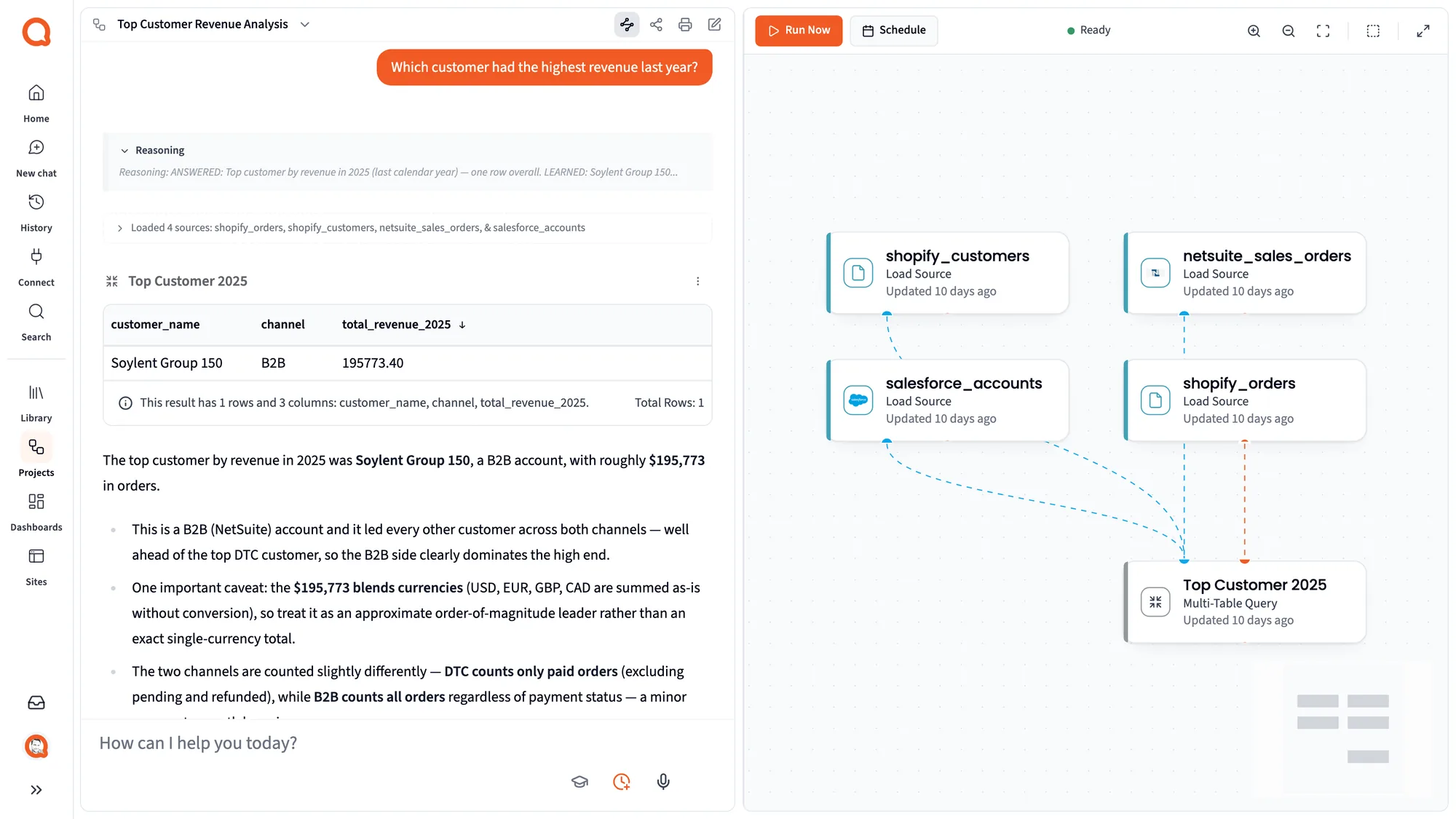
A Querri project answering which customer had the highest revenue last year from four sources, including salesforce_accounts and netsuite_sales_orders, with a caveat that the total blends currencies
Four sources, including Salesforce and NetSuite, in one answer, with the caveat that matters: the total blends currencies.

Answers you can stand behind

When a question has two fair readings, Querri says which one it used

"Pipeline added this quarter" can mean opportunities created this quarter or opportunities that reached a pipeline stage this quarter. Both are defensible, and they give different numbers. Querri answers with one, names it and shows you the other, so the meeting argues about the business, not the math. See how answers work.

Wake up to what changed

Querri watches the pipeline while you sleep

Every night Querri checks your KPIs against their own history and looks for the part of the pipeline nobody is watching. In the morning it's waiting in your Inbox, and nothing changes without your OK.

Custom Salesforce dashboards

Dashboards that go past 20 components and past Salesforce

Describe the dashboard you want, or start from a screenshot of the one leadership already uses. Every change after that is a sentence, every chart reads from the same Library as the chat, and each rep can see only their own rows.

  • Built by asking, changed by asking
  • Salesforce next to finance, marketing and product data
  • Row-level access per person, set once
Every change is a sentence: asked in chat, the dashboard goes dark, and one click undoes it.

Reports you can stop rebuilding

Six Salesforce reports, built once

What comes over

Your whole org, not one report at a time

Querri syncs the objects you choose, with their fields, and keeps them current. It can only sync what the Salesforce user you connect with is allowed to see.

Selected by default

  • Account
  • Contact
  • Lead
  • Opportunity
  • Opportunity Line Item
  • Case
  • Campaign
  • Campaign Member
  • Task
  • Event
  • User
  • Product
  • Price Book
  • Contract
  • Order
  • Asset
  • Plus any custom object the user can query

Kept in sync

Incremental syncs pick up changed records as often as hourly; a full refresh runs daily, weekly or monthly and also clears records deleted in Salesforce.

Built for big orgs

Objects with 100,000 records or more load through Salesforce's Bulk API automatically, so there's no 2,000-row ceiling.

Read only

Querri only ever reads from Salesforce. It never creates, changes or deletes a record.

Your password stays yours

You sign in with Salesforce. The Connector Agent never sees a password; it only knows the connection is set.

How to connect Salesforce

Connected in a few minutes, with an agent doing the setup

  1. 1

    Ask the Connector Agent

    In Querri, open Connect and say "connect our Salesforce," or pick Salesforce from the catalog.

  2. 2

    Sign in with Salesforce

    Approve access in Salesforce's own sign-in. Querri never sees your password.

  3. 3

    Choose objects

    The standard CRM objects are already selected. Add custom objects, or pick All Tables.

  4. 4

    Approve the load and a schedule

    Nothing loads until you approve it. Pick how often it syncs.

  5. 5

    Ask your first question

    The data lands in your Library, ready for questions, dashboards and reports.

The Connect page with the Connector Agent asking for approval before it starts a connection, beside connector cards for Google Drive, NetSuite, Salesforce, Square, ShipStation and Snowflake
The Connector Agent waits for your approval before it creates or loads anything.

Salesforce FAQ

Questions about Salesforce and Querri

How do I connect Salesforce to Querri?

Open Connect in Querri and ask the Connector Agent to connect Salesforce, or pick it from the catalog. Sign in with Salesforce, choose the objects to sync (the standard CRM objects are preselected), then approve the load and a schedule. Querri never sees your Salesforce password.

What Salesforce data does Querri sync?

Accounts, contacts, leads, opportunities and line items, cases, campaigns, tasks, events, users, products, price books, contracts, orders and assets are selected by default, and you can add any custom object the connected user can query. Querri can only sync what that user is allowed to see.

How often does Salesforce data sync?

Incremental syncs pick up changed records as often as hourly, using each record's last-modified date. A full refresh can run daily, weekly or monthly and also removes records deleted in Salesforce. You can run a sync by hand at any time.

Does Querri write to or change my Salesforce data?

No. Querri only ever reads from Salesforce. It never creates, updates or deletes a record.

How do Salesforce permissions carry over to Querri?

Querri can only sync the objects and fields that the Salesforce user you connect with is allowed to see, so connect with a user whose access matches what you want in Querri. Inside Querri, who sees which rows is set by Querri's own sharing and row-level access, not by each person's Salesforce permissions.

How do I get past Salesforce's 2,000-row report limit?

Querri syncs whole objects rather than running reports, and objects with 100,000 records or more load through Salesforce's Bulk API automatically. Questions, dashboards and exports in Querri work on the full data, not the first 2,000 rows.

How do I see what changed in my Salesforce pipeline week over week?

Track pipeline as a KPI in Querri. Querri keeps the KPI's history from the day you start measuring it, so you can ask how it moved since last week, and Nightly insights flags changes worth a look without anyone building a snapshot report.

How do I combine Salesforce and NetSuite data?

Connect both, and Querri joins them in the Library: closed-won opportunities to sales orders, invoices and payments, matched on the customer. Tell Querri once what counts as a booking, and every answer, dashboard and report uses that definition.

How do I combine Salesforce and HubSpot data?

Connect both, and Querri matches contacts and companies across the two systems so you can follow a marketing source through to closed revenue. When a match could be off, for example because of a different email address, the answer says so.

How do I get a pipeline coverage report against quota?

Connect Salesforce and the spreadsheet or system that holds quota. Querri joins them, measures coverage by region and rep as a KPI, and keeps it current on every sync. The pipeline coverage playbook walks through it step by step.

Can I build custom Salesforce dashboards without CRM Analytics or Tableau?

Yes. Describe the dashboard, or start from a screenshot of the one you use today. You change it by asking, it can mix Salesforce with other systems, and each person can be limited to their own rows.

Can I ask ChatGPT or Claude about my Salesforce data?

Yes. Connect Querri to Claude or ChatGPT once, and the assistant answers from your Querri Library with your definitions and rules, under each person's own access in Querri. The answer in Claude matches the one in Querri.

Can I send each sales rep their own Salesforce report automatically?

Yes. Build the report once as a project, then schedule it. Querri reruns it on fresh Salesforce data and can send each rep their own version as an email or a formatted Excel workbook.

Our Salesforce data is messy. Will the answers be wrong?

Querri checks the columns before it answers: the same value spelled many ways, duplicate records, text that only looks blank. It tells you what it cleaned and how much that moved the number, and it says so when it couldn't check.

Can each rep see only their own pipeline?

Yes. In Querri you set a row filter per person once, and it follows them into chat, dashboards, Claude and the API.

Does Querri work with large Salesforce orgs?

Yes. Objects with 100,000 records or more load through Salesforce's Bulk API 2.0 automatically, and incremental syncs only pick up records that changed.

Can I connect a Salesforce sandbox?

Not today. Querri connects through Salesforce's standard sign-in at login.salesforce.com.

Is my Salesforce data secure in Querri?

Querri is SOC 2 Type II, HIPAA and ISO 27001:2022 certified. You sign in through Salesforce, so the Connector Agent never sees your password, data is encrypted in transit and at rest, and your data is never used to train a model.

Ask Salesforce the question that's been waiting in the queue.

Connect it in a few minutes. Querri only ever reads your data.