What are each shipper's on-time and tender acceptance numbers for the QBR?
Join Tai tenders and loads to Macropoint stop times. Build on-time pickup, on-time delivery and tender acceptance for any shipper, against its own history, and find the lane behind any slip.
Open QuerriWhat you'll need
Querri (Free trial) to join the exports and run the checks
Tai exports and a Macropoint file: Step 1 says what each adds
Your on-time rules: so every shipper is measured the same way
Free resources
Start your free trial here →Sample data sets
Synthetic data for a made-up freight brokerage. Not real shipper data.
Need help?
If you have any questions, you can request a demo or email our team.
Before we begin
Every QBR deck needs the same three numbers. The shipper often has its own version, and if the lane behind a slip isn't on the slide, the meeting becomes about whose number is right. Tenders and appointments are in the TMS and arrivals are in Macropoint, so building one shipper's pack has meant an afternoon of exports.
This playbook builds on-time pickup, on-time delivery and tender acceptance for one shipper, compares the quarter with its own history, and finds the lane behind any slip.
How it works:
- • Upload the Tai and Macropoint exports
- • Calculate the three QBR numbers
- • Compare the quarter with the shipper's history
- • Find the lane behind the slip
- • Build the QBR pack
Follow the steps
Upload the Tai and Macropoint exports
Two systems, one project:
- •
Tai tenders and load export (or your TMS reports): every tender with its status, and every load with its pickup and delivery appointments.
- •
Macropoint stop events: the actual arrival at every pickup and delivery.
Both come in as files. Upload next quarter's over the old ones and every view rebuilds.
Tip: Pull five quarters, so the shipper's last four are there to compare with.
-
 Tai tenders and loads
- Macropoint stop events
 One project
Calculate on-time pickup, on-time delivery and tender acceptance
Start with the three numbers the shipper will ask about, next to the company's:
"For Q3, what share of loads picked up and delivered on time against the appointment, and what share of tenders did we accept, for the company and for Pellham Home Goods?"
Pellham's pickups and tender acceptance beat the company. On-time delivery is the one number below it: 88.9% against 91.4%.
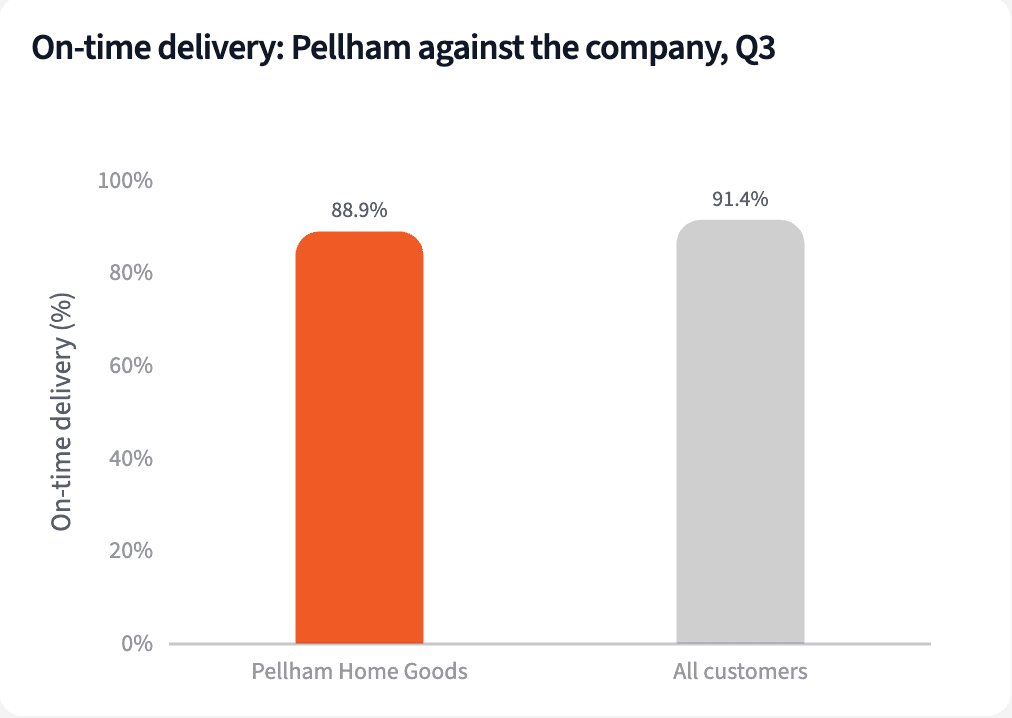
| Measure | Pellham Home Goods | All customers |
|---|---|---|
| Loads | 666 | 9,086 |
| On-time pickup | 92.3% | 91.2% |
| On-time delivery | 88.9% | 91.4% |
| Tender acceptance | 95.8% | 94.5% |
Q3 2026, Pellham Home Goods against all customers.
Compare this quarter with the shipper's prior quarters
Hold the shipper against its own last four quarters:
"How does Pellham's Q3 compare with its own last four quarters, and which larger shippers slipped the most?"
Against its own last four quarters, 91.8% weighted by loads, Pellham's on-time delivery fell 2.9 points, the largest drop among shippers with 150 or more Q3 loads. Pickup and tender acceptance held steady.
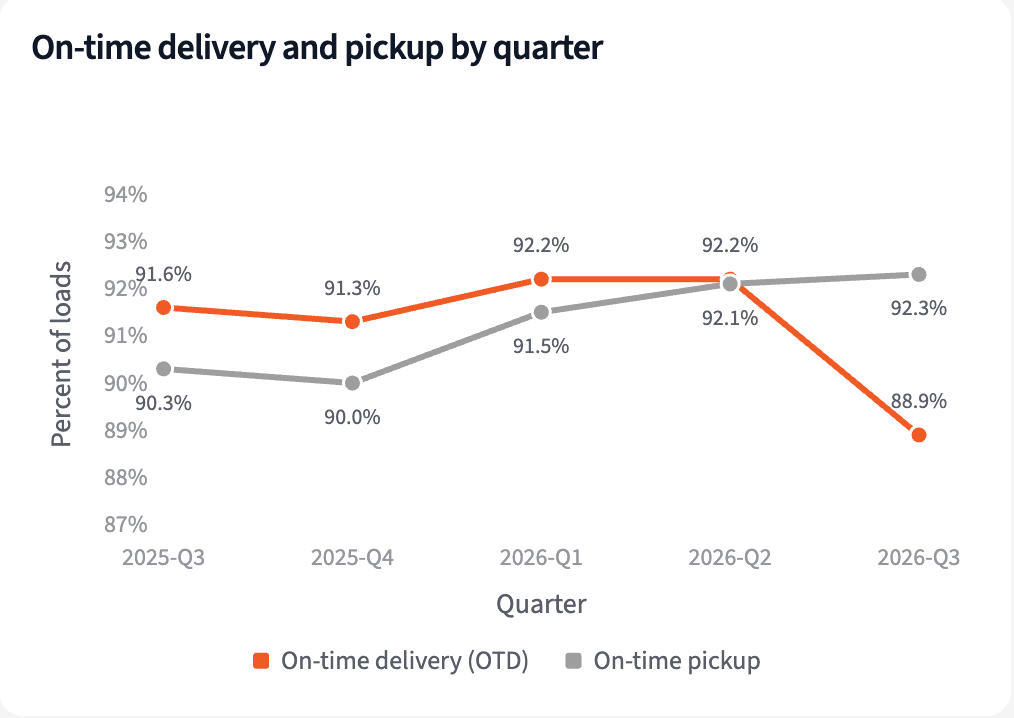
| Quarter | Loads | On-time pickup | On-time delivery | Tender acceptance |
|---|---|---|---|---|
| 2025-Q3 | 621 | 90.3% | 91.6% | 96.9% |
| 2025-Q4 | 643 | 90.0% | 91.3% | 96.4% |
| 2026-Q1 | 639 | 91.5% | 92.2% | 96.8% |
| 2026-Q2 | 629 | 92.1% | 92.2% | 96.2% |
| 2026-Q3 | 666 | 92.3% | 88.9% | 95.8% |
Pellham Home Goods by quarter, 2025-Q3 to 2026-Q3.
Find the lanes behind any slip
Split the shipper's on-time delivery by lane:
"Which of Pellham's lanes explains the slip?"
Atlanta to Dallas fell 8.1 points on 161 loads and accounts for two thirds of Pellham's shortfall. Savannah to Jacksonville improved 4.9 points.
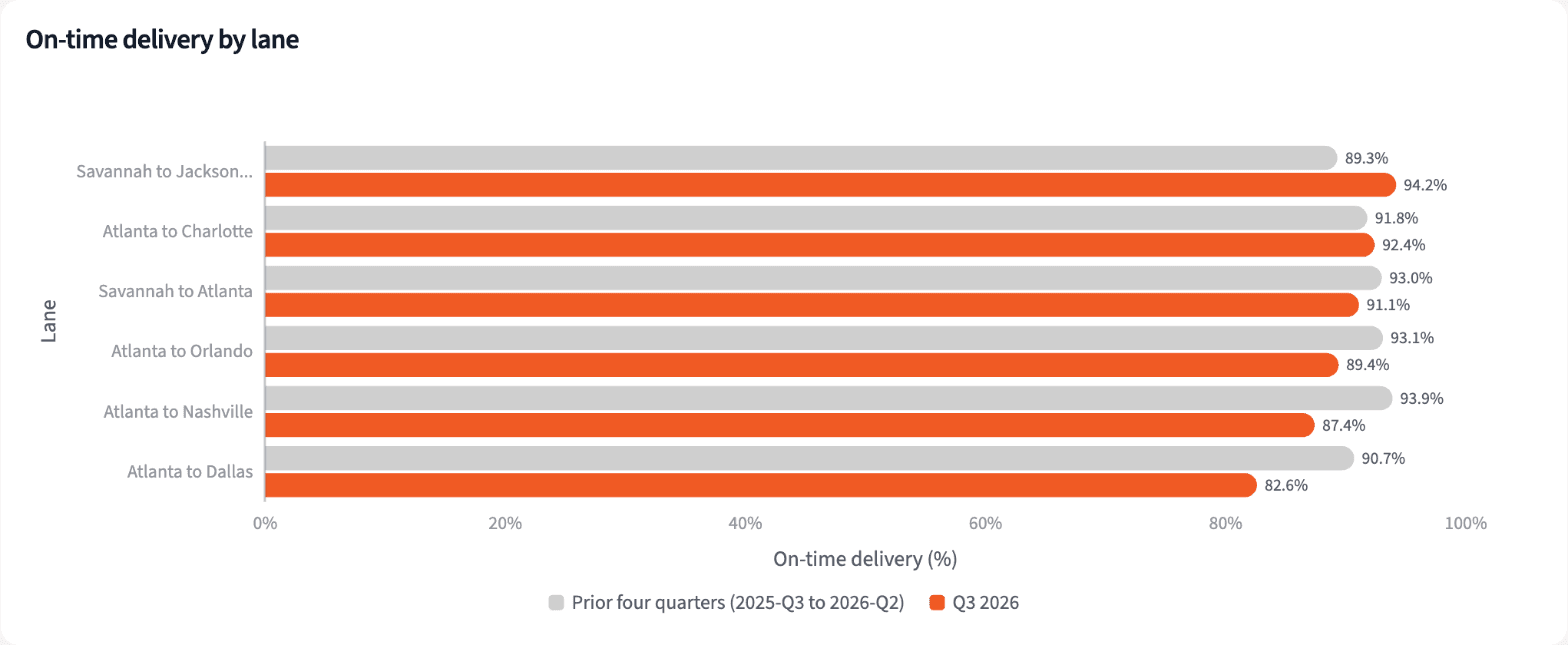
| Lane | Q3 loads | Prior four quarters | Q3 2026 |
|---|---|---|---|
| Atlanta to Dallas | 161 | 90.7% | 82.6% |
| Atlanta to Nashville | 95 | 93.9% | 87.4% |
| Atlanta to Orlando | 104 | 93.1% | 89.4% |
| Savannah to Jacksonville | 86 | 89.3% | 94.2% |
Pellham Home Goods on-time delivery by lane, Q3 2026 against the prior four quarters.
Build the QBR pack for the account manager
Four numbers for the first slide, and what to say about each.
The narrative Querri writes:
Pellham's service held on pickup and tender acceptance in Q3. Delivery slipped, and most of the slip sits on one lane.
What you can create or export:
- The list, to Excel, CSV or Google Sheets
- A live dashboard that refreshes with each upload
- A presentation for the meeting, to PDF or PowerPoint
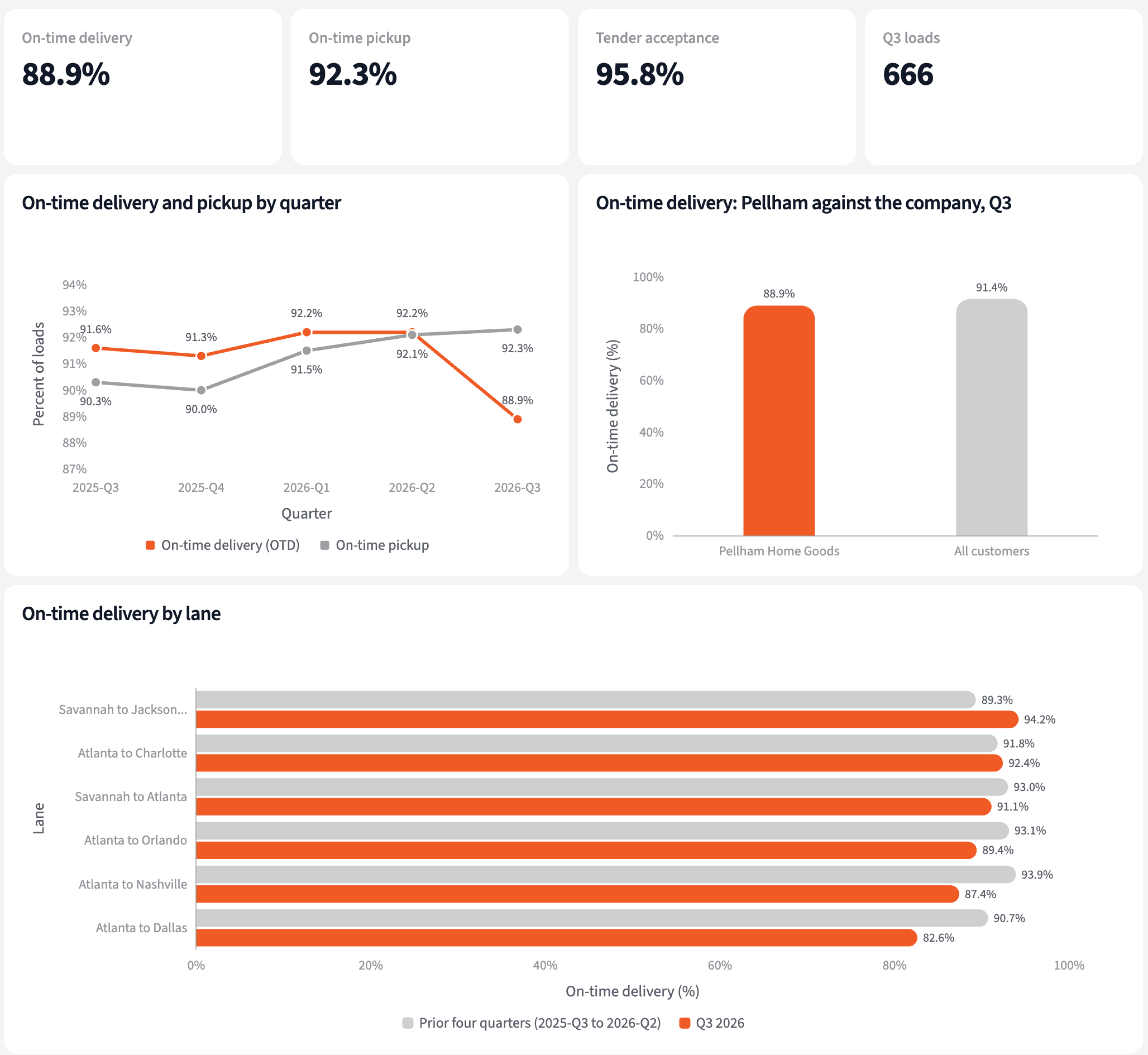
| Topic | Number | What to say |
|---|---|---|
| On-time pickup | 92.3% | Above the company's 91.2% |
| Tender acceptance | 95.8% | 666 of 695 accepted |
| On-time delivery | 88.9% | Down from 91.8% |
| Atlanta to Dallas | 82.6% | Bring a plan for this lane |
QBR talking points, Pellham Home Goods, Q3 2026.
Walk into the QBR with the numbers, and the lane behind them.
Try it on your own dataTips for a QBR that starts on the same numbers
Compare the shipper with itself first
A company average invites a debate about mix. The shipper's own last four quarters show what changed for them.
Bring the lane before they do
A slip the shipper has already noticed is easier to discuss when you name the lane first and come with a plan.
Teach Querri your rules once. Every answer after that follows them.
What on time means, which arrival counts, how tender acceptance is figured: say each rule once and Querri applies it to every question on that data.
Show me how
Say it in chat
Settle a rule in conversation and the Librarian records it as a fact under Facts & Rules, attached to the table it governs. Every later question on that data applies it, whoever asks, and every view built afterwards carries it.
"On-time delivery is Macropoint delivery arrival on or before the Tai delivery appointment. Save that as a rule for the Macropoint stop events."
Or bring the document that already says it
Upload your customer service level agreement like any other file. Querri files a From a document card in the Inbox with the statements it found, each with its page and exact words; tick the ones to keep and they become facts. The rules this playbook depends on:
- On-time pickup: Macropoint arrival on or before the pickup appointment
- On-time delivery: Macropoint arrival on or before the delivery appointment
- No Macropoint stop: use Tai's picked-up or delivered time
- Tender acceptance: accepted over all tenders received
- Quarters: by pickup appointment for loads, requested pickup for tenders
- Lane: origin city to destination city
"Read this shipper's service level agreement and propose the rules it states about on-time windows and tender response. I'll review them in the Inbox."
Where the rules reach
A rule is attached to the data, not to one person's chat, so it follows the data everywhere:
- • Every question asked in chat, by any account manager
- • Every view the Librarian builds on that data
- • Every step of a project, including the code it writes
- • Dashboards and scheduled runs, each time they refresh
- • Claude and ChatGPT, when they ask Querri
You stay in control
Every rule is listed under Facts & Rules next to the data it governs, where you can edit or remove it. Rules from a document wait for your tick in the Inbox, and a Worth remembering card is how Querri offers one it noticed itself. Workspaces and roles decide who can change what. Company-wide rules go in Settings → Customize; the Library is where the rest lives.
The payoff at the QBR
The account manager brings the shipper's three numbers, its own history and the lane that moved. Changing the on-time window is a sentence.
Frequently asked questions
How is on-time delivery measured?
What if Macropoint has no stop for a load?
How is tender acceptance measured?
Why compare with the last four quarters?
Can I build this for another shipper?
Do I need a TMS connector?
Does Querri change anything in Tai or Macropoint?
How often should this run?
Other popular resources
Playbook
Shippers tendering less
Which shippers are tendering fewer loads than usual?
Playbook
Detention, and who pays
Which detention charges are building up, and who pays them?
Demo
Request a walkthrough
See Querri in action with your own data.
Pricing
Compare plans
Find the right plan for individuals, teams, or enterprise.