Which shippers are tendering fewer loads than usual?
Join your Tai load export to HubSpot and your tender allocations. See which shippers sent fewer loads than their usual week, who is behind their quarter, and who hasn't heard from you.
Open QuerriWhat you'll need
Querri (Free trial) to join the exports and run the checks
A Tai load export, HubSpot and your allocation sheet: Step 1 says what each adds
Your volume rules: so every shipper is judged the same way
Free resources
Start your free trial here →Sample data sets
Synthetic data for a made-up freight brokerage. Not real shipper data.
Need help?
If you have any questions, you can request a demo or email our team.
Before we begin
A shipper rarely says it's moving freight elsewhere. It just sends fewer loads, and a busy week across the rest of the book hides it. The loads are in the TMS, the allocations are in a spreadsheet and the last call is in the CRM, so spotting a quiet shipper has depended on an account manager noticing.
This playbook compares every regular shipper's week with its own usual week, checks contract shippers against their quarterly allocation, and shows when each one last heard from Brinlow.
How it works:
- • Upload the Tai export and connect HubSpot
- • Compare each shipper's week with its usual
- • Check contract shippers against allocation
- • See which quiet shippers nobody called
- • Build Monday's call list
Follow the steps
Upload the Tai export and connect HubSpot
Three sources, one project:
- •
Tai load export (or your TMS load report): every load with its shipper, customer code and pickup appointment.
- •
Tender allocation (Excel): each contract shipper's committed loads for the quarter.
- •
HubSpot: each shipper's account manager, and every call, email and meeting.
HubSpot connects directly and syncs on a schedule. The Tai export comes in as a file; upload next week's over the old one and every view rebuilds.
Tip: Pull at least 14 weeks of loads, so every shipper has 13 weeks to set its usual week.
-
 Tai load export
- Tender allocation
-
 HubSpot companies and activities
 One project
Compare each shipper's week with its usual weeks
Hold every regular shipper against its own last 13 weeks:
"Compare each shipper's loads last week with its average over the 13 weeks before. Which shippers that usually send 3 or more a week are under 70% of their usual?"
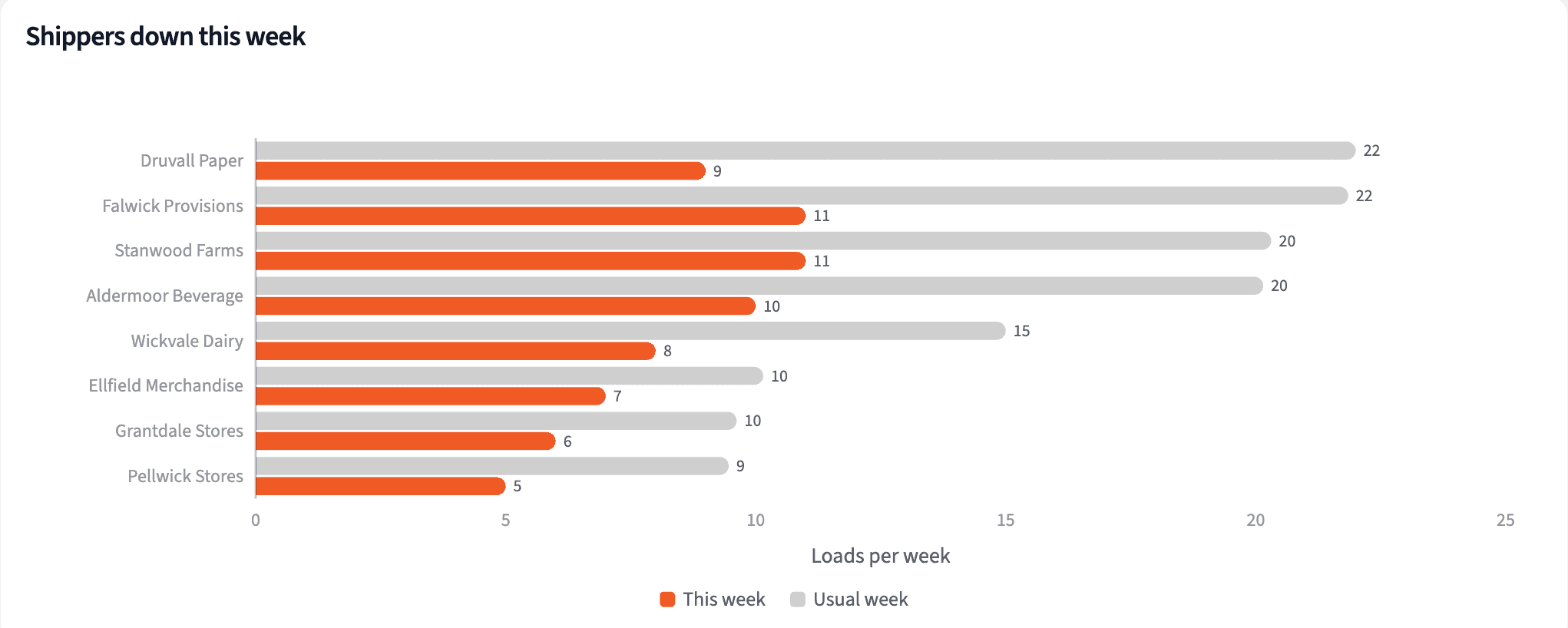
The company is 2.6% under its usual week, well within normal. Underneath, 15 of the 54 shippers that usually send 3 or more loads a week are under 70% of their usual. Druvall Paper sent 9 against a usual 22.
| Shipper | This week | Usual week | Share of usual |
|---|---|---|---|
| Druvall Paper | 9 | 22.0 | 41% |
| Aldermoor Beverage | 10 | 20.2 | 50% |
| Falwick Provisions | 11 | 21.8 | 50% |
| Wickvale Dairy | 8 | 15.0 | 53% |
| Company | 673 | 690.9 | 97% |
Loads in the week of October 26, 2026, against each shipper's usual week.
Check contract shippers against their quarterly allocation
For shippers with a committed volume, measure the quarter so far:
"For contract shippers, how far along are they on their Q4 tender allocation, 32 days into the quarter?"
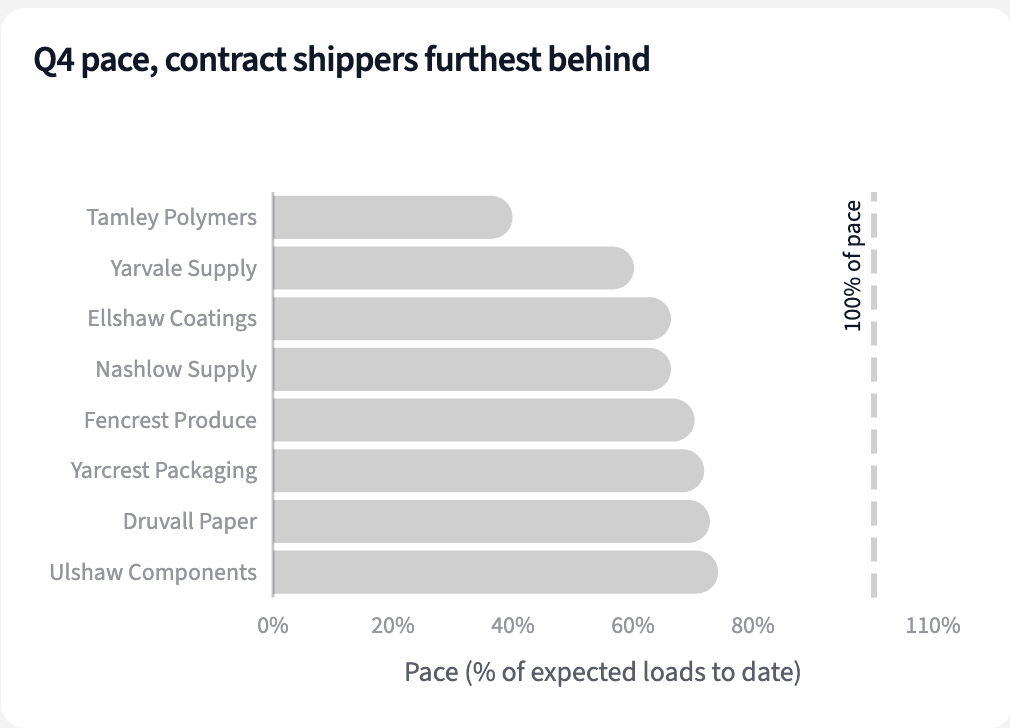
32 days in, 20 of 62 contract shippers are under 90% of the pace their allocation implies. Tamley Polymers has sent 5 loads against 12.5 expected.
| Shipper | Q4 allocation | Loads to date | Pace |
|---|---|---|---|
| Tamley Polymers | 36 | 5 | 39.9% |
| Yarvale Supply | 43 | 9 | 60.2% |
| Ellshaw Coatings | 39 | 9 | 66.3% |
| Nashlow Supply | 39 | 9 | 66.3% |
Q4 2026 pace for contract shippers, November 1 (32 of 92 days).
See which quiet shippers nobody has called
Bring in HubSpot, and look at the last contact for each down shipper:
"For each shipper that's down, when did anyone last call, email or meet with them in HubSpot?"
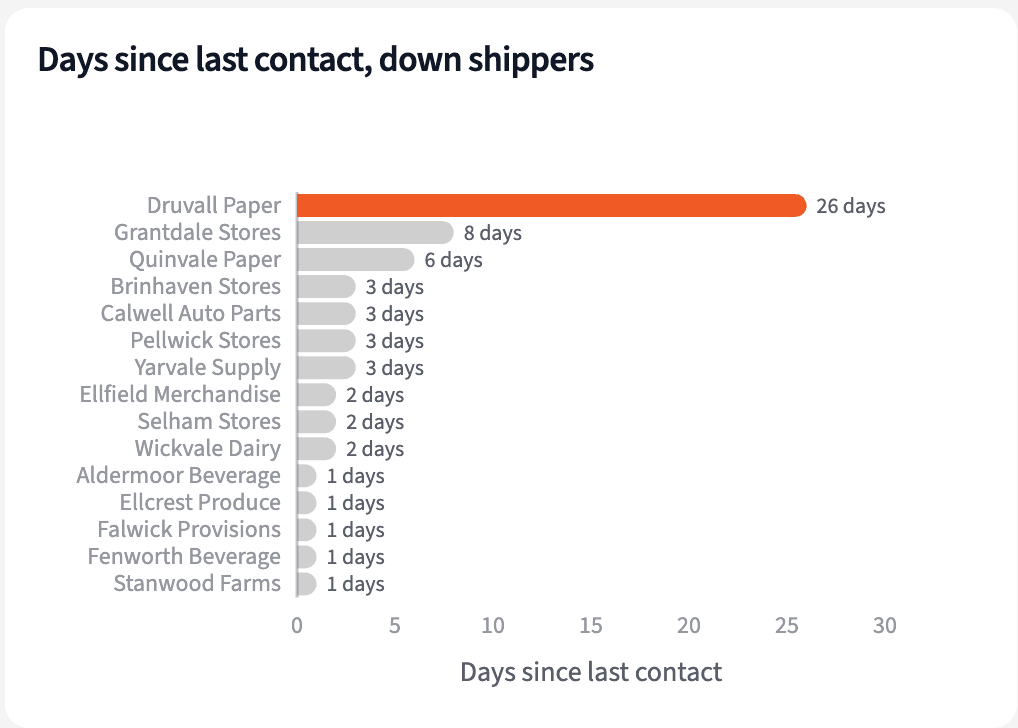
Most down shippers heard from Brinlow in the last few days; the median gap is 2 days. Druvall Paper hasn't been contacted since October 7, 26 days.
| Shipper | Account manager | Last contact | Days |
|---|---|---|---|
| Druvall Paper | Maya Linden | October 7 | 26 |
| Grantdale Stores | Brooke Holloway | October 25 | 8 |
| Quinvale Paper | Elena Kowal | October 27 | 6 |
| Aldermoor Beverage | Maya Linden | November 1 | 1 |
Last HubSpot contact for shippers down this week, as of November 2, 2026.
Build Monday's call list by account manager
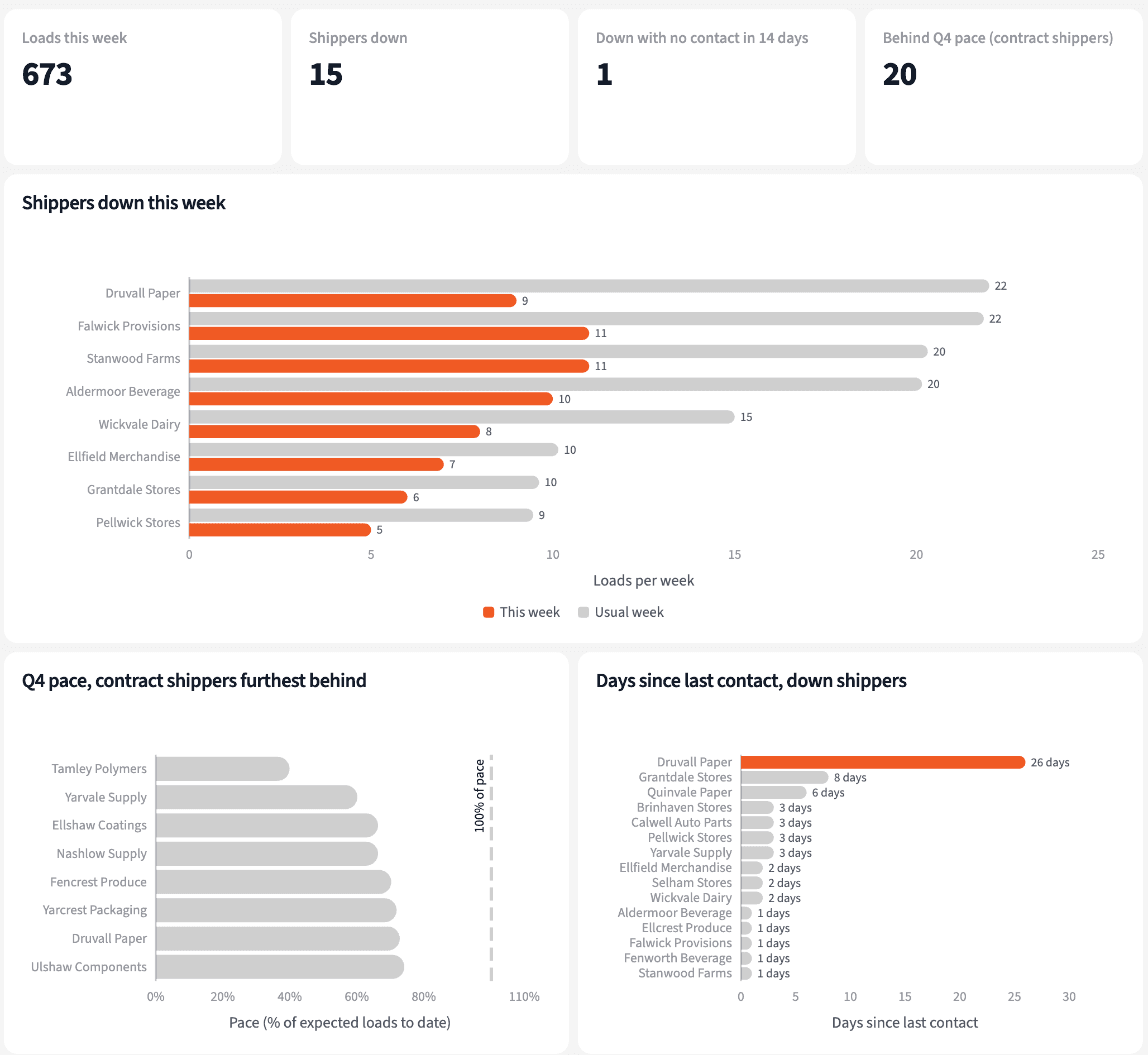
Four numbers for Monday, and the calls to make first.
The narrative Querri writes:
The week looks normal in total, but 15 regular shippers sent far less than usual, and one of them has gone almost four weeks without a call.
What you can create or export:
- The list, to Excel, CSV or Google Sheets
- A live dashboard that refreshes with each HubSpot sync and Tai upload
- A presentation for the meeting, to PDF or PowerPoint
| Shipper | This week (usual) | Last contact |
|---|---|---|
| Druvall Paper | 9 (22.0) | 26 days |
| Aldermoor Beverage | 10 (20.2) | 1 day |
| Falwick Provisions | 11 (21.8) | 1 day |
| Stanwood Farms | 11 (20.3) | 1 day |
Monday's call list, week of November 2, 2026.
Call the shipper that went quiet this week, not next quarter.
Try it on your own dataTips for catching a quiet shipper early
Measure each shipper against its own week
A company total down 2.6% says nothing. A shipper at 41% of its usual week says a lot, and it's visible the week it happens.
Put the last call next to the drop
A shipper that's down and was called yesterday is in hand. One that's down and hasn't heard from you in weeks is the first call.
Teach Querri your rules once. Every answer after that follows them.
What a usual week is, when a shipper counts as down, what pace means: say each rule once and Querri applies it to every question on that data.
Show me how
Say it in chat
Settle a rule in conversation and the Librarian records it as a fact under Facts & Rules, attached to the table it governs. Every later question on that data applies it, whoever asks, and every view built afterwards carries it.
"A shipper is down when this week's loads are under 70% of its average over the prior 13 weeks, and it averages 3 or more a week. Save that as a rule for the Tai loads table."
Or bring the document that already says it
Upload your account management playbook like any other file. Querri files a From a document card in the Inbox with the statements it found, each with its page and exact words; tick the ones to keep and they become facts. The rules this playbook depends on:
- Week: Monday to Sunday, by pickup appointment
- Usual week: average of the prior 13 weeks, empty weeks as zero
- Regular shipper: 3 or more loads a week on average
- Down: under 70% of the usual week
- Q4 pace: loads to date against allocation times days gone
- Last contact: latest HubSpot call, email or meeting, any owner
"Read our account management playbook and propose the rules it states about volume reviews, contact frequency and escalation. I'll review them in the Inbox."
Where the rules reach
A rule is attached to the data, not to one person's chat, so it follows the data everywhere:
- • Every question asked in chat, by any account manager
- • Every view the Librarian builds on that data
- • Every step of a project, including the code it writes
- • Dashboards and scheduled runs, each time they refresh
- • Claude and ChatGPT, when they ask Querri
You stay in control
Every rule is listed under Facts & Rules next to the data it governs, where you can edit or remove it. Rules from a document wait for your tick in the Inbox, and a Worth remembering card is how Querri offers one it noticed itself. Workspaces and roles decide who can change what. Company-wide rules go in Settings → Customize; the Library is where the rest lives.
The payoff on Monday
Each account manager starts the week with the shippers that went quiet and when they were last called. Changing the 70% rule is a sentence.
Frequently asked questions
What is a shipper's usual week?
Why only shippers with 3 or more loads a week?
What does under 70% mean?
How is Q4 pace measured?
How are Tai shippers matched to HubSpot?
Do I need a TMS connector?
Does Querri change anything in HubSpot?
How often should this run?
Other popular resources
Playbook
Detention, and who pays
Which detention charges are building up, and who pays them?
Playbook
On-time numbers for the QBR
What are each shipper's on-time and tender acceptance numbers for the QBR?
Demo
Request a walkthrough
See Querri in action with your own data.
Pricing
Compare plans
Find the right plan for individuals, teams, or enterprise.