What moved ARR this month, and does it tie to billing?
Build June's ARR roll-forward from Stripe and check it against Salesforce and NetSuite. See new, expansion, contraction and churn by customer, with billing corrections pulled out before the number goes to the board.
Open QuerriWhat you'll need
Querri (Free trial) to join the exports and build the roll-forward
Stripe, Salesforce and NetSuite exports: Step 1 says what each adds
Your ARR rules: so every month is measured the same way
Free resources
Start your free trial here →Sample data sets
Synthetic data for a made-up software company. Not real customer data.
Need help?
If you have any questions, you can request a demo or email our team.
Before we begin
Every month someone in finance signs the ARR number, and every month someone asks why the CRM, the billing system and the board deck show three different figures. Most of the gap isn't lost revenue; it's timing and clean-up. A seat count fixed two days after month end looks like a downgrade, and a cancellation on the 30th isn't in the CRM yet. Sorting that out by hand takes a day of spreadsheets.
This playbook builds the roll-forward from billing, pulls the corrections out, and ties the result to Salesforce and NetSuite.
How it works:
- • Upload Stripe, Salesforce and NetSuite
- • Build June's roll-forward from billing
- • Take billing corrections out of contraction
- • Tie billing ARR to the CRM and the ledger
- • Produce the board ARR page
Follow the steps
Upload Stripe, Salesforce and NetSuite
Three exports, one project:
- •
Stripe subscription change events (or Maxio, Chargebee): every start, seat change and cancellation, with its MRR.
- •
Salesforce (or HubSpot): the ARR field, seats and owner for every account.
- •
NetSuite (or QuickBooks): subscription revenue by customer and month.
Add your ARR rules in a small sheet, so it's easy to change. Prefer live data? Querri connects to Stripe, Salesforce and NetSuite directly.
Tip: Pull the change events from the first subscription, not just this year, so every customer has an opening balance.
-
 Stripe change events
-
 Salesforce accounts
-
 NetSuite revenue
 One project
Build June's roll-forward from billing
Take each subscription's MRR at the start and end of the month, and sort every change:
"Build June's ARR roll-forward from the Stripe change events: opening, new, expansion, contraction, churn and closing, with customer counts. Then NRR and GRR for the trailing 12 months."
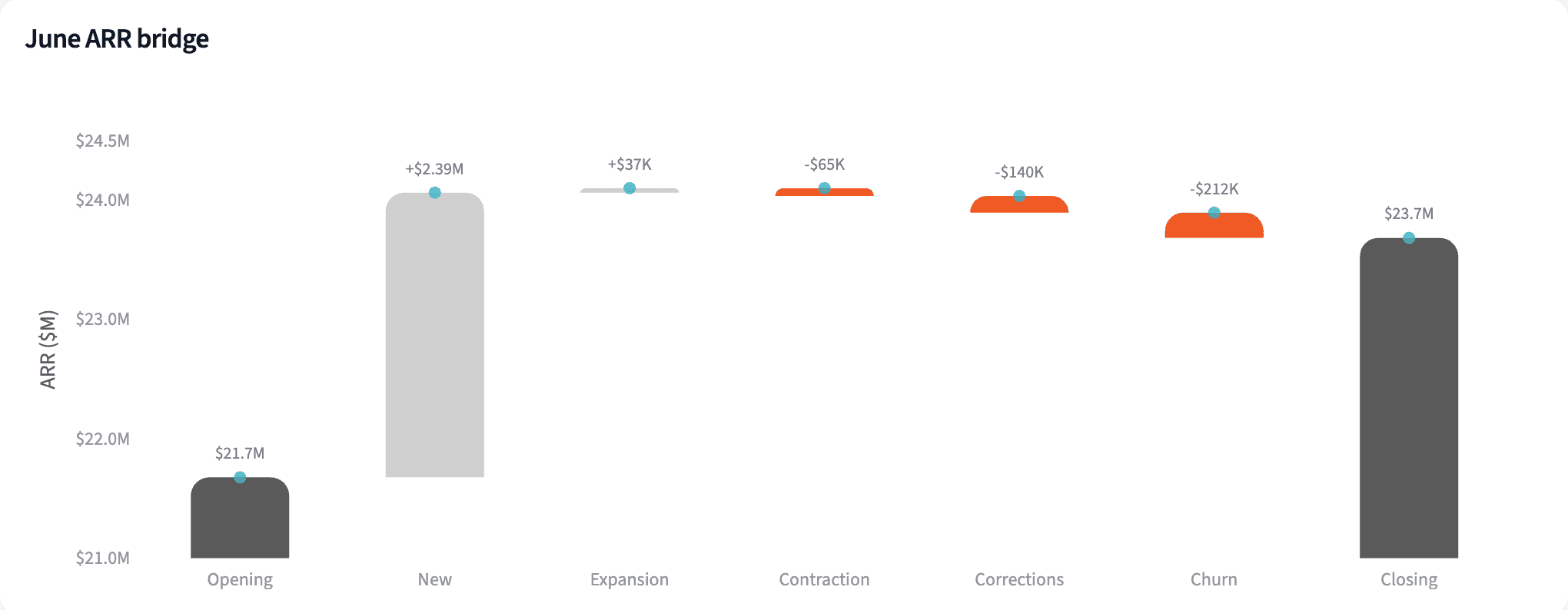
New customers added $2.39M. Contraction and churn took out $417K, more than ten times expansion. Trailing 12-month NRR comes out at 99.9%.
| Line | Customers | ARR |
|---|---|---|
| Opening ARR, May 31 | $21,677,189 | |
| New | 45 | +$2,386,570 |
| Expansion | 6 | +$37,331 |
| Contraction | 20 | -$204,893 |
| Churn | 9 | -$212,200 |
| Closing ARR, June 30 | $23,683,997 |
June 2026 ARR roll-forward, as billing reports it.
Take billing corrections out of contraction
Find seat reductions that came back within 60 days, and give them their own line for finance to confirm:
"List every seat reduction that was reversed within 60 days. Which ones sit inside June's roll-forward, how much of June's contraction are they, and what are NRR and GRR without them?"
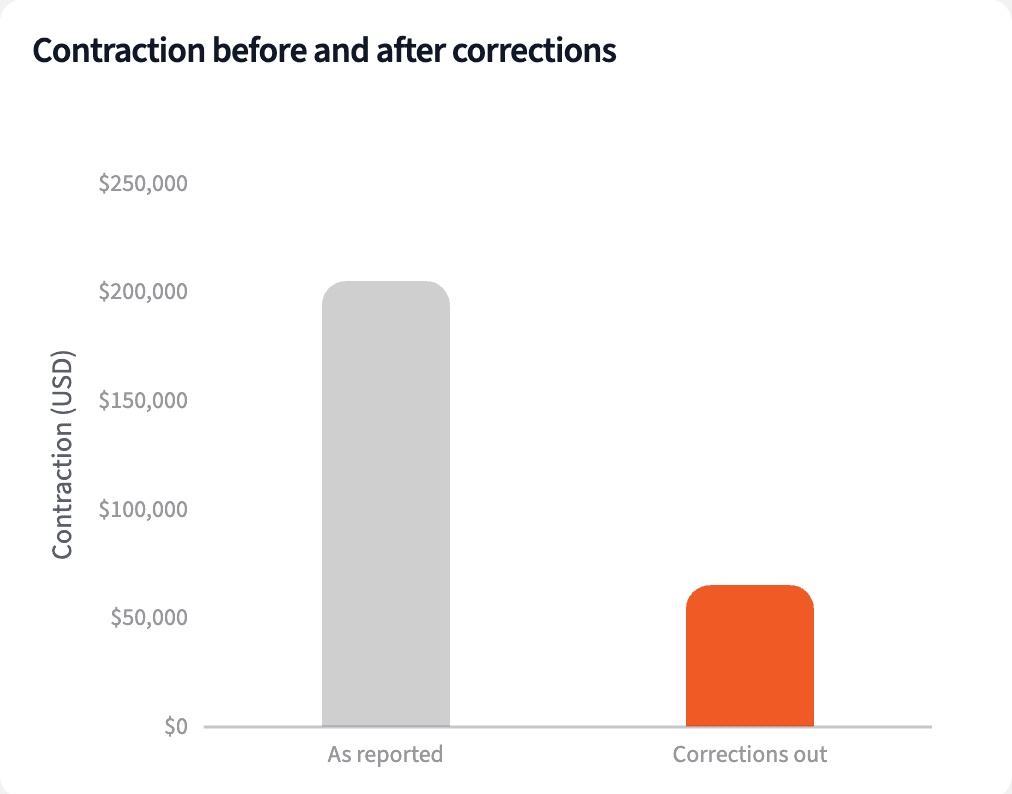
Six customers lost seats on June 29 or 30 and got them back by July 3. That's 68% of June's contraction, and NRR moves from 99.9% to 102.5%.
| Measure | As reported | Corrections out |
|---|---|---|
| Contraction | $204,893 | $65,035 |
| Closing ARR | $23,683,997 | $23,823,855 |
| NRR, trailing 12 months | 99.9% | 102.5% |
| GRR, trailing 12 months | 93.1% | 95.4% |
June with and without the six billing corrections.
Tie billing ARR to the CRM and the ledger
Match every account to Salesforce, check June against NetSuite, and give each gap a reason:
"Compare billing ARR with the Salesforce ARR field account by account, and June MRR with NetSuite subscription revenue. List the accounts more than 2% apart with a reason for each."
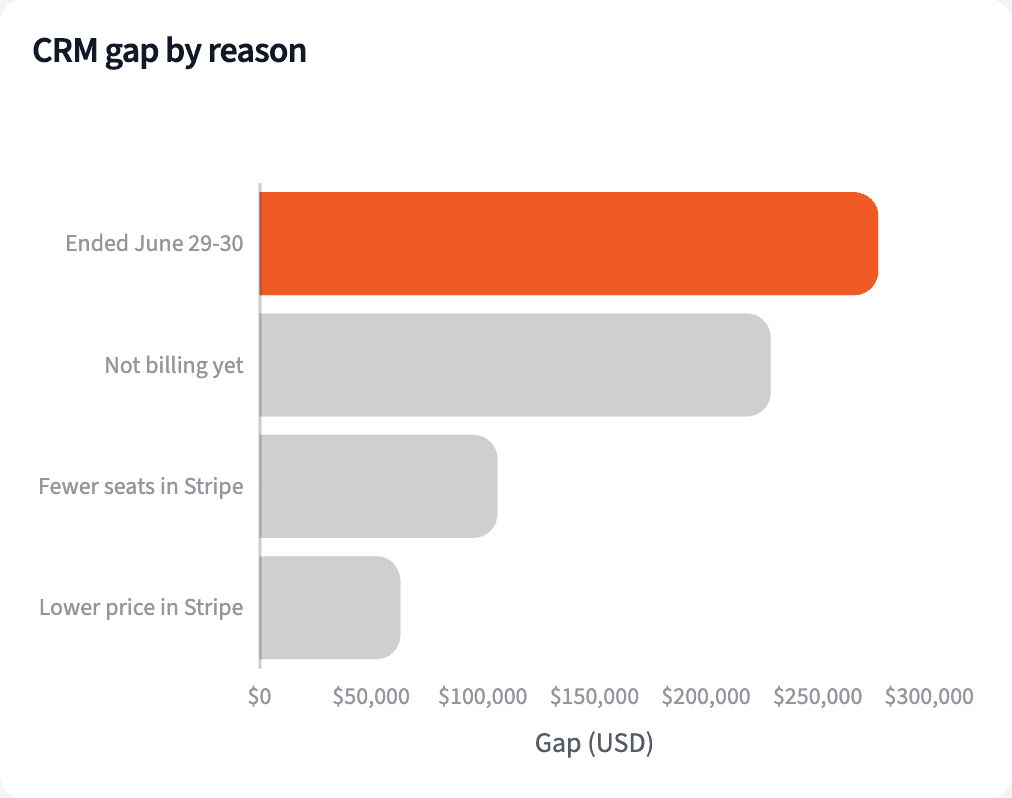
Salesforce is $675,967 higher on 47 accounts. Some of it is timing, and some is seats or prices billing never picked up, so each one needs a look. For customers with no change in June, the ledger ties within 1.5% in total.
| Reason | Accounts | CRM higher by |
|---|---|---|
| Cancelled or cut seats on June 29 or 30 | 23 | $277,234 |
| No subscription billing yet | 4 | $229,000 |
| Fewer seats in Stripe | 13 | $106,623 |
| Lower price in Stripe | 7 | $63,110 |
The gap between Salesforce and billing ARR, by reason.
Produce the board ARR page
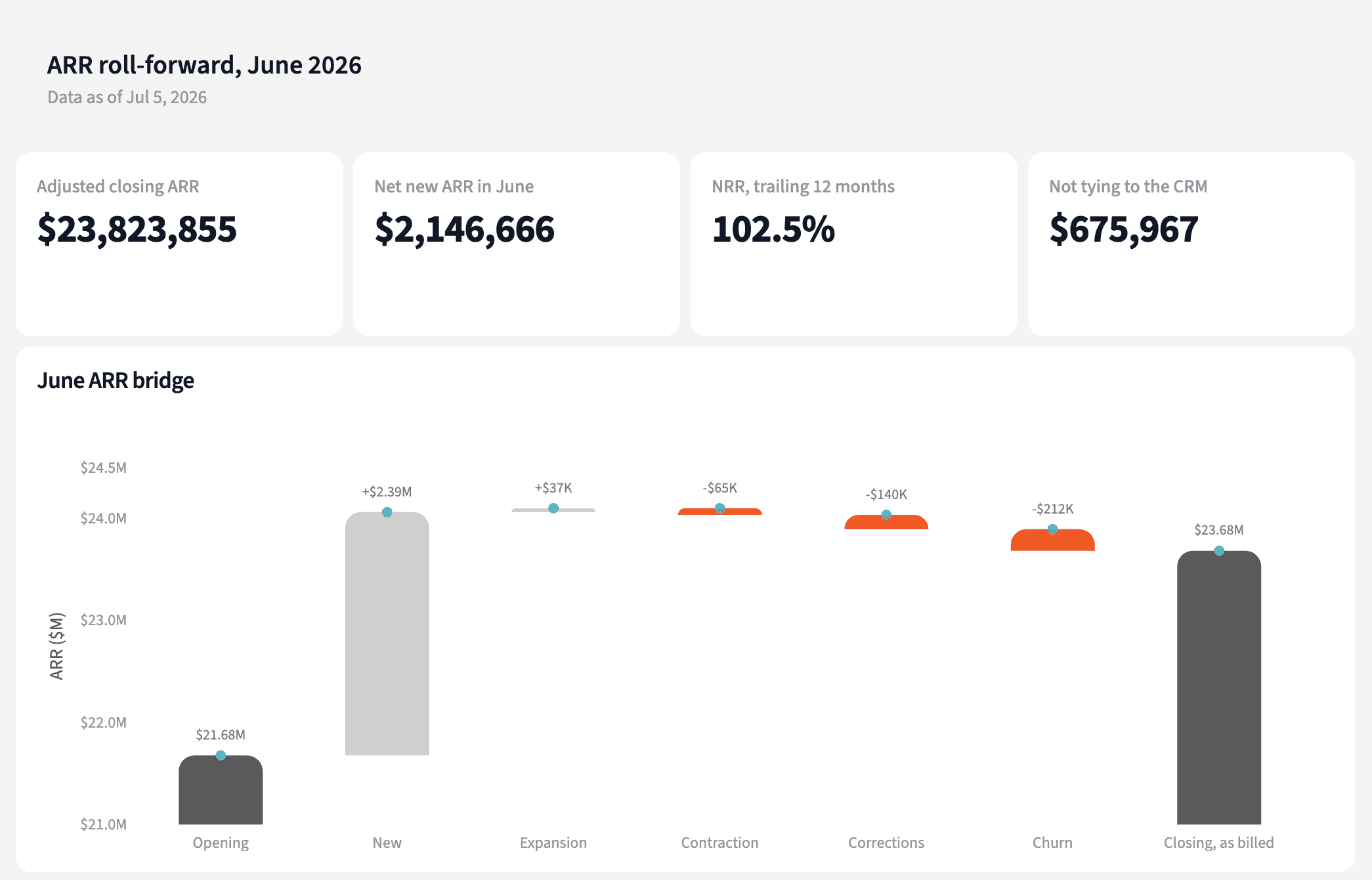
Four numbers for the board pack, and the accounts to fix before it goes out.
The narrative Querri writes:
Adjusted closing ARR is $23.82M once six end-of-quarter seat corrections are confirmed and put back.
What you can create or export:
- The accounts to fix, to Excel, CSV or Google Sheets
- A live dashboard that refreshes after each close
- A presentation for the board, to PDF or PowerPoint
| Account | Salesforce ARR | Why billing ARR is $0 |
|---|---|---|
| Yu, Davidson and Leonard | $86,000 | Billing starts in July |
| Williams and Sons | $62,000 | Not billing yet |
| Wilson and Sons | $55,500 | Billing starts in July |
| Lopez, Hernandez and Morris | $31,900 | Cancelled June 30 |
The four largest gaps. Billing ARR on June 30 is $0 for each.
Sign the ARR number knowing what moved it and where it ties.
Try it on your own dataTips for an ARR number the board can trust
Treat billing as the source
The CRM records what was sold; billing records what is charged. Build ARR from billing and use the CRM field as the check.
Look at the last days of the month
Seat clean-ups and cancellations bunch up at quarter end. A reduction reversed a few days later is probably a correction, not a downgrade; confirm it before adding it back.
Teach Querri your rules once. Every answer after that follows them.
What ARR means, when a reduction is a correction, how NRR is measured: say each rule once and Querri applies it to every question on that data.
Show me how
Say it in chat
Settle a rule in conversation and the Librarian records it as a fact under Facts & Rules, attached to the table it governs. Every later question on that data applies it, whoever asks, and every view built afterwards carries it.
"A billing correction is a seat reduction reversed within 60 days. Report corrections on their own line, not as contraction. Save that as a rule for the Stripe change events table."
Or bring the document that already says it
Upload your revenue policy or board metrics definitions like any other file. Querri files a From a document card in the Inbox with the statements it found, each with its page and exact words; tick the ones to keep and they become facts. The rules this playbook depends on:
- ARR: MRR on the last day of the month, times 12
- New and churn: customers with no ARR at one end of the month
- Expansion and contraction: the change for everyone else
- Billing correction: a seat reduction reversed within 60 days, confirmed by finance
- NRR and GRR: the customers who had ARR 12 months ago
- CRM tie: billing ARR within 2% of the Salesforce field
- Ledger tie: June MRR within 2% of June subscription revenue
"Read our board metrics definitions and propose the rules they state for ARR, NRR and GRR. I'll review them in the Inbox."
Where the rules reach
A rule is attached to the data, not to one person's chat, so it follows the data everywhere:
- • Every question asked in chat, by anyone on the team
- • Every view the Librarian builds on that data
- • Every step of a project, including the code it writes
- • Dashboards and scheduled runs, each time they refresh
- • Claude and ChatGPT, when they ask Querri
You stay in control
Every rule is listed under Facts & Rules next to the data it governs, where you can edit or remove it. Rules from a document wait for your tick in the Inbox, and a Worth remembering card is how Querri offers one it noticed itself. Workspaces and roles decide who can change what. Company-wide rules go in Settings → Customize; the Library is where the rest lives.
The payoff at the board meeting
One ARR number, a roll-forward that adds up, and an answer ready for why the CRM says something else.
Frequently asked questions
Where does ARR come from here?
What counts as new, expansion, contraction and churn?
What is a billing correction?
How are NRR and GRR measured?
Why doesn't Salesforce match billing?
Why compare with NetSuite revenue?
What if a customer has no Salesforce ID in Stripe?
Which number goes to the board?
How often should this run?
Other popular resources
Playbook
Late payers and cash
Which customers are paying late, and how long will our cash last?
Playbook
Booked to billed
Did last quarter's closed-won deals start billing and get used?
Demo
Request a walkthrough
See Querri in action with your own data.
Pricing
Compare plans
Find the right plan for individuals, teams, or enterprise.