Actuals, budget, billing and bookings,on one set of numbers.
Querri reads ERP actuals, the budget workbook, billing and CRM data, so budget versus actuals, the ARR roll-forward and the Board deck share the same definitions. Last month's figure doesn't quietly change in next month's deck.
One minute: every department against budget, the SaaS Finance blueprint, and what else your finance data answers.
One view of the month
Four systems. One set of month-end numbers.
Actuals sit in the ERP, the budget in a workbook, subscriptions in billing and bookings in the CRM. Querri reads all four and defines variance, ARR and NRR once, so the review with department heads and the Board package start from the same figures.
ERP actualsNetSuiteQuickBooks
Budget workbookExcelGoogle Sheets
Billing and subscriptionsStripeChartMogul
CRM bookingsSalesforceHubSpot
Defined once
Month-end numbers, one definition each
Metric
From
Value
Closing ARR, June 30
Billing
$48,599,989
Net revenue retention
Billing
106.0%
Gross revenue retention
Billing
91.0%
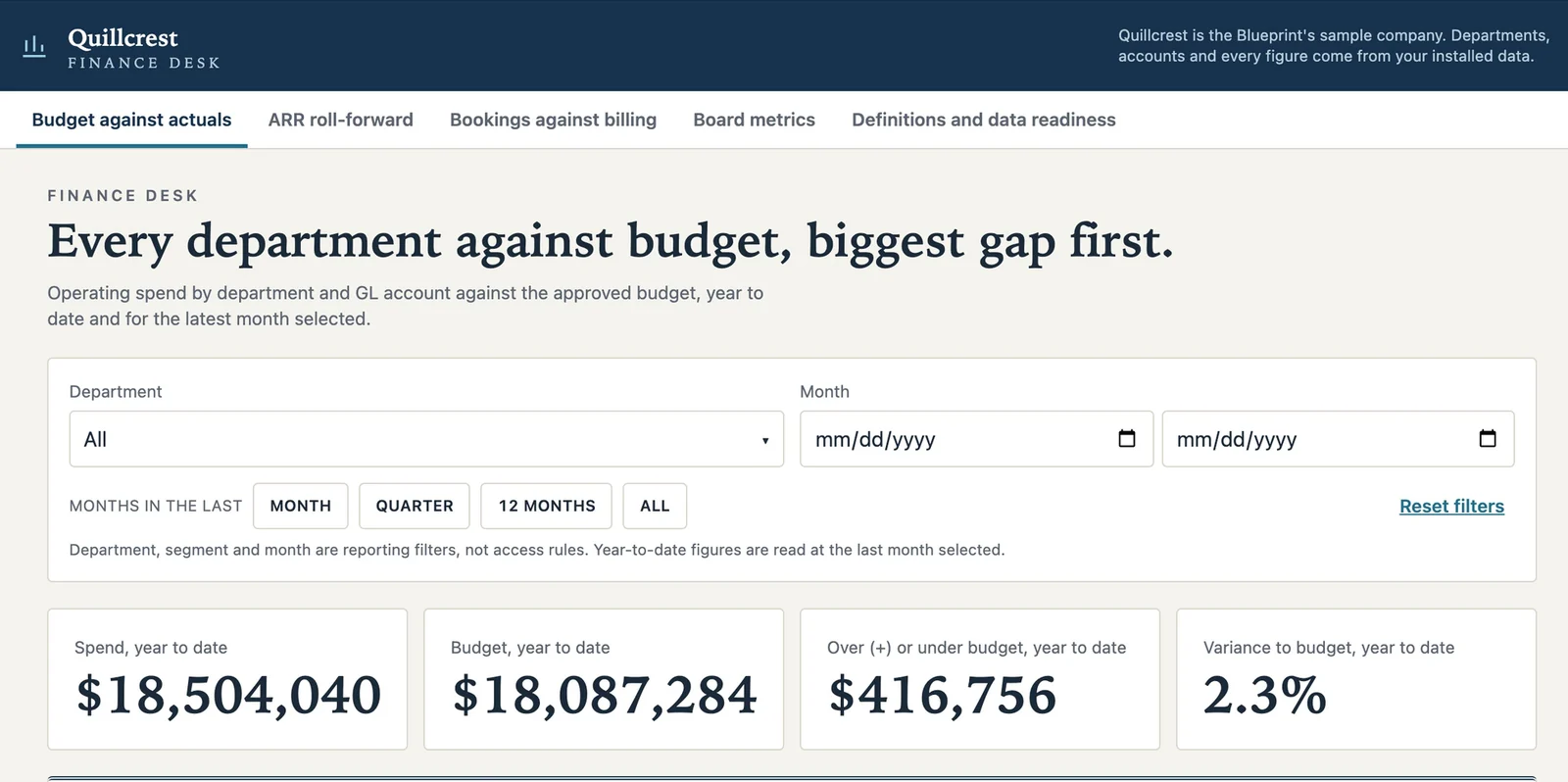
Spend against budget, year to date
ERP and budget
+$416,756
June bookings not yet in billing
CRM and billing
$222,585
Sample data: Quillcrest, a fictional software company with $48.6M ARR.
Where SaaS finance teams start
Three numbers finance rebuilds every month
These are good first jobs, not the whole list. Once actuals, the budget, billing and bookings are in, the same definitions answer whatever you ask next.
Every department against budget, biggest gap first.
“What is our variance to budget this month, by department, and why?”
How it's done today
A planning tool with department heads, or reports extracted to Excel, every month.
In Querri
Define variance once as a KPI, with over budget shown as unfavorable. Querri sorts every department and GL account by the gap, a monitor flags which department's spend moved against its own history, and a click on any variance shows the GL lines behind it.
Sample data. Most of Marketing's gap is the events account (+$393K).
ARR roll-forward, with bookings checked against billing.
“What are ARR, NRR and GRR this month, and are the definitions the same in every report?”
How it's done today
Billing and ERP reports, or a planning tool, reconciled by hand before each report.
In Querri
ARR, the roll-forward components, NRR and GRR defined once. Querri joins closed-won bookings in the CRM to new ARR in billing and shows where they disagree, and a monitor watches churned and contracted ARR by segment.
Sample data. NRR 106.0% and GRR 91.0%, trailing 12 months. In June, 5 accounts booked $222,585 that billing hasn't started.
Board metrics on your month-end definitions.
“What goes in this quarter's Board package, and does each number tie to month-end?”
How it's done today
FP&A builds the dashboards and the deck by hand each quarter.
In Querri
A Board dashboard on the same KPIs as the month-end close, sent out as formatted workbooks and slides. A saved report replays the same code, so last month's figure doesn't quietly change in the deck.
Budget versus actuals is one view. Ask next about department spend by month or CAC payback. See how asking works →
More than a finance dashboard
One set of definitions, for every report and every AI agent
The three jobs run on the same foundation as everything else in Querri. Define a number once, and every dashboard, workbook, Board deck and AI answer uses it.
The Library
Teach it once. It stays right.
Say which revenue counts as ARR, or that over budget shows as unfavorable, and every answer after that uses it. The department review, the ARR roll-forward and the Board deck finally agree.
Click a department's variance on a dashboard to see each step and the GL source tables behind it, with when they refreshed. When a question has two reasonable readings, Querri tells you, and when it can't answer, it says what's missing.
Querri reads the budget workbook and sends finished views back as formatted workbooks and slides. Build a dashboard by asking, or ask from Claude, under each person's own access.
Monitors judge each department's spend and each segment's churned ARR against its own history and say which one moved, not just that the total did. Every night Querri works through your data and leaves what it found in your Inbox. Nothing changes without your OK.
How Querri compares with the other ways finance teams get these numbers
Most SaaS finance teams already have a planning tool or a well-kept workbook, a data team's queue, an AI assistant, or all three. Here is where each fits, where it stops, and how Querri works alongside it.
Querri
A planning tool
A warehouse and a data team
An AI assistant you wire up yourself
Time to the first answer
Minutes on sample data from the blueprint, then on your own
Once the plan model and its integrations are set up
Months: pipelines, models, then dashboards
A first demo in a day
ERP, budget, billing and CRM together
One Library, from 125+ connectors and workbook uploads
Actuals and plan, through its own integrations
Once each source is piped in and modeled
One connector at a time, joined in the chat
A question nobody built a report for
Ask it in plain words
Its reports, or an export to Excel
Joins the data team's queue
Ask it in plain words
What ARR or NRR means
Taught once; every answer, dashboard and AI agent uses it
Set in its model, for planning
In a semantic layer the data team maintains
Per person or per project, in prompts and skill files
Where a number came from
Click any number to see its steps and source tables
In the model's formulas and its source sync
In the SQL, for whoever can read it
In the chat, worked out fresh each time
Watching for changes
Monitors on any KPI, each department against its own history
Variance reports you run at each review
Through a BI or alerting tool on top
Scheduled tasks someone writes and keeps working
Budgets, forecasts and scenario plans
Not Querri's job. Keep your planning tool or workbook
Its core strength
Not its job
Only if someone builds it
How it works with Querri
Reads from all three, plus the ERP, billing and CRM
Keep it for the plan. Querri reads its export beside actuals, billing and bookings
Querri connects to it and puts the answers in front of finance
Use both. Querri works inside the assistant, on the same definitions
The right call on its own when
Your numbers cross systems and need one definition
Planning is the job and its reports cover the review
A staffed data team already models finance data and has time for FP&A
It's a one-off look at a spreadsheet
Approaches, not products: what each typically looks like in late 2026. A planning tool without a Querri connector comes in as an export.
SaaS finance reporting, BvA and ARR: common questions
How do SaaS finance teams keep ARR, NRR and GRR on one definition?
In Querri, a SaaS finance team defines ARR, the roll-forward components, NRR and GRR once, and every dashboard, workbook, Board deck and AI answer uses those definitions. A saved report replays the same code, so last month's figure doesn't quietly change in next month's deck. Querri also joins closed-won bookings in Salesforce or HubSpot to new ARR in Stripe and shows where the two disagree. How KPIs work →
Can a SaaS finance team keep working in Excel spreadsheets with Querri?
Yes. Keep your spreadsheets as the working tool: Querri reads the budget workbook and sends finished views back as formatted Excel workbooks and slides. Budget versus actuals, the ARR roll-forward and Board metrics come from the same definitions, so the workbook you send department heads matches the dashboard and the Board deck. Excel workbooks →
What does Querri do differently if we already have a planning tool for budgets and forecasts?
Querri works alongside a planning tool, so keep it for budgets, forecasts and scenario plans. Querri reads the plan's export beside NetSuite or QuickBooks actuals, billing and CRM bookings, defines variance once, and sorts every department and GL account by the gap. A monitor flags which department's spend moved against its own history, so the review with department heads starts from the biggest gap. See every connector →
Which source tables sit behind a budget variance or ARR figure in Querri?
Querri shows the source tables behind any budget variance or ARR figure when you click it on a dashboard. You see each step and the GL source tables, with when each one refreshed. Because a saved report replays the same code, the figure you reviewed at month-end is the figure in the Board package, and anyone checking it can follow it back to the ledger, billing or CRM data. How Querri gets to an answer →
Why use Querri for SaaS board metrics instead of a general AI assistant?
Querri keeps your finance definitions, so ARR, NRR and budget variance mean the same in every answer, every month. Answers become saved reports that re-run on new data, and every number shows its query, which matters when a Board number has to tie to month-end. You can use both: Querri works inside Claude through MCP, on the same definitions. Querri inside your AI assistant →
Is it safe to connect NetSuite, QuickBooks or Stripe to Querri?
Yes. Querri's connectors are read-only, so Querri never changes a record in your ERP or billing system, and an agent sets up each connection without ever seeing your passwords. Each organization has its own database and storage, encrypted with AES-256 at rest, and your data, prompts and results never train any model. Querri is SOC 2 Type II, HIPAA and ISO 27001:2022 certified. Visit the Trust Center →
What does a SaaS finance team connect first to get started with Querri?
To get started with Querri, a SaaS finance team connects its ERP, such as NetSuite or QuickBooks, and uploads the budget workbook; billing and the CRM can follow when you're ready. The SaaS Finance blueprint opens on sample data first, with department spend against budget, the ARR roll-forward with NRR and GRR, bookings against billing and Board metrics, then runs on your own numbers. Sign up and open the blueprint →
Do I need a credit card to try Querri for SaaS finance reporting?
No. Querri is free to start, and no credit card is required. When you sign up, the SaaS Finance blueprint opens on sample data with every department against budget, biggest gap first, so you can see how it works before you connect your ERP. Current plans are on the Querri pricing page. See pricing →
Playbooks
Three reports finance rebuilds by hand
Step by step, with sample data, for the person who builds the report.
Playbook coming
Budget against actuals by department
What is our variance to budget this month, by department, and why?
Playbook coming
An ARR roll-forward with NRR and GRR
What are ARR, NRR and GRR this month, and are the definitions the same in every report?
Playbook coming
Board metrics that tie to month-end
What goes in this quarter's Board package, and does each number tie to month-end?
From the blog
For the VP of finance
What to do once you have the answer.
Article coming
Which departments missed budget?
Start the review with the biggest gap.
Article coming
One ARR definition
Settle it before the roll-forward goes out.
Article coming
Board metrics that tie back to month-end
Check them before the deck.
Start with every department against budget.
The SaaS finance blueprint opens when you sign up. Connect your ERP and upload the budget workbook, and every department lands on one list, biggest gap first. Then ask what you'd ask next.
 NetSuite
 QuickBooks
 Excel
 Google Sheets
 Stripe
 ChartMogul
 Salesforce
 HubSpot