Which SKUs are out of stock or aging, by channel?
Join Shopify inventory and sales to Amazon's FBA ledger. See in-stock rate by channel, the SKUs out on Amazon that your warehouse still holds, and stock that hasn't sold in 90 days.
Open QuerriWhat you'll need
Querri (Free trial) to line up both channels day by day
Shopify and Amazon Seller Central: Step 1 says what each adds
Your stock rules: so in stock and aged mean the same thing on both channels
Free resources
Start your free trial here →Sample data sets
Synthetic data for Curio Supply, a made-up home goods brand. Not real customer, retailer or marketplace data.
Need help?
If you have any questions, you can request a demo or email our team.
Before we begin
In-stock rate usually gets reported as one number per channel, and it usually looks fine. A healthy rate can hide a steady seller that has been out on Amazon for days while a thousand units sit in your own warehouse. Shopify knows what the warehouses hold and Amazon knows what its fulfillment centers hold, so seeing the gap between them takes two exports and a SKU map.
This playbook works out in-stock rate day by day on each channel, lists the SKUs out on Amazon that the warehouse still holds, and finds stock with no sale on a channel in 90 days.
How it works:
- • Connect Shopify and Amazon Seller Central
- • Calculate in-stock rate by channel, day by day
- • Find SKUs out on Amazon but stocked in the warehouse
- • List aged SKUs with units on hand
- • Build the weekly stock view
Follow the steps
Connect Shopify and Amazon Seller Central
Two sources, one project:
- •
Shopify: daily sellable units at each warehouse location, and sales by day and SKU.
- •
Amazon Seller Central: the FBA inventory ledger: each SKU's daily ending balance, receipts and shipments.
Both connect directly and sync on a schedule. Querri matches Amazon seller SKUs to Shopify SKUs, including a few legacy listings matched by title.
Tip: Pull at least 90 days of sales, so a SKU with no sale in that window is aged rather than new.
-
 Shopify inventory and sales
-
 Amazon FBA inventory ledger
 One project
Calculate in-stock rate by channel, day by day
Start with the rate, every day, on both channels:
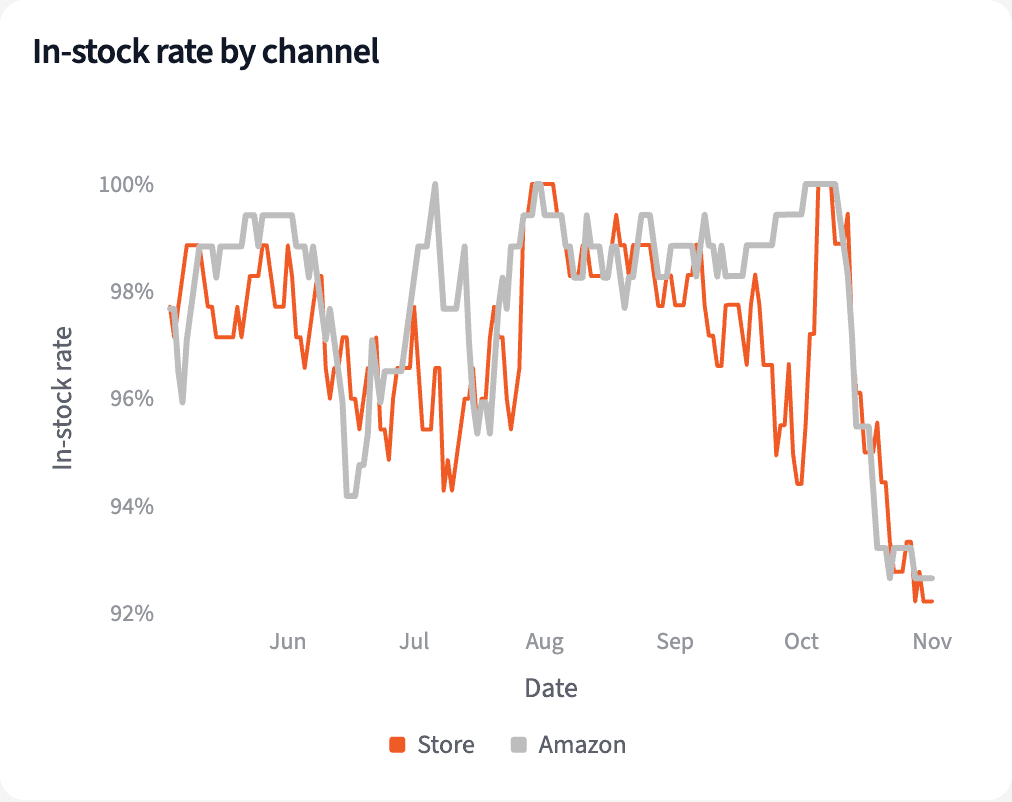
"What share of our SKUs is in stock on the store and on Amazon, day by day?"
From May to early October the store averaged 97.4% in stock and Amazon 98.3%. By 2026-11-01 both had fallen, to 92.2% and 92.7%.
| Date | Store | Amazon |
|---|---|---|
| Average, 2026-05-04 to 2026-10-04 | 97.4% | 98.3% |
| 2026-10-04 | 97.2% | 100.0% |
| 2026-11-01 | 92.2% | 92.7% |
Share of listed SKUs in stock, by channel.
Find SKUs out on Amazon but stocked in the warehouse
Then find what's out on Amazon that you already have:
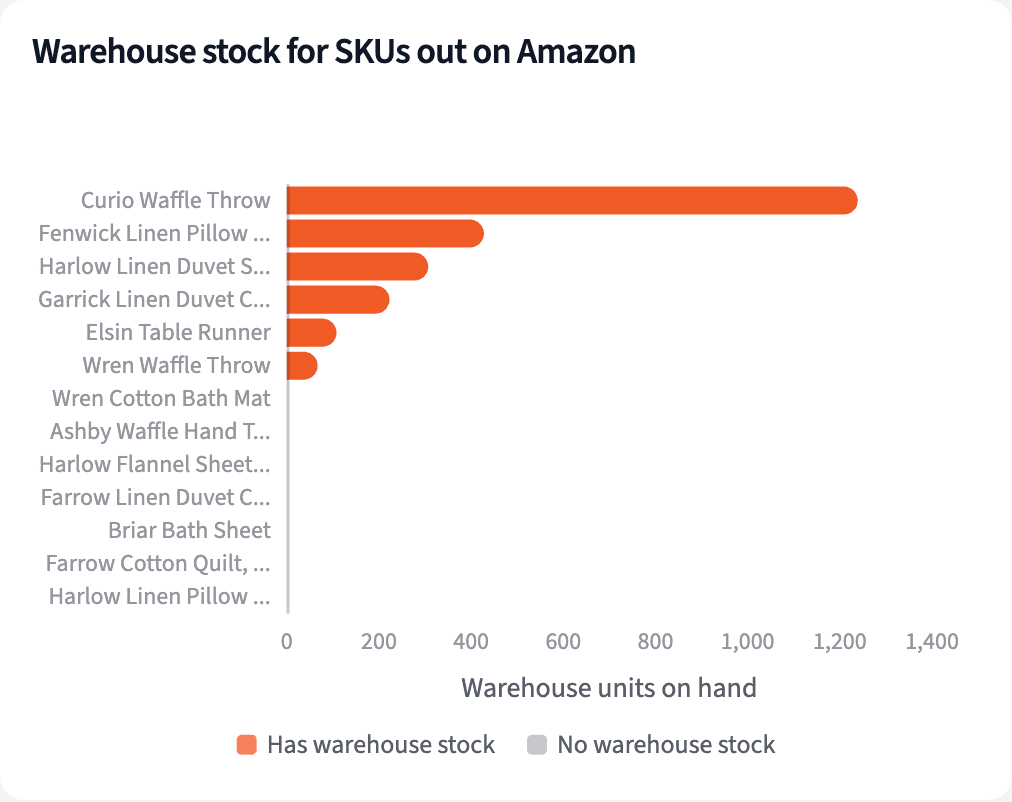
"Which SKUs are out on Amazon today, and which of them do we still have in the warehouse?"
13 SKUs were out on Amazon on 2026-11-01. 6 of them have 2,372 units in the warehouses, among them the Curio Waffle Throw, Amazon's ninth-best seller, with 1,239.
| SKU | Warehouse units | Days out of last 14 |
|---|---|---|
| Curio Waffle Throw | 1,239 | 9 |
| Fenwick Linen Pillow Cover, 20 in | 428 | 14 |
| Harlow Linen Duvet Set, Queen | 307 | 14 |
| Garrick Linen Duvet Cover, King | 223 | 11 |
| Two more SKUs | 175 | 14 |
Out on Amazon on 2026-11-01, with units in the warehouses.
List aged SKUs with units on hand
Last, find stock that isn't selling where it sits:
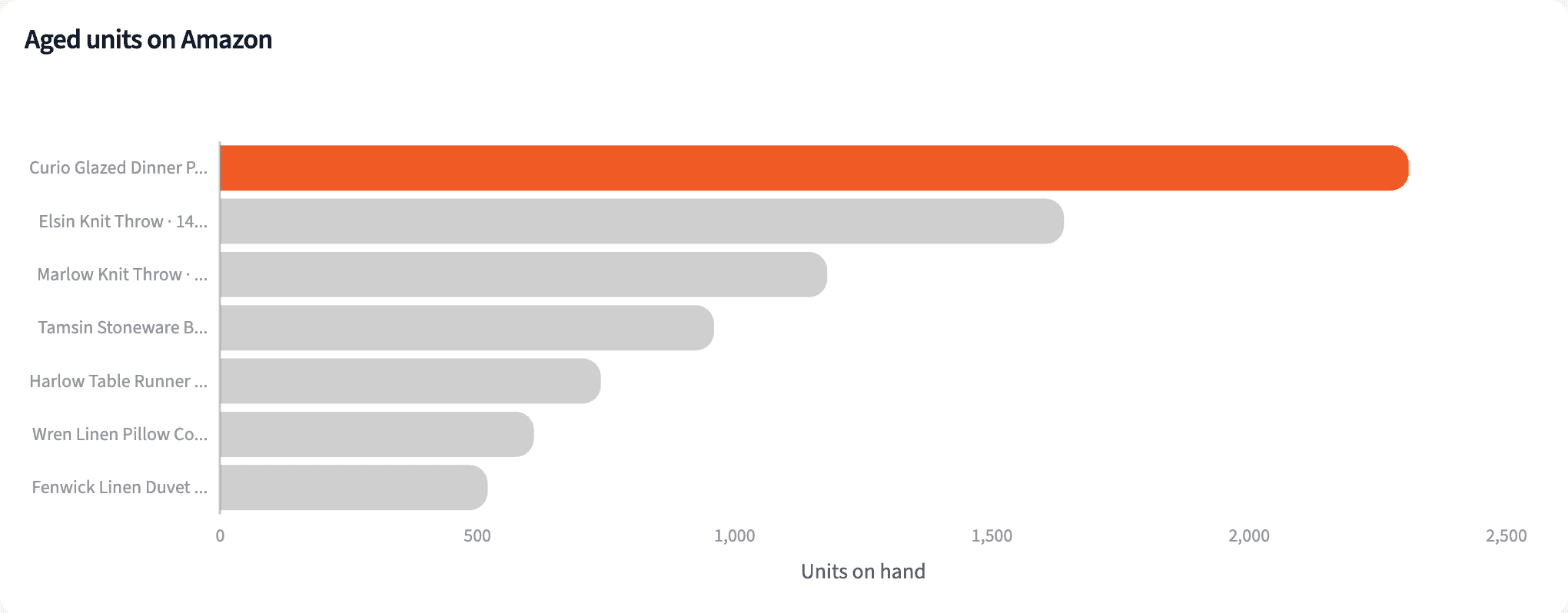
"Which SKUs have stock but haven't sold on that channel in 90 days?"
7 SKUs on Amazon hold 7,960 units with no Amazon sale in the 90 days to 2026-11-01. The largest is Curio Glazed Dinner Plates, Set of 4: 2,310 units, last sold on 2026-07-21.
| SKU | Units at Amazon | Last sale |
|---|---|---|
| Curio Glazed Dinner Plates, Set of 4 | 2,310 | 2026-07-21 |
| Elsin Knit Throw | 1,640 | 2026-06-14 |
| Marlow Knit Throw | 1,180 | 2026-07-06 |
| Tamsin Stoneware Bowls, Set of 4 | 960 | 2026-06-28 |
| All 7 aged SKUs | 7,960 |
Aged on Amazon: units on hand and no Amazon sale in the 90 days to 2026-11-01.
Build the weekly stock view
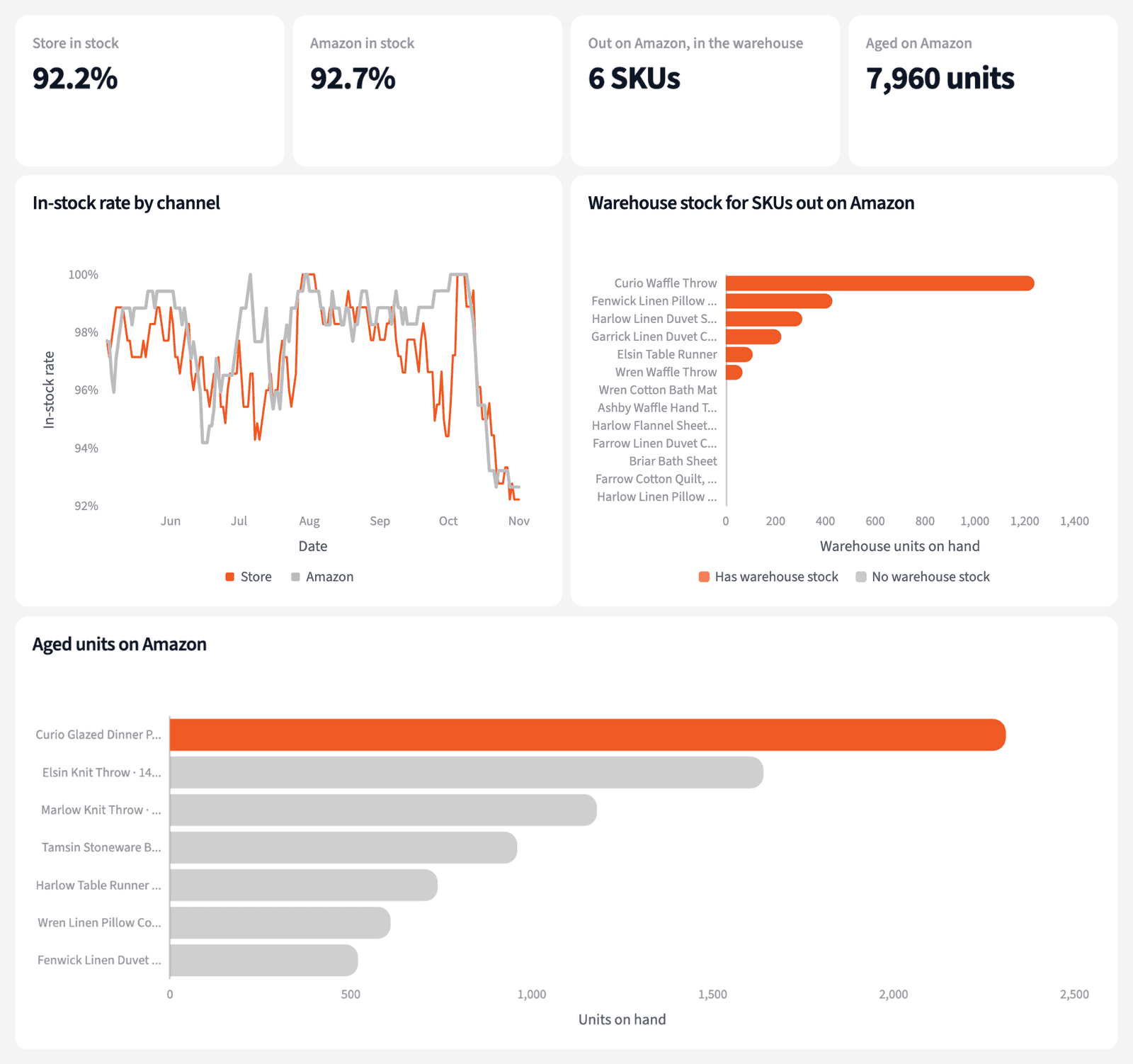
Four numbers for the weekly meeting, and one list of what to look at.
The narrative Querri writes:
Amazon's in-stock rate fell to 92.7% by 2026-11-01, and 6 of the 13 SKUs out there still have units in the warehouse.
What you can create or export:
- The table, to Excel, CSV or Google Sheets
- A live dashboard that refreshes with each sync
- A presentation for the meeting, to PDF or PowerPoint
| Group | SKUs | Next step |
|---|---|---|
| Out on Amazon, units in the warehouse | 6 | Check a transfer |
| Out on both channels | 7 | Check reorder timing |
| Aged on Amazon | 7 | Review the listing |
| Aged on the store | 3 | Review the listing |
The weekly stock list, 2026-11-01.
One list of what to send in and what to stop sending.
Try it on your own dataTips for a stock view people trust
Check the warehouse before you reorder
A SKU out on Amazon may only need a transfer. Look at warehouse units first, then decide whether a purchase order is needed.
Age stock by channel
A SKU can sell well in the store and sit still at Amazon. Measuring the last sale per channel shows where the units are stuck.
Teach Querri your rules once. Every answer after that follows them.
What in stock means, how long before stock is aged, which units are sellable: say each rule once and Querri applies it to every question on that data.
Show me how
Say it in chat
Settle a rule in conversation and the Librarian records it as a fact under Facts & Rules, attached to the table it governs. Every later question on that data applies it, whoever asks, and every view built afterwards carries it.
"A SKU is aged on a channel when it has units on hand there and no sale on that channel in 90 days. Save that as a rule for the inventory tables."
Or bring the document that already says it
Upload your inventory policy like any other file. Querri files a From a document card in the Inbox with the statements it found, each with its page and exact words; tick the ones to keep and they become facts. The rules this playbook depends on:
- In stock: at least one sellable unit at the end of the day
- Sellable on Amazon: ending warehouse balance, not inbound or reserved
- Sellable on the store: units at the 3PL East and West locations
- Aged: units on hand and no sale on that channel in 90 days
- SKUs listed for fewer than 90 days are not aged
- Amazon SKU map: Curio SKU plus -FBA, or by title for legacy listings
"Read our inventory policy and propose the rules it states about in-stock rate and aged stock. I'll review them in the Inbox."
Where the rules reach
A rule is attached to the data, not to one person's chat, so it follows the data everywhere:
- • Every question asked in chat, by anyone on the ecommerce team
- • Every view the Librarian builds on that data
- • Every step of a project, including the code it writes
- • Dashboards and scheduled runs, each time they refresh
- • Claude and ChatGPT, when they ask Querri
You stay in control
Every rule is listed under Facts & Rules next to the data it governs, where you can edit or remove it. Rules from a document wait for your tick in the Inbox, and a Worth remembering card is how Querri offers one it noticed itself. Workspaces and roles decide who can change what. Company-wide rules go in Settings → Customize; the Library is where the rest lives.
The payoff in the meeting
The meeting gets one list: what to send to Amazon, what to reorder, what to stop sending. Changing the aging window is a sentence.
Frequently asked questions
How is in-stock rate counted?
Why compare with the warehouse?
What counts as aged?
Why are some SKUs left out of aging?
Are inbound and reserved units counted?
Does this forecast stockouts?
Does Querri move inventory?
How often should this run?
Other popular resources
Playbook
Contribution margin by channel
What does each channel earn after fees, ads and product cost?
Playbook
Email revenue by flow
What share of store revenue comes from each email flow?
Demo
Request a walkthrough
See Querri in action with your own data.
Pricing
Compare plans
Find the right plan for individuals, teams, or enterprise.