Which carrier bills came in above the agreed rate, or twice?
Match every QuickBooks Online carrier bill to its Tai load. Hold repeat bills, dispute rates above the confirmation, and check billed detention against Macropoint stop times before the pay run.
Open QuerriWhat you'll need
Querri (Free trial) to join the exports and run the checks
QuickBooks Online, a Tai export and a Macropoint file: Step 1 says what each adds
Your carrier pay rules: so every bill is checked the same way
Free resources
Start your free trial here →Sample data sets
Synthetic data for a made-up freight brokerage. Not real shipper or carrier data.
Need help?
If you have any questions, you can request a demo or email our team.
Before we begin
Carrier bills arrive by the hundreds every week, and nearly all of them are right. The ones that aren't look just like the ones that are: a second bill for the same load, a rate a little above the confirmation, detention nobody approved. The bill is in QuickBooks, the agreed pay is in the TMS and the stop times are in Macropoint, so checking a single bill takes three lookups, and the pay run rarely waits for them.
This playbook matches every bill to its load, compares it with the agreed carrier pay, and checks each unapproved detention charge against the time the truck spent at the stop.
How it works:
- • Upload the Tai and Macropoint files and connect QuickBooks
- • Match every bill to its load
- • List bills over agreed pay, and repeats
- • Check detention against stop times
- • Build the pay run exception list
Follow the steps
Upload the Tai and Macropoint files and connect QuickBooks
Three sources, one project:
- •
QuickBooks Online: carrier bills, each with its load number in the memo.
- •
Tai load export and carrier charges (or your TMS load report): the agreed carrier pay for each load, and every carrier charge line with its approval flag.
- •
Macropoint stop events: arrival and departure at every pickup and delivery.
QuickBooks Online connects directly and syncs on a schedule. The Tai and Macropoint exports come in as files; upload next week's over the old ones and every view rebuilds.
Tip: Include a month of bills before the one you're paying, so a repeat of last month's bill is caught too.
-
 QuickBooks bills
-
 Tai loads and carrier charges
- Macropoint stop events
 One project
Match every October carrier bill to its Tai load
Start by making sure every bill points at a real load:
"Match every October carrier bill in QuickBooks to its Tai load through the load number in the memo. How many match, and which don't?"
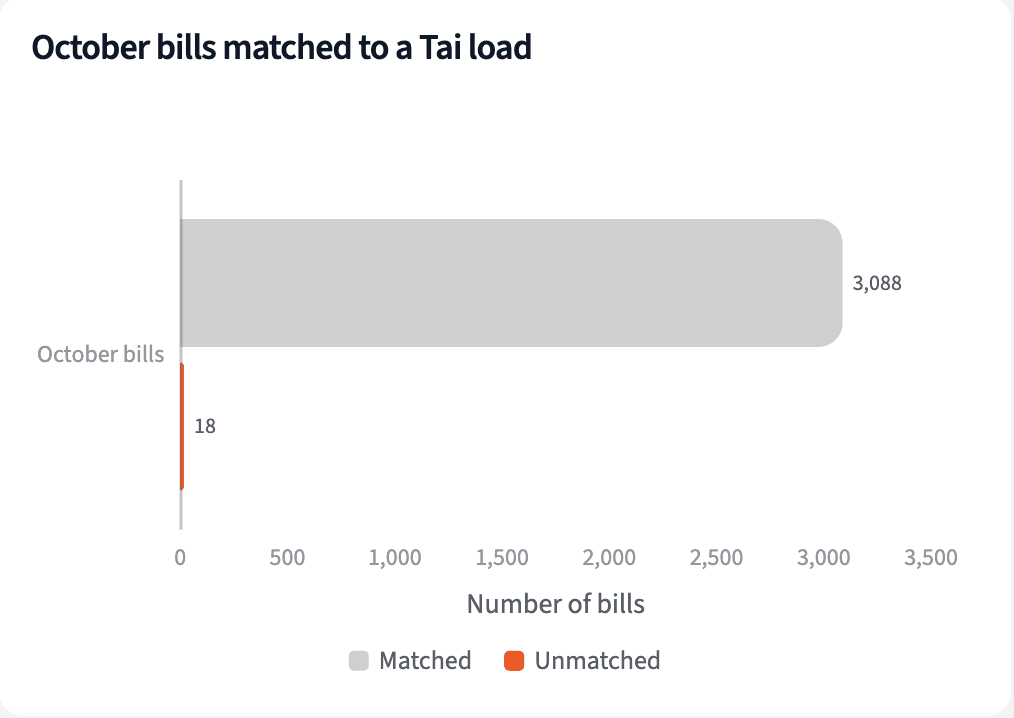
3,106 bills for $4.57M. 3,088 of them match a Tai load, 99.4%. The 18 that don't, $31,801, go back to the carrier for a load number before they're paid.
| Bills | Count | Amount |
|---|---|---|
| Matched to a Tai load | 3,088 | $4,541,808 |
| No load number, or not in Tai | 18 | $31,801 |
| Total | 3,106 | $4,573,608 |
October 2026 carrier bills, matched to a Tai load.
List bills above agreed pay, and bills sent twice
Add up each load's bills, set repeats aside, and compare with what was agreed:
"For each load, add up its bills, leaving out repeats, and compare with the agreed carrier pay in Tai. Which loads were billed over, and by which carriers? List any repeat bills."
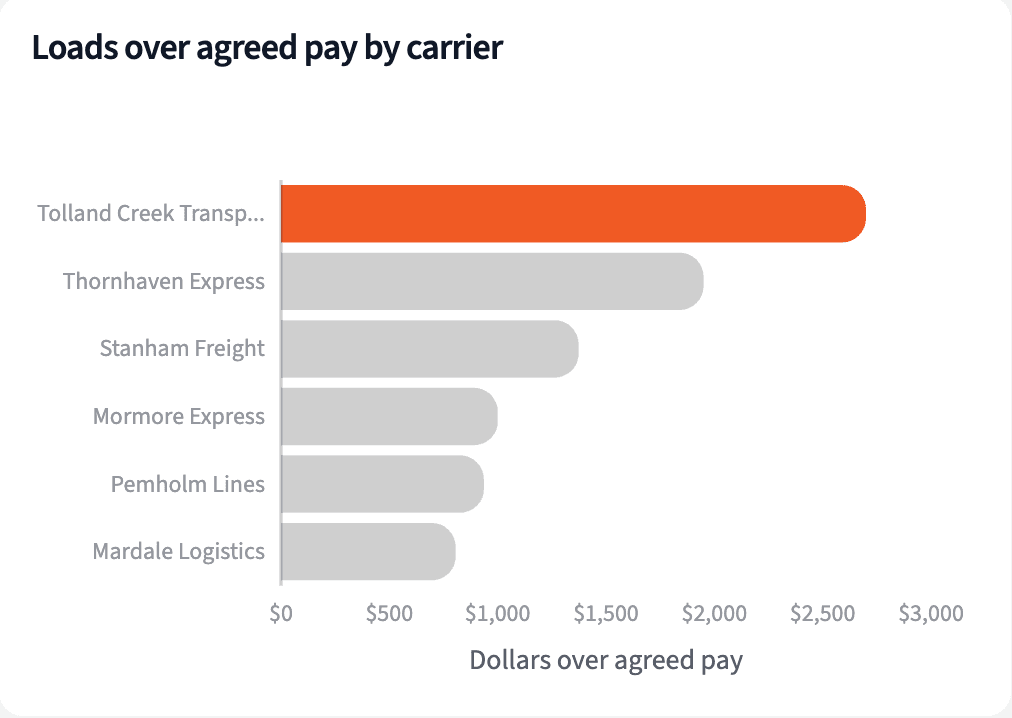
104 of the 3,063 loads billed in October came in over agreed pay, $19,926 in all. Tolland Creek Transport has 16 of them; no other carrier has more than 3. Mevick Trucking sent two bills twice.
| Carrier | Loads | Over agreed pay |
|---|---|---|
| Tolland Creek Transport | 16 | $2,700 |
| Redbrook Transportation | 3 | $390 |
| Mormore Express | 2 | $1,001 |
| Cranberg Freight Lines | 2 | $375 |
| All carriers | 104 | $19,926 |
Loads first billed in October 2026 above agreed carrier pay, by carrier.
Check billed detention against the time at the stop
Detention nobody approved isn't wrong by default. Check whether the truck waited:
"For the loads billed over, find unapproved detention lines in Tai and check each against Macropoint: did the truck wait past two hours of free time at that stop?"
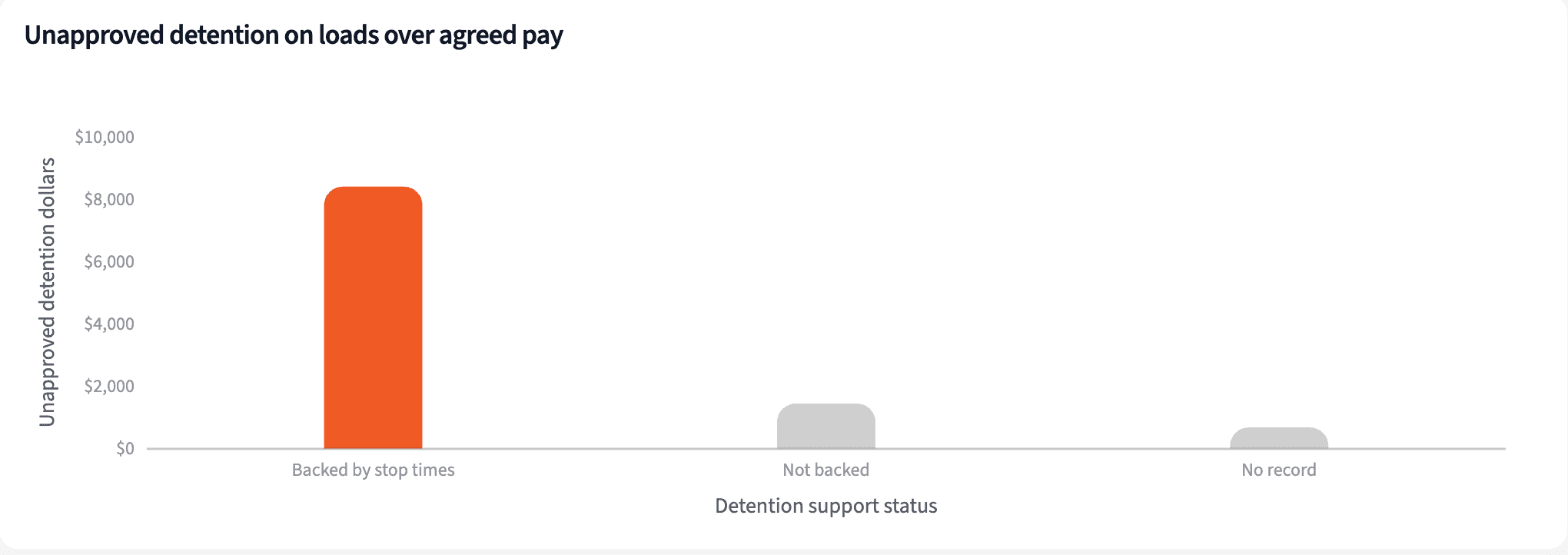
81 unapproved detention lines sit on those loads, $10,515. Macropoint backs 68 of them, $8,400: the truck waited past free time, so review them for approval and bill under the shipper's terms. Tolland Creek's 15 lines are all Fresno to Denver, and 14 are backed.
| Stop times | Lines | Amount |
|---|---|---|
| Backed: truck waited past free time | 68 | $8,400 |
| Not backed | 9 | $1,440 |
| No stop record | 4 | $675 |
| Total | 81 | $10,515 |
Unapproved detention lines on loads billed over agreed pay, October 2026.
Build the pay run exception list for the accounting team
Four numbers before the pay run, and what to do with every bill on hold.
The narrative Querri writes:
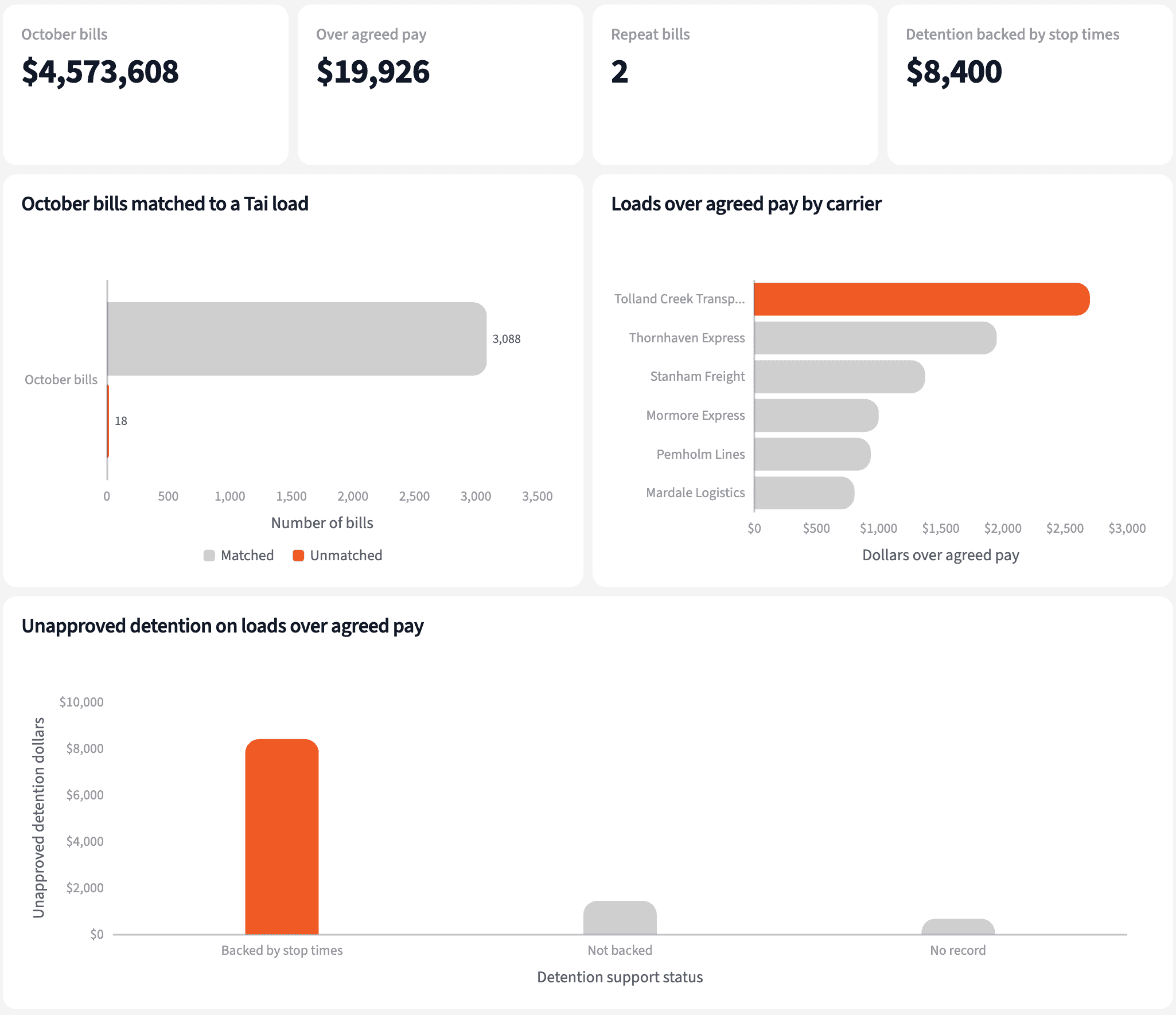
October's carrier bills are almost all in order, but $21,509 should not go out in this pay run as billed.
What you can create or export:
- The list, to Excel, CSV or Google Sheets
- A live dashboard that refreshes with each QuickBooks sync
- A presentation for the meeting, to PDF or PowerPoint
| Group | Amount | Action |
|---|---|---|
| Repeat bills | $1,583.63 | Don't pay |
| Detention backed by stop times | $8,400.00 | Review, then bill |
| Everything else over agreed pay | $11,525.62 | Dispute |
| Total held | $21,509.25 | Resolve first |
The hold list, October 2026 pay run.
Catch the repeat bill before it's paid, not at audit.
Try it on your own dataTips for a pay run that pays what was agreed
Check against the confirmation, not the last bill
The agreed carrier pay in the TMS is the number the bill should match. Compare every bill with it and the overcharges sort themselves into a short list.
Let the stop times settle detention
A detention line nobody approved may still be owed. If Macropoint shows the truck waited past free time, review it for approval and bill under the shipper's terms instead of disputing it.
Teach Querri your rules once. Every answer after that follows them.
What agreed pay means, what counts as a repeat, how much free time a stop gets: say each rule once and Querri applies it to every question on that data.
Show me how
Say it in chat
Settle a rule in conversation and the Librarian records it as a fact under Facts & Rules, attached to the table it governs. Every later question on that data applies it, whoever asks, and every view built afterwards carries it.
"Agreed carrier pay for a load is the Carrier Total in the Tai export. Save that as a rule for the QuickBooks bills table."
Or bring the document that already says it
Upload your carrier pay policy like any other file. Querri files a From a document card in the Inbox with the statements it found, each with its page and exact words; tick the ones to keep and they become facts. The rules this playbook depends on:
- Agreed pay: Tai Carrier Total, with line haul, fuel and approved accessorials
- Repeat bill: same carrier, load and amount as an earlier bill
- Over agreed pay: a load's bills, less repeats, above its Carrier Total
- Free time: 2 hours from the later of arrival and appointment
- Backed detention: Macropoint shows the truck at the stop past free time
- Matching: QuickBooks to Tai through the load number in the bill memo
"Read our carrier pay policy and propose the rules it states about detention, free time and approvals. I'll review them in the Inbox."
Where the rules reach
A rule is attached to the data, not to one person's chat, so it follows the data everywhere:
- • Every question asked in chat, by anyone on the accounting team
- • Every view the Librarian builds on that data
- • Every step of a project, including the code it writes
- • Dashboards and scheduled runs, each time they refresh
- • Claude and ChatGPT, when they ask Querri
You stay in control
Every rule is listed under Facts & Rules next to the data it governs, where you can edit or remove it. Rules from a document wait for your tick in the Inbox, and a Worth remembering card is how Querri offers one it noticed itself. Workspaces and roles decide who can change what. Company-wide rules go in Settings → Customize; the Library is where the rest lives.
The payoff at the pay run
The pay run goes out with repeats held, detention approved where the truck waited, and a short dispute list for the carriers. Changing free time is a sentence.
Frequently asked questions
What is agreed carrier pay?
What counts as a repeat bill?
How are bills matched to loads?
Why check detention against Macropoint?
What about detention the stop times don't back?
Do I need a TMS connector?
Does Querri change anything in QuickBooks?
How often should this run?
Other popular resources
Playbook
Shippers paying slower
Which shippers are paying slower than they used to?
Playbook
Delivered, not invoiced
Which delivered loads haven't been invoiced yet?
Demo
Request a walkthrough
See Querri in action with your own data.
Pricing
Compare plans
Find the right plan for individuals, teams, or enterprise.