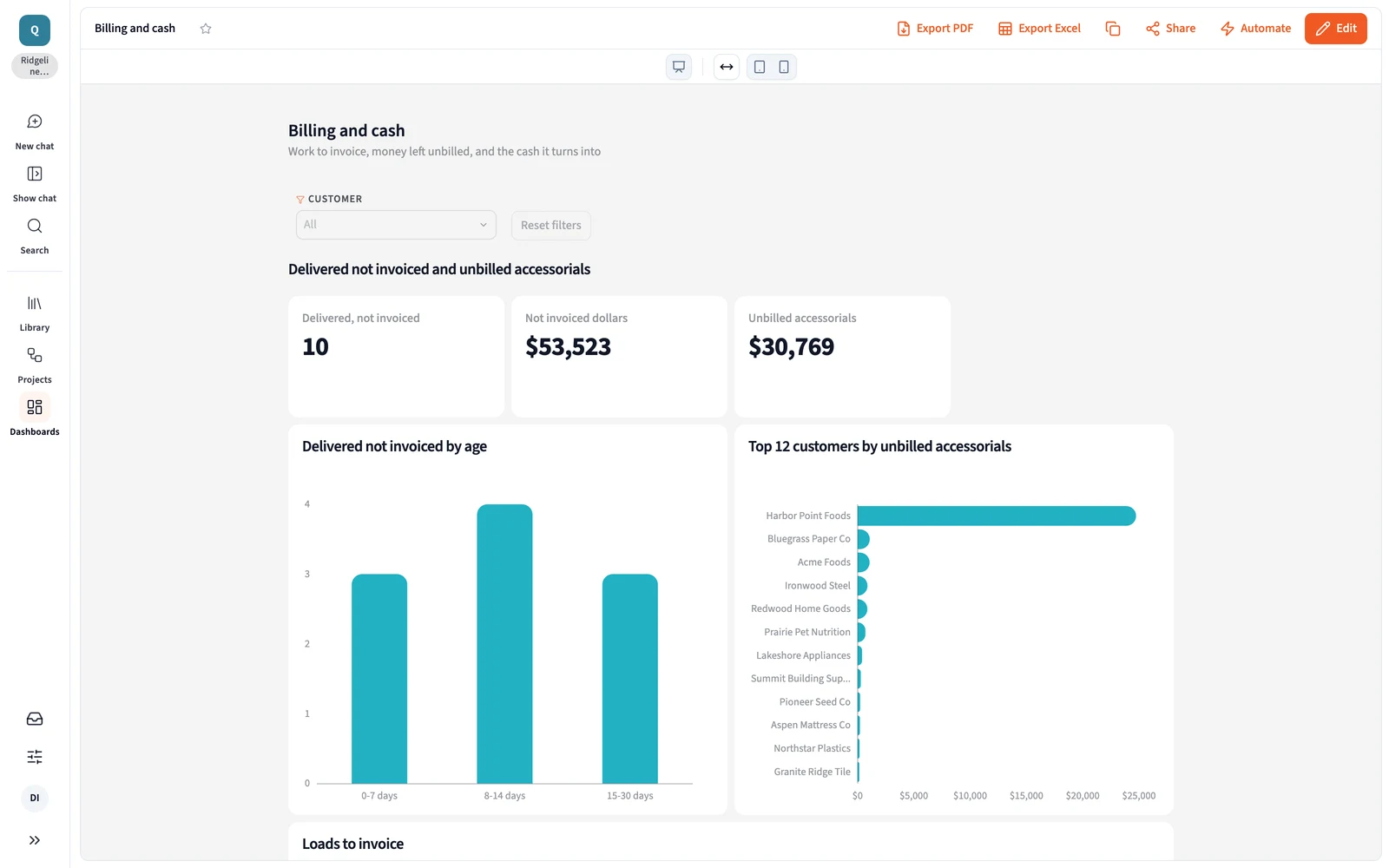
Querri joins your TMS with QuickBooks or NetSuite, so finance sees which delivered loads haven't been invoiced or paid, what each load really earned after carrier bills and short pays, and where the TMS and the books disagree before close.
One minute: every delivered load followed to cash, the Load to cash blueprint, and what else your finance data answers.
One view of the month
Four sources. One load-to-cash picture.
Loads and carrier pay sit in the TMS, invoices and payments in the books, carrier bills in payables and the plan in a workbook. Querri reads all four and defines net revenue and delivered-not-invoiced once, so the close and the owner's review start from the same figures.
TMS loads and carrier payYYour TMS
Invoices and paymentsQuickBooksNetSuite
Carrier bills and settlementsQuickBooksGoogle Drive
Budget workbookExcelGoogle Sheets
Defined once
Load to cash, April to September
Metric
From
Value
Net revenue, as booked
TMS
$358,188
Net revenue, after carrier bills
TMS and QuickBooks
$328,615
Delivered, not invoiced
TMS and QuickBooks
$53,523
Accessorials paid, not billed
TMS and carrier bills
$30,769
Days sales outstanding
QuickBooks
31.1 days
Sample data: Ridgeline Freight, a fictional brokerage with 583 loads in six months.
Where brokerage finance teams start
Three answers finance rebuilds every month
Good first jobs, not the whole list. Once loads, invoices, carrier bills and the plan are in, the same definitions answer what you ask next.
Every delivered load, followed to cash.
“Which delivered loads haven't turned into cash, and which invoices are late or short-paid?”
How it's done today
Delivered dates from the TMS matched against QuickBooks aging in a spreadsheet, load by load.
In Querri
Querri joins delivered loads in the TMS with invoices and payments in QuickBooks, so one list shows loads not invoiced, invoices past due and short pays, by shipper. A monitor flags new ones each morning, and any amount opens to the load and invoice behind it.
Sample data. 10 delivered loads ($53,523) have no invoice yet; 8 invoices were short-paid by $1,680.
What each load really earned, after the bills land.
“What did each load really earn once carrier bills, accessorials and short pays landed?”
How it's done today
Margin from the TMS at booking. Carrier bills and detention land in the books weeks later, never joined back.
In Querri
Define net revenue once: shipper charges minus carrier pay, after every accessorial and carrier bill. Querri puts booked against realized margin for every load, shipper and lane, and shows the detention paid to carriers that never got billed back.
Sample data, April to September. Harbor Point Foods: $24,750 of detention on 65 loads, paid to carriers, never billed back.
The TMS and the books, tied out before close.
“Do the TMS and the books agree this month, and why are we off plan?”
How it's done today
Two reports exported side by side, reclasses hunted by hand, the variance explained after close.
In Querri
Querri lines up TMS revenue and carrier pay with QuickBooks or NetSuite, load by load, against the budget workbook. The gap comes back as a list of loads, not a number to chase, and a saved report reruns it next month.
Sample data. The whole revenue gap is the 10 loads not yet invoiced; the plan comes from the budget workbook.
Load to cash is one view. Ask next about DSO by shipper or carrier bills above the rate confirmation. See how asking works →
More than a finance dashboard
One set of definitions, for every report and every AI agent
The three jobs run on the same foundation as everything else in Querri. Define a number once, and every dashboard, workbook, owner's review and AI answer uses it.
The Library
Teach it once. It stays right.
Say what counts as net revenue and how rebills and accessorials land, and every answer uses it. The close, the owner's review and the sales numbers agree.
Click a load's margin to see each step and the TMS and QuickBooks rows behind it, with when they refreshed. When a question has two reasonable readings, Querri tells you, and when it can't answer, it says what's missing.
Querri reads the budget workbook and the TMS export and sends finished views back as formatted workbooks and slides. Build a dashboard by asking in plain words, with no SQL, under each person's own access.
Monitors judge each shipper's realized margin and each week's unbilled loads against their own history and say which one moved, not just that the total did. Every night Querri works through your data and leaves what it found in your Inbox. Nothing changes without your OK.
How Querri compares with the other ways brokerage finance gets these numbers
Most brokerage finance teams already have TMS and accounting reports, a well-kept spreadsheet or an AI assistant. Here is where each fits, where it stops, and how Querri works alongside it.
Querri
TMS and accounting reports
A warehouse and a data team
An AI assistant you wire up yourself
Time to the first answer
Minutes on sample data from the blueprint, then on your own
Right away, inside each system
Months: pipelines, models, then dashboards
A first demo in a day
TMS, books and plan together
One Library, from 125+ connectors and file uploads
Each stops at its own system's edge
Once each source is piped in and modeled
One connector at a time, joined in the chat
A question nobody built a report for
Ask it in plain words
Its reports, or an export to Excel
Joins the data team's queue
Ask it in plain words
What net revenue means
Taught once; every answer, dashboard and AI agent uses it
Each system's own field, until a rebill changes it
In a semantic layer the data team maintains
Per person or per project, in prompts and skill files
Where a number came from
Click any number to see its steps and source rows
In the report's filters
In the SQL, for whoever can read it
In the chat, worked out fresh each time
Watching for changes
Monitors on any KPI, each shipper against its own history
Aging and reports you run at each close
Through a BI or alerting tool on top
Scheduled tasks someone writes and keeps working
Billing shippers and paying carriers
Not Querri's job. Keep your TMS and accounting system
Their core strength
Not its job
Only if someone builds it
How it works with Querri
Reads from all three, plus the TMS and the books
Keep them for billing and posting. Querri reads them side by side
Querri connects to it and puts the answers in front of finance
Use both. Querri works inside the assistant, on the same definitions
The right call on its own when
Your numbers cross the TMS and the books and need one definition
The question lives inside one system
A staffed data team already models freight data
It's a one-off look at a spreadsheet
Approaches, not products: what each typically looks like in late 2026.
Freight brokerage finance, load to cash: common questions
How does a freight brokerage find delivered loads that haven't been invoiced or paid?
In Querri, a brokerage joins delivered loads from its TMS with invoices and payments in QuickBooks or NetSuite, so one list shows every load delivered but not invoiced, every invoice past due and every short pay, by shipper. A monitor flags new ones each morning, and any amount opens to the load and invoice behind it. Nightly insights and Monitors →
How do brokerage finance teams see realized margin per load after carrier bills and accessorials?
Querri defines net revenue once, as shipper charges minus carrier pay after every accessorial and carrier bill, and puts booked against realized margin for every load, shipper and lane. It also shows detention and layover paid to carriers but never billed to the shipper, where most of that gap sits. How KPIs work →
Can Querri tie out a brokerage's TMS against QuickBooks at month-end?
Yes. Querri lines up TMS revenue and carrier pay with QuickBooks or NetSuite load by load, and returns the gap as a list of loads, such as delivered loads not yet invoiced or carrier bills above the rate confirmation. A saved report reruns the same steps next month, so the tie-out isn't rebuilt each close. Reports →
Can a brokerage finance team keep working in Excel spreadsheets with Querri?
Yes. Keep your spreadsheets as the working tool: Querri reads the budget workbook and the TMS export, and sends finished views back as formatted Excel workbooks and slides. They come from the same definitions as the dashboard, so the workbook you send matches it. Excel workbooks →
Why use Querri for brokerage finance instead of a general AI assistant?
Querri keeps your finance definitions, so net revenue, realized margin and DSO mean the same in every answer, every month. Answers become saved reports that re-run on new data, and every number shows its query, which matters when a figure has to tie to the books. You can use both: Querri works inside your AI assistant through MCP, on the same definitions. Querri inside your AI assistant →
Is it safe to connect QuickBooks, NetSuite and our TMS to Querri?
Yes. Querri's connectors are read-only, so Querri never changes a load or a record in your TMS or your books, and an agent sets up each connection without ever seeing your passwords. Each organization has its own database and storage, encrypted with AES-256 at rest, and your data, prompts and results never train any model. Querri is SOC 2 Type II, HIPAA and ISO 27001:2022 certified. Visit the Trust Center →
What does a brokerage finance team connect first to get started with Querri?
To get started with Querri, a brokerage finance team connects QuickBooks or NetSuite and its TMS, or drops in the load export the TMS already produces. The Load to cash blueprint opens on sample data first, with money still on the table, realized margin by shipper and lane, and billing and cash, then runs on your own loads. Sign up and open the blueprint →
Do I need a credit card to try Querri for brokerage finance?
No. Querri is free to start, and no credit card is required. When you sign up, the Load to cash blueprint opens on sample data with every delivered load not yet invoiced, biggest amount first, so you can see how it works before you connect your books. Current plans are on the Querri pricing page. See pricing →
Playbooks
Three reports finance rebuilds by hand
Step by step, with sample data, for the person who builds the report.
Playbook coming
Delivered, not invoiced: every load to cash
Which delivered loads haven't turned into cash, and which invoices are late or short-paid?
Playbook coming
Booked against realized margin per load
What did each load really earn once carrier bills, accessorials and short pays landed?
Playbook coming
A month-end TMS to books tie-out
Do the TMS and the books agree this month, and why are we off plan?
From the blog
For the controller
What to do once you have the answer.
Article coming
The loads you delivered and never billed
Find them before month-end.
Article coming
Where booked margin goes after the load
Detention, layover and short pays, shipper by shipper.
Article coming
Closing on numbers the TMS and the books agree on
Tie them out before the review.
Start with every delivered load, followed to cash.
The Load to cash blueprint opens when you sign up. Connect QuickBooks and your TMS, and every load not yet invoiced or paid lands on one list, biggest amount first.
 QuickBooks
 NetSuite
 Google Drive
 Excel
 Google Sheets