Which residents are coming to fewer programs than usual?
Compare each resident's last four weeks of programs with their own usual. Put care-level changes and move-out notices beside the list, so the team knows who to see first.
Open QuerriWhat you'll need
Querri (Free trial) to compare each resident with their own usual
LifeLoop, PointClickCare and Yardi: Step 1 says what each adds
Your rule for coming less: so every community builds its list the same way
Free resources
Start your free trial here →Sample data sets
Synthetic data for Tallowmere Senior Living, a made-up operator with four communities. Residents appear as codes only. Not real resident, family, staff or financial data.
Need help?
If you have any questions, you can request a demo or email our team.
Before we begin
Life enrichment staff notice when a regular stops coming. Whether anyone connects it to a care-level change or a notice depends on who remembers to look. Attendance lives in the engagement app, care levels in the care records and notices in the resident system.
This playbook compares each resident's last four weeks with their own usual, adds care-level changes and notices, and builds a short weekly list for each community.
How it works:
- • Upload LifeLoop, PointClickCare and Yardi
- • Compare each resident with their own usual
- • Add care-level changes and notices
- • Check who the rule leaves out
- • Build the weekly list by community
Follow the steps
Upload LifeLoop, PointClickCare and Yardi
Three sources, one project:
- •
LifeLoop (or your engagement app): every program each resident attended.
- •
PointClickCare (or your care records): care-level changes and when they took effect.
- •
Yardi (or your resident system): who lives where, and move-out notices.
Each comes in as an export; next week's files rebuild the list.
Tip: Bring sixteen weeks of attendance: twelve to set each resident's usual and the last four to compare.
-
 LifeLoop attendance
- PointClickCare care levels
- Yardi notices
 One project
Compare each resident with their own usual
Start with each resident's own pattern, not an average:
"Compare each resident's program attendance over the last four weeks with their own usual over the twelve weeks before. Who is at half or less?"
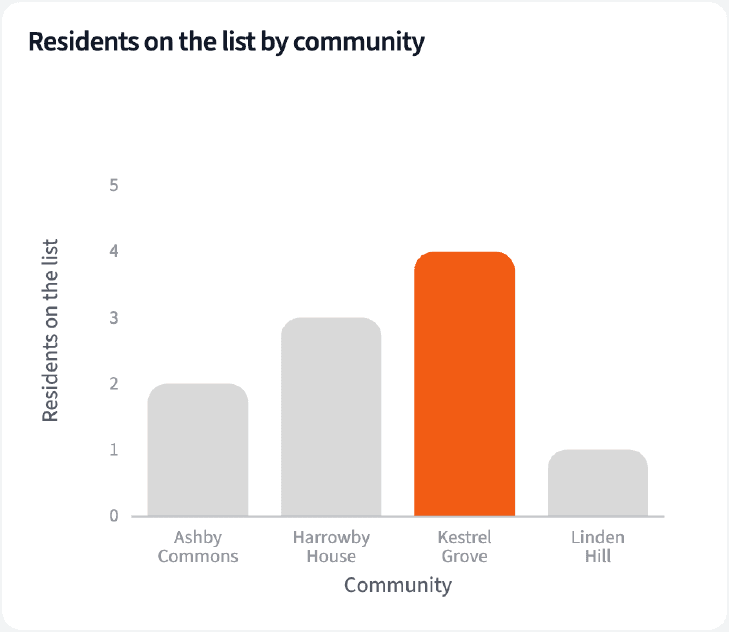
Of 301 residents who usually come to at least one program a week, 10 are at half their usual or less over the last four weeks.
| Community | Scored | On the list |
|---|---|---|
| Kestrel Grove | 58 | 4 |
| Harrowby House | 68 | 3 |
| Ashby Commons | 92 | 2 |
| Linden Hill | 83 | 1 |
Week ending September 27, 2026. Usual: June 8 to August 30. Residents who moved in after June 8 aren't scored yet.
Add care-level changes and notices
Then put what else changed beside each name:
"Beside each resident on the list, show any care-level change from PointClickCare in the last 60 days and any move-out notice from Yardi."
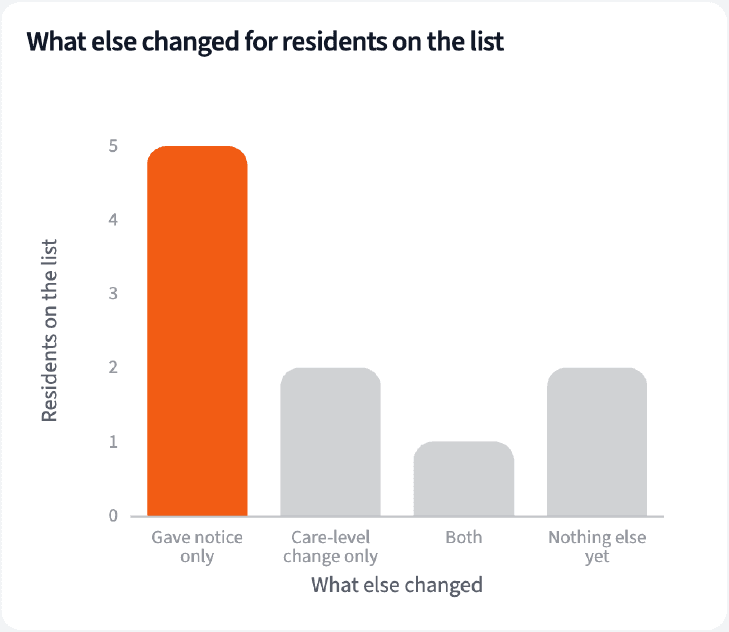
Eight of the 10 also gave notice or had a care-level change; one had both. Two show nothing else yet.
| Resident | Programs a week, usual to now | What else changed |
|---|---|---|
| HAR-1134 | 2.9 to 0.0 | Notice Sep 13; care level 1 to 2 |
| KES-1083 | 1.5 to 0.0 | Nothing else yet |
| KES-1006 | 2.7 to 0.2 | Notice Sep 24 |
| ASH-1170 | 4.7 to 2.2 | Care level 2 to 3 |
Residents on the list, with any notice or care-level change since July 30. Codes only.
Check who the rule leaves out
Every rule leaves someone out. Count them:
"Who does this rule leave out? Count residents who seldom come at all, and check how many residents with a notice or a care-level change are on the list."
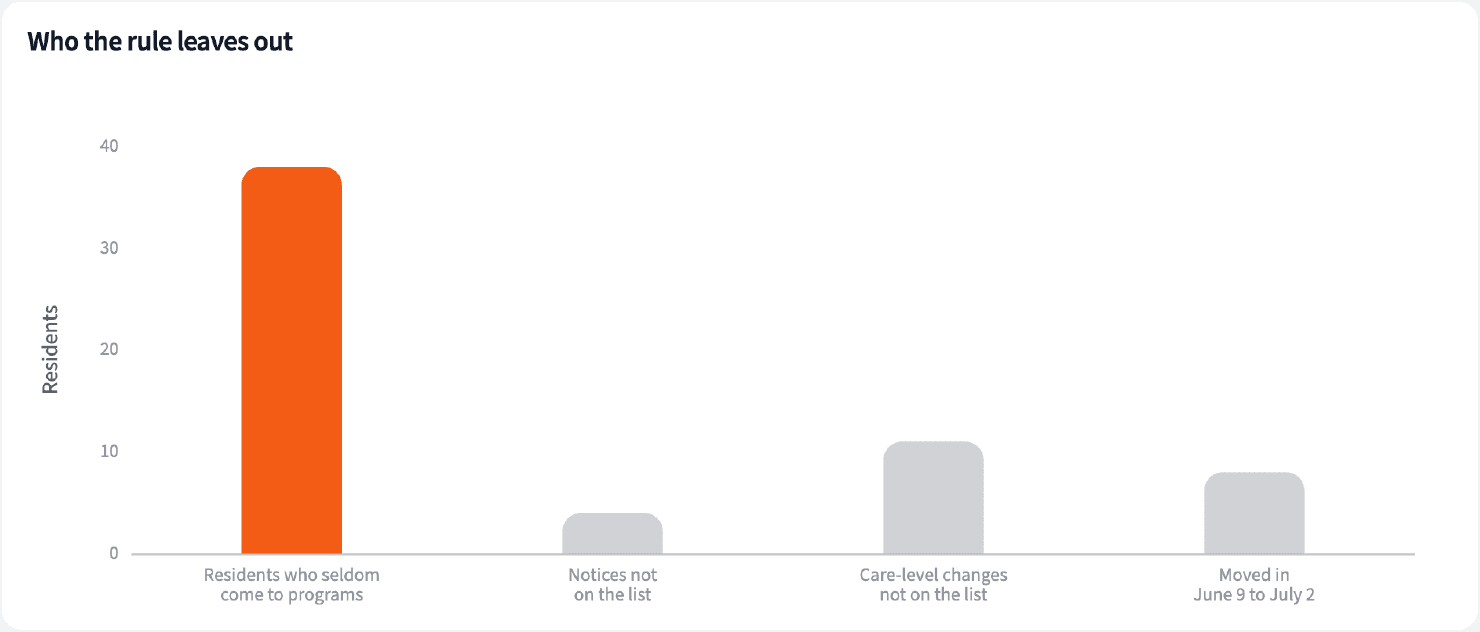
Thirty-eight residents seldom come to programs, so the rule can't flag them. Six of the 10 notices on file are on the list, and 3 of 14 recent care-level changes.
| Group | Residents | On the list |
|---|---|---|
| Usually under one program a week | 38 | Not scored |
| Notice on file | 10 | 6 |
| Care-level change since July 30 | 14 | 3 |
| Moved in June 9 to July 2 | 8 | Not scored |
Residents in house at September 30, 2026.
Build the weekly list by community
Four numbers for the weekly huddle, and the list itself.
The narrative Querri writes:
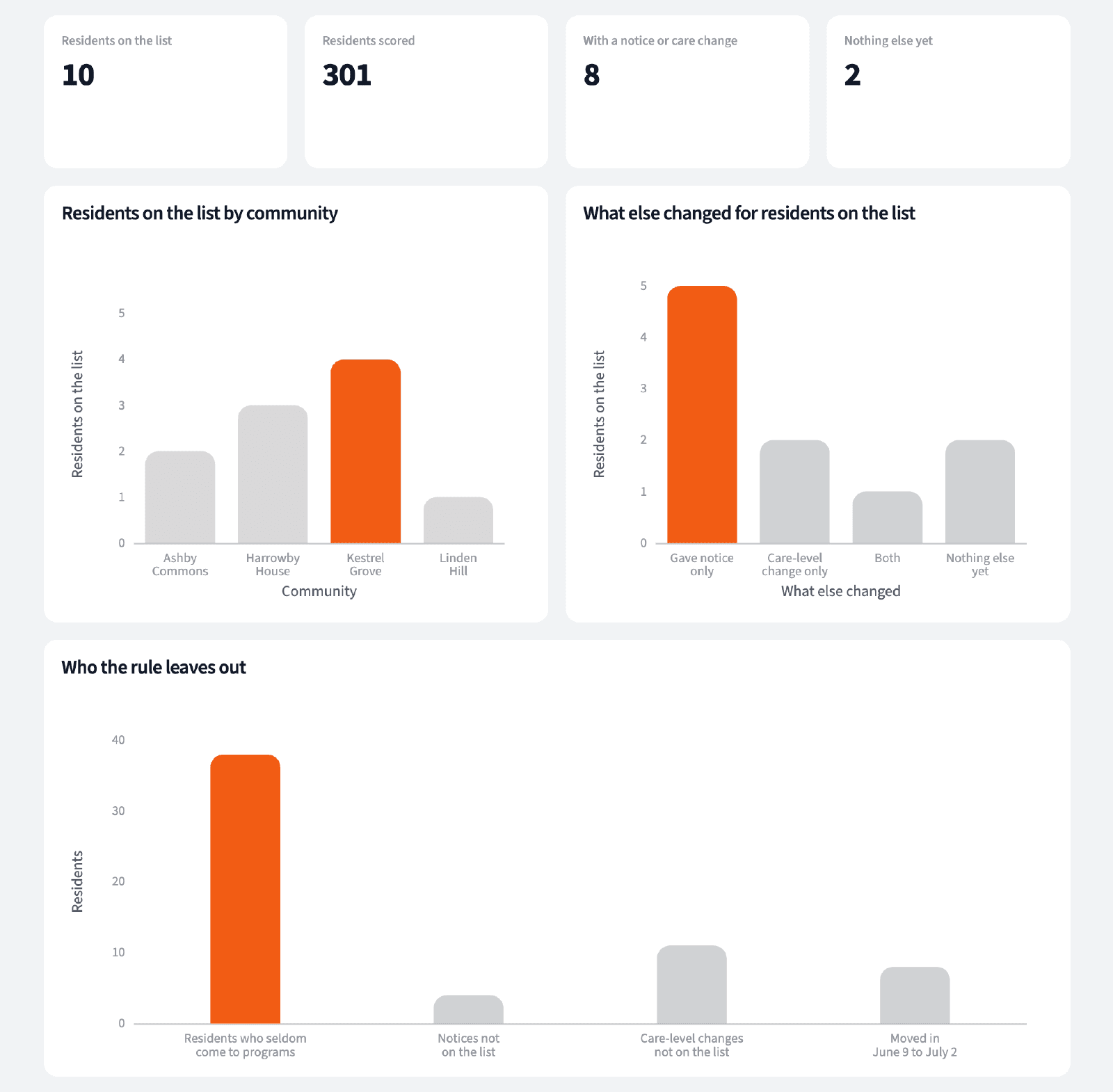
Ten residents are coming to half their usual programs or less; eight also have a notice or a care-level change, and two show nothing else yet.
What you can create or export:
- The table, to Excel, CSV or Google Sheets
- A live dashboard that refreshes when new exports land
- A presentation for the meeting, to PDF or PowerPoint
| Resident | Programs a week, usual to now | What else changed |
|---|---|---|
| KES-1083 | 1.5 to 0.0 | Nothing else yet |
| KES-1038 | 2.0 to 1.0 | Nothing else yet |
| HAR-1139 | 2.8 to 0.2 | Notice Sep 16 |
| HAR-1028 | 1.2 to 0.5 | Care level 3 to 4 |
Residents to see, week ending September 27, 2026. Codes only.
Start the week with a short list of residents to see, and a reason to start the conversation.
Try it on your own dataTips for a weekly list people trust
Compare each resident with themselves
Some residents come to one program a week and always have. Their own usual is the fair comparison, not the community average.
Say who the rule can't see
Residents who seldom come and the newest residents can't be flagged. List them on their own so nobody assumes they were checked.
Teach Querri your rules once. Every answer after that follows them.
What a resident's usual is, what coming less means, which changes go beside the list, who isn't scored: say each rule once and Querri applies it to every question on that data.
Show me how
Say it in chat
Settle a rule in conversation and the Librarian records it as a fact under Facts & Rules, attached to the table it governs. Every later question on that data applies it, whoever asks, and every view built afterwards carries it.
"A resident's usual is their programs a week over the 12 weeks before the last four; they are on the list at half their usual or less. Save that as a rule for the LifeLoop attendance table."
Or bring the document that already says it
Upload your resident engagement guidelines like any other file. Querri files a From a document card in the Inbox with the statements it found, each with its page and exact words; tick the ones to keep and they become facts. The rules this playbook depends on:
- Usual: programs a week over the 12 weeks before the last four
- Recent: programs a week over the last four weeks
- On the list: usual of one or more, recent at half or less
- Care-level change: a new level in the last 60 days
- Notice: a scheduled move-out on file
- Residents appear by code, never by name
"Read our resident engagement guidelines and propose the rules they state about attendance follow-up. I'll review them in the Inbox."
Where the rules reach
A rule is attached to the data, not to one person's chat, so it follows the data everywhere:
- • Every question asked in chat, by anyone on the resident experience team
- • Every view the Librarian builds on that data
- • Every step of a project, including the code it writes
- • Dashboards and scheduled runs, each time they refresh
- • Claude and ChatGPT, when they ask Querri
You stay in control
Every rule is listed under Facts & Rules next to the data it governs, where you can edit or remove it. Rules from a document wait for your tick in the Inbox, and a Worth remembering card is how Querri offers one it noticed itself. Workspaces and roles decide who can change what. Company-wide rules go in Settings → Customize; the Library is where the rest lives.
The payoff in the huddle
Each community starts the week with a short list and a reason beside each name. Changing the rule is a sentence.
Frequently asked questions
Does the list say why a resident is coming less?
Why compare with the resident's own usual?
Who isn't on the list?
What about the newest residents?
Why are only some notices on the list?
Is this a prediction of who will move out?
Who can see the list?
How often should this run?
Other popular resources
Playbook
Resident experience by community
Which communities are slipping on resident experience, and what else changed?
Playbook
The first 90 days
Are new residents settling in during their first 90 days?
Demo
Request a walkthrough
See Querri in action with your own data.
Pricing
Compare plans
Find the right plan for individuals, teams, or enterprise.