Did every community bill for the care it delivered last month?
Set each resident's care level in PointClickCare beside their bill in Yardi. See where the charge doesn't match the care level, before the month closes.
Open QuerriWhat you'll need
Querri (Free trial) to set care records beside every bill
PointClickCare, Yardi and your rate sheet: Step 1 says what each adds
Your care levels and fees: so every bill is checked against the same prices
Free resources
Start your free trial here →Sample data sets
Synthetic data for Tallowmere Senior Living, a made-up operator with four communities. Residents appear as codes only. Not real resident, family, staff or financial data.
Need help?
If you have any questions, you can request a demo or email our team.
Before we begin
A resident's care level changes in the care records, and the bill changes only when someone updates the charge. Before close, the business office lines up assessments, transfers and move-outs against the charge register by hand, community by community. The care level lives in PointClickCare, the charges in Yardi and the prices in a spreadsheet.
This playbook checks every assisted living and memory care resident's September bill against their care level and the rate sheet, and lists what to review.
How it works:
- • Upload PointClickCare, Yardi and the rate sheet
- • Check each care level against the September bill
- • Find transfers at the old rate and charges after move-out
- • See how often increases reach the first bill
- • Build the month-end billing review
Follow the steps
Upload PointClickCare, Yardi and the rate sheet
Three sources, one project:
- •
PointClickCare (or your care records): each resident's care level and when it took effect.
- •
Yardi (or your resident system): who lives where, the move-ins and move-outs, and every monthly charge.
- •
Rate sheet (Excel): rents and care-level fees by community.
Each comes in as an export or upload; drop in next month's files and every check rebuilds.
Tip: Bring nine months of charges, so you can see how long care-level changes take to reach the bill.
-
 PointClickCare care levels
- Yardi residents and charges
- Rate sheet (Excel)
 One project
Check each care level against the September bill
Start with every assisted living resident's care charge:
"Check every assisted living resident's care level in PointClickCare against the care charge on their September bill in Yardi, using our rate sheet."
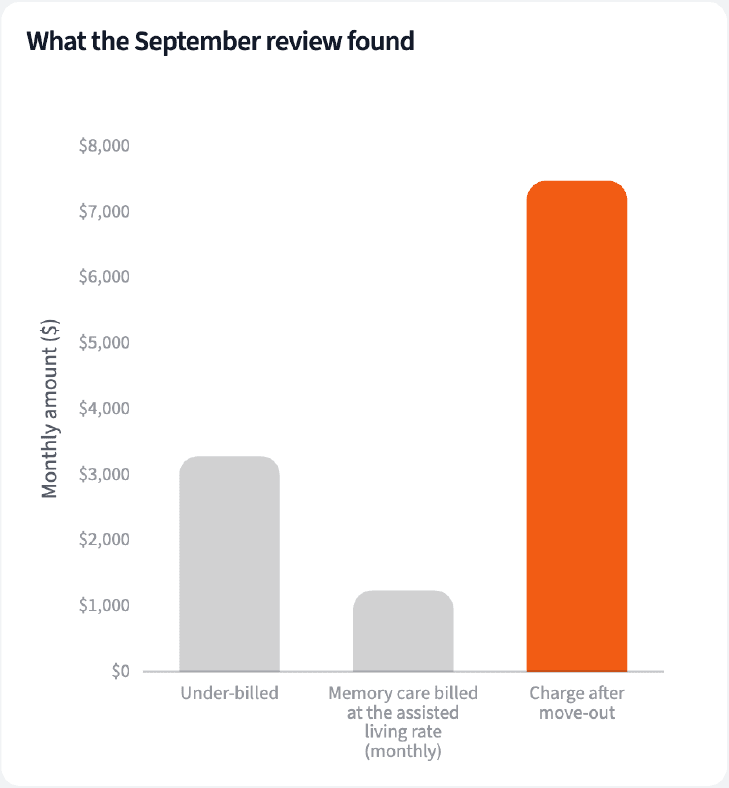
Of 242 assisted living residents, 235 were billed for their care level. Five care charges were below the rate for the care level on file, $3,280 a month in all.
| Result | Residents | Monthly difference |
|---|---|---|
| Charge matches the care level | 235 | $0 |
| Charge below the care level | 5 | $3,280 |
| No assessment on file | 2 | Not priced |
Assisted living residents in house on September 1, 2026, by result of the care level check.
Find transfers at the old rate and charges after move-out
Then look for the two cases a care-level check misses:
"Now find residents who moved to memory care and are still billed at the assisted living rate, and September charges for anyone who had already moved out."
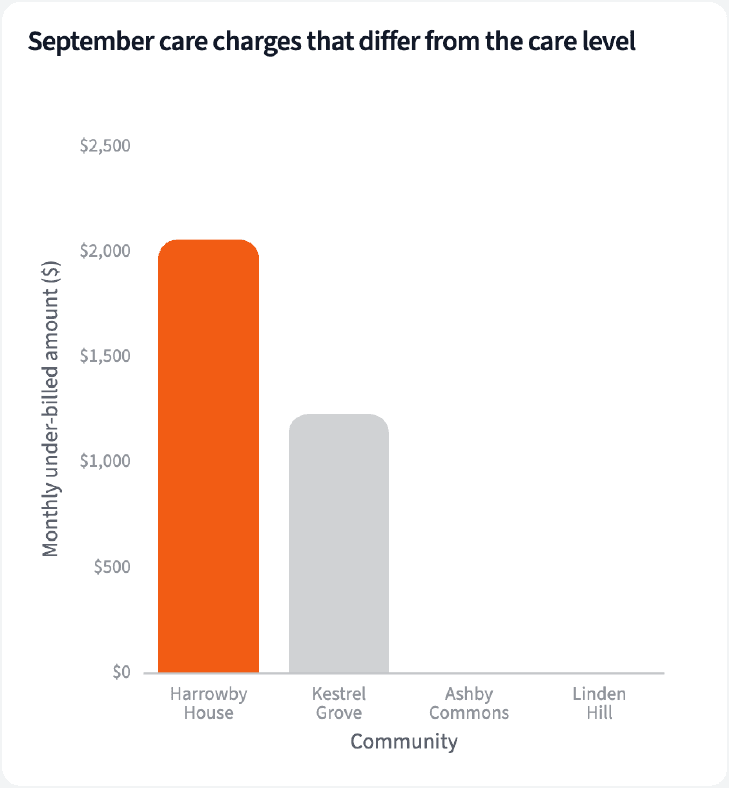
One resident who moved to memory care in July is still billed as assisted living, $1,235 a month under the memory care rate. One resident who moved out in August was charged $7,470 for September.
| Community | Residents | Potential monthly gap |
|---|---|---|
| Harrowby House | 4 | $3,290 |
| Kestrel Grove | 2 | $1,225 |
| Ashby Commons | 0 | $0 |
| Linden Hill | 0 | $0 |
Potential gaps to review on the September bill, by community. Monthly amounts.
See how often increases reach the first bill
A gap at close usually started months earlier:
"For every care level increase this year, did the higher fee show up on the first bill after it took effect? Show the share by community."
Across the portfolio, 47 of 55 care level increases this year reached the first bill. At Harrowby House it was 10 of 14, the lowest share.
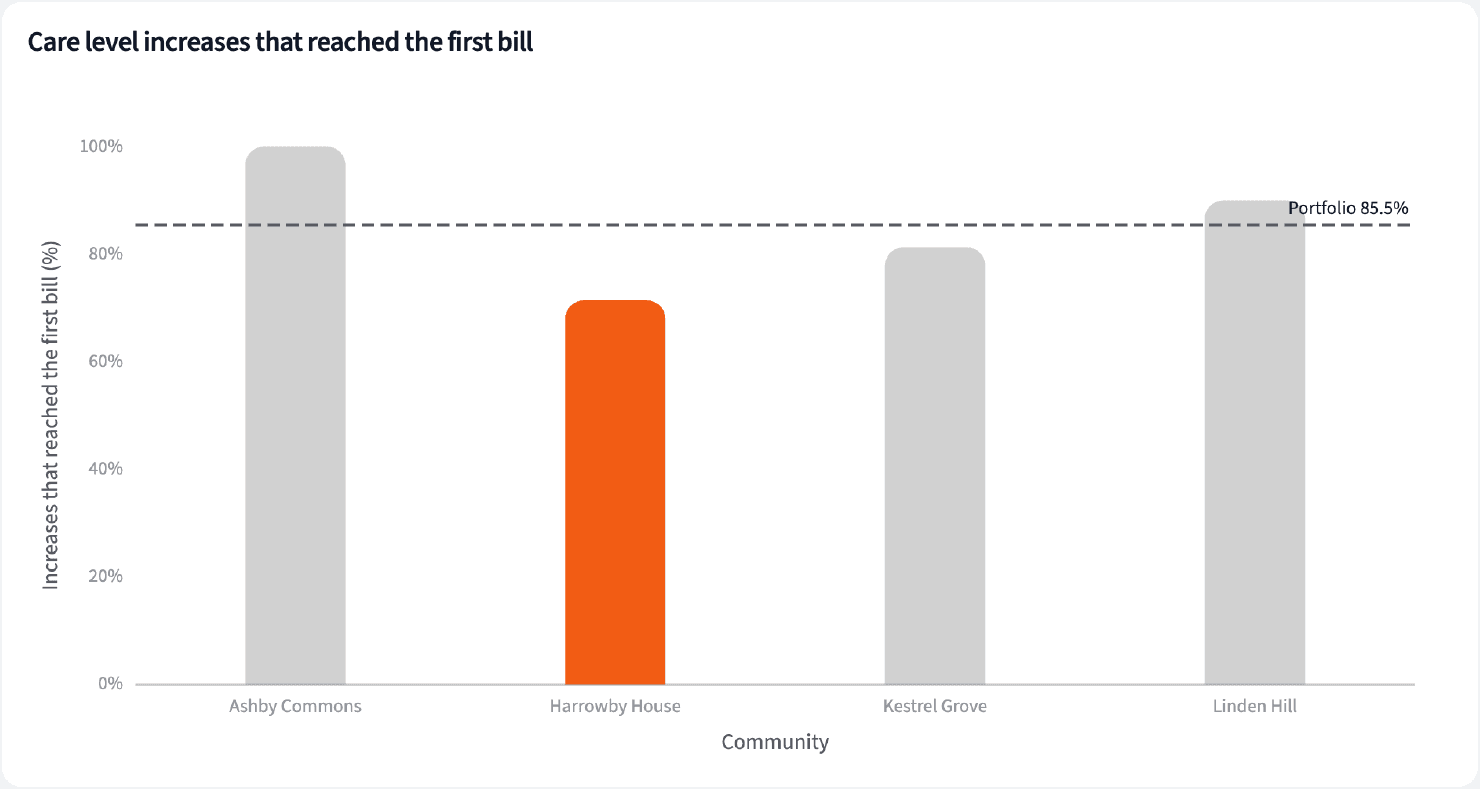
| Community | Increases | On the first bill |
|---|---|---|
| Ashby Commons | 15 | 100% |
| Linden Hill | 10 | 90.0% |
| Kestrel Grove | 16 | 81.3% |
| Harrowby House | 14 | 71.4% |
Care level increases effective January 1 to September 1, 2026, and whether the higher fee was on the first bill.
Build the month-end billing review
Four numbers for the close, and what the business office reviews.
The narrative Querri writes:
Six residents' September bills are below their care level or care setting, $4,515 a month in potential gaps to review, most of it at Harrowby House.
What you can create or export:
- The table, to Excel, CSV or Google Sheets
- A live dashboard that refreshes when new exports land
- A presentation for the meeting, to PDF or PowerPoint
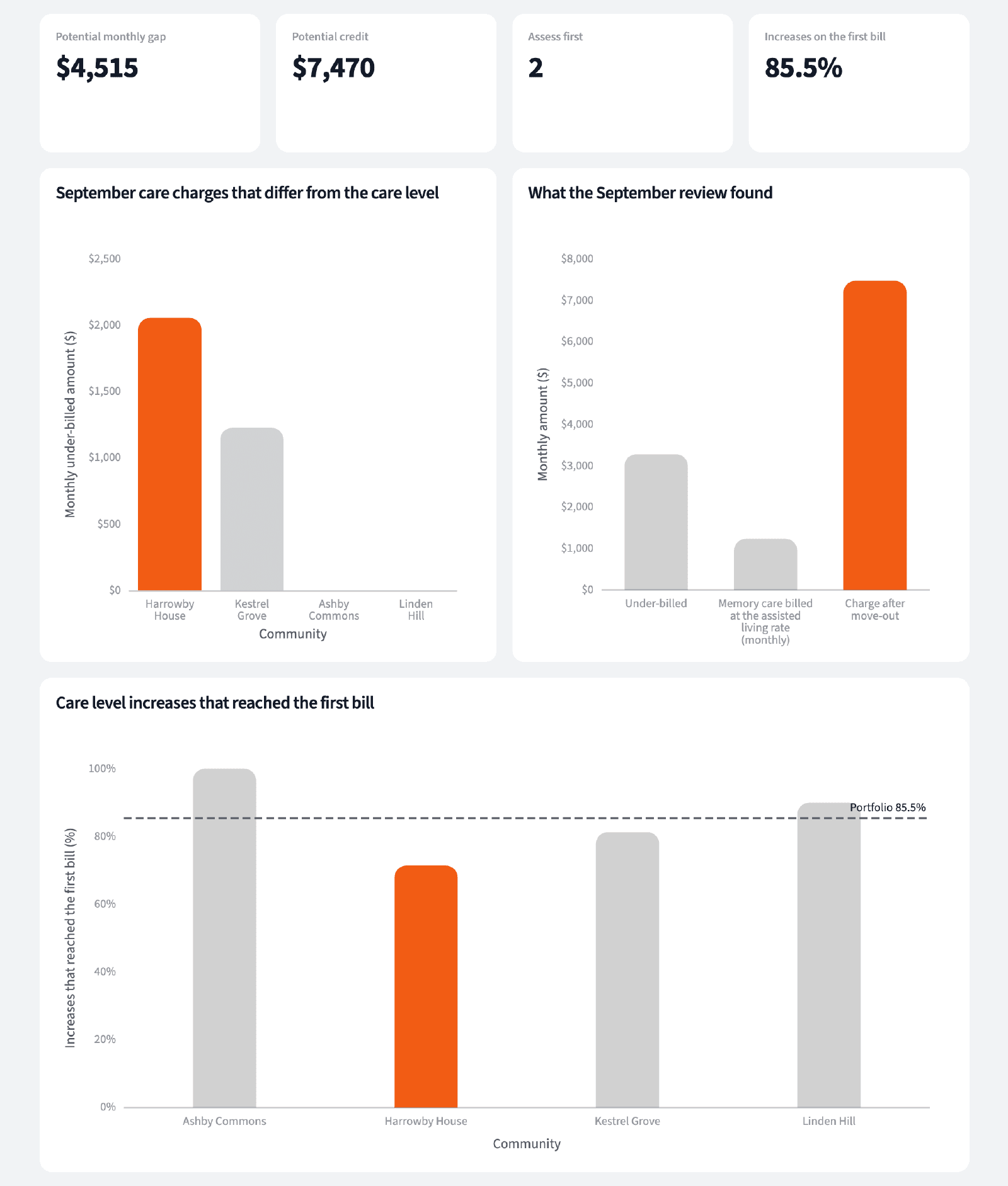
| Exception | Residents | Next step |
|---|---|---|
| Care charge below the care level | 5 | Review the charge |
| Memory care billed as assisted living | 1 | Review the rate |
| Charged after move-out | 1 | Review for credit |
| No assessment on file | 2 | Assess first |
Exceptions for the business office, September 2026.
Close the month with the care-level changes already on the bill, not found next quarter.
Try it on your own dataTips for a billing review people trust
Check transfers separately
A move to memory care is a new unit and a new rate. A care-level check only compares fees, so it won't catch a transfer still billed at the old rate.
Assess before you bill
A resident with no assessment on file can't be checked. List them on their own so the care team assesses first and billing follows.
Teach Querri your rules once. Every answer after that follows them.
Which care level is in effect, which fee goes with it, when a change reaches the bill, what counts as a transfer: say each rule once and Querri applies it to every question on that data.
Show me how
Say it in chat
Settle a rule in conversation and the Librarian records it as a fact under Facts & Rules, attached to the table it governs. Every later question on that data applies it, whoever asks, and every view built afterwards carries it.
"A care level change takes effect on the bill from the first of the month on or after its effective date. Save that as a rule for the charge register."
Or bring the document that already says it
Upload your care and billing policy like any other file. Querri files a From a document card in the Inbox with the statements it found, each with its page and exact words; tick the ones to keep and they become facts. The rules this playbook depends on:
- Care level: the latest assessment on or before the first of the month
- Care fee: the rate sheet amount for the community and level
- A change bills from the first of the month on or after it takes effect
- Memory care residents pay the memory care rate, with no separate care fee
- A transfer between care settings is not a move-out
- Charges stop after the move-out date
- No assessment on file means assess before billing
"Read our care and billing policy and propose the rules it states about care levels and charges. I'll review them in the Inbox."
Where the rules reach
A rule is attached to the data, not to one person's chat, so it follows the data everywhere:
- • Every question asked in chat, by anyone on the finance team and the business office
- • Every view the Librarian builds on that data
- • Every step of a project, including the code it writes
- • Dashboards and scheduled runs, each time they refresh
- • Claude and ChatGPT, when they ask Querri
You stay in control
Every rule is listed under Facts & Rules next to the data it governs, where you can edit or remove it. Rules from a document wait for your tick in the Inbox, and a Worth remembering card is how Querri offers one it noticed itself. Workspaces and roles decide who can change what. Company-wide rules go in Settings → Customize; the Library is where the rest lives.
The payoff at close
The business office starts the close with a short list of bills to review, not a spreadsheet to build. Changing a fee is a sentence.
Frequently asked questions
Does a gap mean the resident was under-billed?
Why check transfers separately?
What about residents with no assessment?
Why September charges after a move-out?
When does a care level change reach the bill?
Which community needs attention?
Do I need a connector for PointClickCare or Yardi?
How often should this run?
Other popular resources
Playbook
Community margin against budget
Where is each community's margin going: occupancy, labor or agency?
Playbook
Owner package that ties to operations
Does the owner package match what operations reports?
Demo
Request a walkthrough
See Querri in action with your own data.
Pricing
Compare plans
Find the right plan for individuals, teams, or enterprise.