Did every community bill for the care it delivered?
it.Querri for senior living finance. Querri it. Every level of care, billed. Every community, explained.
Querri checks census, care levels and billing against the books, explains each community's margin, and builds an owner package that matches what operations reports. Connect the systems you already run and close on numbers the whole company agrees with.
One minute: care billed against care delivered, the Community finance blueprint, and what else your finance data answers.
One view of the month
Four systems. One set of month-end numbers.
Care levels sit in the care records, charges in billing, revenue in the ledger and hours in payroll. Querri reads all four and defines occupancy, care billed and margin once, so the close and the owner package start from the same figures.
Care recordsPPointClickCareMMatrixCare
Billing and rent rollYYardiAALIS
The ledgerSSage IntacctNetSuiteQuickBooks
Budget and laborExcelGoogle SheetsWWorkday
Defined once
September close, one definition each
Metric
From
Value
Occupancy, all communities
Resident records
90.7%
Revenue per occupied unit
Billing and ledger
$6,492
Care delivered, not billed
Care records and billing
$7,150 a month
NOI margin against budget
Ledger and budget
-2.5 pts
Resident A/R over 60 days
Billing, by payer
$241K
Sample data: Evergreen Communities, a fictional operator with 4 communities and 408 units.
Where senior living finance teams start
Three things finance checks by hand every month
These are good first jobs, not the whole list. Once care records, billing, the books and labor are in, the same definitions answer whatever you ask next.
Census and care levels, checked against every bill.
“Did every community bill for the census and care it delivered last month?”
How it's done today
Census, care-level changes and the billing register lined up in a spreadsheet, then calls to each community.
In Querri
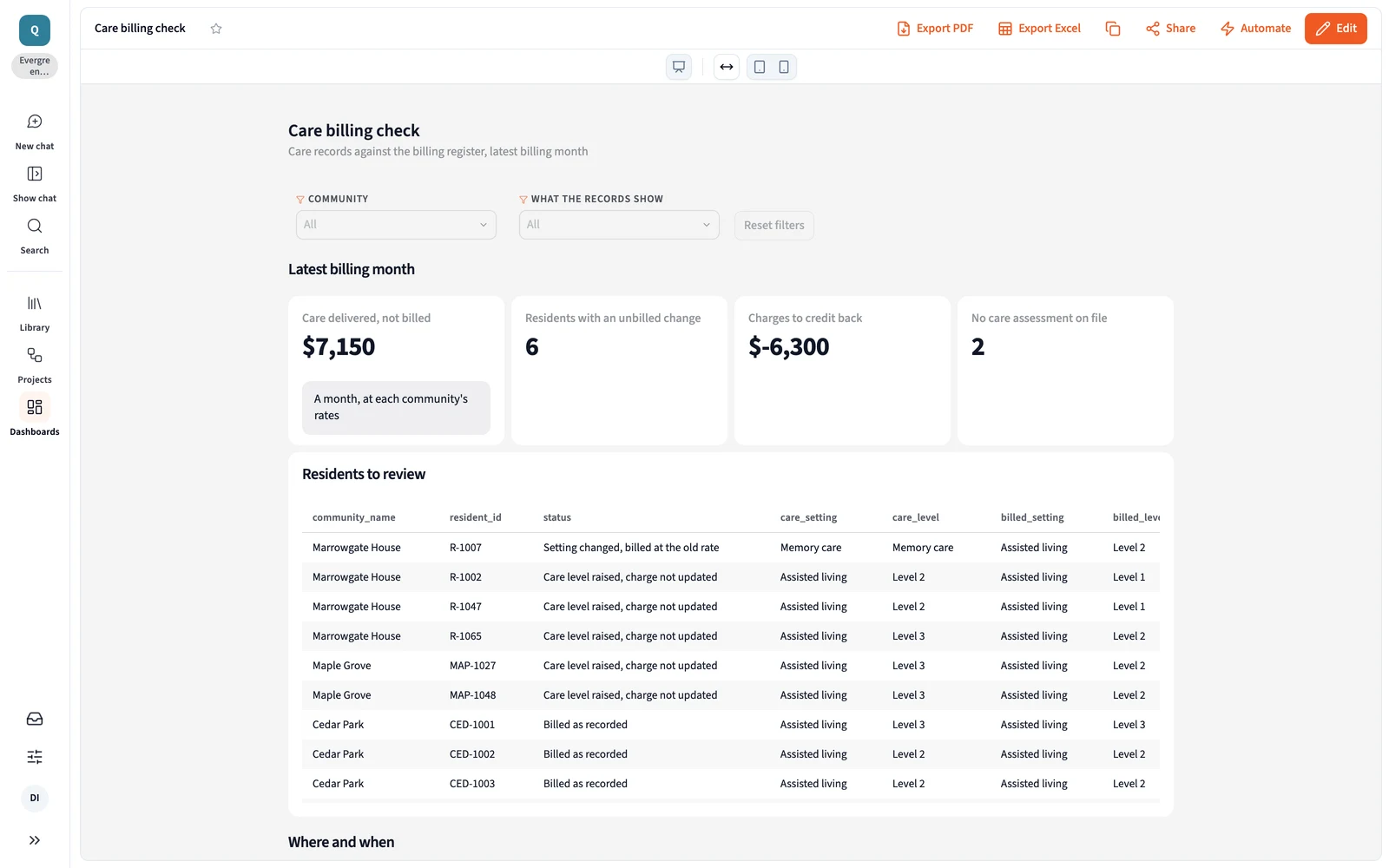
Querri joins care records, billing and the rent roll, and ledger revenue for every resident. It lists each care-level change with no new charge, each transfer billed at the old rate and each charge after a move-out, and a monitor flags new ones before close.
Moved to memory care, billed at assisted living rate
1
+$2,150
Marrowgate House
Care level raised, charge not updated
3
+$3,600
Maple Grove
Care level raised, charge not updated
2
+$1,400
Marrowgate House
No care assessment on file
2
Assess first
Cedar Park
Billed after the move-out date
1
-$6,300
Sample data. $7,150 a month of care delivered and not billed across 6 residents, plus one charge to credit back.
Each community's margin, explained against budget.
“Where is each community's margin going: occupancy, labor or agency, against budget?”
How it's done today
The ledger's P&L by community, then census and payroll exports, compared by hand.
In Querri
Querri puts the ledger, the budget, census and the labor export side by side for every community, with occupancy, hours per resident day, agency share and NOI margin defined once. X-ray any gap to the source tables behind it.
Sample data. Maple Grove's gap is labor: agency staff work 16% of its hours at the lowest occupancy. Marrowgate's gap is census.
An owner package that matches operations.
“Is the capital partner package ready, and does each number match what operations reports?”
How it's done today
Each figure pasted in from a different system, then the same owner questions next quarter.
In Querri
Occupancy, rate, NOI and resident A/R by payer on the same definitions operations uses, sent as slides and workbooks. A saved report replays the same code, so last quarter's figure doesn't quietly change.
Sample data. Exported as slides and a workbook. Over-60 A/R is 61% private pay, 27% long-term care insurance and 12% Medicaid waiver.
Care billing is one view. Ask next about Medicaid and insurance receipts or labor cost per occupied unit. See how asking works →
More than a finance dashboard
One set of definitions, for every report and every AI agent
The three jobs run on the same foundation as everything else in Querri. Define a number once, and every dashboard, workbook, owner package and AI answer uses it.
The Library
Teach it once. It stays right.
Say how occupancy counts units in service, or which care levels carry a charge, and every answer after that uses it. The ED's P&L, the regional review and the owner package finally agree.
Click a community's margin gap to see each step and the source tables behind it, with when they refreshed. When a question has two reasonable readings, Querri tells you, and when it can't answer, it says what's missing.
Querri reads the budget workbook and sends finished views back as workbooks and slides. The business office and each executive director ask in plain language, with no SQL and no analyst queue.
Monitors judge each community's care-level changes, agency hours and A/R against its own history and say which one moved, not just that the total did. Every night Querri works through your data and leaves what it found in your Inbox. Nothing changes without your OK.
A senior living finance blueprint, ready in minutes
Four steps from sign-up to your own finance desk. Here is everything that installs, ready to ask questions of and make your own.
1
Sign up free
No credit card. Your own workspace is ready in about a minute.
2
Install Community finance
Open Blueprints, pick the card and install it. Sample data comes with it, so every page has numbers right away.
Community finance19 pieces
3
Keep the sample, or connect your data
Connect your resident system and the ledger, such as Sage Intacct, NetSuite or QuickBooks, and upload the budget workbook. An agent sets up each connection with you.
4
Open your Finance desk
Care billing, margin by community and the owner package on one site.
Open your Finance desk
Every care-level change with no charge, by community, in the Community finance blueprint (Evergreen sample data).
Everything that installs
4 Site pages
Finance desk
Care billing check
Margin by community
Owner package
Resident A/R by payer
3 Dashboards
Care billing check
Margin against budget
Owner package
4 Views
Census to revenue
Care levels against charges
Margin and labor by community
A/R aging by payer
4 KPIs
Occupancy
Revenue per occupied unit
NOI margin
Agency share of hours
4 Skill and monitors
Month-end billing review
Care level change watch
Agency hours watch
Over-60 A/R watch
Margin is NOI over revenue. A care-level change counts as billed once a matching charge posts.
How Querri compares with the other ways finance teams get these numbers
Senior living finance teams say no two systems talk, so the close runs on spreadsheets. Here is where each common approach fits, where it stops, and how Querri works alongside it.
Querri
Each system's own reports
A BI build: a consultant or a data hire
An AI assistant you wire up yourself
Time to the first answer
Minutes on sample data from the blueprint, then on your own
Right away, inside each system
Months: a hire or a consultant, pipelines, then dashboards
A first demo in a day
Care records, billing, the ledger and labor together
One Library, from 125+ connectors and workbook uploads
Each stops at its own system's edge
Once each source is piped in and modeled
One connector at a time, joined in the chat
A question nobody built a report for
Ask it in plain words
An export to Excel
Joins the builder's queue
Ask it in plain words
What occupancy or NOI means
Taught once; every answer, dashboard and AI agent uses it
Each system counts it its own way
In the model the builder maintains
Per person or per project, in prompts and skill files
Where a number came from
Click any number to see its steps and source tables
Inside each system's report logic
In the SQL, for whoever can read it
In the chat, worked out fresh each time
Watching for changes
Monitors on any KPI, each community against its own history
Reports you run at close
Through an alerting tool on top
Scheduled tasks someone writes and keeps working
Resident billing, statements and posting
Not Querri's job. Billing stays in your resident system
Its core strength
Not its job
Not its job
How it works with Querri
Reads from all three, plus care records, billing and the ledger
Keep them. Querri reads each one and joins them on one definition
Querri connects to what's built and puts the answers in front of finance
Use both. Querri works inside the assistant, on the same definitions
The right call on its own when
Your numbers cross systems and need one definition
One system holds the whole answer
A staffed data team already models census and finance data
It's a one-off look at a spreadsheet
Approaches, not products: what each typically looks like in late 2026.
Senior living finance, care billing and margin: common questions
How do senior living finance teams check census and care levels against billing before close?
In Querri, a senior living finance team joins care records, billing and the rent roll, and ledger revenue for every resident. Querri lists each care-level change with no matching charge, each transfer to memory care still billed at the old rate and each charge after a move-out, and a monitor flags new ones before close. How Views work →
Can Querri explain each senior living community's margin against budget?
Yes. Querri puts the ledger, the budget, census and the labor export side by side for every community, with occupancy, hours per resident day, agency share and NOI margin defined once. You see whether a gap is occupancy, labor or agency, and X-ray shows the steps and source tables behind it. How KPIs work →
How can senior living finance build an owner or lender package that matches operations?
Querri builds the capital partner package from the same definitions operations uses: occupancy from the resident records, rate and revenue from billing and the ledger, and resident A/R by payer. It goes out as slides and workbooks, and a saved report replays the same code, so last quarter's figures don't change. Reports →
Can a senior living business office keep working in Excel with Querri?
Yes. Querri reads the budget workbook and sends finished views back as formatted Excel workbooks and slides. Care billing, margin by community and the owner package come from the same definitions, so the workbook each executive director gets matches the dashboard. Excel workbooks →
Which source tables sit behind a community's margin or a care billing gap in Querri?
Click any margin gap or billing line and Querri shows each step and the source tables behind it, from the care records, billing or the ledger, with when each refreshed. A saved report replays the same code, so the figure you reviewed at close is the figure in the owner package. How Querri gets to an answer →
Is it safe to connect our resident system and ledger to Querri?
Yes. Querri's connectors are read-only, so Querri never changes a record in your resident system or ledger, and an agent sets up each connection without ever seeing your passwords. Each organization has its own database and storage, encrypted with AES-256 at rest, and your data, prompts and results never train any model. Querri is SOC 2 Type II and ISO 27001:2022 certified and HIPAA compliant, and signs a BAA. Visit the Trust Center →
What does a senior living finance team connect first to get started with Querri?
Connect your resident system and your ledger, such as Sage Intacct, NetSuite or QuickBooks, and upload the budget workbook; scheduling and payroll can follow. The Community finance blueprint opens on sample data first, with care billing, margin by community and the owner package, then runs on your own numbers. Sign up and open the blueprint →
Do I need a credit card to try Querri for senior living finance?
No. Querri is free to start, and no credit card is required. The blueprint opens on sample data with every unbilled care-level change on one list, so you can see how it works before you connect anything. Current plans are on the pricing page. See pricing →
Playbooks
Three checks finance runs by hand
Step by step, with sample data, for the person who closes the month.
The Community finance blueprint opens when you sign up. Connect your resident system and the ledger, and every unbilled care-level change lands on one list. Then ask what you'd ask next.
 NetSuite
 QuickBooks
 Excel
 Google Sheets