Querri vs Qlik
Qlik is a proven BI standard. Querri answers the questions its apps weren't built for.
Same goal: trusted answers. Different starting points.
Qlik has earned its place at the center of many companies: a fast associative engine, deep data integration and AI that ships today. Its answers come from Qlik apps that developers build and keep current. Querri is the question-first data platform. It starts from the questions your business asks and builds what's needed to answer them, on one predictable bill.
Time, cost and control
Answers without waiting for an app, a bill you can plan, and no developer queue
Qlik is a platform developers build apps on. Querri is the finished path from your systems and spreadsheets to an answer. Here's what that difference means for the business.
-
Answers in days, not after an app request
In Qlik, a new question usually needs an app: a load script, a data model and sheets. With Querri, you connect a system or upload a file and ask the same day.
-
A price that doesn't follow your data volume
Qlik Cloud is priced on the gigabytes of data you load, with overage billed monthly above the plan. Querri is one predictable bill: a monthly credit allowance tied to the work your team does, alerts before you reach it, and no automatic overage charges.
-
No Qlik developer required
Load scripts and set analysis are specialist skills, and the teams without a developer wait. In Querri, the people who already know the business decide what the numbers mean, in plain language.
-
Secure, auditable, nothing to rip out
SOC 2 Type II, HIPAA and ISO 27001:2022, and your data never trains a model. Every number shows its query, and the Qlik apps your company relies on stay exactly where they are.
Where each one fits
Pick by the team and the timeline you have
We'd rather you pick the right tool than pick us for the wrong reason. Here's where each one fits.
Choose Qlik when
- You have Qlik developers, in-house or through a partner, who will build apps and keep the load scripts current.
- People need to explore freely across a large data model, and the associative engine's click-to-filter experience is what they want.
- Many users need access, your data fits the plan's capacity, and "no cost for additional users" makes Qlik Cloud Standard good value.
- You also need enterprise data integration: change data capture, SAP extraction and data quality from Qlik Talend Cloud and Replicate.
- You need on-premises deployment, a government cloud or specific regional hosting.
Choose Querri when
- You want business answers in days, without waiting for someone to build an app.
- Your data lives in business systems and spreadsheets (CRM, accounting, ERP, payments, the regional sales file) and the hard part is joining them.
- The people who know what the numbers mean aren't Qlik developers, and shouldn't need a load script to say so.
- You want one predictable bill, not a capacity meter on the gigabytes you load.
- You want dashboards, reports, an AI agent, data cleaning and MCP for Claude and ChatGPT built in, from the first day.
Feature by feature
The detailed comparison
Every row says where each one is stronger. Where Qlik wins, we say so. Facts are current as of October 2026 and linked in the sources.
Qlik prices are US list, billed annually, from Qlik's pricing page and Qlik Help as of October 15, 2026. Vendr reports most deals are discounted below list.
Pricing
Capacity pricing is simple to buy and harder to forecast
Qlik Cloud charges for the data you load, not the people who use it, and that's a real strength when many people need access. The trade-off is that the bill now follows data volume. As one publisher of software reviews put it, "a finance team that has forecast BI cost per seat for six years now has to forecast it per gigabyte." And the license is the smaller part of the cost: the apps still need someone to build them.
How Qlik Cloud is billed
- Starter from $300 a month for 10 users and a fixed 10 GB. More capacity can't be bought, and at the limit you can't reload apps or add data files.
- Standard from $825 a month (about $9,900 a year) with "no cost for additional users" and 25 GB, expandable in 25 GB increments. Premium from $2,750 with 50 GB. Enterprise by quote, from 250 GB.
- Capacity is measured as a daily peak: the files you store plus the largest reload of the day. The month's highest day is compared with what you bought.
- Above capacity, access continues and overage is billed monthly, up to 10 times the purchased limit. Qlik alerts admins at 80%, 90% and 100%.
- Qlik Answers has a monthly question quota set by your subscription. Unused questions don't carry over, and at the limit users "can no longer ask questions until the next month."
- Vendr's median contract is $43,988 a year across 50 purchases, from $10,944 to $171,127, and over 85% of deals are discounted below list.
When capacity pricing is the better deal
If many people need access, your data fits comfortably in 25 or 50 GB, and you already have Qlik developers, Qlik Cloud Standard is strong value: about $9,900 a year at list with no charge for additional users. Capacity pricing also rewards lean data models, so a team that tunes its apps and reloads keeps the meter steady. If that's your team, the guides below are where to start.
Where Qlik gets hard
Choosing Qlik? Keep capacity and apps in check.
If Qlik is the right call for you, these are the controls and habits that keep the bill and the AI predictable. Most are Qlik's own documentation.
- Understand capacity subscriptions How limits, alerts and monthly overage work on each edition. Qlik Help
- Know what counts as data for analysis Daily peaks, the largest reload of the day and uploaded files. Qlik Help
- Monitor consumption Use the Data Capacity Reporting App to see daily usage and overages. Qlik Help
- Plan Qlik Answers quotas Monthly questions, indexed pages, and what happens at the limit. Qlik Help
- Prepare apps for Qlik Answers Qlik asks you to optimize each app before using it as a source. Qlik Help
- Negotiate the contract Vendr's data on what buyers pay and the discounts they get. Vendr
How Querri keeps the bill predictable
- One bill, no surprises. One plan for the whole organization, with the AI, storage and unlimited dashboard viewers included. See plans and pricing.
- One simple credit. A credit is a unit of business work, like answering a question or syncing a source, so usage is easy to understand and easy to plan for.
- Unlimited dashboard viewers on every plan. Viewing, uploads, exports and the Library never cost credits.
- Usage alerts at 80% of the plan, when it's over and on a spike, plus a monthly limit for any person.
- No automatic overage charges. We tell you as you approach your limit, and you decide what happens next.
- No reloads to size or apps to commission. Credits follow the questions you ask, and storage, the engine and the AI are in the plan.
Total cost
What it takes to get the first answer
Qlik's list price is fair, and for many teams it isn't the big number. Before a team without an app gets a trusted answer, someone builds the app. Here's the typical Qlik path for a new team, next to Querri.
The Qlik path is our arithmetic from Qlik's list prices, Vendr contract data, PayScale salary data and the pricing guide in the linked sources, not a quote. The low end is Standard at list plus a part-time developer; the high end is a median contract plus a full-time developer. If you already have the developers, the people line is a cost you've already chosen.
Built in, not assembled
Everything between your data and the answer, in one product
On the Qlik path, a new answer means integration, a load script, a data model and an app, built and kept in sync by developers. In Querri they're one chain: new data rebuilds the views on it, KPIs recompute and every dashboard refresh replays its saved query, so any number traces back to its source.
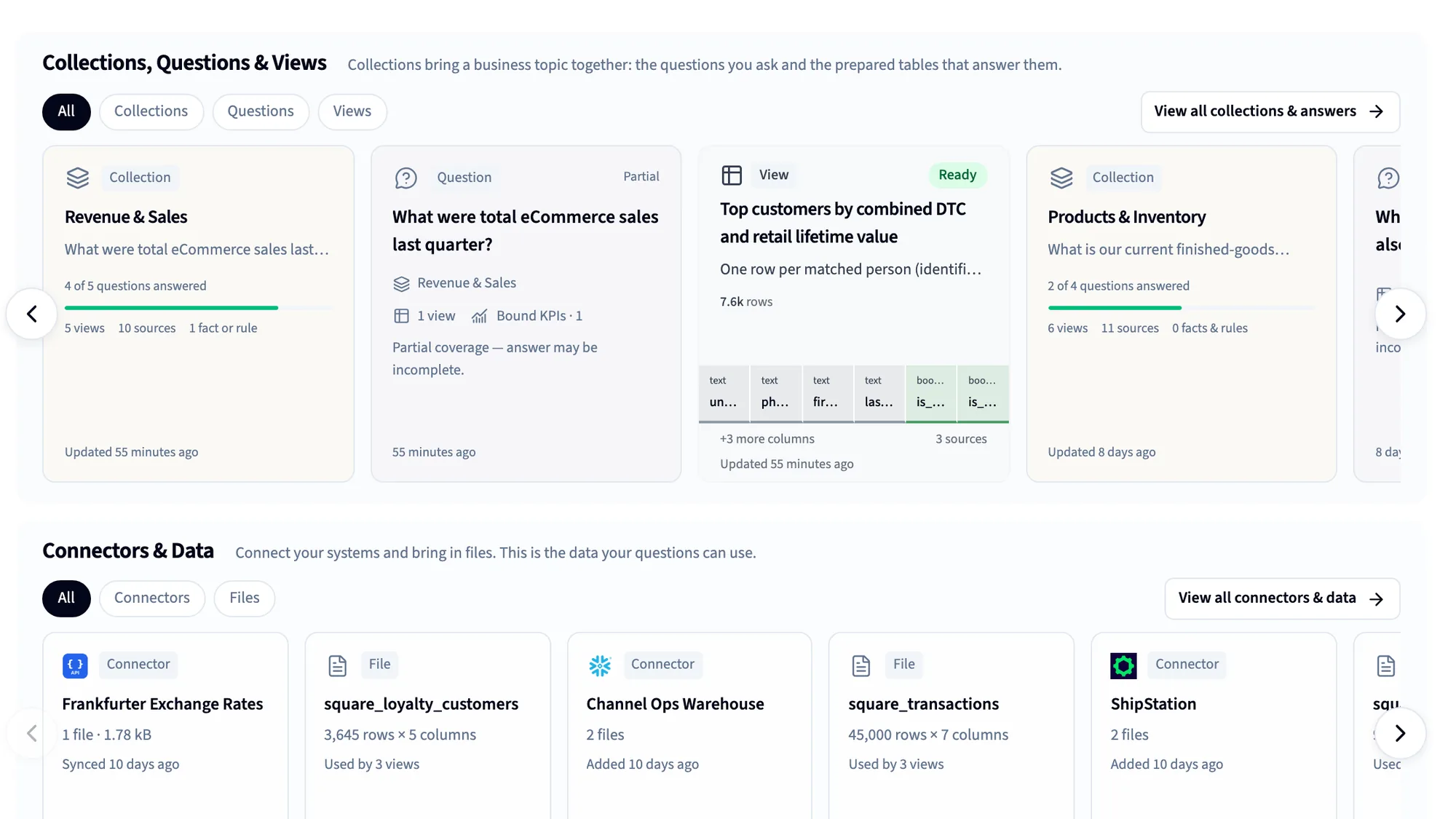
125+ connectors
CRM, accounting, ERP, payments, ads and databases, plus spreadsheets and files.
Automatic data cleaning
More than 180 checks on every table, and the Janitor to fix what they find.
The Library
A business-first semantic layer: definitions, KPIs and rules, taught by saying them.
Dashboards
Built by asking or from a screenshot, shared with unlimited viewers.
Nightly insights and Monitors
Querri works through your data overnight and shows what changed.
MCP for Claude and ChatGPT
Every assistant answers from the same definitions, under each person's access.
Reports and Excel
Scheduled projects, formatted workbooks and decks, delivered for you.
White label and embed
Bring the same understanding inside your own product, under your brand.
Using both
How Qlik and Querri work together
Plenty of teams will run both, and that's a good setup. Keep Qlik for the apps and dashboards your company already relies on, and let Querri be where people ask the questions those apps weren't built for, including the ones still worked out in Excel. Querri doesn't read Qlik apps. It connects to the same sources underneath them, and to the files people export.
Keep in Qlik
- The apps and dashboards headquarters runs on
- Associative exploration of large data models
- Data integration and change data capture
- On-premises and regional deployments
Do in Querri
- Questions no Qlik app was built for
- Spreadsheets and systems that never made it into an app
- Definitions the business owns, in plain language
- AI answers in Querri, Claude and ChatGPT
How they fit together
-
Querri has no Qlik connector and doesn't read Qlik apps. It connects to the sources underneath them where it has a connector, such as SQL Server, PostgreSQL, Snowflake, Salesforce or NetSuite, and syncs a copy on the schedule you set.
-
Excel and CSV files exported from Qlik upload directly, up to 2 GB each, and Querri finds the table inside a messy sheet and remembers where it was next month.
-
Both Qlik and Querri run MCP servers, so Claude or ChatGPT can reach both: Qlik for the governed apps, Querri for everything else, each under the person's own access.
-
Querri never writes back to your sources, and your data is never used to train any model.
FAQ
Questions people ask when comparing Querri and Qlik
How much does Qlik cost in 2026?
Qlik Cloud Analytics is priced on data capacity and billed annually: Starter from $300 a month for 10 users and 10 GB, Standard from $825 a month with unlimited users and 25 GB, Premium from $2,750 a month with 50 GB, and Enterprise by quote from 250 GB. Vendr reports a median contract of $43,988 a year. Querri is one predictable plan with AI and dashboards included; see current plans.
Is Qlik priced per user?
Not on Qlik Cloud Standard and above, which have no charge for additional users. Starter includes 10 users. The meter is data for analysis: the gigabytes you store and reload, measured as a daily peak, with overage billed monthly above your plan.
What happens when you go over Qlik's data capacity?
On Standard and above, access continues and overage is calculated and billed monthly, up to 10 times your purchased capacity, with alerts at 80%, 90% and 100%. On Starter, capacity is fixed: at the limit you can't import or reload apps or add data files. In Querri, there are no automatic overage charges, and admins can set a monthly limit for any person.
Does Qlik have AI and an MCP server?
Yes. Qlik Answers and the Qlik MCP server have been generally available since early 2026, the Discovery Agent since February, and Predict and Automate agents launched in June. The MCP server works with Claude, ChatGPT and GitHub Copilot. These are real products, and they answer from Qlik apps, so the quality depends on how well those apps are built.
Does Qlik Answers work in Spanish or other languages?
Qlik's documentation says Qlik Answers is offered and supported in English only, with other languages available as a preview. Querri runs in English, Spanish, French, German, Portuguese, Arabic and Hindi, and its explanations follow the language each person picks.
Do I need coding skills to use Qlik?
Not to explore a finished app or ask Qlik Answers about it. Building apps takes load scripts, data modeling and set analysis in Qlik's own scripting language, which is specialist work. Querri needs no scripting: ask in plain language, and Querri shows you the query it ran.
Is Qlik good for small businesses?
Qlik Cloud Starter, from $300 a month for 10 users, puts Qlik in reach of a small team, with a fixed 10 GB of data. The harder part is building the apps, which usually takes a Qlik developer or a partner. Querri starts free, connects your systems and spreadsheets directly, and needs no app to be built first.
What's the best Qlik alternative for teams without Qlik developers?
One that doesn't need a load script and a data model before the first answer. Querri connects your systems, cleans the data automatically, learns your definitions in plain language and builds dashboards by asking, on one predictable plan. Many teams run it alongside Qlik rather than instead of it.
How does Qlik's associative engine compare to Querri?
The associative engine is Qlik's signature: click any value and every chart shows what's related and what's excluded, with no predefined query path. It works on the data a developer has loaded into an app. Querri starts from plain-language questions across all your connected data, works out how the tables relate, and shows the query behind each answer.
Can Querri connect to Qlik?
No. Querri has no Qlik connector and doesn't read Qlik apps. It connects to the same databases and systems underneath them where it has a connector, and it reads the Excel and CSV files people export from Qlik.
Is Querri a replacement for Qlik?
We don't recommend starting there. Keep Qlik for the apps your company relies on, and use Querri for the questions those apps weren't built to answer, especially the ones worked out in spreadsheets. For enterprise data integration, on-premises deployment or associative exploration of large models, Qlik is the stronger platform.
Qlik vs Power BI vs Querri: which should I choose?
Qlik and Power BI are both established BI platforms built around developers who model data and build reports: Qlik prices by data capacity with unlimited users from Standard, Power BI mostly per user. Querri takes a different approach, with plain-language questions, one shared Library of definitions for every person and AI assistant, and one predictable plan you can start free.
Is QlikView end of life?
Qlik hasn't announced an end of life for QlikView. Support for specific versions ends on set dates: QlikView 12.90 support ends October 31, 2026, and 12.100 support ends September 30, 2027, per Qlik's lifecycle page. An upgrade or migration is a good moment to ask which teams are still waiting for answers.
Can I try Querri on my own data first?
Yes. You can start on the free plan with no credit card, connect a source and ask. See plans for what each includes. Or bring your hardest question to a 20-minute walkthrough.
Sources
Where these facts come from
Checked October 15, 2026. Qlik updates pricing and products often; if something here is out of date, tell us and we'll fix it.
- Qlik Cloud Analytics pricing (plans, capacity, users, overage FAQ) Qlik
- Qlik Cloud capacity-based subscriptions (overage, alerts, Starter limit) Qlik Help
- Subscription value meters: data for analysis Qlik Help
- Monitoring consumption (Data Capacity Reporting App) Qlik Help
- Qlik Answers (sources, English-only support, app preparation) Qlik Help
- Deploying and administering Qlik Answers (question quotas) Qlik Help
- Qlik MCP Server (70+ tools; Claude, ChatGPT, GitHub Copilot) Qlik Help, Oct 2026
- Qlik brings agentic analytics to general availability and launches MCP server Qlik, 2026
- Qlik extends analytics from answers to agentic action (Discovery Agent, semantic layer) Qlik, Apr 2026
- Qlik product releases, June 2026 (Predict Agent, Automate Agent, verified definitions) Qlik, Jun 2026
- Introducing Agentic Data Engineering Qlik Community, Jun 30, 2026
- Qlik brings agentic data engineering to Qlik Cloud (republished Qlik release) ABES, Jul 2026
- Connecting to SAP sources (Qlik Talend data integration) Qlik Help
- QlikView product lifecycle Qlik Community, updated Jul 10, 2026
- Qlik contract data (median contract, discounts) Vendr, Feb 2026
- Qlik agentic AI services (app readiness for Qlik Answers) element61 (a Qlik partner)
- Best Qlik Sense alternatives in 2026 Rework, Aug 2026
- Qlik Sense pricing and costs (user reviews) PeerSpot, Jan and Jul 2025
- Qlik Sense reviews from G2 G2 reviews via AWS Marketplace, Nov 2025 to Jun 2026
- Qlik Sense pricing guide Mammoth (sells a competing product), Sep 2026
- BI developer with Qlik Sense skills salary PayScale, Apr 2026
- Querri pricing Querri
- Predictable credit use Querri docs
See your own data answer before you commission another app
Connect a system or drop in a spreadsheet, ask the question that matters most, and see the query behind the answer. If Qlik is the better fit, we'll tell you.