Your CRM and your TMS,finally in the same conversation.
Querri joins Salesforce or HubSpot with your TMS and the books, so sales leaders see which effort turns into loads and margin, pay commission that ties to what got paid, and point reps at the lanes you win.
One minute: sales effort against freight, the Freight sales desk blueprint, and what else your sales data answers.
One view of the sales floor
Four systems. One set of sales numbers.
Calls and accounts sit in the CRM, loads and lanes in the TMS, payments in the books and plan rates in a sheet. Querri reads all four and defines net revenue once, so the sales review, the commission run and finance's books use the same figures.
CRM activity and accountsSalesforceHubSpot
TMS loads and lanesYYour TMS
Invoices and paymentsQuickBooksNetSuite
Commission planExcelGoogle Sheets
Defined once
Net revenue by rep, April to September
Rep
Paid loads
Net revenue
Per load
J. Ortega
180
$123,977
$689
M. Chen
111
$60,745
$547
R. Patel
91
$43,624
$479
S. Okafor
74
$30,826
$417
Sample data: Ridgeline Freight, a fictional freight brokerage. Net revenue is after carrier bills.
Where brokerage sales leaders start
Three answers the sales review needs every week
These are good first jobs, not the whole list. Once the CRM, loads, payments and the plan are in, the same definitions answer whatever you ask next.
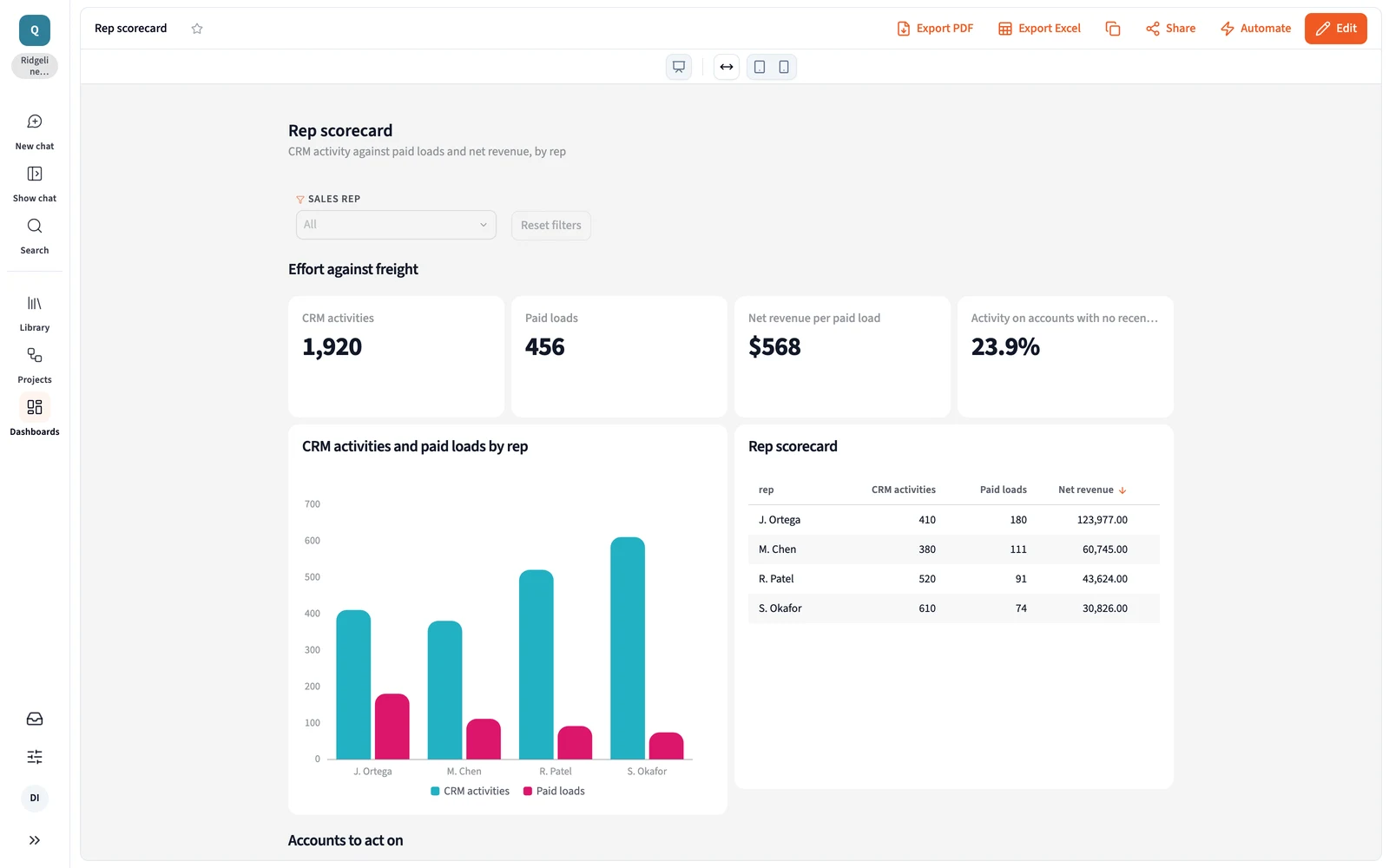
Sales effort, matched to loads and margin.
“Does the sales effort show up in the loads and the margin?”
How it's done today
Activity reports from the CRM in one tab, a TMS export by rep in another, and a guess at which calls turned into freight.
In Querri
Querri joins calls, meetings and account owners in Salesforce or HubSpot with loads and net revenue from the TMS, by rep and account. It shows accounts getting calls but no loads, and loads earning margin with nobody working the account.
Sample data, April to September. S. Okafor logs the most activity and earns the least per load: 38% of his activity goes to accounts with no load in the last four weeks.
Commission that ties to the books.
“What does each rep earn on loads invoiced and paid, rebills included?”
How it's done today
Commission worked out from a TMS export and a plan sheet, then worked out again when a rebill or short pay lands.
In Querri
Querri takes each rep's loads from the TMS, the paid month and any short pay from QuickBooks, and the plan rate from your sheet, and works commission on what was collected. Every line opens to the loads behind it, so the support pack answers the rep's question before they ask.
Sample data. $48,754 on 456 paid loads; 8 short pays ($1,680) came off the base before commission.
The lanes you run well, and who ships on them.
“Which lanes do you run well, and which prospects ship on them?”
How it's done today
Lane margin from a TMS report, a prospect list from the CRM, and the match made from memory.
In Querri
Querri ranks lanes by loads and net revenue per load from the TMS, then finds the accounts and prospects in Salesforce or HubSpot that ship on them, with owner and last activity. Reps get a list of who to call about freight you already move well.
Your busiest strong lanes and the prospects on them
Net revenue per load
Lakeland, FL to Ontario, CA$1,064
Los Angeles, CA to Charlotte, NC$1,059
Allentown, PA to Salt Lake City, UT$850
Lane
Loads
Net revenue per load
Prospects in CRM
Lakeland, FL to Ontario, CA
53
$1,064
7
Los Angeles, CA to Charlotte, NC
48
$1,059
5
Allentown, PA to Salt Lake City, UT
23
$850
3
Sample data. 15 prospects in the CRM ship on lanes Ridgeline already runs at 13% margin or better.
Effort against freight is one view. Ask next about new shippers by rep, accounts gone quiet or net revenue by division. See how asking works →
More than a sales report
One set of definitions, for every report and every AI agent
The three jobs run on the same foundation as everything else in Querri. Define a number once, and every dashboard, commission statement, sales review and AI answer uses it.
The Library
Teach it once. It stays right.
Say what counts as net revenue, when a load counts as paid and how rebills land, and every answer after that uses it. The sales review, the commission run and finance's books finally agree.
Click a rep's commission to see each load, the payment and the plan rate behind it, with when they refreshed. When a question has two reasonable readings, Querri tells you, and when it can't answer, it says what's missing.
Sales leaders and reps ask in plain language and get the table, the chart and how it was worked out. Answers go out as workbooks and slides, or come into your AI assistant, under each person's own access, so each rep sees their own accounts.
Monitors judge each rep's net revenue per load and each account's loads against their own history and say which one moved, not just that the total did. Every night Querri works through your data and leaves what it found in your Inbox. Nothing changes without your OK.
Four steps from sign-up to your own sales desk. Here is everything that installs, ready to ask questions of and make your own.
1
Sign up free
No credit card. Your own workspace is ready in about a minute.
2
Install Freight sales desk
Open Blueprints, pick the card and install it. Sample data comes with it, so every page has numbers right away.
Freight sales desk23 pieces
3
Keep the sample, or connect your data
Connect Salesforce or HubSpot, QuickBooks and your TMS, and upload the commission plan. An agent sets up each connection with you.
4
Open your Sales desk
Effort against freight, commission by paid month and the prospects on your best lanes on one site.
Open your Sales desk
Every rep's activity against loads and net revenue, in the Freight sales desk blueprint (Ridgeline Freight sample data).
Everything that installs
4 Site pages
Sales desk
Effort against freight
Commissions
Lanes and prospects
Definitions
3 Dashboards
Rep scorecard
Commissions
Lane opportunities
4 Views
Rep activity by account
Loads by rep and account
Commission base
Lanes by net revenue per load
3 KPIs
Net revenue per load
Collected margin
Commission owed
3 Skill and monitors
Commission support pack
Rep net revenue watch
Quiet accounts watch
Commission is worked on loads invoiced and paid, after short pays, at each rep's plan rate for the month paid. Loads, Load margin, Billing status, Customer invoices and Commissions also install, with the Freight sales collection, two saved questions and the Weekly sales review project.
How Querri compares with the other ways sales leaders get these numbers
Most brokerage sales teams already have CRM and TMS reports, a commission spreadsheet, a data team's queue or an AI assistant. Here is where each fits, where it stops, and how Querri works alongside it.
Querri
CRM and TMS reports
A warehouse and a data team
An AI assistant you wire up yourself
Time to the first answer
Minutes on sample data from the blueprint, then on your own
Right away, inside each system
Months: pipelines, models, then dashboards
A first demo in a day
CRM, loads and payments together
One Library, from 125+ connectors and file uploads
The CRM has the calls; the TMS has the loads
Once each source is piped in and modeled
One connector at a time, joined in the chat
A question nobody built a report for
Ask it in plain words
Its reports, or an export to Excel
Joins the data team's queue
Ask it in plain words
Commission that matches the books
Worked on loads invoiced and paid, from one net revenue
Worked from the TMS, then redone after rebills
Once someone models the plan
Per person, rebuilt each month
Where a number came from
Click any number to see its loads, payments and plan rate
In the report's filters
In the SQL, for whoever can read it
In the chat, worked out fresh each time
Watching for changes
Monitors on each rep and account against its own history
Reports you run at each review
Through a BI or alerting tool on top
Scheduled tasks someone writes and keeps working
Logging calls, quoting and booking loads
Not Querri's job. Keep your CRM and TMS
Their core strength
Not its job
Only if someone builds it
How it works with Querri
Reads from all three, plus the CRM, the TMS and the books
Keep them for daily work. Querri reads them side by side
Querri connects to it and puts the answers in front of sales
Use both. Querri works inside the assistant, on the same definitions
The right call on its own when
Your sales numbers cross the CRM, the TMS and the books
The question lives inside one system
A staffed data team already models freight and CRM data
It's a one-off look at a spreadsheet
Approaches, not products: what each typically looks like in late 2026.
Freight brokerage sales analytics and commission: common questions
How do freight brokerage sales leaders see whether CRM activity turns into loads and margin?
Querri joins calls, meetings and account owners in Salesforce or HubSpot with loads and net revenue from the TMS, by rep and account. The sales review shows which reps' accounts get calls but no loads, and which loads earn margin with nobody working the account. Net revenue is defined once, so the numbers match what finance books. See every connector →
How can a freight brokerage pay commission on loads that were invoiced and paid?
Querri takes each rep's loads from the TMS, the paid month and any short pay from QuickBooks, and the plan rate from your commission sheet, then works commission on what was collected. Rebills and short pays flow through on their own, and every line opens to the loads behind it, so the support pack is ready before payroll. Skills →
Can Querri show which prospects ship on the lanes a brokerage runs well?
Yes. Querri ranks lanes by loads and net revenue per load from the TMS, then matches accounts and prospects in Salesforce or HubSpot that ship on those lanes, with owner and last activity. Reps get a call list built on freight you already move at a good margin, not on a guess. See how asking works →
Does Querri work with both Salesforce and HubSpot for freight brokerage sales?
Yes. Querri connects to Salesforce and HubSpot read-only, and an agent sets up the connection with you. Accounts, owners, calls, meetings and opportunities sit beside loads from your TMS and payments from QuickBooks or NetSuite, so each rep's activity, freight and commission come from one set of definitions. Salesforce →
What does Querri add if our TMS already reports margin by rep?
TMS rep reports show loads and margin by rep, and they stop there. Querri adds the CRM and the books, so the same review shows the calls behind the freight, the margin after carrier bills and the commission on what got paid. Net revenue is defined once, so the sales review and finance's numbers match, and nobody argues about which report is right. The Library →
Is it safe to connect Salesforce, HubSpot and QuickBooks to Querri?
Yes. Querri's connectors are read-only, so Querri never changes a record in your CRM, your TMS or your books, and an agent sets up each connection without ever seeing your passwords. Each organization has its own database and storage, encrypted with AES-256 at rest, and your data, prompts and results never train any model. Querri is SOC 2 Type II, HIPAA and ISO 27001:2022 certified. Visit the Trust Center →
What does a brokerage sales team connect first to get started with Querri?
To get started with Querri, a brokerage sales team connects Salesforce or HubSpot and its TMS, then adds QuickBooks and the commission plan for commission on what got paid. The Freight sales blueprint opens on sample data first, with activity against freight by rep, commission by paid month and the prospects on your best lanes, then runs on your own numbers. Sign up and open the blueprint →
Do I need a credit card to try Querri for freight sales reporting?
No. Querri is free to start, and no credit card is required. When you sign up, the Freight sales blueprint opens on sample data with every rep's activity against loads and net revenue, so you can see how it works before you connect your CRM. Current plans are on the Querri pricing page. See pricing →
Playbooks
Three reports sales leaders rebuild by hand
Step by step, with sample data, for the person who builds the report.
Playbook coming
Sales effort against loads and margin, by rep
Does the sales effort show up in the loads and the margin?
Playbook coming
Commission on loads invoiced and paid
What does each rep earn on loads invoiced and paid, rebills included?
Playbook coming
Prospects on the lanes you run well
Which lanes do you run well, and which prospects ship on them?
From the blog
For the sales leader
What to do once you have the answer.
Article coming
Calls that never turn into freight
Spot them in the weekly review.
Article coming
Commission reps don't argue with
Tie it to what got paid.
Article coming
Sell the lanes you already run well
Point reps at the shippers on them.
Start with every rep's effort, matched to freight.
The Freight sales blueprint opens when you sign up. Connect Salesforce or HubSpot and your TMS, and every rep lands on one list with activity, loads and net revenue side by side. Then ask what you'd ask next.
 Salesforce
 HubSpot
 QuickBooks
 NetSuite
 Excel
 Google Sheets