How do we consolidate our entities and eliminate intercompany without a consolidation system?
Keep exchange rates and elimination rules in one workbook. Querri translates every entity's ledger to US dollars, eliminates intercompany, lists the pairs that don't agree, and follows the final rates you enter at close.
Open QuerriWhat you'll need
Querri (Free trial) to translate, eliminate and reconcile
A ledger export and a settings workbook: Step 1 says what each needs to hold
A counterparty on intercompany rows: so each charge can find its other side
Free resources
Start your free trial here →Sample data sets
Synthetic data for a made-up group with three entities. The exchange rates are invented too. Not real financial data.
Need help?
If you have any questions, you can request a demo or email our team.
Before we begin
Three entities, three currencies, and a management fee between them. Every month someone exports three ledgers, converts two of them, nets out what the entities charged each other, and hopes both sides booked the same amount in the same month.
This playbook does that from one ledger export and one workbook of settings, and shows which intercompany pairs don't agree.
How it works:
- • Upload the ledger and the settings workbook
- • Translate every entity to US dollars
- • Eliminate intercompany and reconcile the pairs
- • Enter the final rates, then lock the workbook
- • Put the group P&L on a dashboard and watch the breaks
Follow the steps
Upload the ledger and the consolidation settings workbook
Two files, one workspace:
- •
Actuals ledger (NetSuite, QuickBooks or any accounting system): monthly actuals for every entity in its own currency. Intercompany rows name the other entity in a counterparty column.
- •
Consolidation settings workbook: three tabs: month-average exchange rates, the entity list, and the pairs of intercompany accounts that cancel out, each with a tolerance.
The rates and rules sit in a workbook because finance owns them and changes them at every close. Prefer live data? Querri connects to your accounting system and your spreadsheets directly.
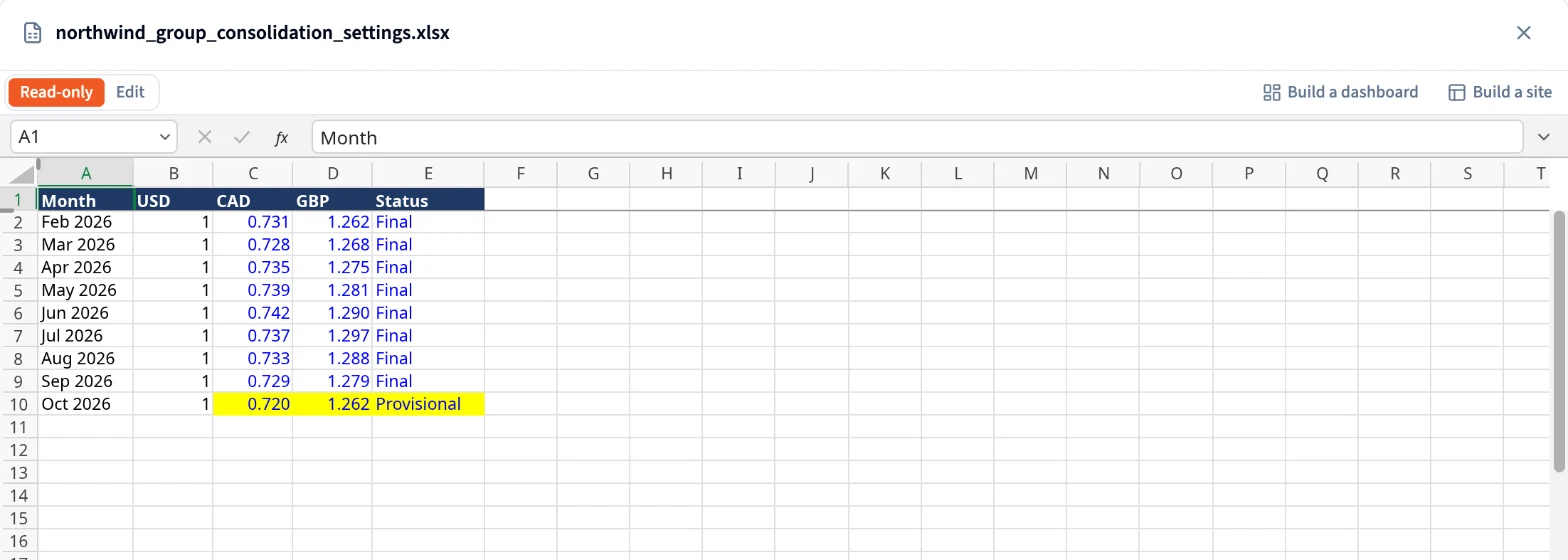
Tip: Mark the latest month's rates Provisional until the month-average is final. Querri read that status and said October's figures might still change.
-
 NetSuite ledger
-
 QuickBooks ledger
-
 Any ledger export
- Settings workbook
 One project
Translate every entity to US dollars
A group total needs one currency. Ask for a View that carries each ledger row with its local amount, that month's rate and the US dollar amount, and have Querri report any row with no rate:
"Build a View called FY27 Actuals in USD by month: every ledger row translated to US dollars at that month's average rate from the Rates tab. Keep the local amount, the rate and the USD amount, and report any row with no rate. Then show revenue, expenses and operating income in USD by entity, with a group total."
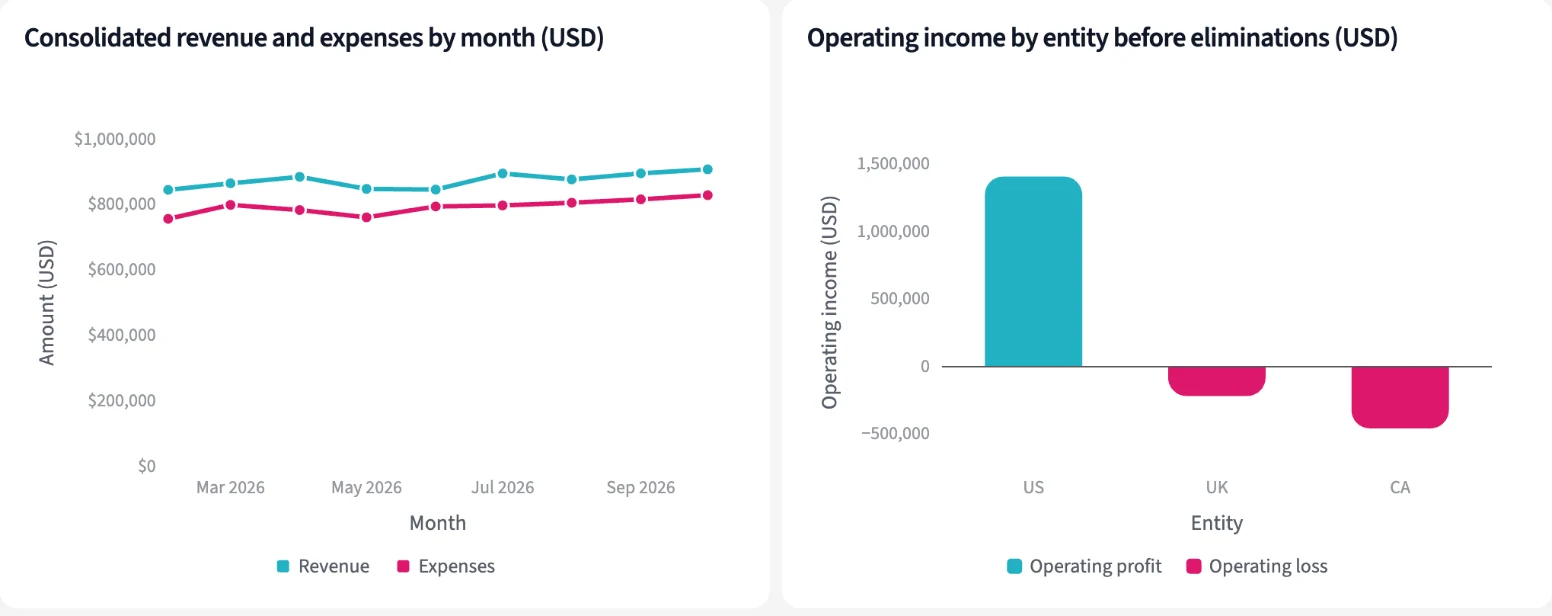
All 486 ledger rows found a rate, and 54 of them are intercompany. Added up, the three entities show 723,774 of operating income. Both lines are overstated, because what the entities charged each other is still in them.
| Entity | Revenue | Expenses | Operating income |
|---|---|---|---|
| US | 5,311,507 | 3,907,199 | 1,404,308 |
| CA | 1,534,983 | 1,994,959 | -459,976 |
| UK | 1,383,336 | 1,603,894 | -220,558 |
| Sum of entities | 8,229,826 | 7,506,052 | 723,774 |
February to October 2026 in US dollars, before eliminations. October is at provisional rates.
Eliminate intercompany and reconcile the pairs
Ask Querri to mark a row as eliminated when it has a counterparty and its account is in the Elimination rules tab. Have it report first: any intercompany row with no rule, and every pair and month where the two sides differ by more than the tolerance:
"Build a View called FY27 Consolidated actuals by month. Mark a row as eliminated when it has a counterparty and its account is in the Elimination rules tab. First tell me which intercompany rows have no rule, and list every rule, pair of entities and month where the two sides differ by more than the tolerance. Then show consolidated revenue, expenses and operating income."
53 of the 54 intercompany rows matched a rule. The other is a 1,800 Canadian dollar software recharge with no rule and no entry on the US side. Of 27 pairs and months, 24 agree within 175 dollars and three don't: the UK booked no fee in September and about double in October.
| Pair and month | Charged | Booked | Difference |
|---|---|---|---|
| US to CA, July | 12,000 | 9,966 | +2,034 |
| US to UK, September | 6,000 | none | +6,000 |
| US to UK, October | 6,000 | 11,891 | -5,891 |
The three intercompany breaks, in US dollars, at provisional October rates.
Enter the final rates in the workbook, then lock it
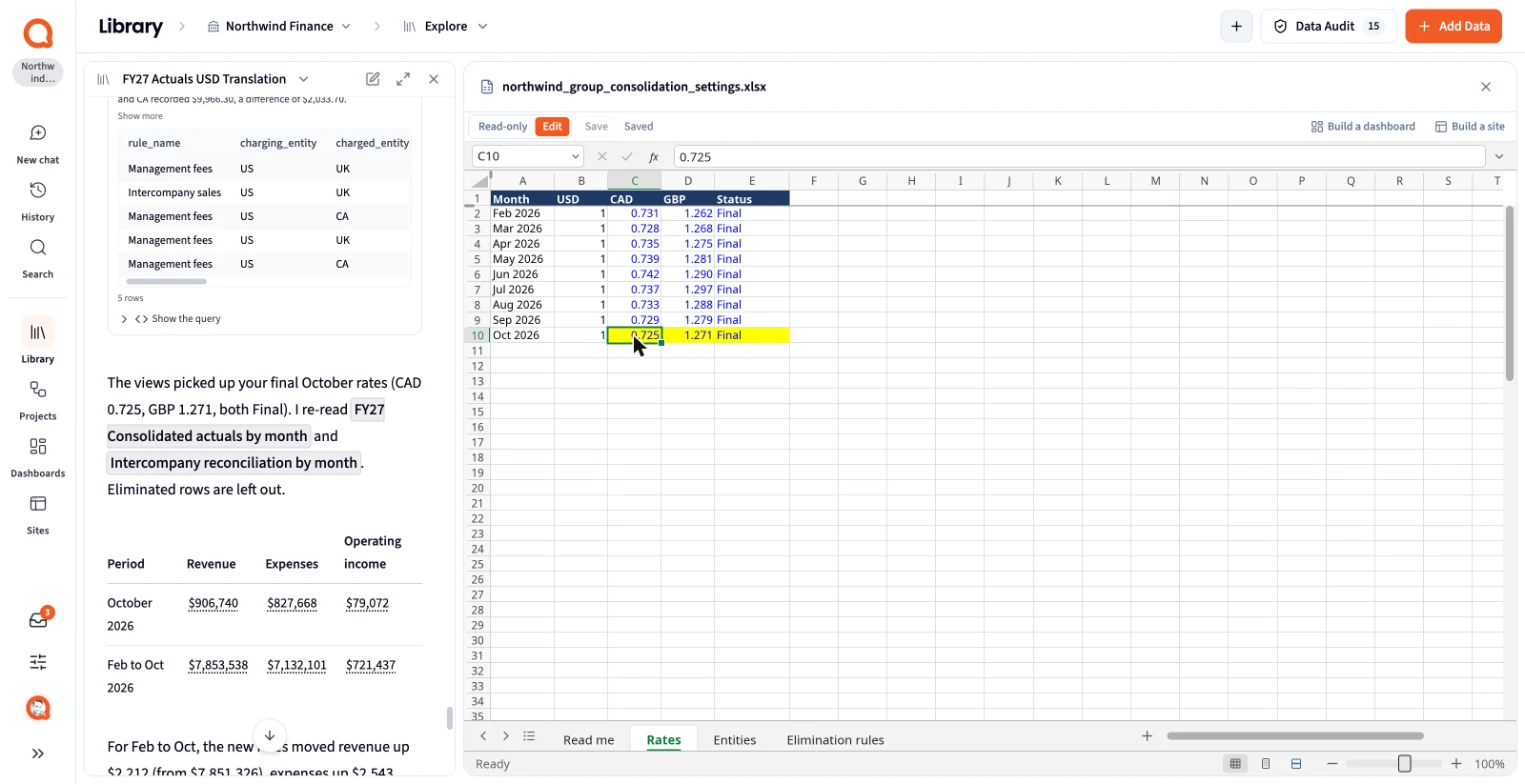
October was translated at provisional rates. When the month-average is final, open the settings workbook in Querri, choose Edit, type the final rates over the provisional ones, change the status to Final and Save. Then ask:
"I entered the final October rates in the settings workbook. Read the consolidated View again: what are consolidated revenue, expenses and operating income for October and for February to October now, and which pairs are still over tolerance?"
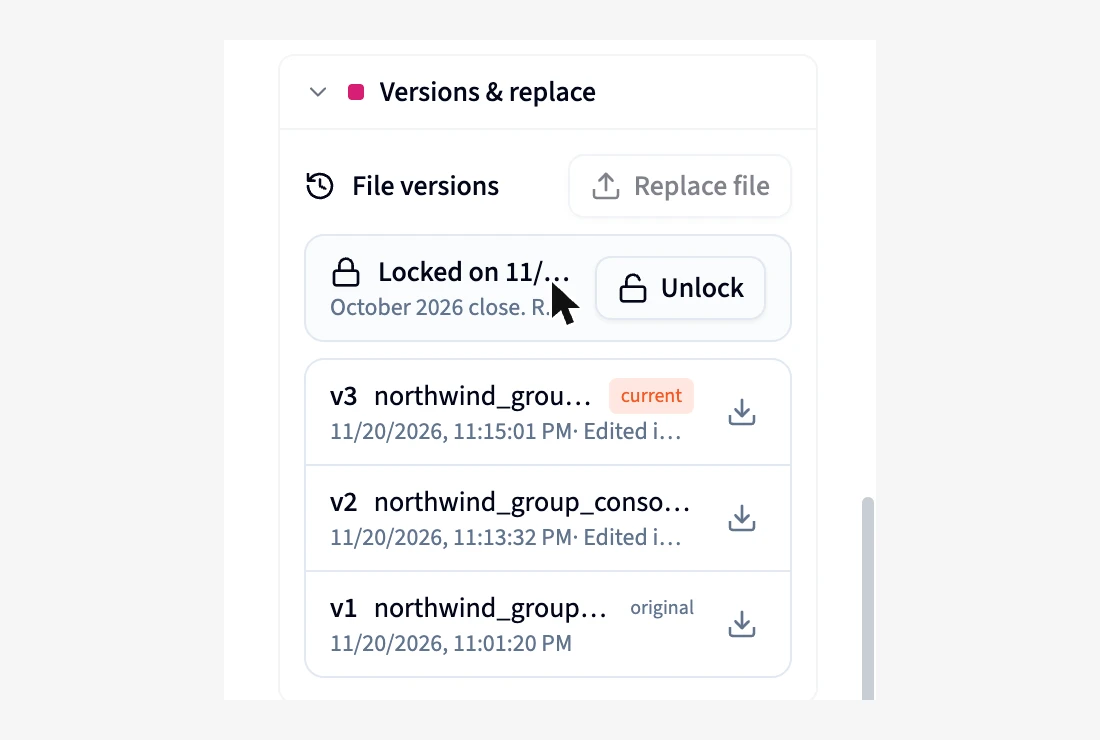
Both Views rebuilt from the saved workbook. The final rates added 2,212 of revenue and 2,543 of expenses, so operating income fell by 331. The three breaks are still breaks, so they're bookings to fix and not exchange rates. Lock the workbook with a note once the close is done.
| Provisional | Final | |
|---|---|---|
| October rates, CAD and GBP | 0.720 and 1.262 | 0.725 and 1.271 |
| Consolidated revenue | 7,851,326 | 7,853,538 |
| Consolidated expenses | 7,129,559 | 7,132,101 |
| Consolidated operating income | 721,767 | 721,437 |
The group P&L for February to October before and after the final October rates.
Put the group P&L on a dashboard and watch the breaks
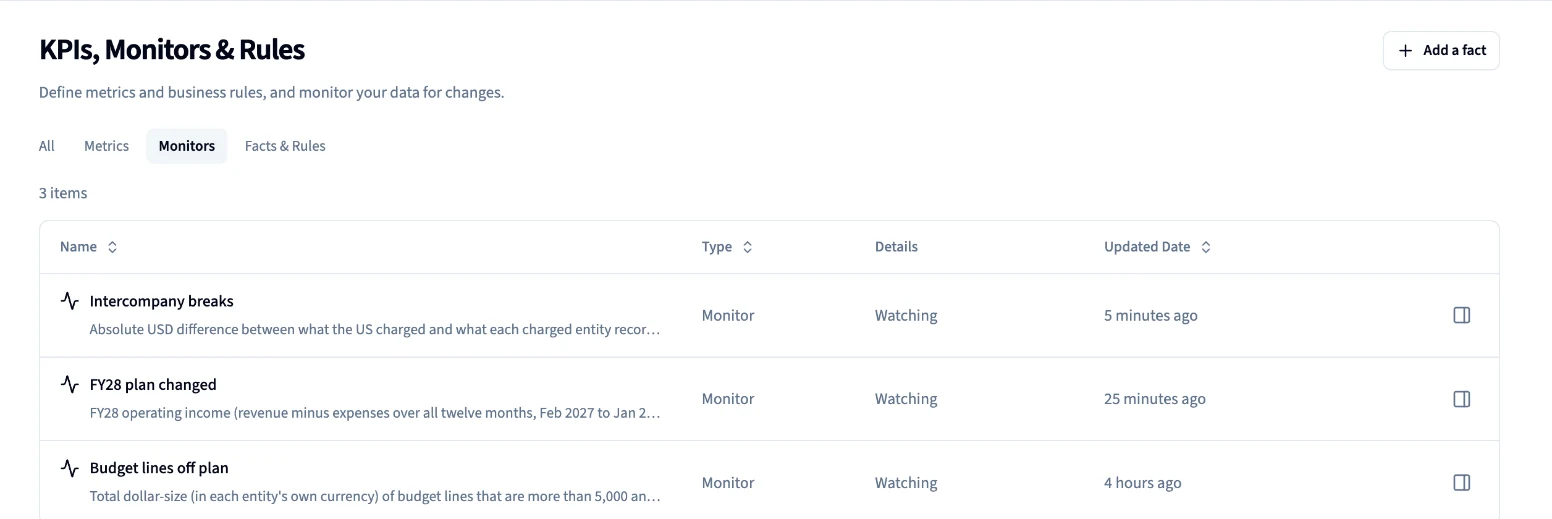
Ask for a dashboard on the consolidated View and the reconciliation View, then a monitor so a new break doesn't wait for month end.
What the dashboard says:
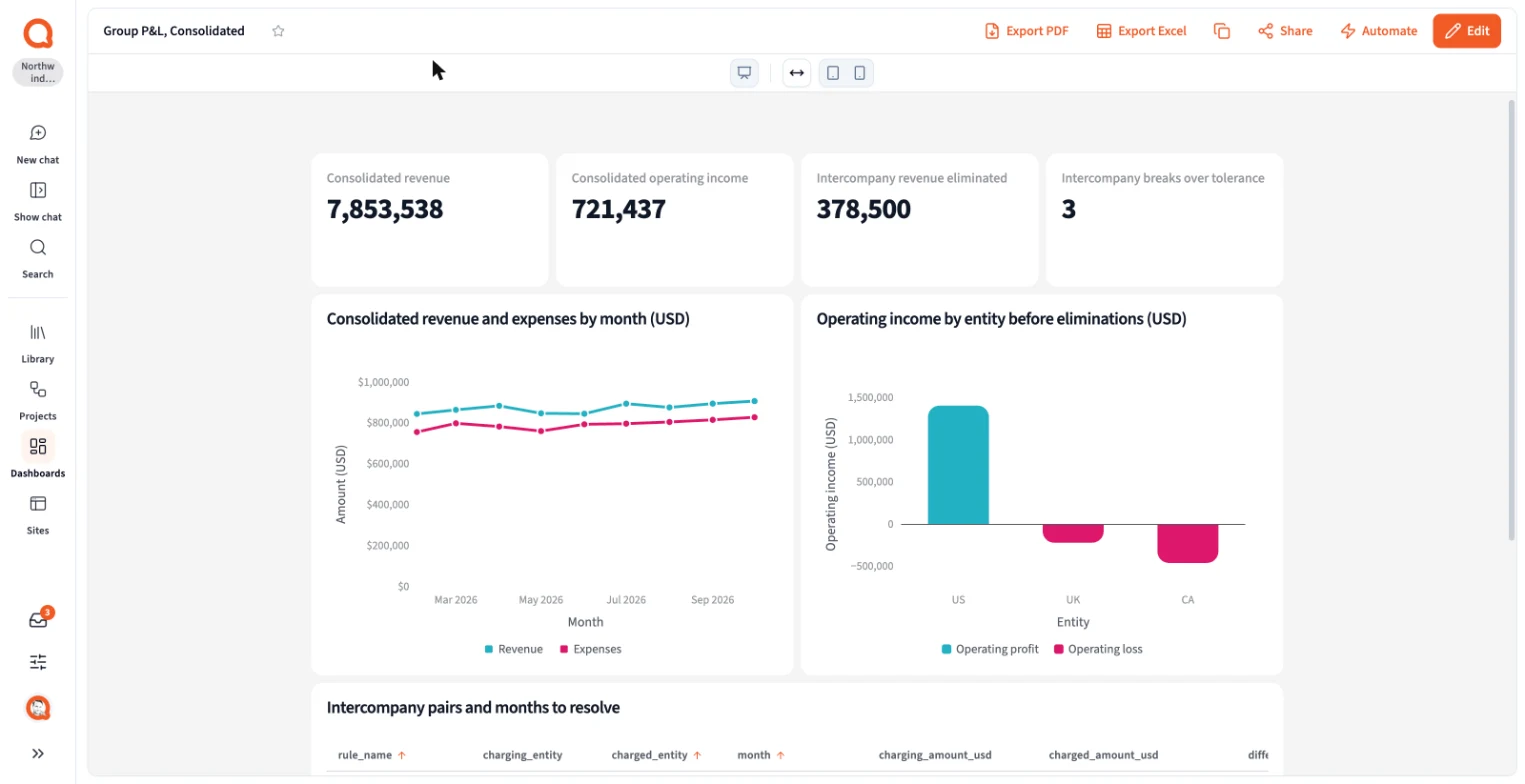
The group made 721,437 on 7.85 million of revenue. The US earns it: Canada and the UK both run at a loss once the management fee is charged.
What you can create or export:
- The consolidated P&L, to Excel, CSV or Google Sheets
- A dashboard that refreshes on a schedule
- A monitor on the reconciliation View, with alerts in the Inbox
- A presentation, to PDF or PowerPoint
| Operating income | |
|---|---|
| US, before eliminations | 1,404,308 |
| CA, before eliminations | -460,380 |
| UK, before eliminations | -220,850 |
| Group, consolidated | 721,437 |
Operating income in US dollars, February to October 2026, at final rates.
Close next month from the ledger and one workbook.
Try it on your own entitiesTips for a consolidation people trust
Keep rates and rules in a workbook finance owns
Two cells changed at close and both Views rebuilt. The rates, the entity list and the elimination pairs are in one file with a version history, not inside a formula nobody can find.
Ask for the rows with no rule before you trust the total
One intercompany row, a 1,800 Canadian dollar recharge, had no rule and no other side. It stayed in the group numbers, and Querri named it before building the View.
Reconcile by pair and month, not for the year
The UK's missing 6,000 in September and its extra 5,891 in October nearly cancel. A year-to-date check would have passed them both.
Change the rate, then see what's left
After the final October rates went in, the October break moved from 5,891 to 5,976 and the other two didn't move. Rate differences were never the cause.
Teach Querri your rules once. Every answer after that follows them.
Which rate applies, what counts as intercompany, how large a difference is a break: say each rule once and Querri applies it to every question on the group's numbers.
Show me how
Say it in chat
Settle a rule in conversation and the Librarian records it as a fact under Facts & Rules, attached to the table it governs. Every later question on that data applies it, whoever asks, and every view built afterwards carries it.
"An intercompany row is eliminated when it has a counterparty and its account is in the elimination rules. A pair is a break when the two sides differ by more than 500 US dollars in a month. Save that as a rule for the consolidated table."
Or bring the document that already says it
Upload your consolidation policy or intercompany agreement like any other file. Querri files a From a document card in the Inbox with the statements it found, each with its page and exact words; tick the ones to keep and they become facts. The rules this playbook depends on:
- Translation: local amount times that month's average rate, in US dollars per one unit of the currency
- Group currency: US dollars
- Eliminated: a row with a counterparty whose account is in the elimination rules
- Break: the two sides of a pair differ by more than 500 US dollars in a month
- No rule: an intercompany row whose account has no rule stays in and is reported
- Operating income: revenue minus expenses
- Rates in force: the current version of the locked settings workbook
"Read our intercompany agreement and propose the rules it states about management fees, recharges and who books what. I'll review them in the Inbox."
Where the rules reach
A rule is attached to the data, not to one person's chat, so it follows the data everywhere:
- • Every question asked in chat, by anyone on the team
- • Every view the Librarian builds on that data
- • Every step of a project, including the code it writes
- • Dashboards and scheduled runs, each time they refresh
- • Claude and ChatGPT, when they ask Querri
You stay in control
Every rule is listed under Facts & Rules next to the data it governs, where you can edit or remove it. Rules from a document wait for your tick in the Inbox, and a Worth remembering card is how Querri offers one it noticed itself. Workspaces and roles decide who can change what. Company-wide rules go in Settings → Customize; the Library is where the rest lives.
The payoff at close
The close meeting starts on the three entries that don't agree, not on whose spreadsheet has the right rate. Changing the tolerance is a sentence, not a rebuild.
Frequently asked questions
Do we need a consolidation system to do this?
Where do the exchange rates come from?
Which rate does the translation use?
What happens when the two sides of an intercompany charge don't agree?
What about an intercompany row that no rule covers?
What happens to the group P&L when a rate changes?
How do we stop changes once the month is closed?
Does the ledger have to be a file?
Does this cover the balance sheet?
Other popular resources
Playbook
Live budget vs actual
How do we run budget vs actual from the budget workbook we already have?
Playbook
Driver-based scenario planning
How do we run Base, Downside and Upside from the plan workbook we already have?
Demo
Request a walkthrough
See Querri in action with your own data.
Pricing
Compare plans
Find the right plan for individuals, teams, or enterprise.