How do we run budget vs actual from the budget workbook we already have?
Keep the budget in its Excel workbook. Querri reads it as a table, joins it to the ledger, and follows every revision you save, with a version history, a lock for the approved budget, a dashboard and a monitor.
Open QuerriWhat you'll need
Querri (Free trial) to read the workbook and build the Views
Your budget workbook and a ledger export: Step 1 says what each needs to hold
The keys both files share: entity, department, account and month
Free resources
Start your free trial here →Sample data sets
Synthetic data for a made-up company with three entities. Not real financial data.
Need help?
If you have any questions, you can request a demo or email our team.
Before we begin
The budget lives in a workbook because that is where the assumptions and formulas are. The trouble starts after it is approved. A copy goes into the reporting pack, someone revises a line in March, and by June nobody is sure which file the variance report was built from.
This playbook keeps one workbook as the source and builds everything else on top of it.
How it works:
- • Upload the budget workbook and the ledger
- • Turn the Budget tab into a View
- • Join the ledger and find the lines to explain
- • Revise a budget cell, then lock the workbook
- • Put it on a dashboard and set a monitor
Follow the steps
Upload the budget workbook and the actuals ledger
Two files, one workspace:
- •
Budget workbook: the Excel file as it is. The Budget tab has one row per entity, department and account, and a column for each month.
- •
Actuals ledger (NetSuite, QuickBooks or any accounting system): monthly actuals by the same entity, department and account.
Both files need the same account codes and entity names. Prefer live data? Querri connects to your accounting system and your spreadsheets directly.
Tip: Give the two files a workspace of their own, so the budget's access and history stay separate from everything else.
-
 Budget workbook
-
 NetSuite ledger
-
 QuickBooks ledger
- Any ledger export
 One project
Turn the Budget tab into a View
A budget tab is wide: one column per month. To compare it with a ledger it has to be long, one row per line per month. Ask for that as a View, a saved table that follows the workbook:
"Build a View called FY27 Budget by month from the Budget tab: one row per entity, department, account and month, with a month date and a budget amount. Leave out the total column. Then give me the full-year budget by entity."
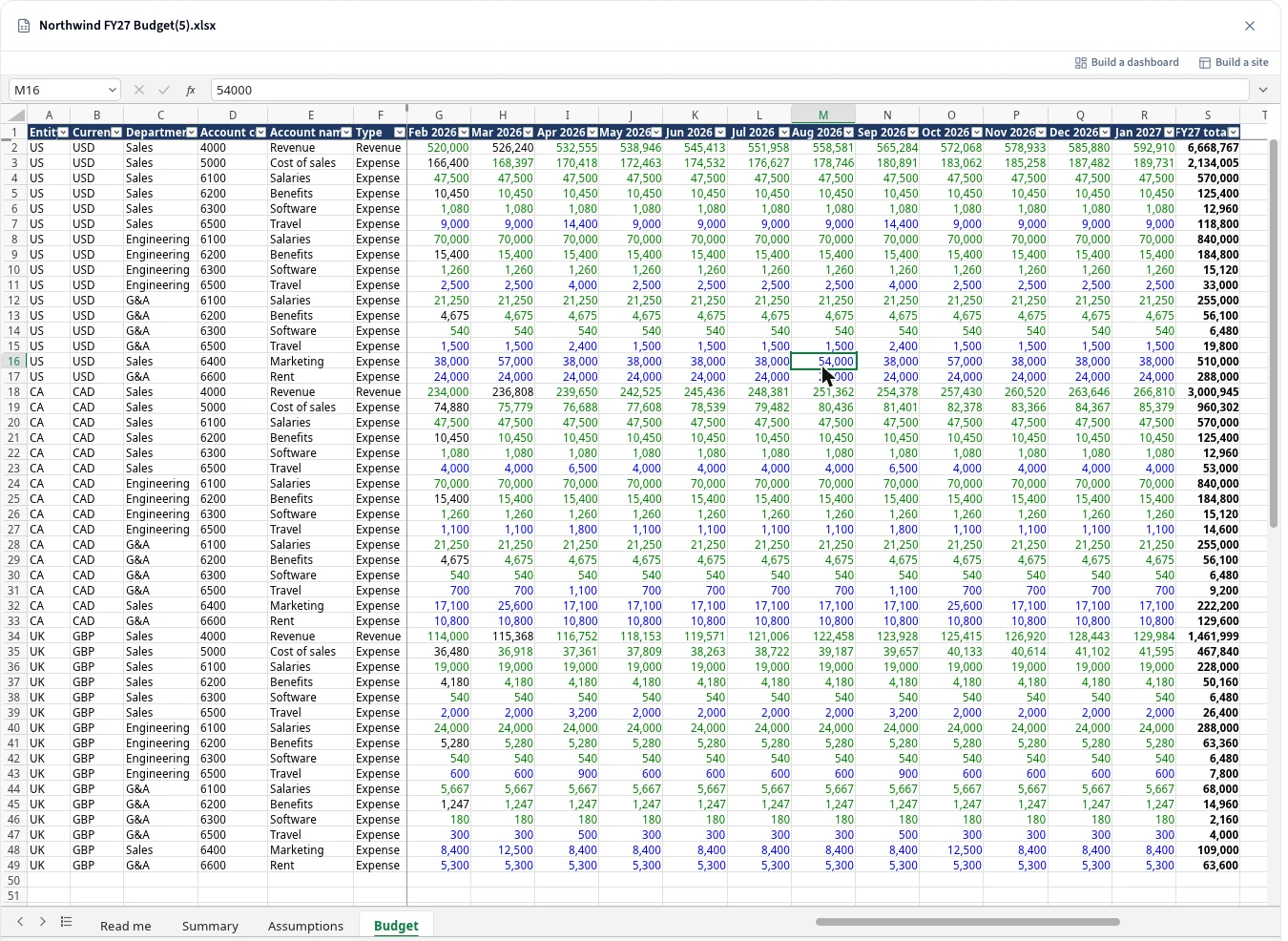
The 48 budget lines became 576 rows. Querri's own check flagged the jump in row count, then explained it: 48 lines times 12 months. Canada budgets more expense than revenue for the year.
| Entity | Revenue | Expenses |
|---|---|---|
| US (USD) | 6,668,767 | 5,153,465 |
| CA (CAD) | 3,000,945 | 3,454,762 |
| UK (GBP) | 1,461,999 | 1,406,240 |
FY27 budget by entity, each in its own currency.
Join the ledger and find the lines to explain
Build a second View that joins budget to actuals, and ask which lines are far enough from budget to need a reason. Test the year to date and each month, because they catch different things:
"Build a View called FY27 Budget vs actual by month, joining the budget View to the ledger on entity, department, account code and month. Tell me how many ledger rows did not match. Then list the lines more than 5% and 5,000 away from budget for February to October, and any single month more than 25% and 5,000 away."
All 432 ledger rows matched a budget line. Three lines pass the year-to-date test, led by Canadian revenue, 5.2% under and slipping since June. The fourth only shows by month: US Marketing was 42% over in August.
| Line | Budget | Actual | Variance |
|---|---|---|---|
| CA Sales revenue (CAD) | 2,209,970 | 2,095,077 | -114,893 (-5.2%) |
| US Engineering salaries (USD) | 630,000 | 664,672 | +34,672 (+5.5%) |
| UK Sales travel (GBP) | 20,400 | 14,417 | -5,983 (-29.3%) |
| US Marketing, August only (USD) | 38,000 | 53,960 | +15,960 (+42.0%) |
The four lines to explain, February to October 2026.
Revise the budget in the workbook, then lock it
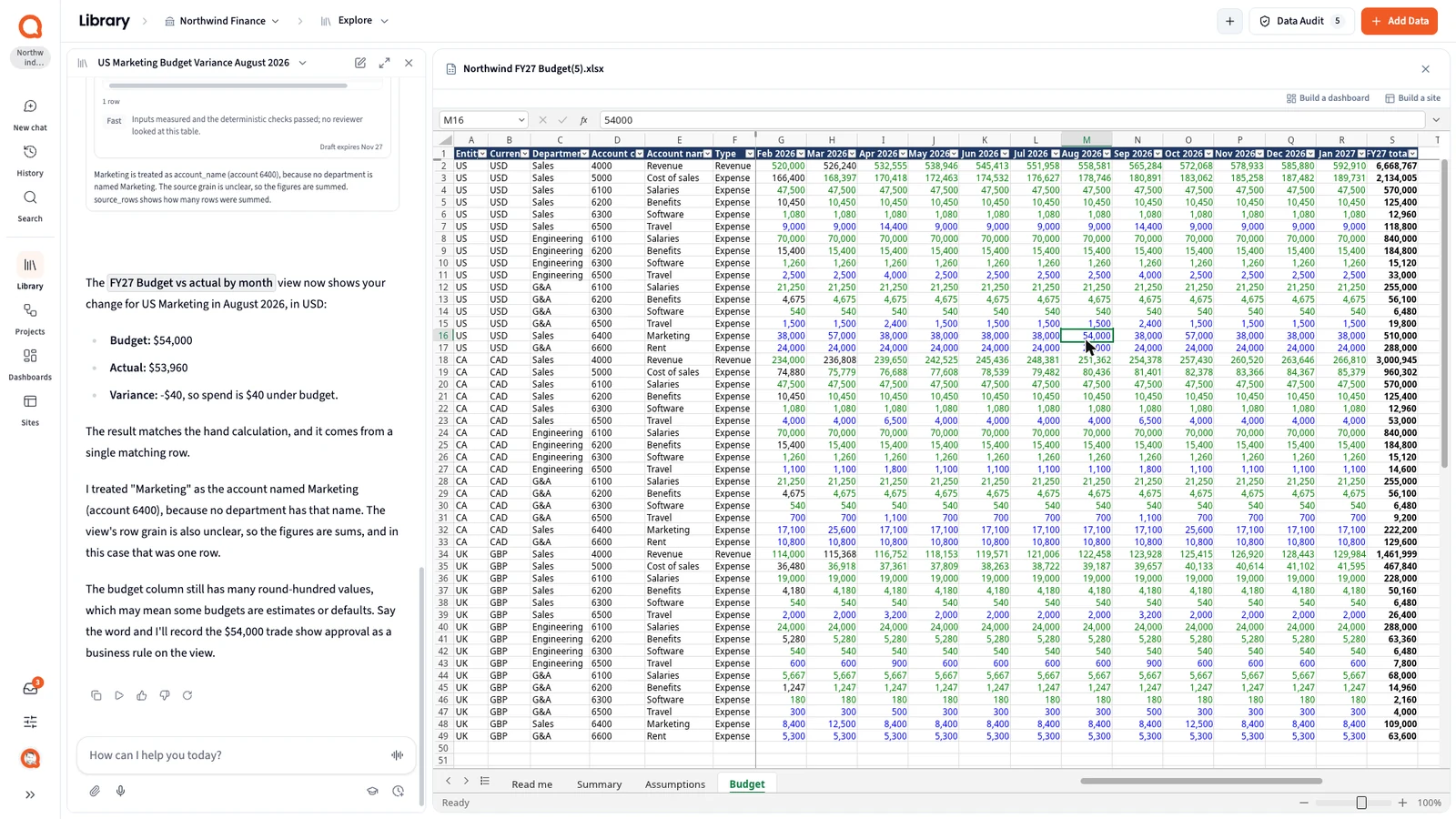
The August overrun was a trade show approved in July. The approval is in someone's email and the budget never changed, so the variance will be explained again every month. Open the workbook in Querri, choose Edit, set US Marketing for August to 54,000 and Save. Then ask:
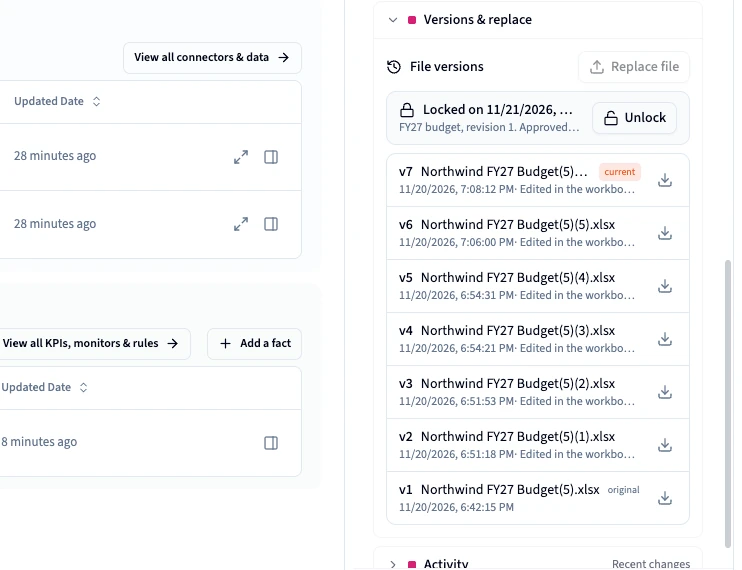
"I raised the US Marketing budget for August 2026 to 54,000 in the workbook. Read the budget vs actual View again: what does that line show now, and what is the US full-year expense budget?"
Both Views read the new number with nothing rebuilt by hand. Every save is a version you can download or restore. When the revision is approved, Lock the file with a note: it can't be edited, replaced or restored until it is unlocked.
| Before | After | |
|---|---|---|
| US Marketing budget, August | 38,000 | 54,000 |
| Variance for that line | +15,960 (+42.0%) | -40 (-0.1%) |
| US full-year expense budget | 5,153,465 | 5,169,465 |
| US expenses vs budget, Feb to Oct | +1.5% | +1.1% |
The same questions before and after one cell changed.
Put it on a dashboard and set a monitor
Ask for a dashboard on the budget vs actual View, then a monitor so nobody has to remember to look.
What the dashboard says:
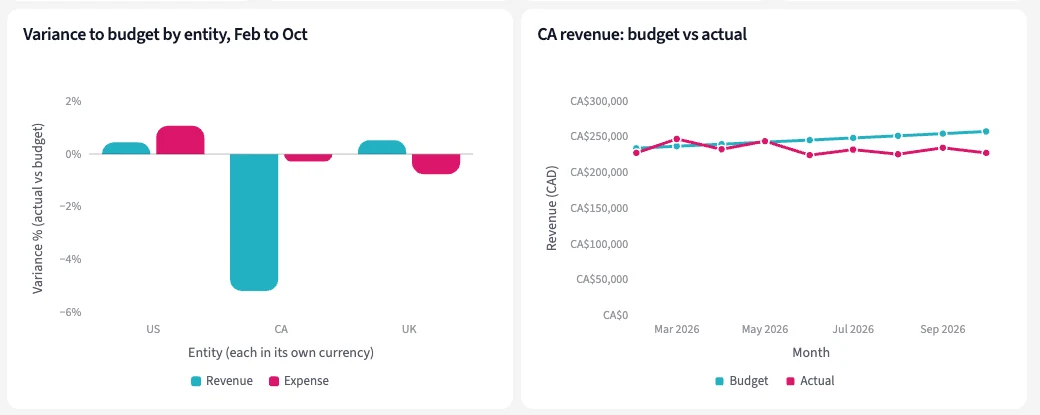
Canada's revenue is the story: 5.2% under budget for the year and 11.7% under in October. US engineering salaries have been over budget every month since July.
What you can create or export:
- The budget vs actual table, to Excel, CSV or Google Sheets
- A dashboard that refreshes on a schedule
- A monitor that alerts in the Inbox when a line goes off plan
- A presentation, to PDF or PowerPoint
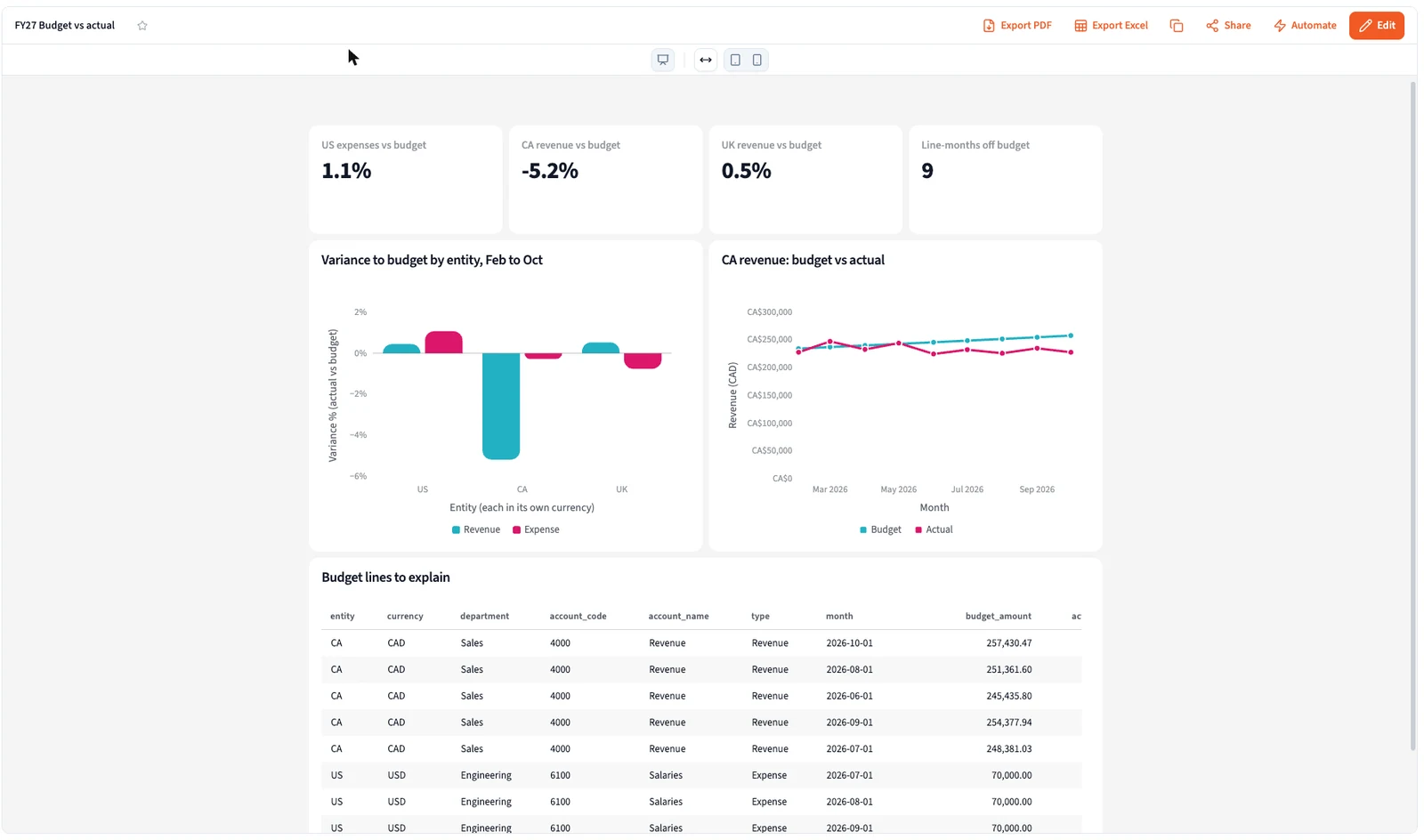

| Entity | Revenue | Expenses |
|---|---|---|
| US | +0.4% | +1.1% |
| CA | -5.2% | -0.3% |
| UK | +0.5% | -0.8% |
Variance to budget by entity, February to October 2026, after the revision.
Run next month's budget review from the workbook you already have.
Try it on your own budgetTips for a budget vs actual people trust
Leave the budget in its workbook
The assumptions and formulas stay where finance built them. The View did the reshaping, 48 lines into 576 rows, and the file was not changed by it.
Check the join before you read a variance
Ask how many ledger rows found no budget line. Here it was none of 432. A new account code that matches nothing would otherwise vanish from the report.
Test each month as well as the year to date
The August marketing overrun was 42% of that month's budget and did not pass the year-to-date test. Three lines passed one test, a fourth passed only the other.
Revise the budget when the plan changes
After the approved 16,000 went into the workbook, the line read 40 under. The original is still there as version one, and the lock note says which revision is in force.
Teach Querri your rules once. Every answer after that follows them.
What counts as off plan, which sign means over, when a revision is in force: say each rule once and Querri applies it to every question on the budget.
Show me how
Say it in chat
Settle a rule in conversation and the Librarian records it as a fact under Facts & Rules, attached to the table it governs. Every later question on that data applies it, whoever asks, and every view built afterwards carries it.
"A budget line is off plan when its variance is more than 5% of budget and more than 5,000 in the entity's own currency. Save that as a rule for the budget vs actual table."
Or bring the document that already says it
Upload your budget policy or the chart of accounts like any other file. Querri files a From a document card in the Inbox with the statements it found, each with its page and exact words; tick the ones to keep and they become facts. The rules this playbook depends on:
- Variance: actual minus budget, so a positive expense variance is an overspend
- Variance percent: total variance over total budget, never an average of monthly percentages
- Currency: each entity in its own currency, never added across entities
- Off plan, year to date: more than 5% and more than 5,000 from budget
- Off plan, single month: more than 25% and more than 5,000 from budget
- Fiscal year: FY27 runs February 2026 to January 2027
- Budget in force: the current version of the locked workbook
"Read our budget policy and propose the rules it states about revisions, approvals and variance thresholds. I'll review them in the Inbox."
Where the rules reach
A rule is attached to the data, not to one person's chat, so it follows the data everywhere:
- • Every question asked in chat, by anyone on the team
- • Every view the Librarian builds on that data
- • Every step of a project, including the code it writes
- • Dashboards and scheduled runs, each time they refresh
- • Claude and ChatGPT, when they ask Querri
You stay in control
Every rule is listed under Facts & Rules next to the data it governs, where you can edit or remove it. Rules from a document wait for your tick in the Inbox, and a Worth remembering card is how Querri offers one it noticed itself. Workspaces and roles decide who can change what. Company-wide rules go in Settings → Customize; the Library is where the rest lives.
The payoff on review day
The budget review stops arguing about which file is right and starts on Canada's revenue. Changing a threshold is a sentence, not a rebuild.
Frequently asked questions
Do we have to move the budget out of Excel?
What happens to the reports when someone changes a budget cell?
How do we stop changes once the budget is approved?
Can we see what the budget was before a change?
How does this handle more than one currency?
Does the ledger have to be a file?
What does the monitor alert on?
What about consolidation and scenario planning?
How often should this run?
Other popular resources
Playbook
Over budget, and why
Which departments are over budget this month, and is it headcount, vendors or timing?
Playbook
Group consolidation
How do we consolidate our entities and eliminate intercompany without a consolidation system?
Demo
Request a walkthrough
See Querri in action with your own data.
Pricing
Compare plans
Find the right plan for individuals, teams, or enterprise.