Which product requests are renewing customers holding over us?
Link every feature request in Intercom to the account's ARR, renewal date and Jira status. Bring product the requests with the most renewing ARR behind them, and tell each customer where theirs stands before renewal.
Open QuerriWhat you'll need
Querri (Free trial) to link the exports and build the briefing
Intercom, Jira and Salesforce exports: Step 1 says what each adds
Your renewal window: so every request is weighed the same way
Free resources
Start your free trial here →Sample data sets
Synthetic data for a made-up software company. Not real customer data.
Need help?
If you have any questions, you can request a demo or email our team.
Before we begin
Every CS leader carries customer feedback into the roadmap meeting, and most of it arrives as the requests heard most often. Then a renewal call comes up and the customer brings up the one thing they asked for months ago. Customers give plenty of feedback; using it is the hard part. The requests live in the support inbox, the status in Jira and the renewal dates in the CRM, so lining them up means a spreadsheet nobody keeps current.
This playbook weighs every request by the renewing ARR behind it, checks what product has planned, and gives each CSM the accounts to update.
How it works:
- • Upload Intercom, Jira and Salesforce
- • Link every request to an account
- • Rank requests by renewing ARR
- • Match each request to the roadmap
- • Give each CSM the accounts to update
Follow the steps
Upload Intercom, Jira and Salesforce
Three exports, one project:
- •
Intercom: conversations tagged feature-request, with the linked Jira issue.
- •
Jira (or Productboard): each request's status and target quarter.
- •
Salesforce (or HubSpot): ARR, renewal date and CSM for every account.
Add your renewal window in a small sheet, so it's easy to change. Prefer live data? Querri connects to Intercom and Salesforce directly.
Tip: Pull a full year of conversations. A request asked once in October still counts at a December renewal.
-
 Intercom requests
-
 Jira issues
-
 Salesforce accounts
 One project
Link every feature request to an account and its renewal
Join each request to the account that asked, and count the ones with no Jira link:
"Link every feature-request conversation to its account in Salesforce and its Jira issue. How many are linked, how many aren't, and how much ARR renewing in the next two quarters sits behind the linked ones?"
730 of 925 requests are linked to a Jira issue. Accounts renewing in the next two quarters asked 444 of them.
| Feature requests | Conversations |
|---|---|
| All, from 329 accounts | 925 |
| Linked to a Jira issue | 730 |
| Unlinked, counted only | 195 |
| Linked, from 168 accounts renewing in two quarters | 444 |
Feature-request conversations, July 2025 to June 2026.
Rank requests by renewing ARR, not ticket count
Put the two rankings side by side before the roadmap meeting:
"Rank the linked requests two ways: by number of conversations from all accounts, and by the ARR of the accounts renewing in Q3 and Q4 that asked, counting each account once."
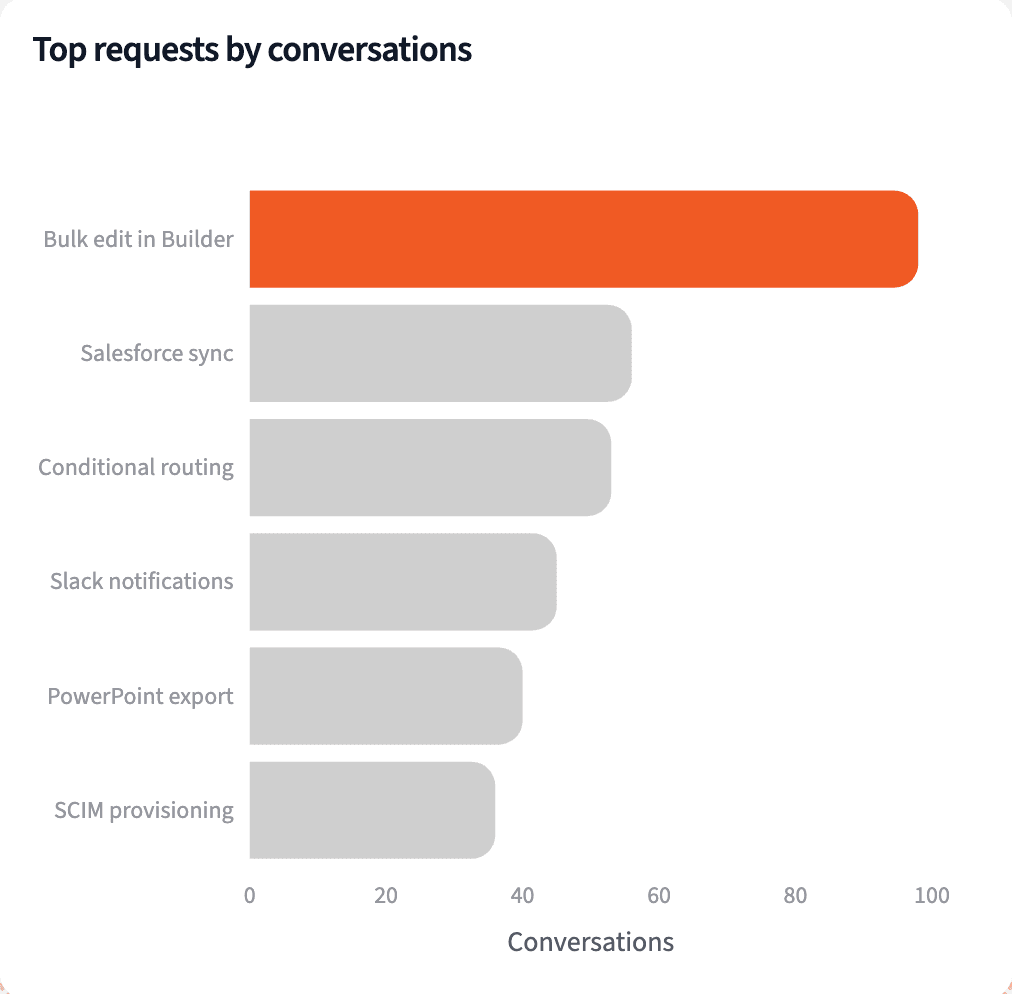
The most-asked request comes mostly from small accounts and ranks fifth by renewing ARR. SCIM provisioning leads with $1.5M.
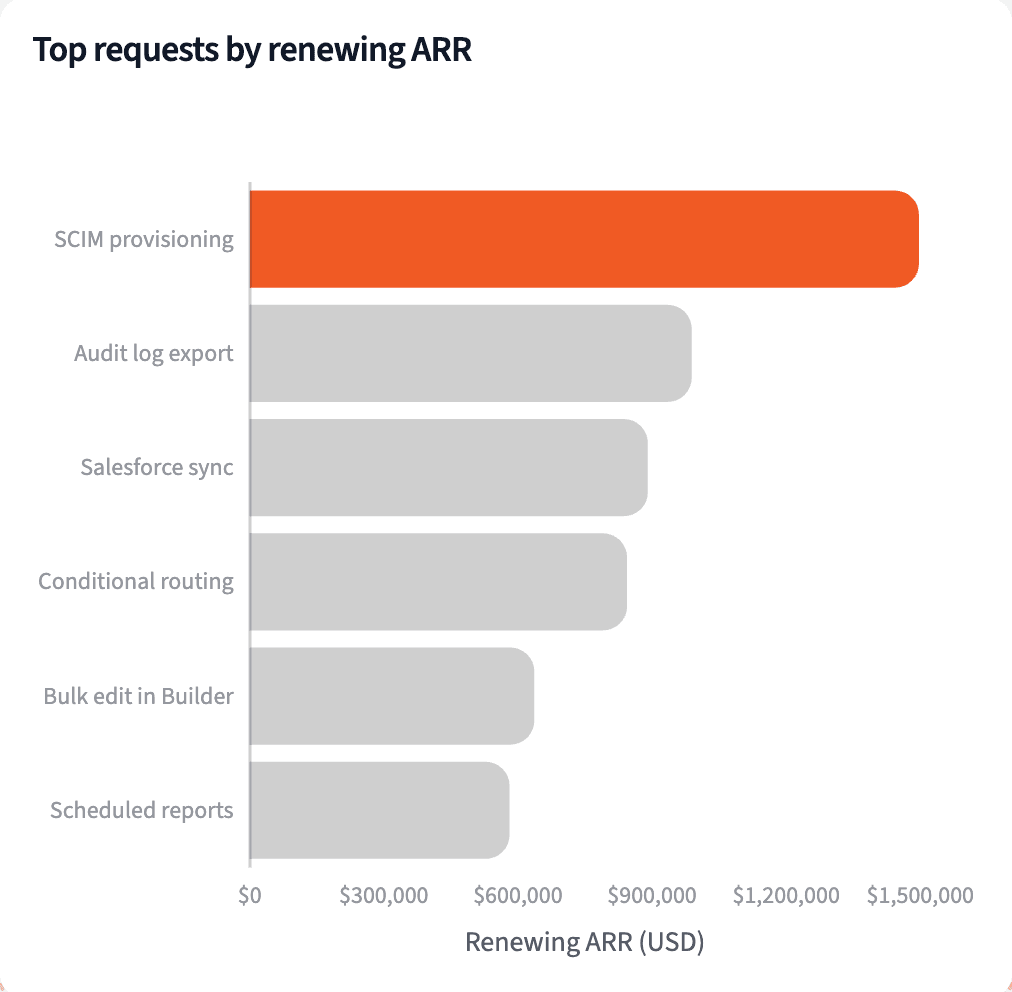
| Request | Conversations, all accounts | Renewing ARR |
|---|---|---|
| SCIM user provisioning | 36 | $1,496,979 |
| Audit log export to a SIEM | 25 | $988,813 |
| Two-way Salesforce sync | 56 | $890,650 |
| Conditional approval routing | 53 | $844,150 |
| Bulk edit rows in Builder | 98 | $636,800 |
Top five requests by renewing ARR, with their conversation counts from all accounts.
Match each request to what product has planned
Check each request's Jira status against the renewal date of every account that asked:
"Sort each request into shipped, planned or not planned from its Jira status and target quarter, and show how many accounts renewing next quarter are waiting on each."
The two requests with the most renewing ARR have no target quarter. 11 accounts renewing next quarter asked for something that has already shipped.
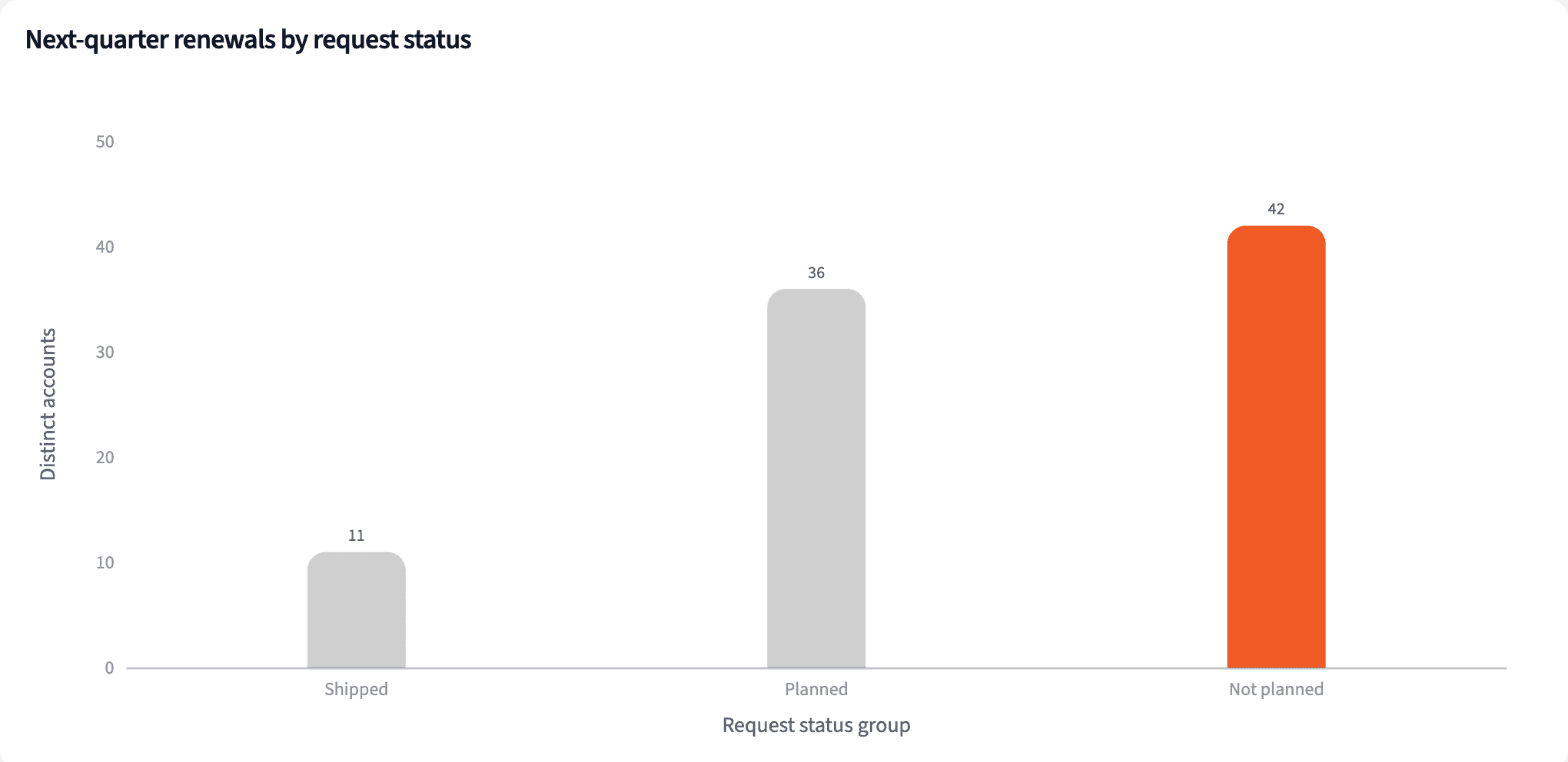
| Status | Accounts | ARR |
|---|---|---|
| Shipped, tell them | 11 | $629,575 |
| Planned, share the target | 36 | $1,625,450 |
| Not planned, prepare the answer | 42 | $2,213,563 |
Accounts renewing next quarter, by the status of their requests. An account with several requests can appear in more than one row.
Produce the renewal briefing
Four numbers for the roadmap meeting, and a list of accounts to update for each CSM.
The narrative Querri writes:
Weighed by renewing ARR, the roadmap conversation changes: the two requests with the most renewing ARR behind them have no date.
What you can create or export:
- Each CSM's list, to Excel, CSV or Google Sheets
- A live dashboard for the roadmap meeting
- A presentation, to PDF or PowerPoint
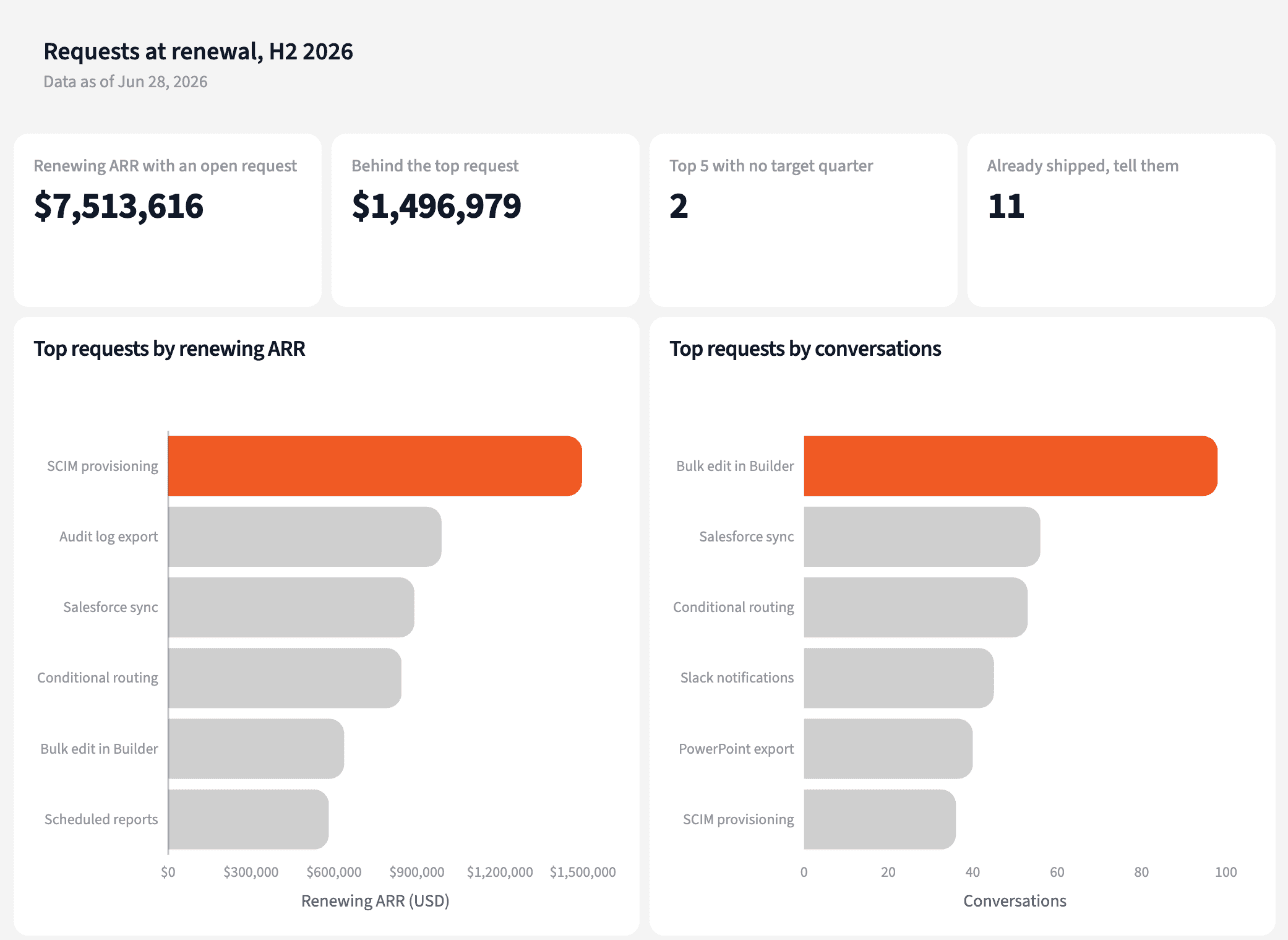
| Account | Request | Status |
|---|---|---|
| Pearson-Mason | PowerPoint export | Shipped, tell them |
| Parks LLC | SCIM provisioning | Not planned |
| Burns, Warren and James | Conditional routing | Planned, Q3 2026 |
| Crawford-Hensley | Conditional routing | Planned, Q3 2026 |
Four of the accounts renewing next quarter, with what to tell them.
Walk into the roadmap meeting with the requests renewing customers have raised.
Try it on your own dataTips for feedback product will act on
Count each account once
One customer can ask for the same thing ten times. Weigh requests by distinct accounts and their ARR, so the loudest account doesn't set the roadmap.
Close the loop before renewal
A request that already shipped is the easiest good news a CSM will ever deliver. Check the shipped list first, every month.
Teach Querri your rules once. Every answer after that follows them.
What counts as a request, which renewals are in the window, how a status maps to planned: say each rule once and Querri applies it to every question on that data.
Show me how
Say it in chat
Settle a rule in conversation and the Librarian records it as a fact under Facts & Rules, attached to the table it governs. Every later question on that data applies it, whoever asks, and every view built afterwards carries it.
"A feature request is a conversation tagged feature-request with a Jira Issue filled in, and renewing ARR counts each account once per request. Save that as a rule for the Intercom conversations table."
Or bring the document that already says it
Upload your voice-of-the-customer process or product feedback policy like any other file. Querri files a From a document card in the Inbox with the statements it found, each with its page and exact words; tick the ones to keep and they become facts. The rules this playbook depends on:
- Feature request: a conversation tagged feature-request
- Linked request: the conversation's Jira Issue is filled in
- Renewal window: Renewal Date in the next two quarters
- Renewing ARR: each asking account's ARR, counted once per request
- Shipped: Jira status Done, resolved in the last 12 months
- Planned: In Progress, or a target quarter set
- Not planned: Backlog with no target quarter
"Read our product feedback policy and propose the rules it states about logging requests, linking them to Jira and what counts as planned. I'll review them in the Inbox."
Where the rules reach
A rule is attached to the data, not to one person's chat, so it follows the data everywhere:
- • Every question asked in chat, by anyone on the team
- • Every view the Librarian builds on that data
- • Every step of a project, including the code it writes
- • Dashboards and scheduled runs, each time they refresh
- • Claude and ChatGPT, when they ask Querri
You stay in control
Every rule is listed under Facts & Rules next to the data it governs, where you can edit or remove it. Rules from a document wait for your tick in the Inbox, and a Worth remembering card is how Querri offers one it noticed itself. Workspaces and roles decide who can change what. Company-wide rules go in Settings → Customize; the Library is where the rest lives.
The payoff at the roadmap meeting
The meeting starts on the requests with the most renewing ARR behind them, not on the loudest thread. Changing the window is a sentence.
Frequently asked questions
What counts as a feature request here?
What is renewing ARR behind a request?
Why not rank requests by how often they come up?
Does a request from a renewing customer mean it will decide the renewal?
How are shipped, planned and not planned decided?
What if requests aren't linked to Jira?
Why two quarters and not one?
What should a CSM say about a request that isn't planned?
How often should this run?
Other popular resources
Playbook
Renewals below target
Which accounts renewing next quarter are below our usage target?
Playbook
New customer ramp
Which new customers are falling behind in their first 90 days?
Demo
Request a walkthrough
See Querri in action with your own data.
Pricing
Compare plans
Find the right plan for individuals, teams, or enterprise.