Every customer, from every system,on one account list.
Product usage, CRM, billing and support data, joined on the account and defined once. See who is really using the product, which renewals are at stake and what renewing customers are saying, then ask anything else about your book of business.
One minute: the accounts that need attention, the customer health blueprint, and what else your customer data answers.
One view of every account
Four systems. One row per account.
Usage lives in the product, renewals in the CRM, revenue in billing and feedback in support. Querri joins them on the account, so a CSM reads one row instead of four tabs, and every number means the same thing to everyone who reads it.
Product usageAmplitudeBigQueryDatabricks
CRM and renewalsSalesforceHubSpot
BillingStripeChartMogul
Support and NPSIntercomSimpleSat
Joined on the account
Accounts renewing in the next 90 days
Account
CSM
Active users
Renews
ARR
Health
Crest Health
Mara
44%
Jul 1
$37K
At risk
Northpine Labs
Carlos
84%
Jul 21
$350K
Healthy
Halden Clinics
Ivy
22%
Aug 30
$286K
At risk
Summit Consulting
Tom
48%
Aug 31
$646K
Watch
Corvo Freight
Carlos
8%
Sep 15
$64K
At risk
Sample data: Quillcrest, a fictional software company with 480 accounts. Active users is this week's share of licensed seats. $11.76M renews in the next 90 days.
Where customer success teams start
Three questions your team answers every month
These are good first jobs, not the whole list. Once your usage, CRM and support data are in, the same understanding answers whatever you ask next.
Every account against your usage target.
“Which customers are really using the product, and which accounts need attention right now?”
How it's done today
Scripts that build tables, exported to Excel, rebuilt every month.
In Querri
Define the active-user rate once as a KPI. Querri ranks every account and every CSM's book against it, and a monitor flags which account dropped against its own history.
Sample data, week of June 22. 30 accounts are below 20% active this week.
Next quarter's renewals, with usage beside each.
“Which renewals land this quarter and next, and what is the ARR at stake?”
How it's done today
CSM inputs rolled up by hand into a forecast leadership has to trust.
In Querri
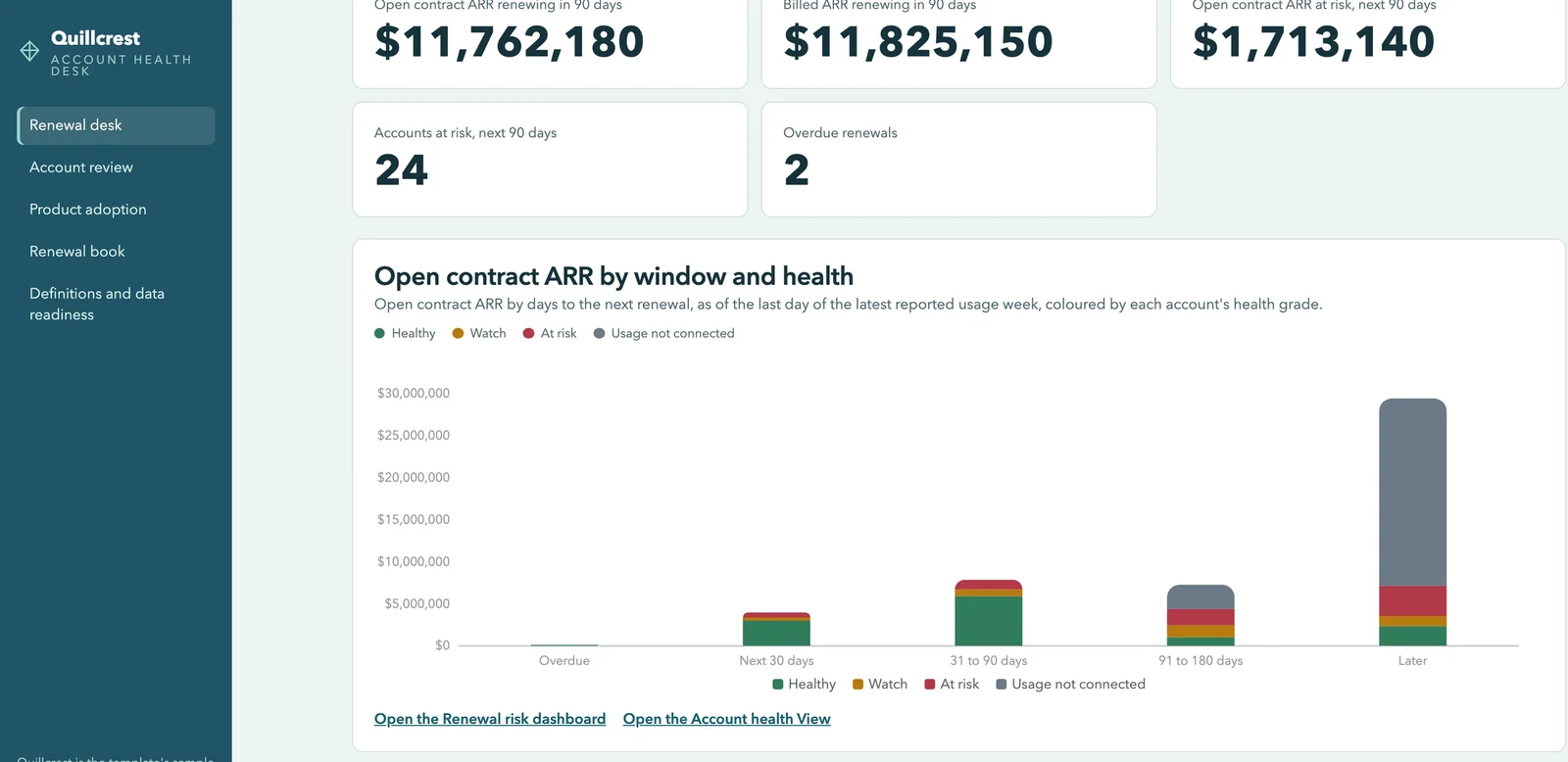
Renewal dates and contract ARR from your CRM, joined to billing and to how each account uses the product, by renewal window. The number leadership reads and the CSM view come from the same definition.
Sample data. $11.76M renews in the next 90 days; $1.71M (15%) of it is on 24 accounts graded At risk.
NPS and tickets for accounts renewing soon.
“Is NPS going up or down on accounts we renew next, and what feedback are they holding?”
How it's done today
Logging into each support and survey tool, one account at a time.
In Querri
Conversations and NPS responses joined to the accounts in your renewal window, with a monitor on NPS by segment, so the feedback is on the table before the renewal call.
Usage against target is one view. Ask next about seats, renewals or NPS for any account in your book of business. See how asking works →
More than a customer success dashboard
One understanding of your customers, for every person and every AI agent
The three jobs run on the same foundation as everything else in Querri. Define a number once, and every dashboard, QBR, alert and AI answer uses it.
The Library
Teach it once. It stays right.
Say what an active user is, or which ARR counts, and every answer after that uses it. The CSM dashboard, the QBR export and the number your CEO reads finally agree.
Click an account's active-user rate on a dashboard to see the seat and usage tables behind it. When a question has two reasonable readings, Querri tells you, and when it can't answer, it says what's missing.
Answers for the whole team, not just whoever builds reports.
Ask in plain language. Build a dashboard by asking, or from a screenshot of the one you use now. Export the QBR to Excel, or ask from Claude, under each person's own access.
Monitors judge each account and each CSM's book against its own history and say which one moved, not just that the total did. Every night Querri works through your data and leaves what it found in your Inbox. Nothing changes without your OK.
Four steps from sign-up to your own account health desk. Here is everything that installs, ready to ask questions of and make your own.
1
Sign up free
No credit card. Your own workspace is ready in about a minute.
2
Install Customer health and renewals
Open Blueprints, pick the card and install it. Sample data comes with it, so every page has numbers right away.
Customer health and renewals31 pieces
3
Keep the sample, or connect your data
Point it at product usage and your CRM, or upload exports. An agent sets up each connection with you.
4
Open your Account health desk
Renewals, adoption and NPS on one site, ready for your first question.
Open your Account health desk
Every renewal by window and health grade, on the Renewal desk (Quillcrest sample data).
Everything that installs
4 Site pages
Account health desk
Renewal desk
Account review
Product adoption
Renewal book
4 Dashboards
Renewal risk
Product adoption
NPS trend
New customer onboarding
4 Views
Account health
Renewal book
Weekly product adoption
NPS responses
3 KPIs
Seat utilization
Logo renewal rate
ARR renewal rate (contract ARR)
3 Skill and monitors
Weekly renewal review
Seat utilization watch
Key feature adoption watch
The grade is a stated rule over the last four weeks: seat use under 40%, or active users down 25% or more, is At risk. It tells a CSM where to look, not who will churn.
How Querri compares with the other ways CS teams get these answers
Most customer success teams already have a CS platform, a data team's queue, an AI assistant, or all three. Here is where each fits, where it stops, and how Querri works alongside it.
Querri
A customer success platform
A warehouse and a data team
An AI assistant you wire up yourself
Time to the first answer
Minutes on sample data from the blueprint, then on your own
Usually weeks of implementation first
Months: pipelines, models, then dashboards
A first demo in a day
Usage, CRM, billing and support together
One Library, from 125+ connectors and exports
Once an admin maps each source into its account records
Once each source is piped in and modeled
One connector at a time, joined in the chat
A question nobody built a report for
Ask it in plain words
Inside its report widgets and their limits
Joins the data team's queue
Ask it in plain words
What active users or NRR means
Taught once; every answer, dashboard and AI agent uses it
Set in its health score and field configuration
In a semantic layer the data team maintains
Per person or per project, in prompts and skill files
Where a number came from
Click any number to see its query and sources
The fields behind each widget
In the SQL, for whoever can read it
In the chat, worked out fresh each time
Watching for changes
Monitors on any KPI, each account against its own history
Alerts and plays on its own fields, a real strength
Through a BI or alerting tool on top
Scheduled tasks someone writes and keeps working
The CSM's daily workflow: tasks, plays, outreach
Not Querri's job. Keep your CS platform
Its core strength
Not its job
Only if someone builds it
How it works with Querri
Reads from all three, plus usage, CRM, billing and support
Keep it for the workflow. Querri joins its data to everything else
Querri connects to it and puts the answers in front of your CS team
Use both. Querri works inside the assistant, on the same definitions
The right call on its own when
Your questions cross systems and need one definition
Your questions stay inside the platform's own data
A staffed data team already models customer data and has time for CS
It's a one-off look at a spreadsheet
Approaches, not products: what each typically looks like in late 2026. Querri connects to several CS platforms directly and takes an export from the rest.
Customer success analytics for SaaS: common questions
What does Querri do differently if our CRM can already report on renewals?
Querri joins your CRM's renewal data to what sits outside the CRM: product usage, billing and support. A cross-object report in Salesforce or HubSpot stops at the CRM. Querri puts each account's renewal date, contract ARR, active users and NPS on one row, joined on the account and defined once, so the number leadership reads and the CSM's view come from the same definition. See every connector →
Can a SaaS customer success team keep its CS platform and still use Querri?
Yes. Keep your CS platform for the CSM's daily workflow of tasks, plays and outreach; that isn't Querri's job. Querri reads from it, directly for several CS platforms and by export for the rest, and joins it to product usage, CRM, billing and support data. That answers the questions its reporting can't, such as every account against your usage target, and watches the numbers by segment. See every connector →
How are Querri monitors different from the alerts in a customer success platform?
Querri monitors watch any view or KPI built from any connected source, and compare each account and each CSM's book against its own history. A monitor can say which account's active users dropped, not just that the total did, even when usage lives in BigQuery and renewals in your CRM. Alerts and plays on a CS platform's own fields are a real strength, so use both. How monitors work →
Why would a customer success team use Querri instead of a general AI assistant?
Querri keeps your definitions, so active users and NRR mean the same thing in every answer, dashboard and QBR export. Answers become saved reports that re-run on new data, and every number shows its query. You can use both: Querri works inside Claude through MCP, under each person's own access and on the same definitions. Querri inside your AI assistant →
Which data does Querri use to show SaaS customer health and renewal risk?
Querri builds customer health from data joined on the account: product usage from BigQuery, Databricks or Amplitude, renewals and contract ARR from Salesforce or HubSpot, billing from Stripe, and support and NPS from Intercom. The grade is a stated rule over the last four weeks: seat use under 40%, or active users down 25% or more, is At risk. It tells a CSM where to look, not who will churn. How KPIs work →
Is our customers' data safe when a customer success team connects it to Querri?
Yes. Querri is SOC 2 Type II, HIPAA and ISO 27001:2022 certified. Each organization has its own database and storage, encrypted with AES-256 at rest, and your data, prompts and results never train any model. Connectors are read-only, an agent sets up each connection and never sees your passwords, and your access rules apply before any code runs, so each person gets answers only from customer data they may see. Visit the Trust Center →
Do I need a data team to get started with Querri for customer success?
No. A customer success team can set up Querri without a data team: connect wherever product usage lives, such as BigQuery, Databricks or Amplitude, plus Salesforce or HubSpot, or upload exports. An agent sets up each connection with you. The Customer health and renewals blueprint opens when you sign up, on sample data first, with the renewal desk, weekly adoption by account and NPS by quarter, then runs on your own data. Sign up and open the blueprint →
Is Querri free to start for SaaS customer success teams?
Yes. Querri is free to start, and no credit card is required. When you sign up, the Customer health and renewals blueprint opens on sample data, so you can see every account against a usage target and next quarter's renewals before you connect your own systems. Current plans for larger teams are on the Querri pricing page. See pricing →
Playbooks
Three reports customer success rebuilds by hand
Step by step, with sample data, for the person who builds the report.
Playbook coming
Every account against your usage target
Which customers are really using the product, and which accounts need attention right now?
Playbook coming
A renewal forecast with usage beside every account
Which renewals land this quarter and next, and what is the ARR at stake?
Playbook coming
Feedback before the renewal call
Is NPS going up or down on accounts we renew next, and what feedback are they holding?
From the blog
For the VP of customer success
What to do once you have the answer.
Article coming
Which customers are below your usage target?
Call the low end first.
Article coming
A renewal forecast with usage beside every account
Check usage before you commit.
Article coming
What renewing customers are telling you
Settle open feedback before the renewal call.
Start with the accounts below your usage target.
The customer health blueprint opens when you sign up. Connect your CRM and your usage data, or bring an export, and every account lands on one list. Then ask what you'd ask next.
 Amplitude
 BigQuery
 Databricks
 Salesforce
 HubSpot
 Stripe
 ChartMogul
 Intercom
 SimpleSat