Which accounts renewing next quarter are below our usage target?
Join your Salesforce accounts, product usage, support conversations and NPS in Querri. See which renewals sit below your usage target, whether each one never ramped or dropped off, and which accounts every CSM should call this week.
Open QuerriWhat you'll need
Querri (Free trial) to join the exports and build the view
Salesforce, product usage, Intercom and Simplesat exports: Step 1 says what each adds
Your usage target: so every account is scored the same way
Free resources
Start your free trial here →Sample data sets
Synthetic data for a made-up software company. Not real customer data.
Need help?
If you have any questions, you can request a demo or email our team.
Before we begin
The quarter turns in a week and a third of the book renews. The question is which of those accounts are really using the product, and the CRM can't tell you. Usage lives in the warehouse, the complaints live in the support tool, the survey scores live somewhere else again, and lining them up has meant scripts, exports and a spreadsheet that breaks whenever one of them changes.
This playbook scores every renewing account on usage, sorts the low ones by what happened, and ends with a call list for each CSM.
How it works:
- • Upload CRM, usage, support and survey exports
- • Score every renewal against the usage target
- • Sort the low ones by what happened
- • Check which feedback signal lines up
- • Build the call list for each CSM
Follow the steps
Upload Salesforce, product usage, Intercom and Simplesat
Four exports, one project:
- •
Salesforce: who renews, when, and for how much.
- •
Product usage (BigQuery, Amplitude or similar): who uses the product, month by month.
- •
Intercom: which support conversations are still open.
- •
Simplesat: the latest NPS score for each company.
Add your usage target in a small sheet, so it's easy to change. Prefer live data? Querri connects to all four tools directly.
Tip: Pull a year of usage, so a slow ramp and a sudden drop look different.
-
 Salesforce
-
 BigQuery usage
-
 Intercom
-
 Simplesat
 One project
Score every renewing account against the usage target
Count the seats that show up, not the clicks. Unmatched accounts are reported, not scored as zero:
"Join the usage extract to the Salesforce accounts, work out each account's active-user rate for June (distinct users who ran Builder, Approvals or Reports, divided by licensed seats), and show every account renewing next quarter in a tier: 33% or higher, 20% to less than 33%, or less than 20%."
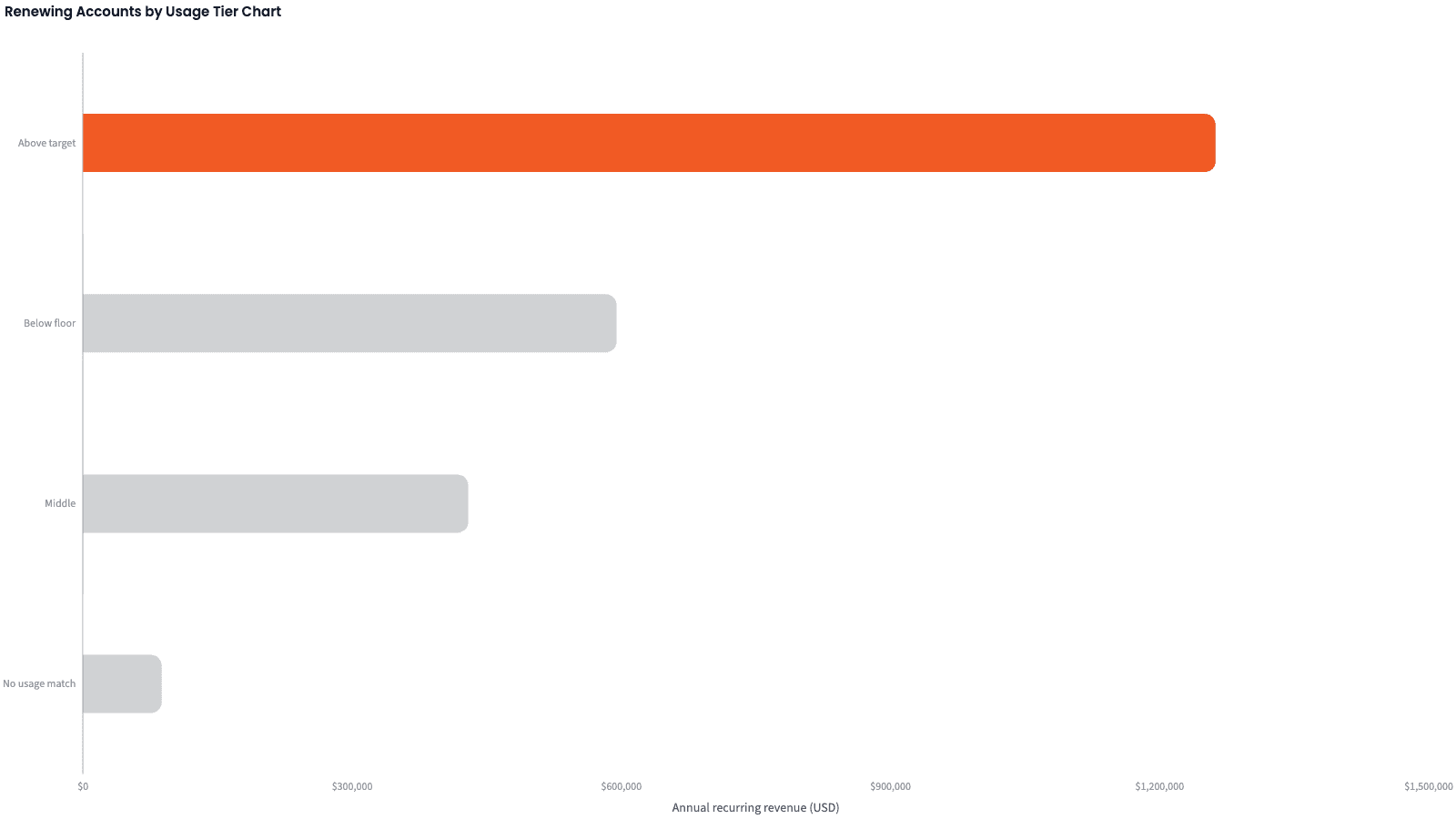
22 of the 64 renewing accounts with usage data are below target, and they hold 45% of that renewal ARR.
| Tier | Accounts | ARR |
|---|---|---|
| Above target (33% or higher) | 42 | $1,262,300 |
| Middle (20% to less than 33%) | 9 | $429,400 |
| Below floor (less than 20%) | 13 | $594,700 |
| No usage match | 2 | $87,700 |
Accounts renewing in Q3, by June usage tier.
Sort the below-target accounts by what happened
A low number has a history, and it changes the call. Onboarding and a win-back are different conversations:
"For each below-target account, say whether it never ramped (went live in the last nine months and never reached 33%), dropped off (hit 33% this year, then fell below for the last two months), or has been low all along. Show accounts and ARR by reason."
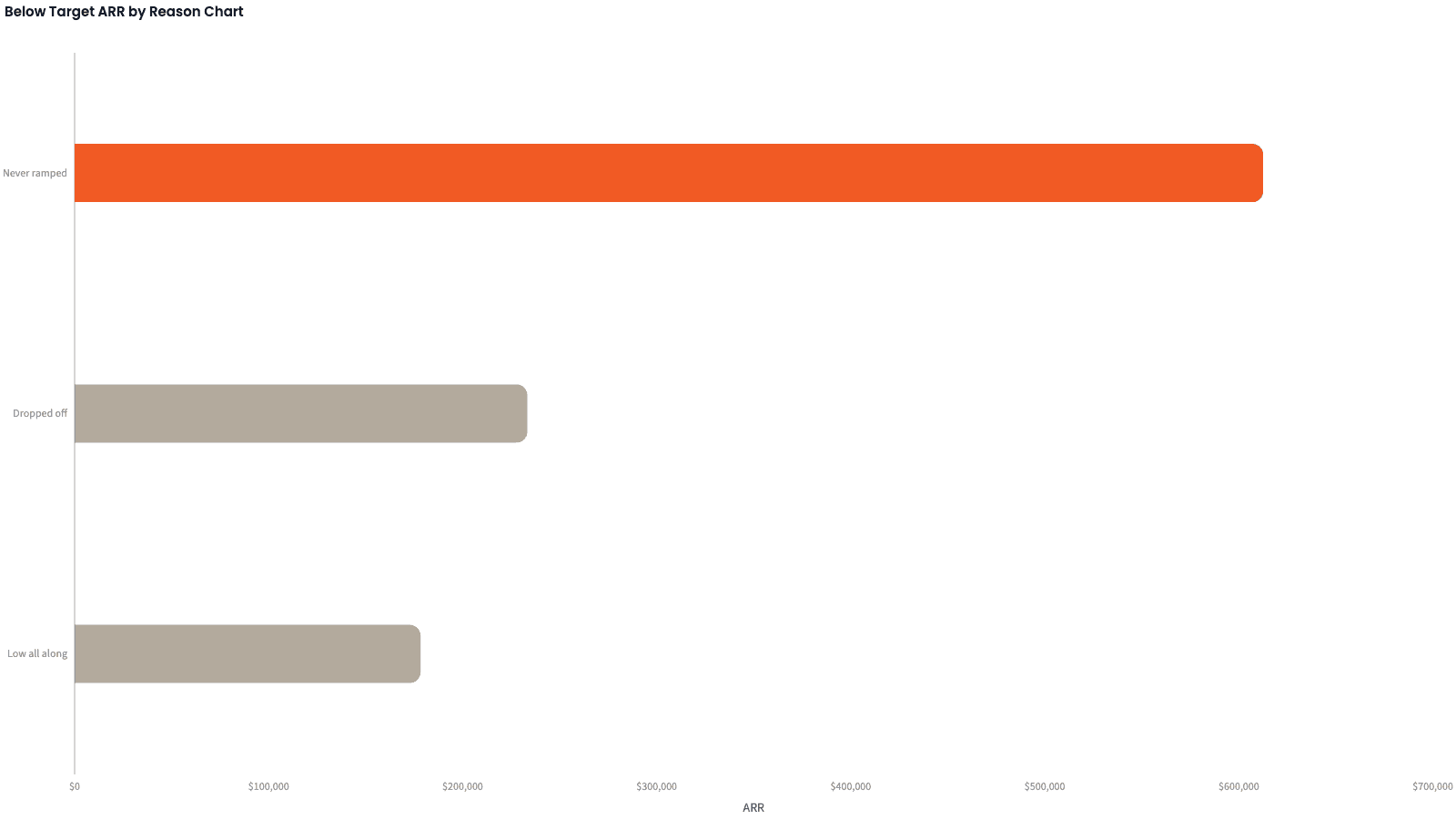
Never ramped holds the most: $612,500, more than the other two reasons combined. These accounts went live in the last nine months.
| Reason | Accounts | ARR | Share |
|---|---|---|---|
| Never ramped | 9 | $612,500 | 59.8% |
| Dropped off | 7 | $233,300 | 22.8% |
| Low all along | 6 | $178,300 | 17.4% |
Below-target ARR by reason, 22 accounts.
Add the feedback, and test which signal lines up
Test three signals before you trust one. "Stale" means open, with no reply from your team in 14 days:
"Add three signals for each renewing account: is the CRM health score Green, is the latest NPS a detractor (6 or lower), and is there an open support conversation nobody has answered in 14 days. Compare each signal's share above target and below target."
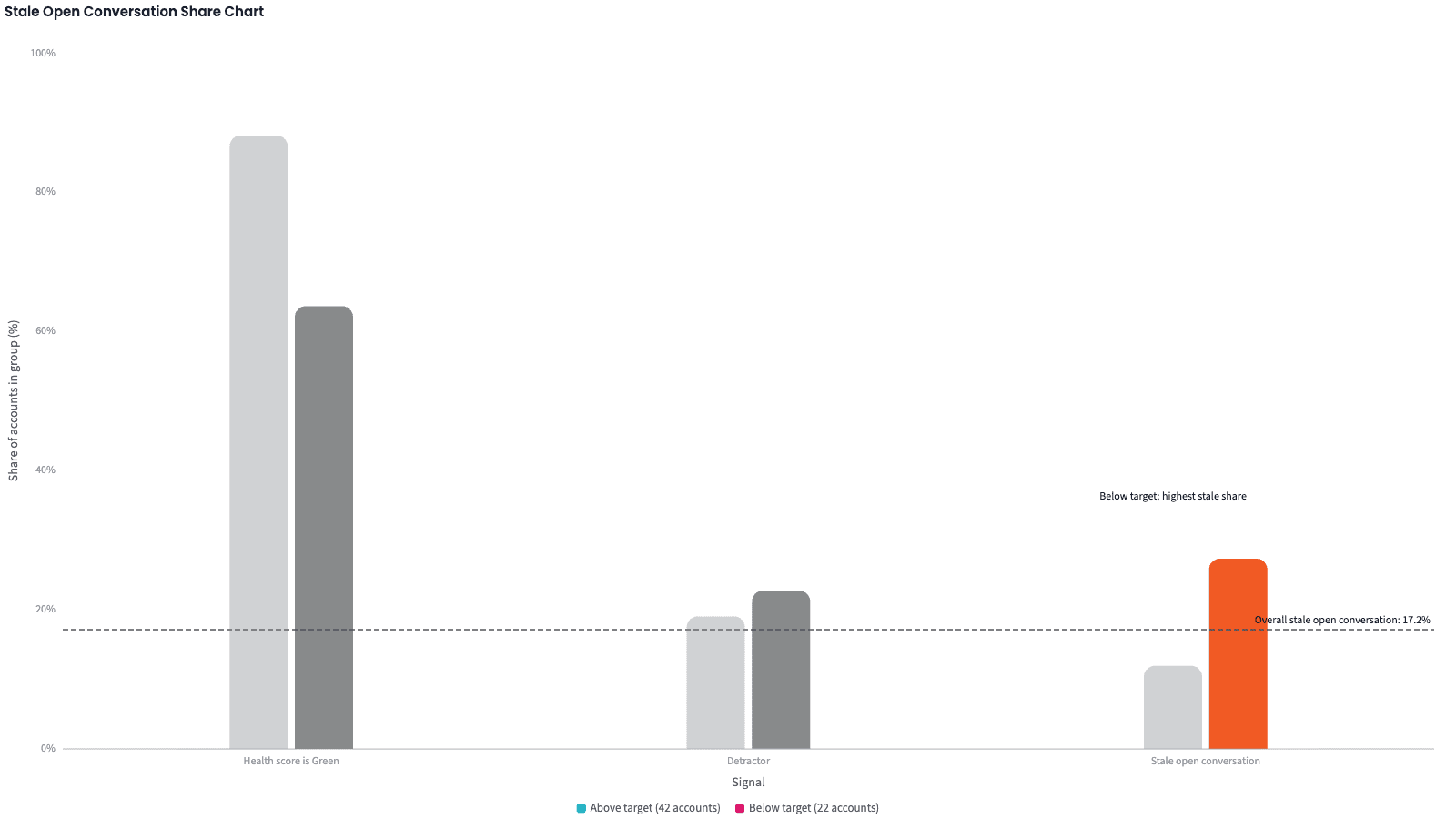
The health score alone misses most below-target accounts: 14 of the 22 are still Green. NPS barely separates the groups. Stale open conversations do: 27% below target against 12% above.
| Signal | Above target | Below target |
|---|---|---|
| Health score is Green | 88.1% | 63.6% |
| Latest NPS is a detractor | 19.0% | 22.7% |
| Stale open conversation | 11.9% | 27.3% |
Share of renewing accounts carrying each signal.
Produce the renewal view
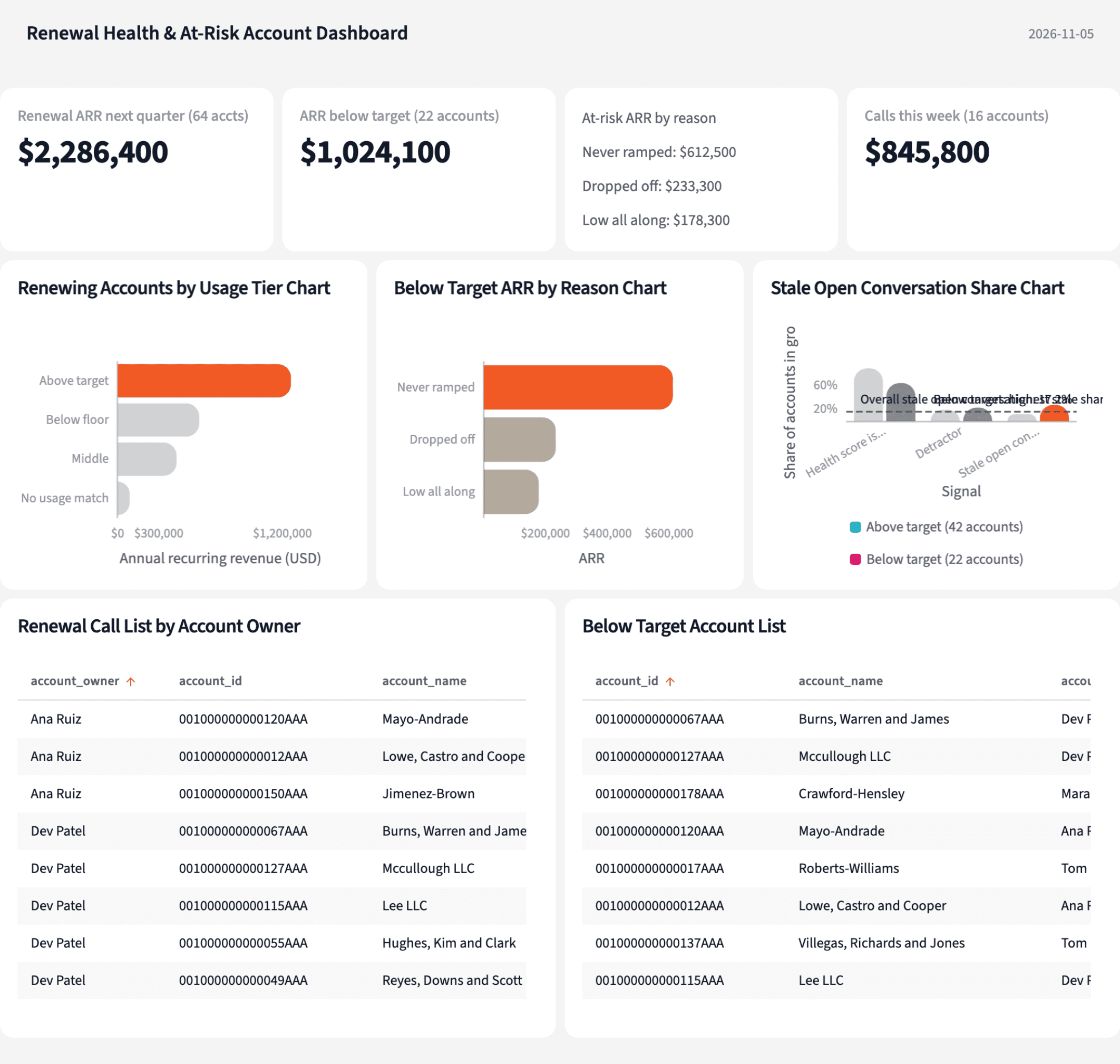
Four numbers for the renewal review, and a call list with the reason beside every name.
The narrative Querri writes:
Nearly half of next quarter's renewal ARR is below the usage target, and most of that sits in accounts that never ramped.
What you can create or export:
- The call list, to Excel, CSV or Google Sheets
- A live dashboard that refreshes on a schedule
- A presentation, to PDF or PowerPoint
| CSM | Calls | Largest account |
|---|---|---|
| Dev Patel | 6 | $122,700, never ramped |
| Ana Ruiz | 3 | $78,800, never ramped |
| Tom Becker | 3 | $75,200, dropped off |
| Mara Lindqvist | 2 | $95,000, never ramped |
| Kim Nakamura and Luis Ortega | 1 each | $29,900 and $17,700 |
Calls this week, by CSM.
See which of your renewals need a call before the quarter turns.
Try it on your own dataTips for a renewal review people trust
Report the accounts you couldn't score
Two accounts had no product ID in the CRM. Say so, with their ARR, instead of letting them look like zero usage.
Count seats that showed up, not events
A rate built on distinct users means the same thing for a 10-seat account and a 150-seat one, and a CSM can defend it.
Teach Querri your rules once. Every answer after that follows them.
What counts as active, where the target sits, how long a ramp gets, when an open conversation is stale: say each rule once and Querri applies it to every question on that data.
Show me how
Say it in chat
Settle a rule in conversation and the Librarian records it as a fact under Facts & Rules, attached to the table it governs. Every later question on that data applies it, whoever asks, and every view built afterwards carries it.
"An active user is a licensed seat that ran Builder, Approvals or Reports at least once in the month, and the active-user rate is active users divided by licensed seats. Save that as a rule for the usage and accounts tables."
Or bring the document that already says it
Upload your CS playbook, the renewal process doc or your data dictionary like any other file. Querri files a From a document card in the Inbox with the statements it found, each with its page and exact words; tick the ones to keep and they become facts. Dictionary entries attach to the columns they describe. The rules this playbook depends on:
- Active-user rate: distinct users who ran a core feature in the month, divided by licensed seats
- Below target: less than 33%; below floor: less than 20%
- Never ramped: went live within nine months and never had a month at target
- Dropped off: at target in one of the last six months, below target in the last two
- Stale conversation: open, with no reply from the team for 14 days
- Detractor: latest NPS score of 6 or lower
- Renewing next quarter: renewal date inside the coming calendar quarter
"Read our renewal playbook and propose the rules it states about usage targets, ramp windows and below-target accounts. I'll review them in the Inbox."
Where the rules reach
A rule is attached to the data, not to one person's chat, so it follows the data everywhere:
- • Every question asked in chat, by anyone on the team
- • Every view the Librarian builds on that data
- • Every step of a project, including the code it writes
- • Dashboards and scheduled runs, each time they refresh
- • Claude and ChatGPT, when they ask Querri
You stay in control
Every rule is listed under Facts & Rules next to the data it governs, where you can edit or remove it. Rules from a document wait for your tick in the Inbox, and a Worth remembering card is how Querri offers one it noticed itself. Workspaces and roles decide who can change what. Company-wide rules go in Settings → Customize; the Library is where the rest lives.
The payoff before the quarter turns
The renewal review stops arguing about what "active" means and starts on which accounts to call. Fixing a definition is a sentence, not a ticket.
Frequently asked questions
What does "below the usage target" mean here?
Why not just use the health score in the CRM?
What are the three reasons, and why do they matter?
Does NPS line up with low usage?
What if the product and the CRM don't share an ID?
Why count distinct users instead of events?
How much history does this need?
How often should this run?
Who gets called first?
Other popular resources
Playbook
Over budget, and why
Which departments are over budget this month, and why?
Playbook
Commit in doubt
Which Commit deals are in doubt before Monday's pipeline meeting?
Demo
Request a walkthrough
See Querri in action with your own data.
Pricing
Compare plans
Find the right plan for individuals, teams, or enterprise.