Did last quarter's closed-won deals start billing and get used?
Follow every deal won last quarter from Salesforce to its first Stripe invoice and into product usage. See where booked and billed ARR differ, and which new customers use under 40% of the seats they bought.
Open QuerriWhat you'll need
Querri (Free trial) to join the exports and build the audit
Salesforce, Stripe and product usage exports: Step 1 says what each adds
Your billing rules: so every deal is judged the same way
Free resources
Start your free trial here →Sample data sets
Synthetic data for a made-up software company. Not real customer data.
Need help?
If you have any questions, you can request a demo or email our team.
Before we begin
Sales closed $5.05M last quarter. Finance's billing report comes in lower, and nobody can say which deals make up the difference. The answer is split across three systems. The deal lives in Salesforce, the invoice in Stripe, and whether anyone logs in sits in the product data, so the monthly reconciliation turns into a spreadsheet someone rebuilds by hand.
This playbook follows every deal you won last quarter to its first invoice and into the product, and names the deals to fix.
How it works:
- • Upload Salesforce, Stripe and product usage
- • Follow each deal to its first invoice
- • Find where booked and billed differ
- • Check which new customers use it
- • Hand Finance and CS their lists
Follow the steps
Upload Salesforce, Stripe and BigQuery
Five exports, one project:
- •
Salesforce (or HubSpot): last quarter's closed-won deals, with owner and lead source.
- •
Opportunity Products: seats, price and discount on each deal.
- •
Stripe subscriptions (or Maxio, Chargebee): what each customer is set up to pay.
- •
Stripe invoice line items: every invoice, with seats billed and the discount.
- •
BigQuery (or Snowflake): who used the product, by month.
Add a small sheet with your billing rules. Prefer live data? Querri connects to Salesforce, Stripe and your warehouse directly.
Tip: Export invoices from the quarter before the deals too, so each expansion has a seat count to compare.
-
 Closed-won deals
- Opportunity products
-
 Subscriptions
- Invoice line items
-
 Product usage
 One project
Follow each deal to its first invoice
Match every deal to its Stripe subscription, then find the first invoice that bills it:
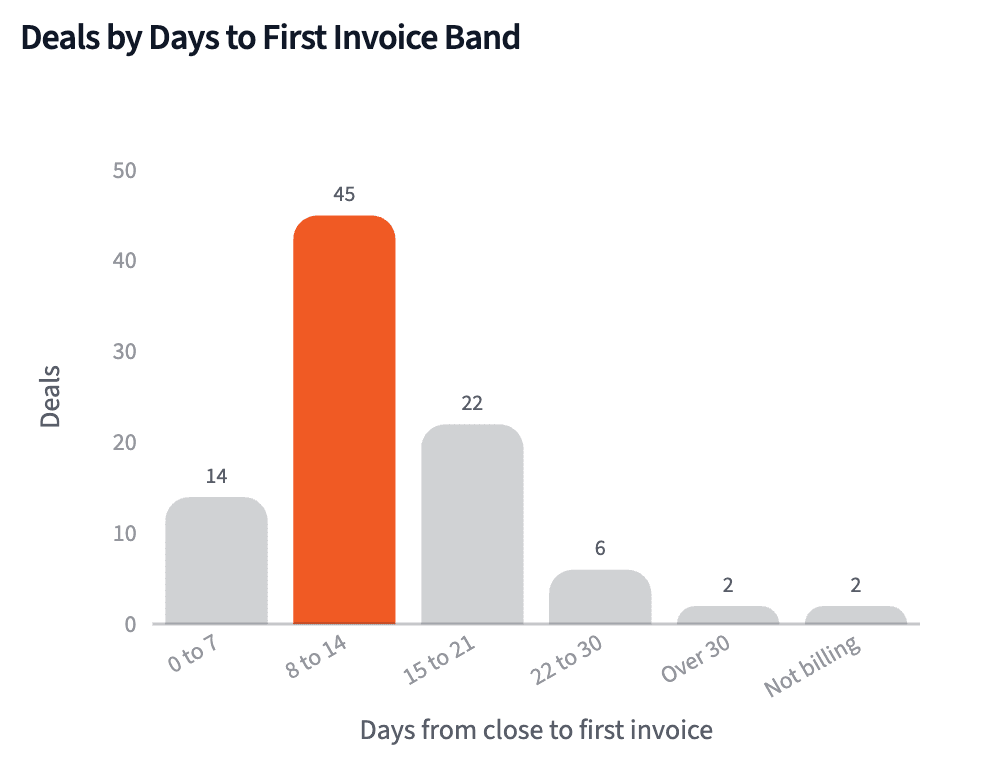
"Match every deal we closed last quarter to its Stripe subscription, by Salesforce account ID or email domain, and show how many days each took to send its first invoice."
A new deal typically sent its first invoice 12 days after closing. Two new customers never made it into Stripe at all.
| Days to first invoice | Deals |
|---|---|
| 0 to 14 days | 59 |
| 15 to 30 days | 28 |
| Over 30 days | 2 |
| No invoice yet | 2 |
Last quarter's 91 new business deals, by days from close to first invoice.
Find where booked and billed ARR differ
Not every gap is a mistake. Give each one a cause, so the planned ones stay off Finance's list:
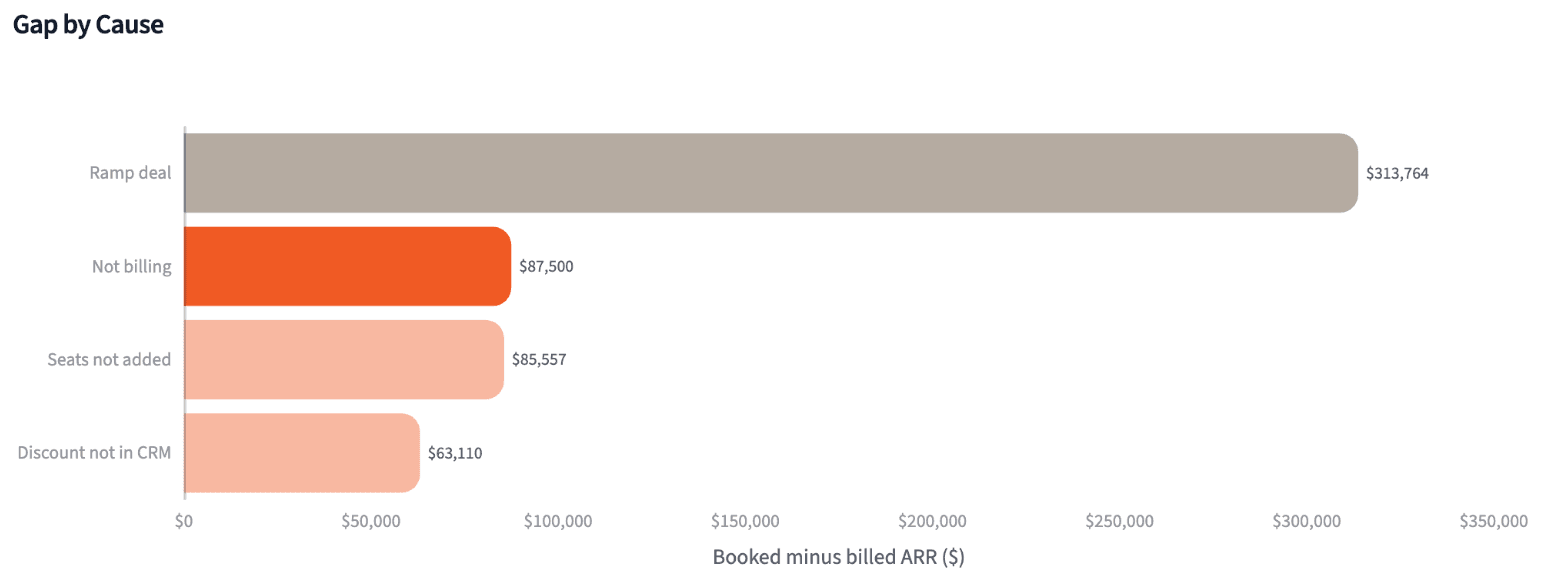
"Compare booked ARR with what Stripe is billing for every deal, and give each gap a cause: not billing, seats not added, a ramp deal, or a discount that isn't in Salesforce."
Most of the gap is planned: seven ramp deals step up next year. The leak is $236,167 across 16 deals, spread across five reps.
| Cause | Deals | Gap |
|---|---|---|
| Ramp deal (planned) | 7 | $313,764 |
| Not billing | 2 | $87,500 |
| Seats not added | 7 | $85,557 |
| Discount not in CRM | 7 | $63,110 |
Booked minus billed ARR on last quarter's 123 deals, by cause.
Check which new customers are using it
An invoice proves the deal is live, not that anyone uses it. Check seats in the month 60 days in:
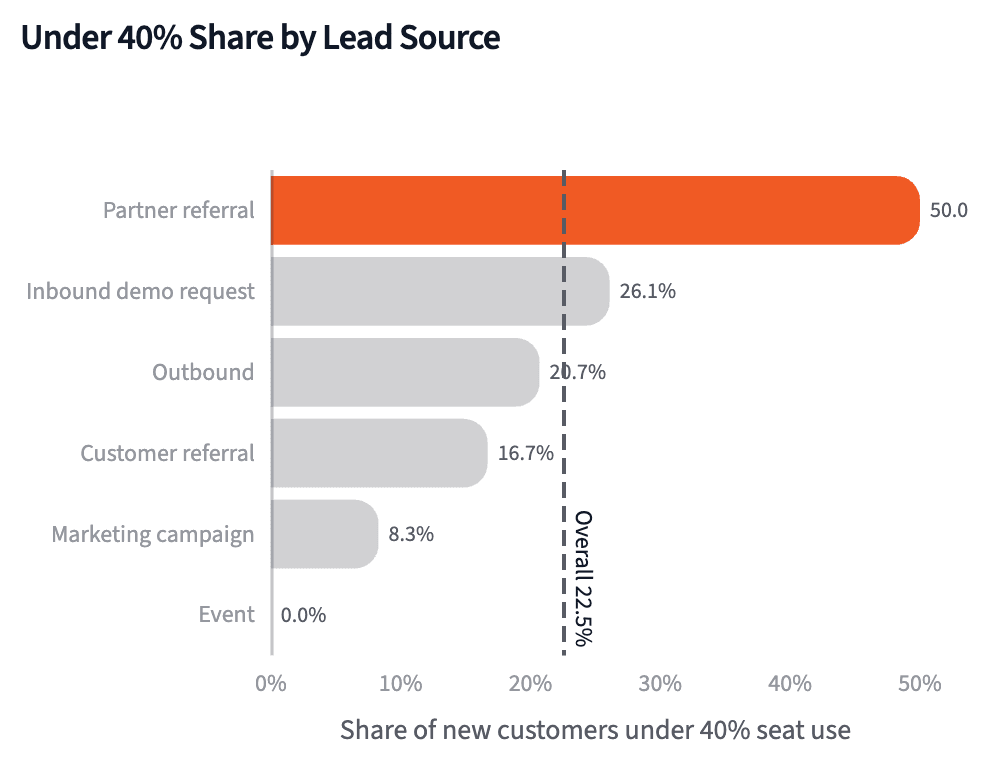
"For each new customer from last quarter, how many of their seats were active in the month that contains day 60 after the first invoice? Show the ones under 40%, and break it down by lead source."
Half the partner-referred customers use under 40% of their seats, against 18% from every other source. Both groups were billed a median of 12 days after closing.
| Lead source | Customers | Under 40% | Share |
|---|---|---|---|
| Partner referral | 12 | 6 | 50% |
| Inbound demo request | 23 | 6 | 26% |
| Outbound | 29 | 6 | 21% |
| All other sources | 25 | 2 | 8% |
| All new customers | 89 | 20 | 22% |
New customers under 40% seat use in the month containing day 60 after the first invoice, by lead source.
Produce the closed-won audit
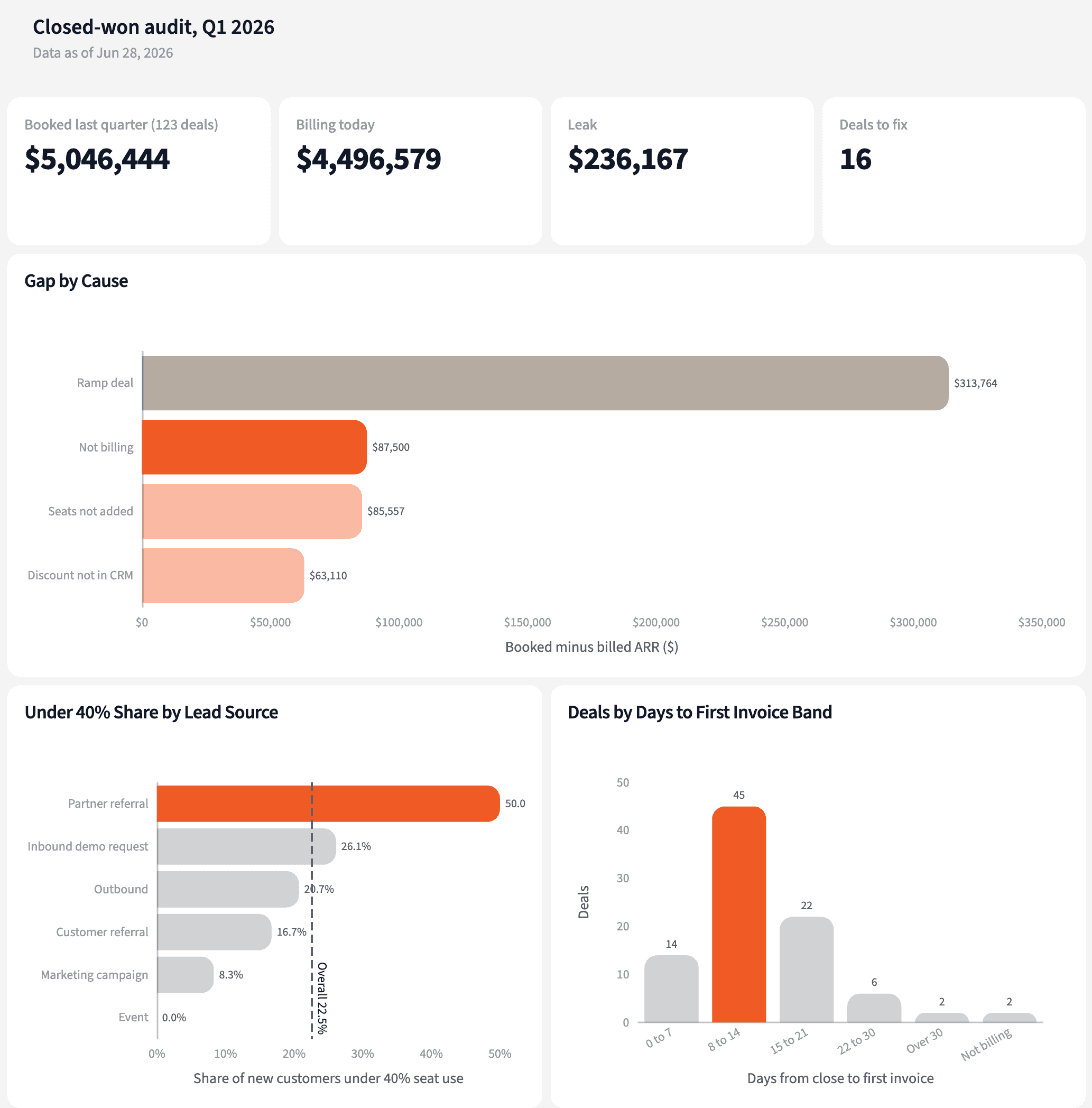
Four numbers for month-end, and two lists: deals to fix with Finance, new customers for Customer Success.
The narrative Querri writes:
Nearly all of last quarter is billing, and the leak sits in how 16 deals were set up after signing.
What you can create or export:
- The deal-level table, to Excel, CSV or Google Sheets
- A live dashboard that refreshes on a schedule
- A presentation, to PDF or PowerPoint
| Account | Cause | Gap |
|---|---|---|
| Williams and Sons | Not billing | $62,000 |
| Thompson Ltd | Discount not in CRM | $25,603 |
| Chen LLC | Not billing | $25,500 |
| Dalton PLC | Seats not added | $20,550 |
The four largest of the 16 deals to fix with Finance.
Close the month knowing which won deals never made it onto an invoice.
Try it on your own dataTips for a reconciliation Finance trusts
Match on the account ID, not the company name
Customer names drift between systems (Inc., LLC, a rebrand). Store the Salesforce account ID in Stripe metadata, with the email domain as the fallback.
Put every gap in a named bucket
A pile called "other" is where reconciliations stall. When a gap fits no cause, write a rule for it, and next month's run sorts it for you.
Teach Querri your rules once. Every answer after that follows them.
What counts as booked, how billed ARR is worked out, when a gap is a leak: say each rule once and Querri applies it to every question on that data.
Show me how
Say it in chat
Settle a rule in conversation and the Librarian records it as a fact under Facts & Rules, attached to the table it governs. Every later question on that data applies it, whoever asks, and every view built afterwards carries it.
"Billed ARR is the subscription's quantity times its price, times 12 for monthly plans, less the discount on its latest invoice. Save that as a rule for the Stripe subscriptions table."
Or bring the document that already says it
Upload your deal desk policy or quote-to-cash process doc like any other file. Querri files a From a document card in the Inbox with the statements it found, each with its page and exact words; tick the ones to keep and they become facts. The rules this playbook depends on:
- Last quarter: deals with a close date in the previous calendar quarter
- Booked ARR: the Opportunity Amount on the closed-won deal
- Billing: the subscription has issued its first invoice, paid or open
- Billed ARR: quantity times price, less the discount, times 12 if monthly; for an expansion, only the seats the deal added
- Leak: billed ARR more than 5% below booked ARR, or no billing at all
- Ramp deal: a product line dated after today and fewer seats billing than booked
- Used: 40% or more of current subscription seats active in the month that contains day 60 after the first invoice
"Read our deal desk policy and propose the rules it states about discounts, ramp deals and when billing should start. I'll review them in the Inbox."
Where the rules reach
A rule is attached to the data, not to one person's chat, so it follows the data everywhere:
- • Every question asked in chat, by anyone on the team
- • Every view the Librarian builds on that data
- • Every step of a project, including the code it writes
- • Dashboards and scheduled runs, each time they refresh
- • Claude and ChatGPT, when they ask Querri
You stay in control
Every rule is listed under Facts & Rules next to the data it governs, where you can edit or remove it. Rules from a document wait for your tick in the Inbox, and a Worth remembering card is how Querri offers one it noticed itself. Workspaces and roles decide who can change what. Company-wide rules go in Settings → Customize; the Library is where the rest lives.
The payoff at month-end
Month-end starts on the 16 deals to fix, not on rebuilding the spreadsheet. Changing the leak threshold is a sentence.
Frequently asked questions
What counts as a leak?
Why isn't a ramp deal a leak?
Why not just compare the ARR fields?
How are deals matched to Stripe?
Why do expansions end up on the list?
Does fast billing mean a customer will use it?
Why measure seat use at 60 days?
What about the partner-referred customers?
How often should this run?
Other popular resources
Playbook
Commit in doubt
Which Commit deals are in doubt before Monday's pipeline meeting?
Playbook
Renewals below target
Which accounts renewing next quarter are below our usage target?
Demo
Request a walkthrough
See Querri in action with your own data.
Pricing
Compare plans
Find the right plan for individuals, teams, or enterprise.