Which orders are late, canceled or escalated this week?
Join Shopify, Amazon, ShipStation and Gorgias. See which shipments went out late and from where, whether cancellations moved, and which escalations still have no owner.
Open QuerriWhat you'll need
Querri (Free trial) to join orders, shipments and tickets
Shopify, Amazon, ShipStation and Gorgias: Step 1 says what each adds
Your ship-by and business-hours rules: so late and waiting are measured the same way
Free resources
Start your free trial here →Sample data sets
Synthetic data for Curio Supply, a made-up home goods brand. Not real customer, retailer or marketplace data.
Need help?
If you have any questions, you can request a demo or email our team.
Before we begin
The weekly report says how many orders shipped. It doesn't say which ones went out late, which warehouse they came from, or which escalations nobody has picked up. Orders are in Shopify and Amazon, ship dates in ShipStation and escalations in Gorgias, so the answer often arrives after customers start writing in.
This playbook lists every shipment past its ship-by date, splits the week's late shipments by warehouse and channel against a usual week, and measures how long escalations wait for an owner in business hours.
How it works:
- • Connect Shopify, Amazon, ShipStation and Gorgias
- • List every order past its ship-by date
- • Split late shipments by channel and warehouse
- • Measure how long escalations wait for an owner
- • Build the weekly fulfillment and escalation view
Follow the steps
Connect Shopify, Amazon, ShipStation and Gorgias
Four sources, one project:
- •
Shopify: store orders with placed, canceled and fulfilled times.
- •
Amazon Seller Central: the All Orders report for orders you ship yourself, with Amazon's promised ship dates.
- •
ShipStation: each shipment's warehouse, ship-by date and ship date.
- •
Gorgias: escalation tags, and when each ticket was first assigned.
All four connect directly and sync on a schedule. Orders Amazon fulfills never pass through your 3PL, so they are left out of late shipments.
Tip: Pull at least 13 weeks, so this week can be held against a usual week built from the 12 before it.
-
 Shopify orders
-
 Amazon orders
-
 ShipStation shipments
-
 Gorgias tickets and events
 One project
List every order past its ship-by date
Start with every shipment that was due this week:
"Which shipments due this week went out late or haven't shipped yet, and how does that compare with a usual week?"
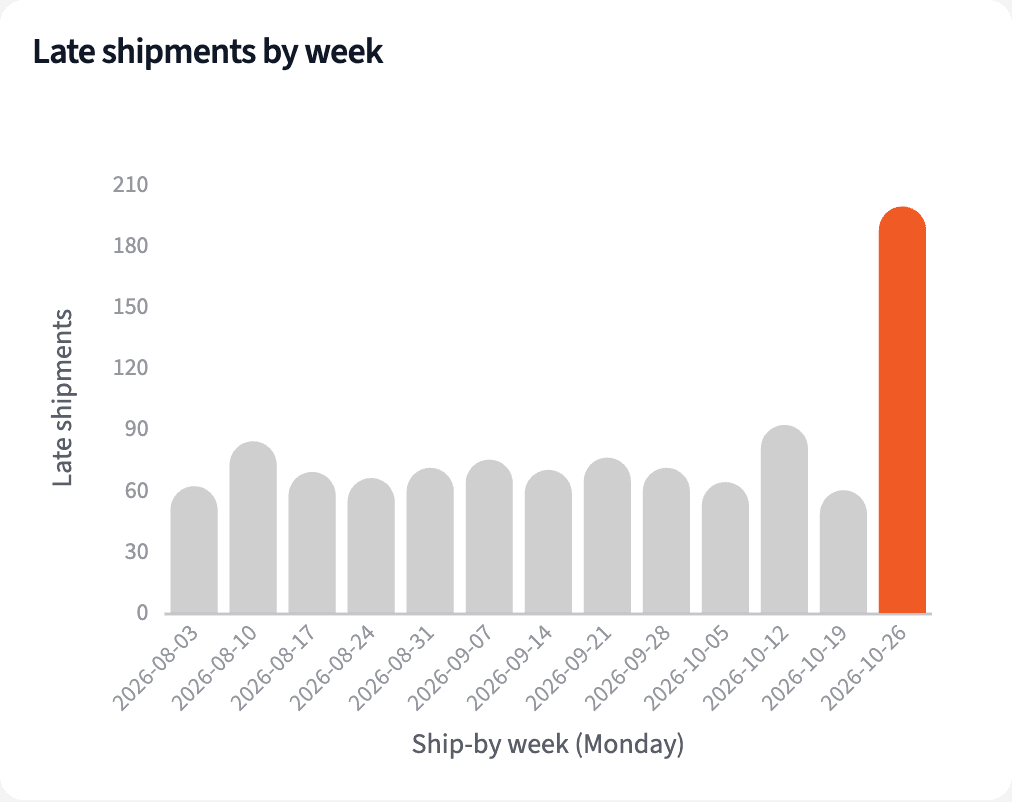
199 of the 5,008 shipments due the week of 2026-10-26 went out late or not at all, against a usual 71.7. 74 had no ship date by Sunday.
| Ship-by week | Late shipments |
|---|---|
| 2026-10-12 | 92 |
| 2026-10-19 | 60 |
| 2026-10-26 | 199 |
| Usual week | 71.7 |
Late shipments by ship-by week. Usual is the average of the 12 weeks before 2026-10-26.
Split late shipments by channel and warehouse
Then see where they came from:
"Split this week's late shipments by warehouse and by channel, against their usual weeks."
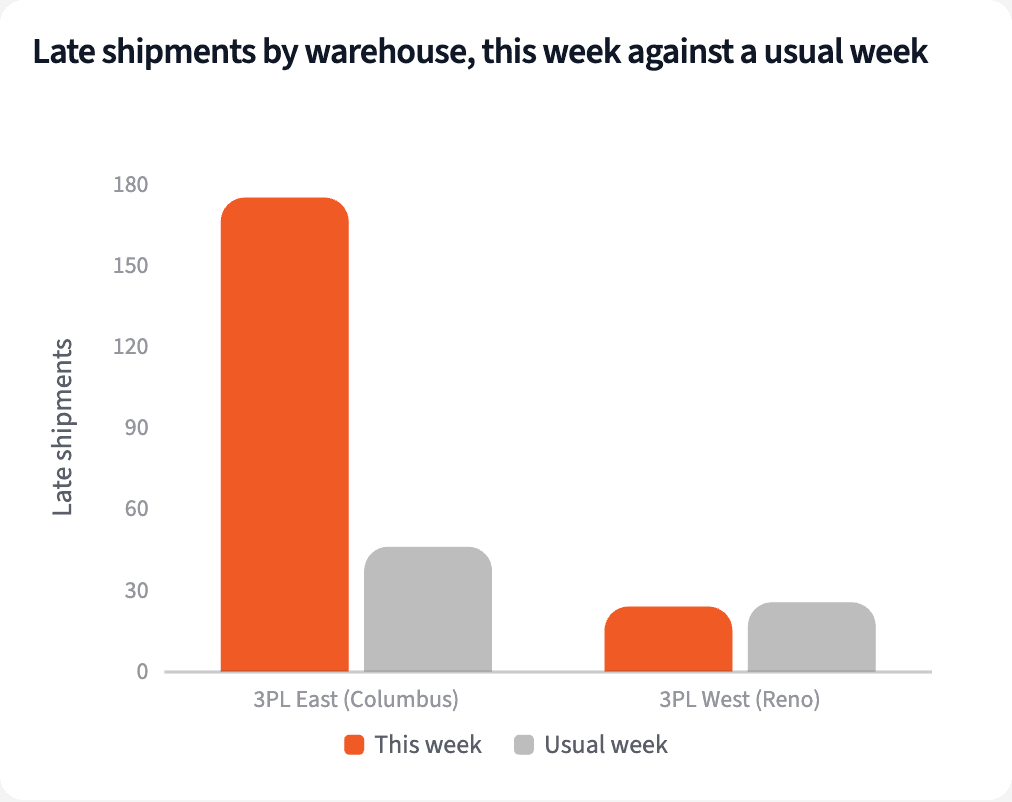
175 late shipments were assigned to 3PL East, against a usual 46.1: 87.9% of the week's late shipments. 3PL West had 24, close to its usual 25.6.
| Split | This week | Usual week |
|---|---|---|
| 3PL East (Columbus) | 175 | 46.1 |
| 3PL West (Reno) | 24 | 25.6 |
| Store orders | 162 | 56.6 |
| Amazon orders you ship | 37 | 15.1 |
Late shipments, week of 2026-10-26, against the usual week. Each split adds up to 199.
Measure how long escalations wait for an owner
Check cancellations, then the escalations:
"Did cancellations move? And how long did this week's escalations wait for someone to own them, in business hours?"
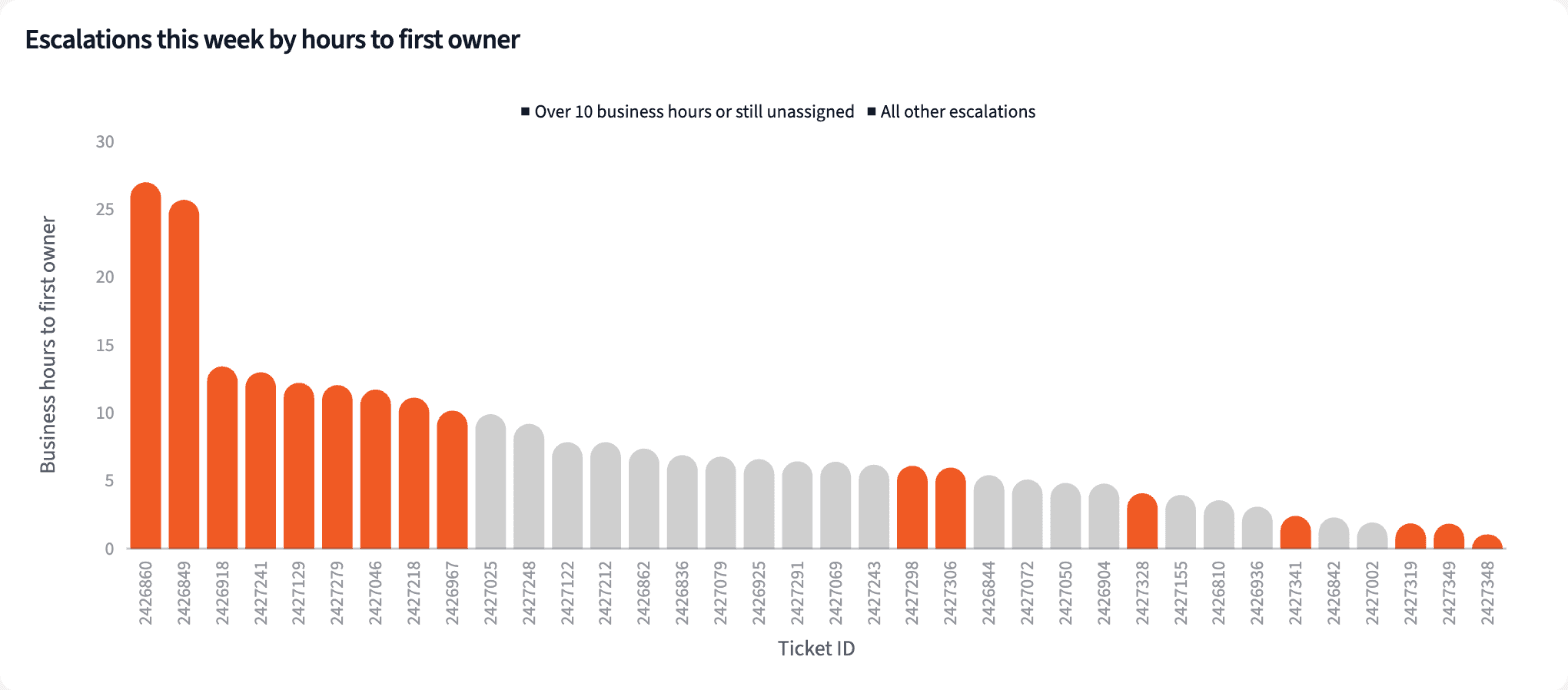
Cancellations held at 1.39% against 1.37%. The median escalation waited 6.8 business hours for an owner, but 16 of 36 waited more than 10 or still have none.
| Escalations | Count | Business hours |
|---|---|---|
| Owner within 10 business hours | 20 | 10 or less |
| Owner after more than 10 | 8 | 10.2 to 27.0 |
| No owner yet | 8 | waiting up to 12.0 |
| All escalations | 36 | median 6.8 |
Escalations tagged the week of 2026-10-26, by business hours to first owner.
Build the weekly fulfillment and escalation view
Four numbers for the Monday call, and who does what.
The narrative Querri writes:
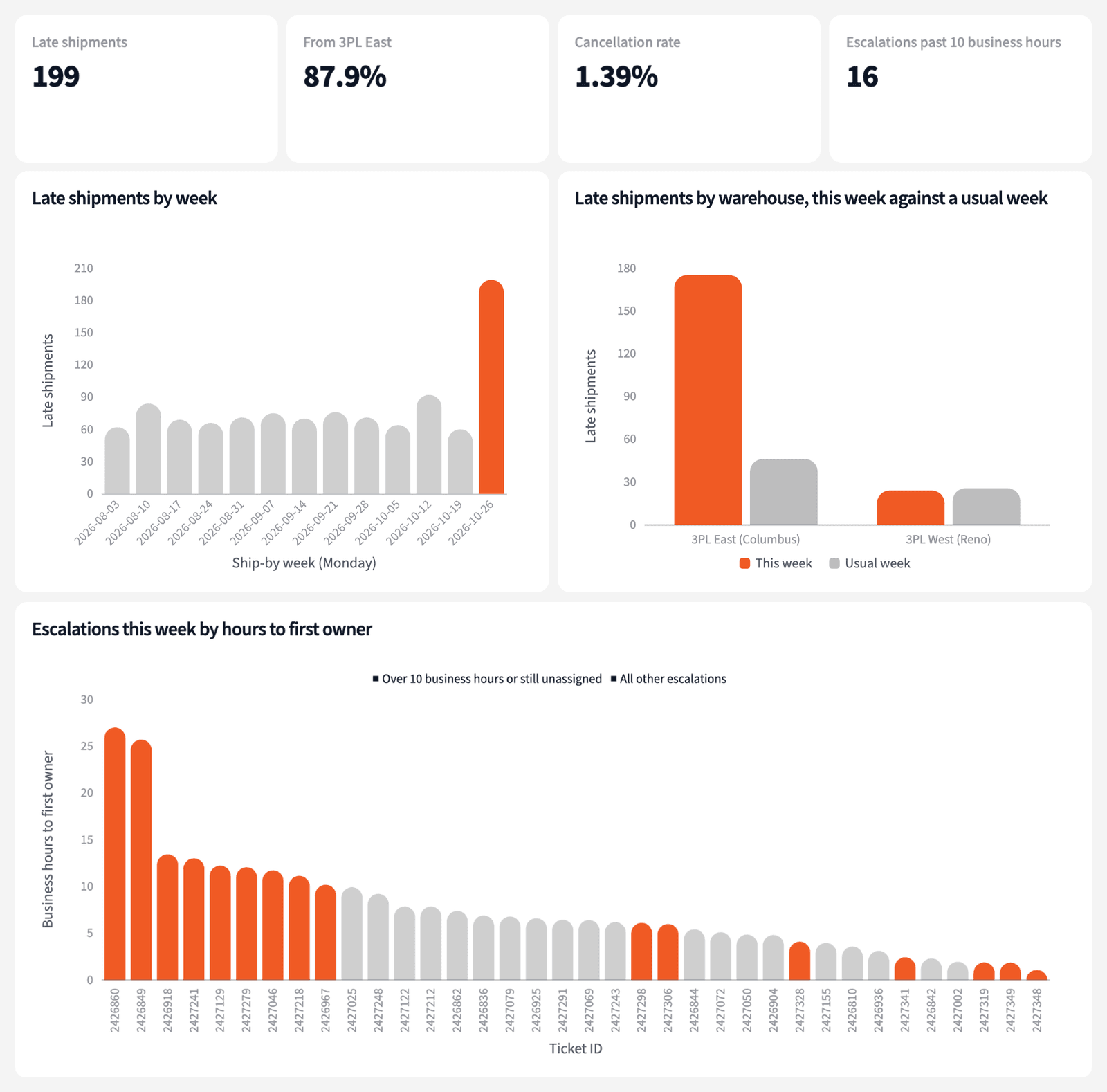
Late shipments ran well above a usual week, 175 of the 199 from 3PL East, while cancellations held steady.
What you can create or export:
- The table, to Excel, CSV or Google Sheets
- A live dashboard that refreshes every Monday
- A presentation for the meeting, to PDF or PowerPoint
| Item | Count | Next step |
|---|---|---|
| Late shipments from 3PL East | 175 | Call 3PL East |
| Escalations with no owner | 8 | Assign an owner |
| Escalations owned after 10+ hours | 8 | Ask for an update |
This week's actions, week of 2026-10-26.
Send the Monday call to one warehouse, and give every open escalation a name.
Try it on your own dataTips for a weekly view people trust
Compare with a usual week, not last week
One bad week makes the next look good. Averaging the 12 weeks before gives each warehouse and channel a fair baseline.
Watch time to first owner
Time to resolve hides the wait before anyone picks an escalation up. Measuring to the first assignment shows the ones nobody owns.
Teach Querri your rules once. Every answer after that follows them.
When a shipment is due, what business hours are, what counts as an owner: say each rule once and Querri applies it to every question on that data.
Show me how
Say it in chat
Settle a rule in conversation and the Librarian records it as a fact under Facts & Rules, attached to the table it governs. Every later question on that data applies it, whoever asks, and every view built afterwards carries it.
"Business hours are Monday to Friday, 8:00 to 18:00 Eastern. Save that as a rule for the Gorgias tickets table."
Or bring the document that already says it
Upload your fulfillment SLA or support escalation policy like any other file. Querri files a From a document card in the Inbox with the statements it found, each with its page and exact words; tick the ones to keep and they become facts. The rules this playbook depends on:
- Due: the ShipStation ship-by date, two business days after the order
- Late: shipped after the ship-by date, or not shipped by Sunday
- Amazon-fulfilled orders are out of scope
- Escalation: a Gorgias ticket tagged escalated
- First owner: the first time the ticket is assigned to a person
- Usual week: the average of the 12 weeks before
"Read our fulfillment SLA and propose the rules it states about ship-by dates and business days. I'll review them in the Inbox."
Where the rules reach
A rule is attached to the data, not to one person's chat, so it follows the data everywhere:
- • Every question asked in chat, by anyone on the customer experience team
- • Every view the Librarian builds on that data
- • Every step of a project, including the code it writes
- • Dashboards and scheduled runs, each time they refresh
- • Claude and ChatGPT, when they ask Querri
You stay in control
Every rule is listed under Facts & Rules next to the data it governs, where you can edit or remove it. Rules from a document wait for your tick in the Inbox, and a Worth remembering card is how Querri offers one it noticed itself. Workspaces and roles decide who can change what. Company-wide rules go in Settings → Customize; the Library is where the rest lives.
The payoff on Monday
Monday starts with one warehouse to call and a name on every open escalation. Changing business hours is a sentence.
Frequently asked questions
What counts as a late shipment?
What is a usual week?
Why are Amazon-fulfilled orders left out?
How are business hours counted?
Why time to first owner and not time to resolve?
Does it say why the warehouse fell behind?
Did cancellations move?
How often should this run?
Other popular resources
Playbook
Orders to tickets
Which orders are turning into support tickets this week?
Playbook
What delivery exceptions cost
What do damaged, lost and late deliveries cost in refunds and reships?
Demo
Request a walkthrough
See Querri in action with your own data.
Pricing
Compare plans
Find the right plan for individuals, teams, or enterprise.