How do ecommerce CX teams find which orders are turning into support tickets?
Querri ties every helpdesk ticket to its order in Shopify or Amazon, matching on the order number, then the subject line, then the customer's email. It rebuilds each order's journey from the 3PL or ShipStation and attributes the ticket to the warehouse, the carrier or the product. The match rate shows first, so you know what the answer covers. How Querri gets to an answer →
Do late deliveries or products drive more ecommerce support tickets?
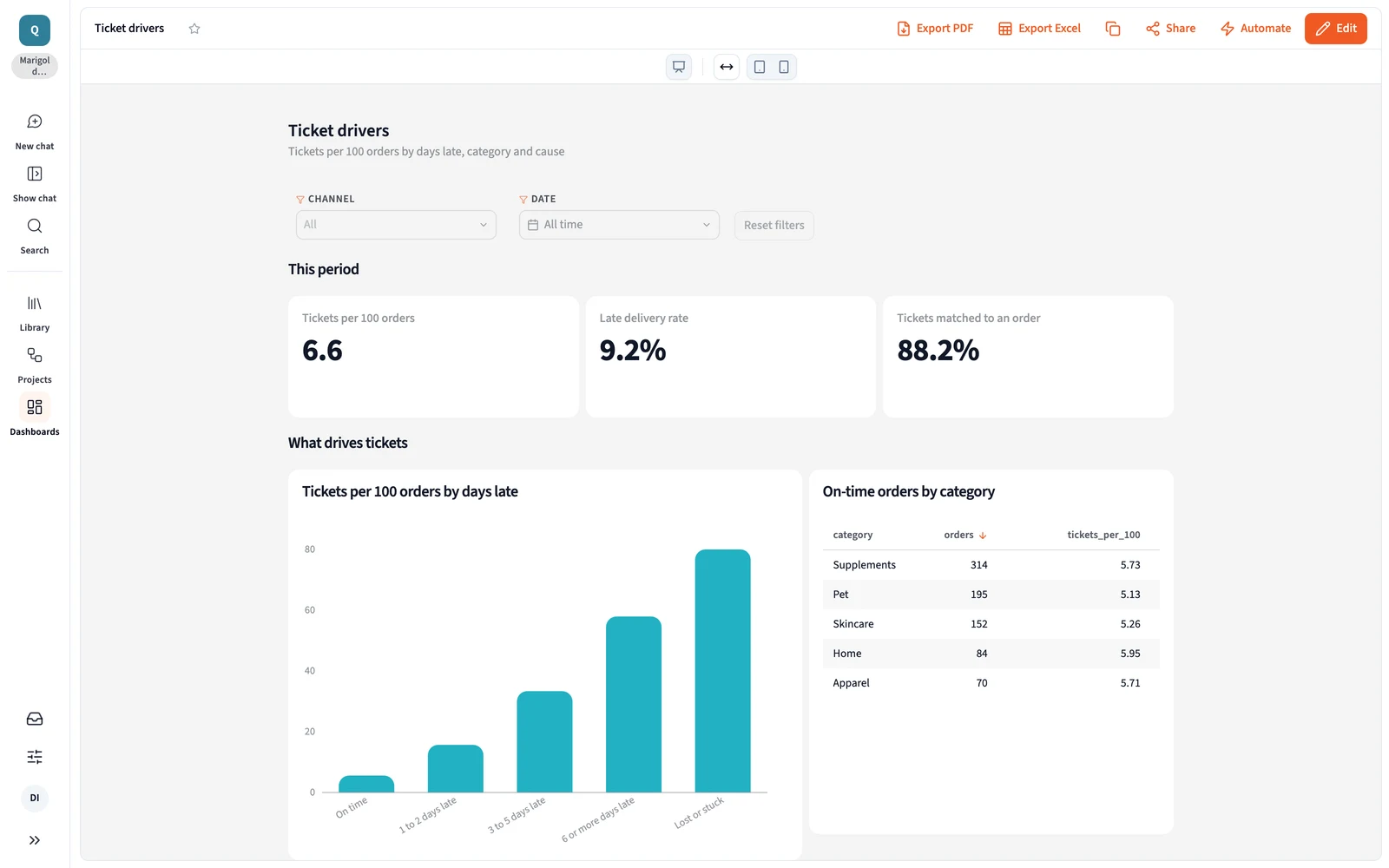
Test it on your own orders. In Querri's sample data, on-time orders ran 5 to 6 tickets per 100 in every product category, while orders six or more days late ran 58 per 100. Querri splits ticket rates by days late, carrier, warehouse and product, so you see which one really moves volume. Open the Orders to tickets playbook →
How can we measure what late, lost and damaged deliveries cost?
Connect Shopify and Amazon for orders and promised dates, your helpdesk for tickets, and the 3PL or ShipStation for shipments, then add your support cost per hour once. Querri puts the late rate, tickets and support hours each carrier, lane and warehouse caused side by side, ready for the next 3PL or carrier review. Dashboards →
What does Querri add if our helpdesk already reports on tickets?
Keep the helpdesk for answering customers and queue stats. It sees what the customer asked, not whether the order shipped late or which carrier had it. Querri joins the ticket to the order, the shipment and the refund, so where-is-my-order turns from a ticket category into a list of lanes and warehouse days to fix. See every connector →
Can Querri flag escalations that nobody owns?
Yes. Querri joins helpdesk escalations and assignment times with each order's value, channel and status. Set how long an escalation can wait without an owner, and a monitor flags each one past that line, with the revenue at stake, in the morning Inbox. Nightly insights and Monitors →
Is customer and order data safe in Querri?
Yes. Querri is SOC 2 Type II, HIPAA and ISO 27001:2022 certified. Each organization has its own database and storage, encrypted with AES-256 at rest, and your data, prompts and results never train any model. Connectors are read-only, so Querri never changes an order or a ticket, and row-level access rules apply before the AI sees anything. Visit the Trust Center →
What does a CX team connect first to get started with Querri?
To get started with Querri, connect your helpdesk and Shopify, then Amazon and ShipStation, or upload your 3PL's shipment and tracking files. An agent sets up each connection with you. The Orders to tickets blueprint opens on sample data first, with tickets by cause and delivery by carrier, then runs on your own data. Sign up and open the blueprint →
Is Querri free to start for ecommerce CX teams?
Yes. Querri is free to start, and no credit card is required. There's no warehouse, BI tool or analyst to set up first, so a CX lead can have the Monday view running on sample data the same day. Current plans and prices are on the Querri pricing page. See pricing →
 Gorgias
 Shopify
 Amazon
 ShipStation
 Shippo
 Excel
 Google Drive