Which departments are over budget this month, and why?
Join your NetSuite detail, budget workbook, Brex card spend and HR roster in Querri. Split every variance into headcount, vendors and timing, and walk into the budget review knowing what to ask each department head.
Open QuerriWhat you'll need
Querri (Free trial) to join the exports and build the view
NetSuite, budget, Brex and HR roster exports: Step 1 says what each adds
Your department mapping and timing rule: so every department is compared the same way
Free resources
Start your free trial here →Sample data sets
Synthetic data for a made-up software company. Not real financial data.
Need help?
If you have any questions, you can request a demo or email our team.
Before we begin
The close is done and the budget review is Thursday. Marketing shows 39% over for the month, and the first question in the room will be why. The ranked list can't answer it. Reasons live in the transaction detail, the hiring plan lives in a workbook, the card spend lives in Brex, and the department codes in the ERP don't match the departments in the budget.
This playbook gets you from the ranked list to a one-line reason for every department.
How it works:
- • Upload the ERP, budget, card and HR exports
- • Find this month's overage
- • Explain it: headcount, vendors or timing
- • Find what the totals hide
- • Prepare the review: one line per department
Follow the steps
Upload NetSuite, the budget workbook, Brex and the HR roster
Four exports, one project:
- •
NetSuite (or QuickBooks, Sage Intacct): the transaction detail, which says what was spent.
- •
Budget workbook: planned spend and planned hires, by department.
- •
Brex (or Ramp): the merchant behind every card charge.
- •
Rippling (or BambooHR): who started, and when.
Add a short mapping from ERP department codes to budget departments. Prefer live data? Querri connects to NetSuite, Brex and your spreadsheets directly.
Tip: Pull more than a year, so last year's annual bills are there to compare.
-
 NetSuite
-
 Budget workbook
-
 Brex
- HR roster
 One project
Rank every department against budget
Map every GL line to a budget department, then rank this month's variance:
"Map each GL line's department to our five budget departments, then compare actuals to the budget workbook by department: May and year to date, dollars and percent, biggest overage first."
Marketing is 39% over for May, almost all of it in one account: events. G&A is 12% over. R&D looks fine.
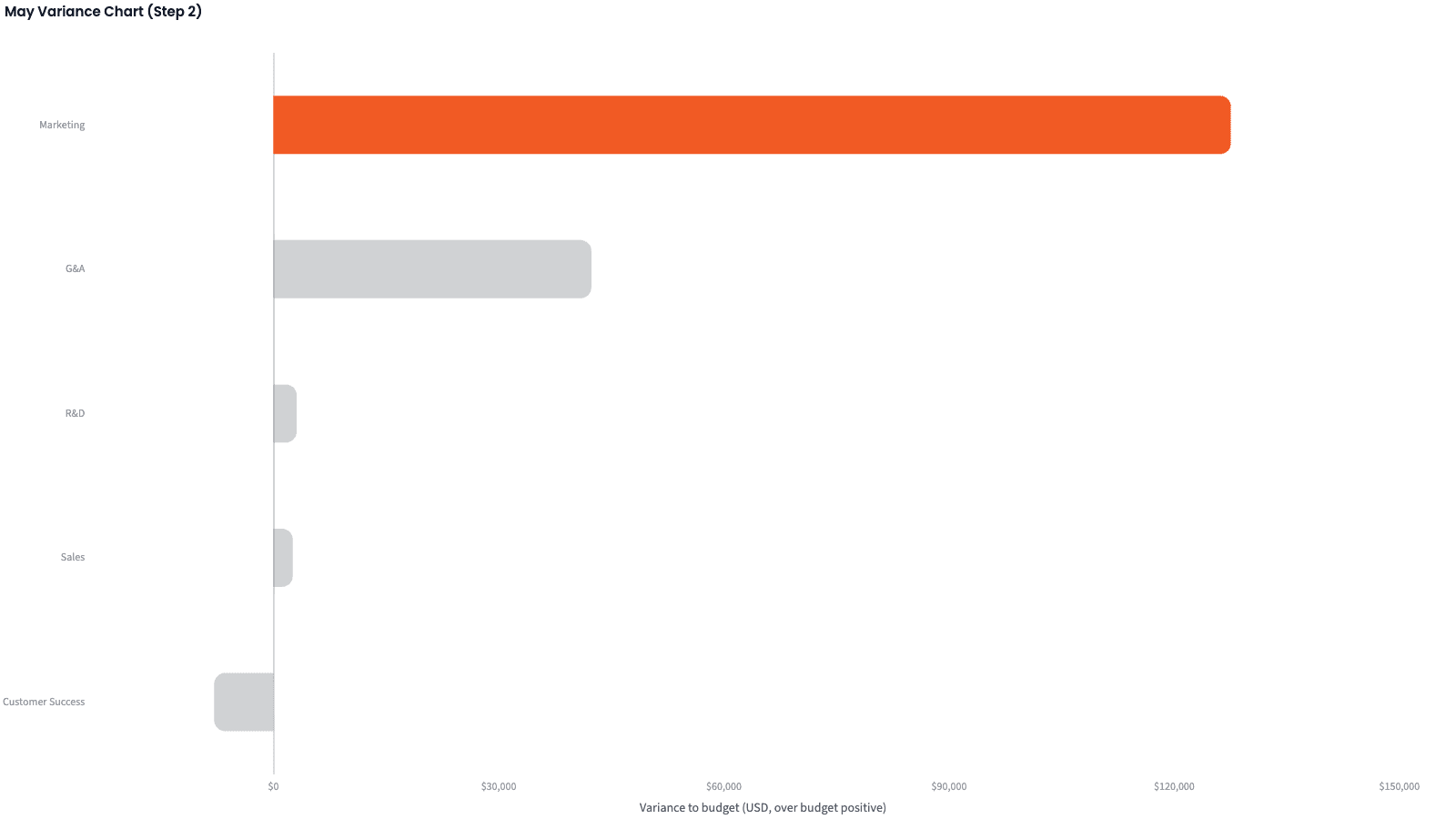
| Department | Budget | Actual | Variance |
|---|---|---|---|
| Marketing | $328,695 | $456,227 | +$127,532 (38.8%) |
| G&A | $369,614 | $411,967 | +$42,353 (11.5%) |
| R&D | $1,403,509 | $1,406,611 | +$3,102 (0.2%) |
| Sales | $548,034 | $550,609 | +$2,575 (0.5%) |
| Customer Success | $341,276 | $333,370 | -$7,906 (-2.3%) |
May 2026 variance by department, ranked.
Split each variance into headcount, vendors and timing
In the sample, annual bills post in one month but cover several. Split each variance so that timing can't hide what's real:
"Break each department's variance into three parts that add up: headcount (the salary and benefits accounts against the hiring plan), timing (bills whose service period spans three or more months, or that posted outside their service month, spread across the months they cover), and vendors (the rest). Also compare the headcount plan with the roster."
Most of Marketing's May overage is timing: $105,000 of $127,532. Year to date, in the table, it's about half timing and half vendors.
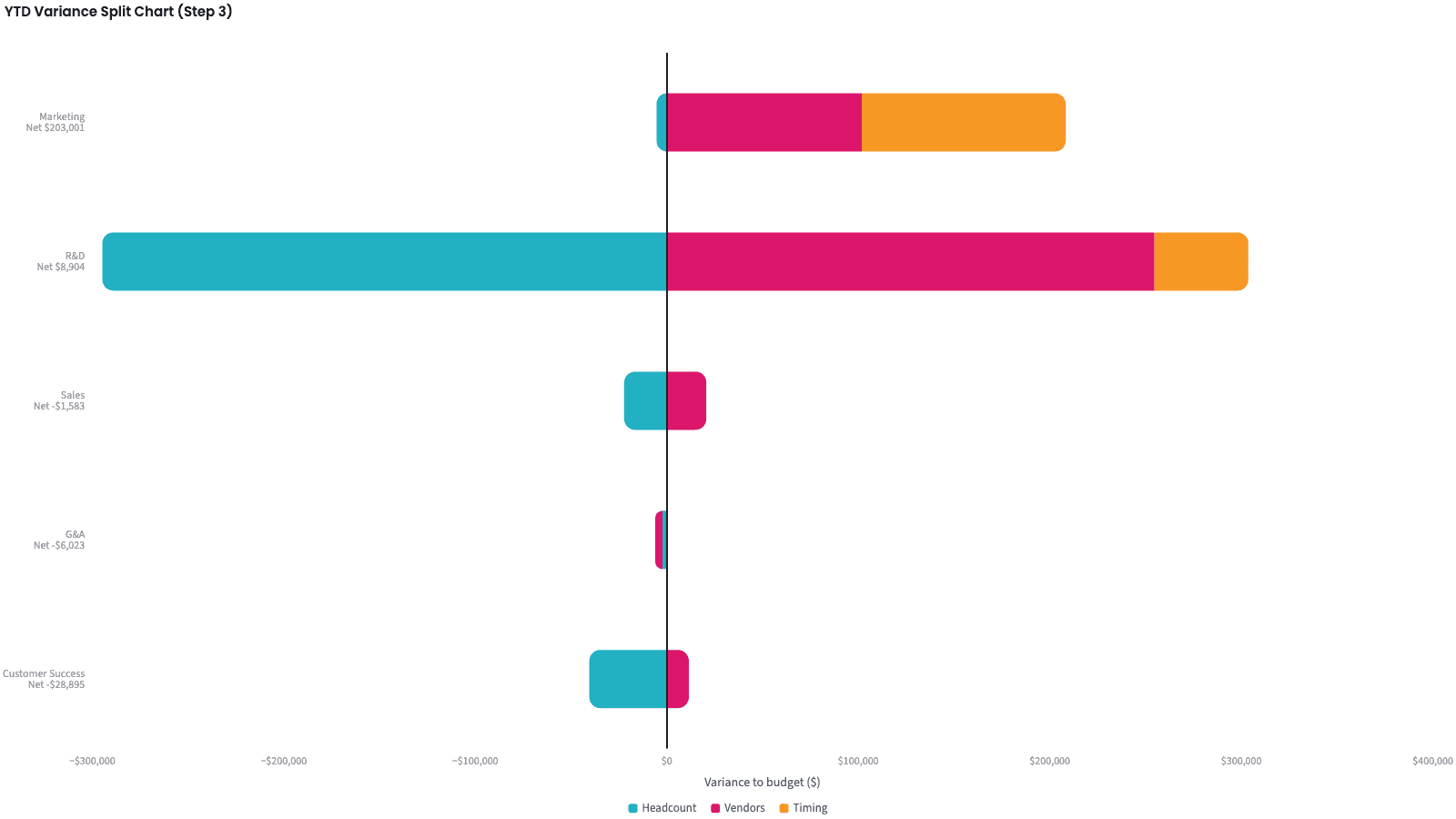
| Department | Headcount | Vendors | Timing | Total |
|---|---|---|---|---|
| Marketing | -$5,335 | +$101,836 | +$106,500 | +$203,001 |
| R&D | -$294,728 | +$254,632 | +$49,000 | +$8,904 |
| Sales | -$22,307 | +$20,724 | 0 | -$1,583 |
| G&A | -$2,306 | -$3,716 | 0 | -$6,023 |
| Customer Success | -$40,424 | +$11,529 | 0 | -$28,895 |
Year to date (January to May 2026), variance split.
Take timing out, and find the offsetting misses
Rank again with timing spread out, and look for misses that cancel:
"Re-rank the departments with timing removed, and flag any department where the headcount and vendor misses are each more than 3% of budget in opposite directions."
Marketing stays on top, driven by events. R&D drops to last and gets the only flag: payroll is under plan with three engineering hires not started, while contractor spend runs over.
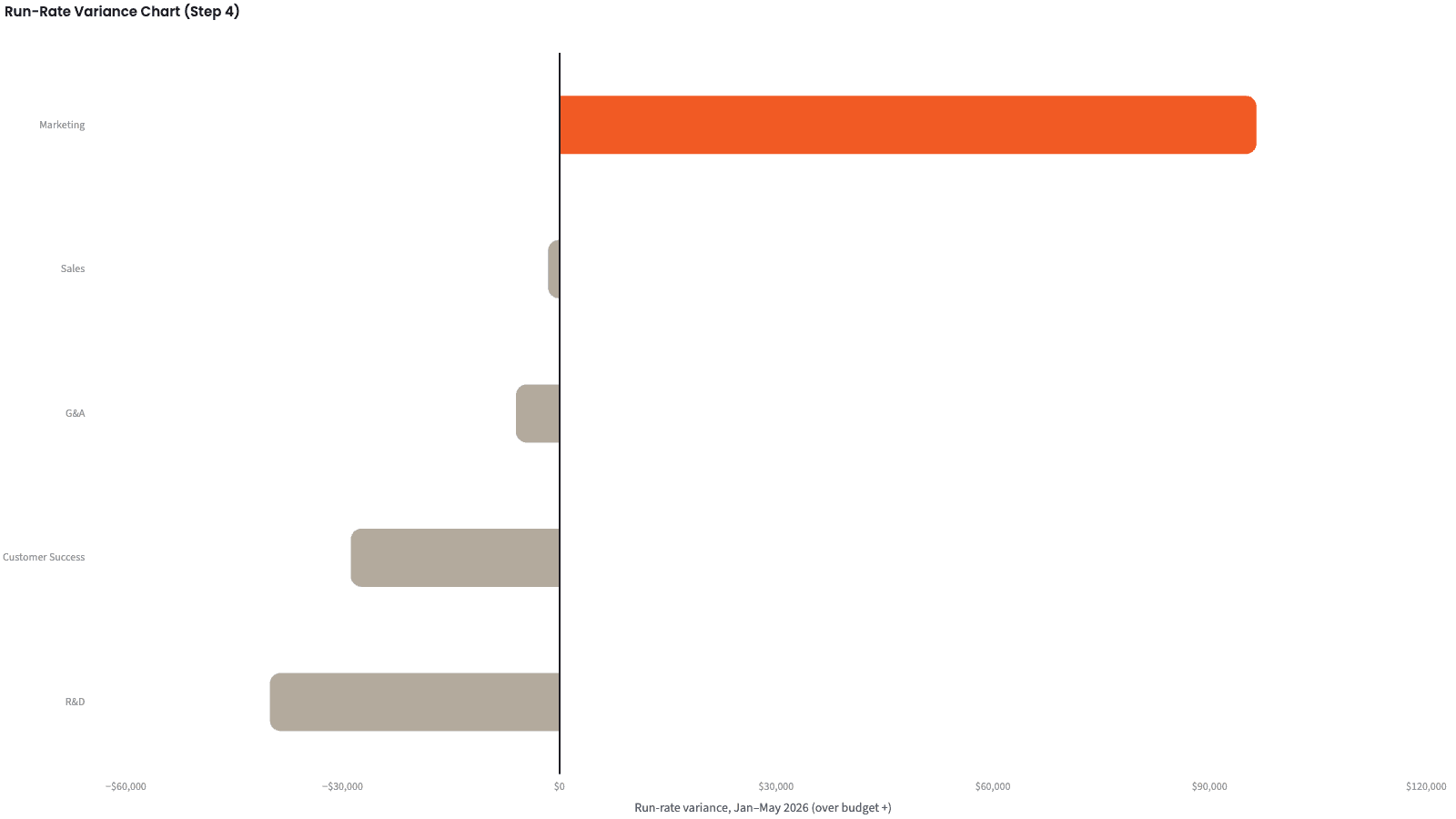
| Department | Year to date | Timing removed | Flag |
|---|---|---|---|
| Marketing | +$203,001 | +$96,501 | vendors |
| Sales | -$1,583 | -$1,583 | |
| G&A | -$6,023 | -$6,023 | |
| Customer Success | -$28,895 | -$28,895 | |
| R&D | +$8,904 | -$40,096 | offsetting |
Year to date, before and after timing is spread out, ranked on the timing-removed figure.
Produce the review pack
Four numbers for the review, and one line per department saying why.
The narrative Querri writes:
The year is 1.2% over budget and most of that is timing. Two conversations matter: Marketing's events spend and R&D's open roles.
What you can create or export:
- The variance table, to Excel, CSV or Google Sheets
- A live dashboard that refreshes on a schedule
- A presentation, to PDF or PowerPoint
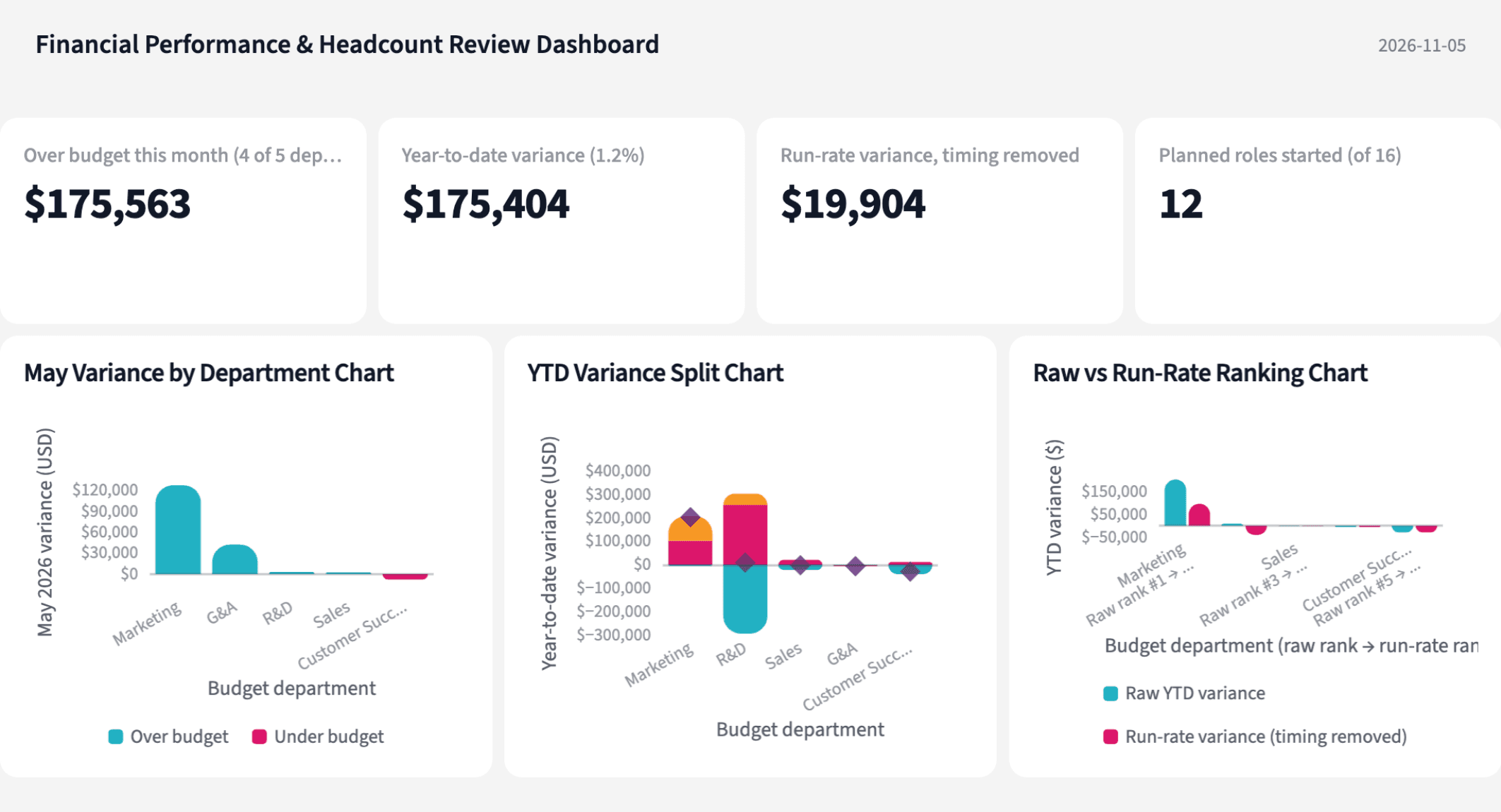
| Department | Year to date | Why |
|---|---|---|
| Marketing | +$203,001 | half timing, the rest vendors |
| R&D | +$8,904 | payroll under, contractors over |
| Sales | -$1,583 | under; one hire started late |
| G&A | -$6,023 | under; May's spike is the audit fee |
| Customer Success | -$28,895 | under; one role still open |
One line per department, year to date.
Walk into your next budget review knowing what to ask each department head.
Try it on your own dataTips for a budget review people trust
Map departments before you compare anything
Eight ERP codes to five budget departments, in a file someone owns. When Support moves under a new VP, you change one row, not the model.
Make the three parts add up
Headcount plus vendors plus timing must equal the variance, department by department. If they don't, something was counted twice or not at all.
Teach Querri your rules once. Every answer after that follows them.
Which accounts count as headcount, when a bill counts as timing, which ERP code belongs to which department: say each rule once and Querri applies it to every question on that data.
Show me how
Say it in chat
Settle a rule in conversation and the Librarian records it as a fact under Facts & Rules, attached to the table it governs. Every later question on that data applies it, whoever asks, and every view built afterwards carries it.
"A timing item is a bill whose service period spans three or more months, or that posted outside its service month. For timing-adjusted views, spread it evenly across its service months. Save that as a rule for the transaction detail table."
Or bring the document that already says it
Upload your close checklist, the accounting policy or the chart of accounts like any other file. Querri files a From a document card in the Inbox with the statements it found, each with its page and exact words; tick the ones to keep and they become facts. Dictionary entries attach to the columns they describe. The rules this playbook depends on:
- Budget variance: actual minus budget, by budget department and account; over budget is positive
- Department: the budget department, after the ERP code is mapped
- Headcount variance: the variance on Salaries & Wages and Payroll Taxes & Benefits
- Late hire: a planned role whose roster start is after its planned start month, or that has no start at all
- Timing item: a bill with a service period of three or more months, or posted outside its service month
- Timing-adjusted variance: the variance with timing items spread across their service months
- Offsetting: headcount and vendor misses each over 3% of budget, in opposite directions
"Read our month-end close policy and propose the rules it states about accruals, prepaid expenses and department mapping. I'll review them in the Inbox."
Where the rules reach
A rule is attached to the data, not to one person's chat, so it follows the data everywhere:
- • Every question asked in chat, by anyone on the team
- • Every view the Librarian builds on that data
- • Every step of a project, including the code it writes
- • Dashboards and scheduled runs, each time they refresh
- • Claude and ChatGPT, when they ask Querri
You stay in control
Every rule is listed under Facts & Rules next to the data it governs, where you can edit or remove it. Rules from a document wait for your tick in the Inbox, and a Worth remembering card is how Querri offers one it noticed itself. Workspaces and roles decide who can change what. Company-wide rules go in Settings → Customize; the Library is where the rest lives.
The payoff on review day
The budget review stops arguing about whether the sponsorship counts and starts on what to do about events and the hiring gap. Changing a threshold is a sentence, not a rebuild.
Frequently asked questions
What counts as over budget here?
What is a timing item?
Why split the variance into headcount, vendors and timing?
How can a department look on budget and still have a problem?
Why does the ERP need a department mapping?
What does the HR roster add?
Does the card feed change the numbers?
How much history does this need?
How often should this run?
Other popular resources
Playbook
Renewals below target
Which accounts renewing next quarter are below our usage target?
Playbook
Commit in doubt
Which Commit deals are in doubt before Monday's pipeline meeting?
Demo
Request a walkthrough
See Querri in action with your own data.
Pricing
Compare plans
Find the right plan for individuals, teams, or enterprise.