Where are rooms about to open, and which sources fill them?
Join the rent roll, the CRM, ad spend and referral fees. See which communities have rooms open or opening, what each source costs per move-in, and where spend went.
Open QuerriWhat you'll need
Querri (Free trial) to set rooms opening beside spend and sources
Yardi, Welcome Home, Google Ads, Meta Ads and Sage Intacct: Step 1 says what each adds
Your source and cost rules: so cost per move-in means the same for every source
Free resources
Start your free trial here →Sample data sets
Synthetic data for Tallowmere Senior Living, a made-up operator with four communities. Residents appear as codes only. Not real resident, family, staff or financial data.
Need help?
If you have any questions, you can request a demo or email our team.
Before we begin
Next month's marketing budget usually follows last month's. Moving it means knowing where rooms are about to open and what each source really costs per move-in, and those sit in the rent roll, the CRM, two ad accounts and the referral invoices. Nobody has time to piece that together before the budget is due.
This playbook counts rooms open or opening by community, works out cost per move-in for every source, and sets last quarter's digital spend beside both.
How it works:
- • Connect the ad accounts; upload Yardi, Welcome Home and Sage Intacct
- • Count vacant units and notices by community
- • Work out cost per move-in by source
- • Compare where spend went with where rooms are opening
- • Build next month's spend view
Follow the steps
Connect the ad accounts; upload Yardi, Welcome Home and Sage Intacct
Five sources, one project:
- •
Yardi rent roll (or your resident system): vacant units and move-out notices.
- •
Welcome Home (or your CRM): inquiries and move-ins by lead source.
- •
Google Ads: search spend by campaign.
- •
Meta Ads: social spend by campaign.
- •
Sage Intacct (or your ledger): referral fees, events and website costs.
Google Ads and Meta Ads connect directly; the others come in as exports.
Tip: Bring twelve months of leads and costs, so cost per move-in rests on more than a handful of move-ins.
-
 Yardi rent roll
- Welcome Home leads
-
 Google Ads
-
 Meta Ads
- Sage Intacct bills
 One project
Count vacant units and notices by community
Start with where rooms are open or about to open:
"From the rent roll, how many units are vacant or on notice at each community today?"
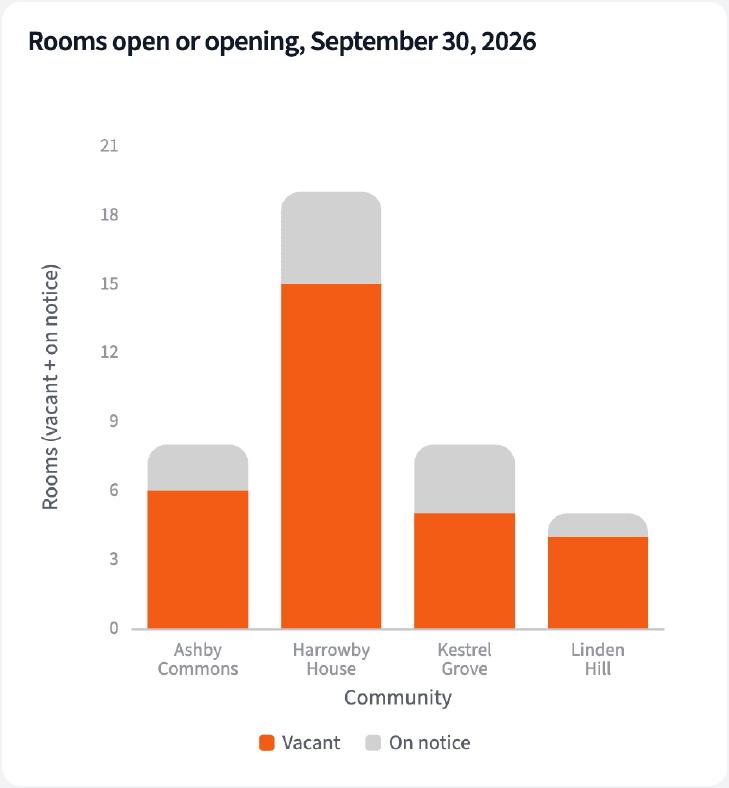
Forty rooms are open or opening across the four communities, and Harrowby House has 19 of them.
| Community | Vacant | On notice |
|---|---|---|
| Harrowby House | 15 | 4 |
| Ashby Commons | 6 | 2 |
| Kestrel Grove | 5 | 3 |
| Linden Hill | 4 | 1 |
Rent roll at September 30, 2026. Units out of service are not counted.
Work out cost per move-in by source
Then price every source the same way:
"For the last 12 months, work out inquiries, move-ins and cost per move-in for each lead source, using Welcome Home, the ad accounts, and the referral and event bills in Sage Intacct."
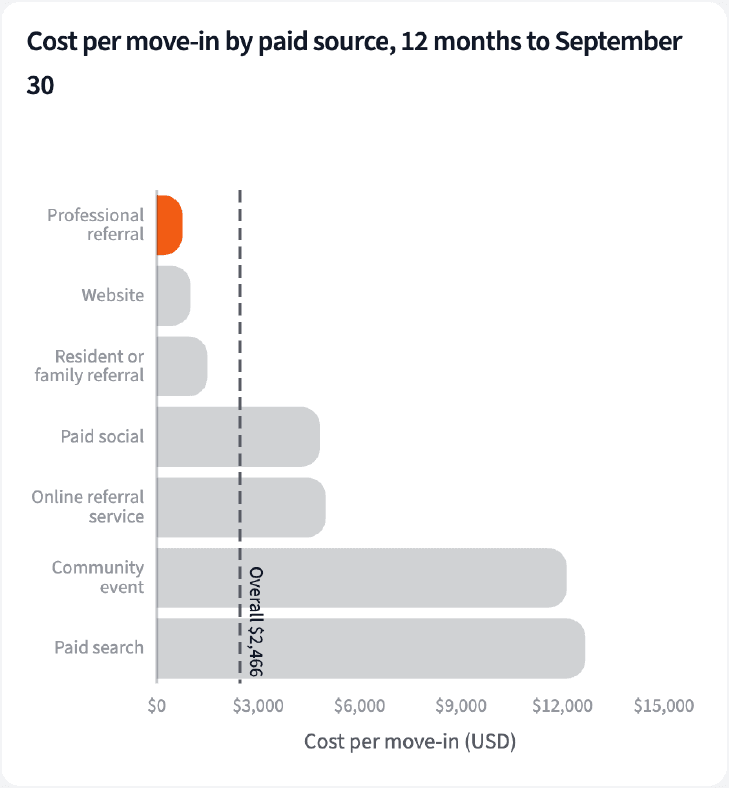
The online referral service brought a third of inquiries at $5,001 per move-in. Professional referrals cost $759 per move-in, the lowest among paid sources.
| Source | Move-ins | Cost per move-in |
|---|---|---|
| Professional referral | 38 | $759 |
| Website | 25 | $998 |
| Resident or family referral | 30 | $1,500 |
| Online referral service | 15 | $5,001 |
| Paid search | 6 | $12,684 |
Twelve months to September 30, 2026. Cost leaves out sales commissions. Walk-ins (10 move-ins) have no recorded cost.
Compare where spend went with where rooms are opening
Last, set spend beside the rooms:
"Compare last quarter's Google and Meta spend by community with where rooms are open or opening."
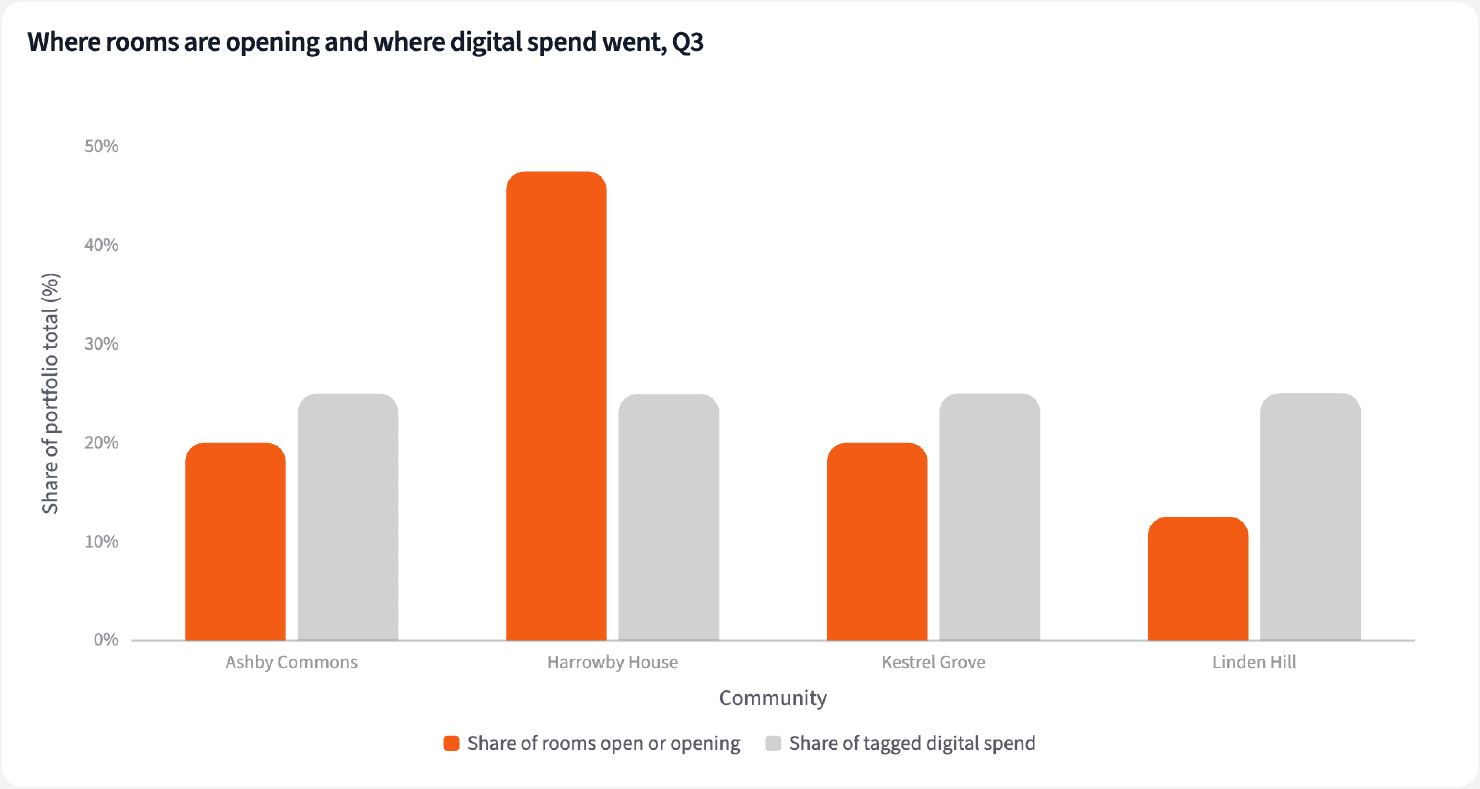
Community-tagged digital spend was split evenly, 25% to each community, while Harrowby House holds 47.5% of the rooms open or opening.
| Community | Rooms share | Digital spend share |
|---|---|---|
| Harrowby House | 47.5% | 25.0% |
| Ashby Commons | 20.0% | 25.0% |
| Kestrel Grove | 20.0% | 25.0% |
| Linden Hill | 12.5% | 25.0% |
Q3 2026 community-tagged paid digital spend (Google Ads and Meta Ads; the brand campaign names no community and is left out), against rooms at September 30.
Build next month's spend view
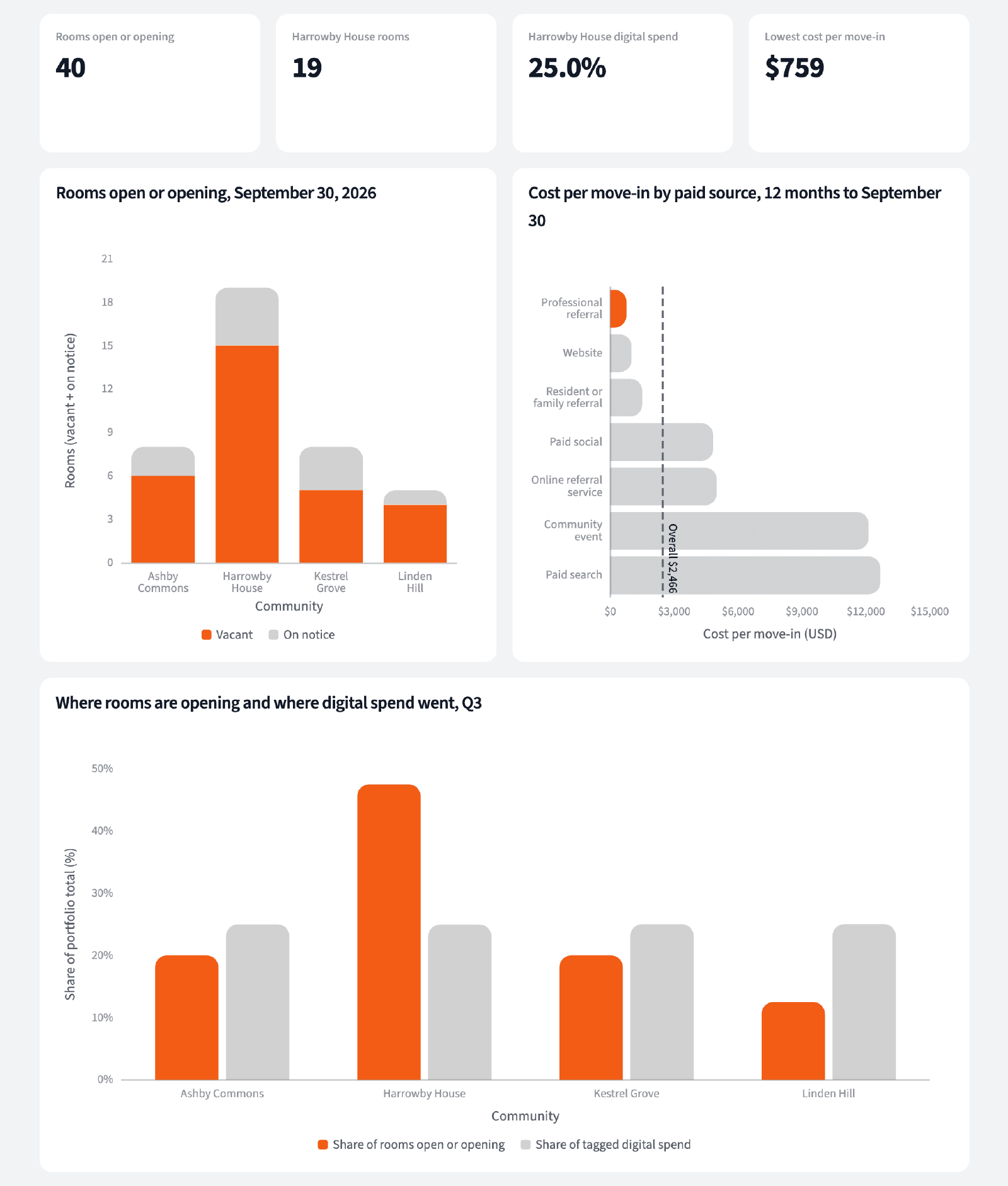
Four numbers for the budget conversation, and where to look first.
The narrative Querri writes:
Harrowby House holds nearly half of the rooms open or opening and a quarter of digital spend, and professional referrals fill rooms for the least.
What you can create or export:
- The table, to Excel, CSV or Google Sheets
- A live dashboard that refreshes when new exports land
- A presentation for the meeting, to PDF or PowerPoint
| Community | Rooms open or opening | Digital spend share |
|---|---|---|
| Harrowby House | 19 | 25.0% |
| Ashby Commons | 8 | 25.0% |
| Kestrel Grove | 8 | 25.0% |
| Linden Hill | 5 | 25.0% |
October planning view.
Put next month's budget where rooms are about to open, on the sources that fill them.
Try it on your own dataTips for a spend view people trust
Count notices, not only vacancies
A unit on notice is a room you can start filling now. Vacancies alone show where you are already behind.
Keep one cost rule for every source
Referral fees, events and ads all count the same way, with commissions left out. Otherwise the cheapest source is whichever one was priced last.
Teach Querri your rules once. Every answer after that follows them.
What a room open or opening is, which costs belong to each source, how move-ins are counted, how campaigns map to communities: say each rule once and Querri applies it to every question on that data.
Show me how
Say it in chat
Settle a rule in conversation and the Librarian records it as a fact under Facts & Rules, attached to the table it governs. Every later question on that data applies it, whoever asks, and every view built afterwards carries it.
"Cost per move-in is a source's referral fees, events, website and ad spend divided by its move-ins, leaving out commissions. Save that as a rule for the Welcome Home leads table."
Or bring the document that already says it
Upload your marketing budget guidelines like any other file. Querri files a From a document card in the Inbox with the statements it found, each with its page and exact words; tick the ones to keep and they become facts. The rules this playbook depends on:
- Rooms open or opening: vacant units plus units on notice
- Units out of service are not counted
- Move-ins by source: the lead's recorded source
- Cost per move-in leaves out sales commissions
- A campaign belongs to the community named in it
- The brand campaign belongs to no community
"Read our marketing budget guidelines and propose the rules they state about source costs. I'll review them in the Inbox."
Where the rules reach
A rule is attached to the data, not to one person's chat, so it follows the data everywhere:
- • Every question asked in chat, by anyone on the sales and marketing team
- • Every view the Librarian builds on that data
- • Every step of a project, including the code it writes
- • Dashboards and scheduled runs, each time they refresh
- • Claude and ChatGPT, when they ask Querri
You stay in control
Every rule is listed under Facts & Rules next to the data it governs, where you can edit or remove it. Rules from a document wait for your tick in the Inbox, and a Worth remembering card is how Querri offers one it noticed itself. Workspaces and roles decide who can change what. Company-wide rules go in Settings → Customize; the Library is where the rest lives.
The payoff in the budget conversation
Spend moves to where rooms are opening, with a cost per move-in behind every source. Changing a cost rule is a sentence.
Frequently asked questions
What counts as a room open or opening?
What does cost per move-in include?
Is move-ins per inquiry a conversion rate?
Why is the online referral service so expensive?
What about walk-ins?
Why leave out the brand campaign?
Do I need connectors for all five?
How often should this run?
Other popular resources
Playbook
Why census dipped
Census dipped. Is it leads, tours, move-outs or price?
Playbook
Incentives against rate
Are incentives filling rooms or giving away rate?
Demo
Request a walkthrough
See Querri in action with your own data.
Pricing
Compare plans
Find the right plan for individuals, teams, or enterprise.