Skip to content
  • Which lead sources move people in?
  • Are incentives giving away rate?
  • Which move-outs are coming?
  • When census dips, is it leads, tours or move-outs?

Querri for senior living sales and marketing. Querri it. Fill the room before it's empty.

Querri joins the CRM, move-ins and move-outs, the rent roll and spend, so sales and marketing see why census moved, put next month's spend where move-outs are coming, and know which incentives pay. Connect the systems you already run and start in minutes.

Free to start. No credit card required.

  • 125+ connectors
  • SOC 2 Type II, HIPAA, ISO 27001:2022
  • Never trains a model on your data
One minute: why census moved, the Community desk blueprint, and what else your sales and census data answers.

One view of census

Four systems. One answer to why census moved.

Leads live in the CRM, move-ins and move-outs in the resident records, rate in the rent roll and spend in the ad accounts and the books. Querri reads all four and defines census, cost per move-in and rate once, so the weekly census meeting and the budget review start from the same figures.

  • CRM leads and tours SalesforceHubSpotWWelcome HomeAAline
  • Move-ins and move-outs YYardiPPointClickCare
  • Rent roll and rate YYardiExcel
  • Ad and referral spend Google AdsMeta AdsQuickBooks

Where senior living sales and marketing teams start

Three questions behind every census report

These are good first jobs, not the whole list. Once the CRM, the resident records, the rent roll and spend are in, the same definitions answer whatever you ask next.

Census dipped. Leads, tours, move-outs or price?

“When a community's census dips, is it leads, tours, move-outs or price?”

How it's done today
A weekly census report, a CRM funnel report and the rent roll, read side by side in the meeting.
In Querri
Querri joins the CRM, move-ins and move-outs from the resident records, and the rent roll on the community. You see whether the dip is fewer leads, fewer tours, more move-outs or discounted rate, and a monitor flags any community whose census moved against its own history.

Next month's spend, where rooms are about to open.

“Which communities have move-outs scheduled or rising, and which sources fill them at the lowest cost per move-in?”

How it's done today
Spend split by habit or last month's budget, with each source's cost pieced together from invoices.
In Querri
Querri joins scheduled move-outs and vacancies with CRM leads by source, ad and referral spend, and census. Cost per move-in is defined once, so next month's budget goes where rooms are about to open, on the sources that fill them.

Incentives that fill rooms, not give away rate.

“Are incentives and discounts filling rooms, or giving away rate?”

How it's done today
Incentives logged in the CRM, and the rate they cost found months later in the rent roll.
In Querri
Querri joins the incentive on each CRM move-in to the rate actually charged on the rent roll and to census. See what each incentive costs in the first year and whether the community it went to filled.

Census by driver is one view. Ask next about speed to lead, re-tours, lost reasons or length of stay by source. See how asking works

More than a census report

One set of definitions, for every report and every AI agent

The three jobs run on the same foundation as everything else in Querri. Define a number once, and every dashboard, census report, budget review and AI answer uses it.

The Library

Teach it once. It stays right.

Say that a transfer to memory care is never a move-in, or how cost per move-in counts referral fees, and every answer after that uses it. The census meeting, the budget review and finance's numbers finally agree.

Answers you can stand behind

Click a number. See where it comes from.

Click a community's move-outs to see each resident record and source table behind them, with when they refreshed. When a question has two reasonable readings, Querri tells you, and when it can't answer, it says what's missing.

Wherever you work

Every sales director asks their own questions.

Directors of sales and regional leaders ask in plain language, with no SQL and no analyst queue, under each person's own access. Build a dashboard by asking, send it as a workbook or slides, or ask from your AI assistant.

It keeps learning

Wake up to what changed.

Monitors judge each community's inquiries, tours, move-outs and cost per move-in against its own history and say which one moved, not just that the total did. Every night Querri works through your data and leaves what it found in your Inbox. Nothing changes without your OK.

The blueprint

A community census blueprint, ready in minutes

Four steps from sign-up to your own census desk. Here is everything that installs, ready to ask questions of and make your own.

  1. Sign up free

    No credit card. Your own workspace is ready in about a minute.

  2. Install Community desk

    Open Blueprints, pick the card and install it. Sample data comes with it, so every page has numbers right away.

    Community desk25 pieces
  3. Keep the sample, or connect your data

    Connect your CRM and your resident system, or bring their exports and your timecards. An agent sets up each connection with you.

    SalesforceHubSpotExcelGoogle AdsMeta AdsQuickBooks
  4. Open your Community desk

    Census today, moves with their reasons, the sales pipeline and spend against rate on one site, ready for the weekly census meeting.

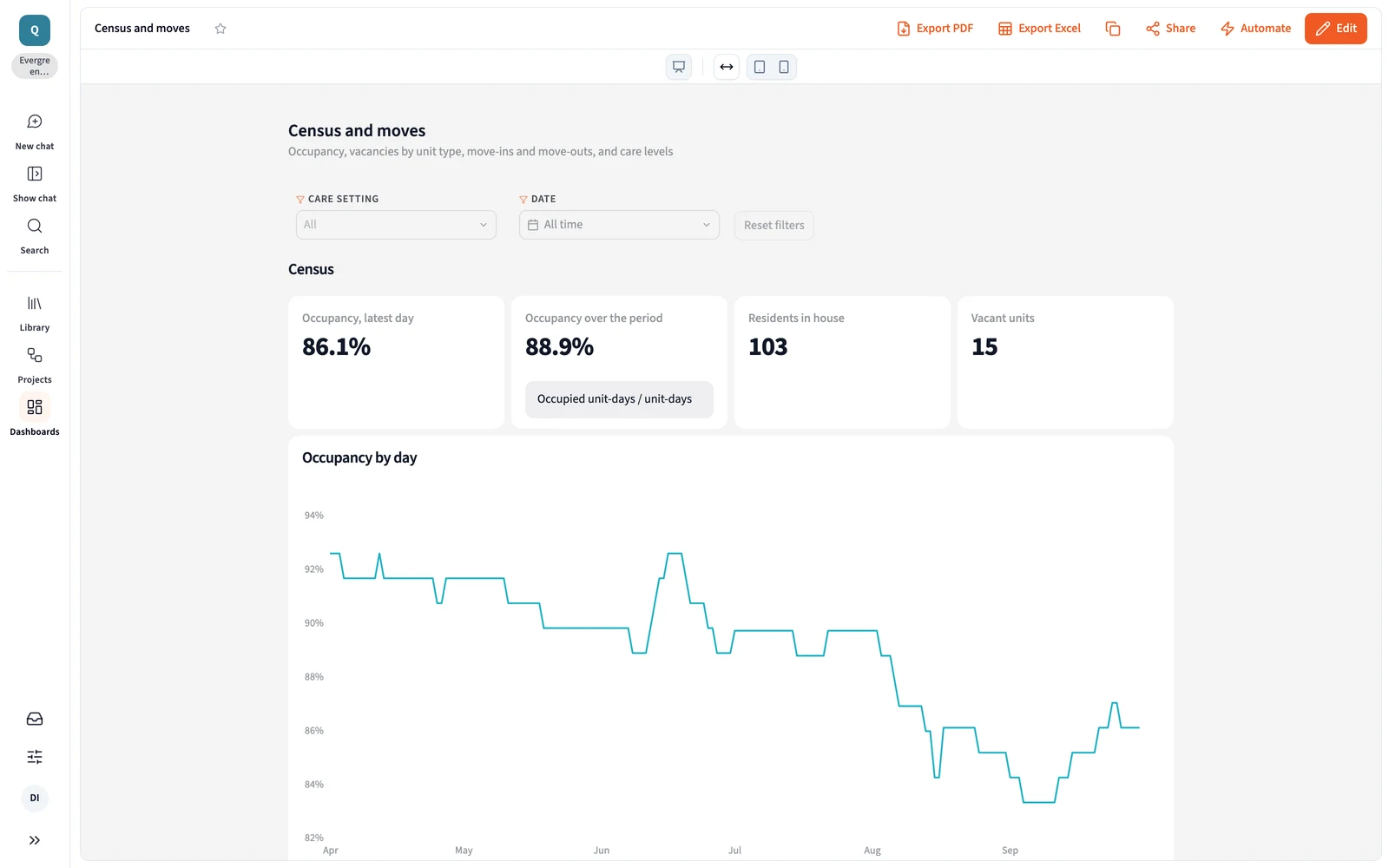
The Community desk blueprint in Querri on Marrowgate House sample data: the Census and moves dashboard, with occupancy on the latest day and over the period, residents in house, vacant units and occupancy by day
Occupancy, residents in house and vacant units for one community, in the Community desk blueprint (Marrowgate House sample data).

Everything that installs

  • 6 Site pages

    Marrowgate House community desk

    • Census today
    • Moves
    • Sales pipeline
    • Spend and rate
    • Care and staffing
    • Data readiness
  • 4 Dashboards

    • Census and moves
    • Sales pipeline
    • Spend and incentives
    • Staffing against census
  • 8 Views

    • Census
    • Moves
    • Sales pipeline
    • Care levels
    • Staffing against census
    • Move-out notices
    • Lead sources and cost
    • Incentives against rate
  • 4 KPIs

    • Occupancy
    • Net move-ins
    • Tour rate
    • Deposit rate
  • 3 Skill and monitors

    • Weekly census meeting
    • Occupancy watch
    • Hours per resident day watch

Occupancy is occupied units over units in service. Residents are people, not units, and a transfer between care settings is never a move-in.

Sign up and open the blueprint

Compare

How Querri compares with the other ways sales and marketing get these numbers

Most senior living sales teams already have CRM reports, a consultant or data hire building dashboards, an AI assistant, or all three. Here is where each fits, where it stops, and how Querri works alongside it.

QuerriCRM reportsA BI build: a consultant or a data hireAn AI assistant you wire up yourself
Time to the first answerMinutes on sample data from the blueprint, then on your ownRight away, for what the CRM holdsMonths: a hire or a consultant, pipelines, then dashboardsA first demo in a day
CRM, move-outs, rent roll and spend togetherOne Library, from 125+ connectors and uploadsStops at move-inOnce each source is piped in and modeledOne connector at a time, joined in the chat
A question nobody built a report forAsk it in plain wordsAn export to ExcelJoins the builder's queueAsk it in plain words
What a move-in or cost per move-in meansTaught once; every answer, dashboard and AI agent uses itSet in the CRM, without move-outs or rateIn the model the builder maintainsPer person or per project, in prompts and skill files
Where a number came fromClick any number to see its steps and source tablesIn the CRM's report filtersIn the SQL, for whoever can read itIn the chat, worked out fresh each time
Watching for changesMonitors on any KPI, each community against its own historyWeekly reports you runThrough an alerting tool on topScheduled tasks someone writes and keeps working
Working leads: follow-up, tours and outreachNot Querri's job. Keep working leads in your CRMIts core strengthNot its jobOnly if someone builds it
How it works with QuerriReads from all three, plus the resident records, rent roll and spendKeep it for the pipeline. Querri reads it beside move-outs, rate and spendQuerri connects to what's built and puts the answers in front of salesUse both. Querri works inside the assistant, on the same definitions
The right call on its own whenCensus questions cross systems and need one definitionThe question stops at move-inA staffed data team already models census, CRM and spendIt's a one-off look at a spreadsheet

Approaches, not products: what each typically looks like in late 2026.

Questions

Senior living census, move-ins and marketing spend: common questions

How do senior living sales and marketing teams find out why census dipped?

In Querri, a senior living sales and marketing team joins the CRM, move-ins and move-outs from the resident records, and the rent roll on each community. Querri shows whether a dip came from fewer inquiries, fewer tours, more move-outs or discounted rate, quarter against quarter, and a monitor flags any community whose census moved against its own history. How Views work

How should a senior living operator decide where next month's ad and referral spend goes?

Querri joins scheduled move-outs and current vacancies with CRM leads by source, ad and referral spend, and census. Cost per move-in is defined once for every source and community, so next month's budget goes to the communities where rooms are about to open, on the sources that actually move residents in, not the ones with the most inquiries. How KPIs work

Can Querri show whether move-in incentives are filling rooms or giving away rate?

Yes. Querri joins the incentive recorded on each CRM move-in to the rate actually charged on the rent roll and to census against budget. You see what each incentive, such as first month free or a waived community fee, cost in the first year, and whether the communities that used it filled. Dashboards

What does Querri do differently if our CRM already has funnel reports?

Querri works alongside your CRM, so keep it for working leads. CRM reports stop at move-in. Querri reads the CRM beside move-outs, the rent roll and spend, so the census meeting sees the whole path from first inquiry to a resident who stays and pays, on the same definitions finance uses. See every connector

Why use Querri for senior living census reporting instead of a general AI assistant?

Querri keeps your definitions, so occupancy, a move-in and cost per move-in mean the same in every answer, every week. Answers become saved reports that re-run on new data, and every number shows its query, which matters when census goes to the regional review and the budget. You can use both: Querri works inside your AI assistant through MCP, on the same definitions. Querri inside your AI assistant

Is it safe to connect our CRM and resident system to Querri?

Yes. Querri's connectors are read-only, so Querri never changes a record in your CRM, resident system or ad accounts, and an agent sets up each connection without ever seeing your passwords. Each organization has its own database and storage, encrypted with AES-256 at rest, and your data, prompts and results never train any model. Querri is SOC 2 Type II and ISO 27001:2022 certified and HIPAA compliant, and signs a BAA. Visit the Trust Center

What does a senior living sales and marketing team connect first to get started with Querri?

To get started with Querri, connect your CRM, such as Salesforce, HubSpot, Welcome Home or Aline, and your resident system for move-ins and move-outs; the rent roll and ad spend can follow. The Community desk blueprint opens on sample data first, with census today, moves and their reasons and the sales pipeline, then runs on your own numbers. Sign up and open the blueprint

Do I need a credit card to try Querri for senior living sales and marketing?

No. Querri is free to start, and no credit card is required. When you sign up, the Community desk blueprint opens on sample data with census, moves and the sales pipeline for one community, so you can see how it works before you connect your CRM. Current plans are on the Querri pricing page. See pricing

Start with why census moved.

The Community desk blueprint opens when you sign up. Connect your CRM and your resident system, and census, moves and the sales pipeline land on one desk. Then ask what you'd ask next.

Free to start. No credit card required.

Each organization has its own database and storage, and your data is never used to train a model. How we handle security and access.