Querri vs Gemini
Gemini is great in the sheet you have open. Querri answers across every system you run.
Keep Gemini in Workspace. Ask the business in one place.
Gemini already sits in your Gmail, Docs and Sheets, and Google can answer questions over BigQuery and Looker once a data team has set them up. Querri is the question-first data platform. It starts from the questions your business asks and builds what's needed to answer them, across Google and every other system, on one predictable bill.
Time, cost and control
Answers across every system this quarter, without a BigQuery and Looker project
Gemini is excellent at the file in front of you. The harder work is one trusted answer across HubSpot, QuickBooks, NetSuite and the spreadsheets. Here's what the difference means for the business.
-
Answers in days, not after a data project
In Google's model, governed answers come from data loaded into BigQuery and modeled in Looker. With Querri, you connect your systems and the Google Sheets you already keep, and ask the same day.
-
A bill you can plan, with no surprises
Gemini comes with the Workspace seat. The governed path adds BigQuery compute for every query, a Looker contract by quote and Gemini Enterprise seats. Querri is one predictable bill: a monthly credit allowance tied to the work your team does, alerts before you reach it, and no automatic overage charges.
-
No LookML to write
Google's own guidance says answer quality is "directly tied" to how well the LookML is prepared. In Querri, the people who know the business teach it what the numbers mean, in plain language.
-
Secure, auditable, nothing to rip out
SOC 2 Type II, HIPAA and ISO 27001:2022, and your data never trains a model. Every number shows its query. Keep Workspace and Gemini: Querri reads your Sheets, Drive files and BigQuery tables, read-only.
Where each one fits
Pick by where your data lives and who will keep it right
We'd rather you pick the right tool than pick us for the wrong reason. Many teams use both. Here's where each one fits.
Choose Gemini when
- Your team lives in Gmail, Docs and Sheets, and most questions are about the spreadsheet in front of you.
- Your data is already in BigQuery, with a data team that maintains Looker models and curates data agents.
- You want one assistant for writing, research, email and meetings as well as numbers, in seats you already pay for.
- You need Google's compliance footprint, including FedRAMP High for Gemini in Workspace and ISO 42001.
- You plan to build your own agents on Gemini models and Google Cloud.
Choose Querri when
- Your numbers live in HubSpot, QuickBooks, NetSuite, Stripe and spreadsheets, not in one warehouse.
- You want governed answers without loading everything into BigQuery and writing LookML first.
- Everyone needs the same definition of revenue every month, not one per sheet or per chat.
- You want dashboards, scheduled Excel reports and nightly insights built in, with unlimited viewers.
- You want one predictable bill, with AI included and no automatic overage charges.
Feature by feature
The detailed comparison
Every row says where each one is stronger. Where Gemini wins, we say so. "Gemini" here includes Gemini in Workspace, Gemini Enterprise and Google's conversational analytics in BigQuery and Looker. Facts are current as of October 2026 and linked in the sources.
Google prices are US list from Google's Workspace, BigQuery and Looker pricing pages, as of October 15, 2026. Gemini Enterprise prices are Google's launch prices as reported in October 2025; Google's product page doesn't list them today. Prices vary by region and contract.
Pricing
Gemini comes with the seat. The governed answers are billed elsewhere.
In a Google shop, nobody buys Gemini: it's already in the Workspace plan, and for the spreadsheet in front of you that's a real advantage. Answers you can trust across systems are a different purchase. They run on BigQuery compute, a Looker contract and the people who curate both.
How Gemini is billed
- Gemini in Sheets starts at Workspace Business Standard: $14 a user a month on an annual plan, $16.80 flexible. Business Starter ($7) gets "basic access" to the Gemini app, not Gemini in Sheets.
- Since July 15, 2026, per-user usage limits apply to the new Sheets features. Higher limits take an AI Expanded Access or AI Ultra Access add-on, with no published price.
- Gemini Enterprise launched at $21 a seat (Business) and $30 (Standard and Plus, starting price), billed annually.
- BigQuery on demand is $6.25 per TiB scanned after the first free TiB each month. Data agents bill "at BigQuery compute pricing" for the queries they run.
- Looker is "Call sales" for every edition, priced per contract. Its AI is $3.00 per million input tokens and $20.00 per million output beyond an allocation, free for now with 90 days' notice before billing.
- Our arithmetic: 50 people on Business Standard is about $8,400 a year, and a Google shop is already paying it.
When Gemini's pricing is the better deal
If you already pay for Business Standard and your questions fit in one spreadsheet, Gemini costs nothing extra, and that's hard to beat. If your data is already in BigQuery with a team maintaining Looker, Google's data agents add little beyond the compute you already manage. If that's you, the guides below are where to start.
Where it gets hard
Choosing Gemini? Set it up to be right.
If Google's stack is the right call for you, these are Google's own guides to getting answers you can trust from it.
- Start with one or two Explores Looker's rollout guide: begin with "one or two well-structured Explores" on clean data. Looker docs
- Prepare the LookML Labels, descriptions, hidden fields and verified queries. Quality is "directly tied" to them. Looker docs
- Curate BigQuery data agents Pick knowledge sources deliberately. Each agent's queries bill as BigQuery compute. Google Cloud docs
- Know the API's limits Row caps, one Explore at a time, and the analysis it doesn't support yet. Google Cloud docs
- Use the AI function carefully 350 cells a run, text only, no undo, and some ranges need a manual refresh. Google Docs Editors Help
- Plan for Sheets usage limits Which editions get the new features, US English only, and the add-ons for more. Google Workspace Updates
How Querri keeps the bill predictable
- One bill, no surprises. One plan for the whole organization, with the AI, storage and unlimited dashboard viewers included. See plans and pricing.
- One simple credit. A credit is a unit of business work, like answering a question or syncing a source, so usage is easy to understand and easy to plan for.
- Unlimited dashboard viewers on every plan. Viewing, uploads, exports and the Library never cost credits.
- Usage alerts at 80% of the plan, when it's over and on a spike, plus a monthly limit for any person.
- No automatic overage charges. We tell you as you approach your limit, and you decide what happens next.
- No warehouse or semantic model to build first. Storage, the engine, the definitions and the AI are in the plan.
Total cost
What it takes to get a governed answer
Gemini in a sheet costs nothing beyond the seat. A trusted answer across all your systems is a bigger build on Google's path. Here's that path, next to Querri.
The Google path is our estimate from Google's published prices, salary ranges and the launch prices in the linked sources, not a quote. A lean setup costs less; if you already run BigQuery and Looker with a team, much of it is a cost you've already chosen.
Built in, not assembled
Everything between your data and the answer, in one product
On Google's governed path, these are separate products to set up, connect and keep current: Workspace, BigQuery, Looker, data agents and Gemini Enterprise. In Querri they're one chain: new data rebuilds the views on it, KPIs recompute and every dashboard refresh replays its saved query, so any number traces back to its source.
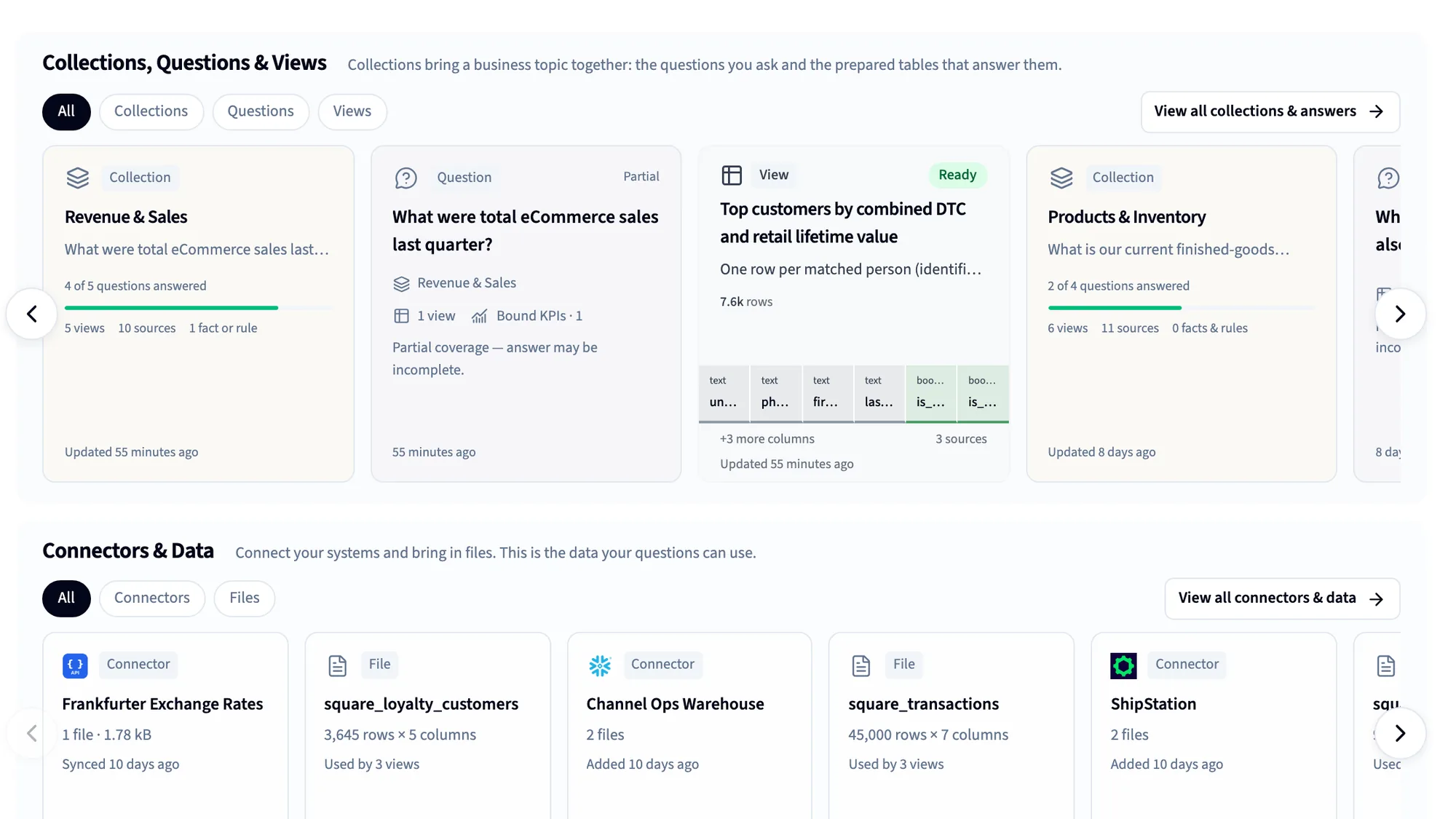
125+ connectors
CRM, accounting, ERP, payments, ads and databases, plus spreadsheets and files.
Automatic data cleaning
More than 180 checks on every table, and the Janitor to fix what they find.
The Library
A business-first semantic layer: definitions, KPIs and rules, taught by saying them.
Dashboards
Built by asking or from a screenshot, shared with unlimited viewers.
Nightly insights and Monitors
Querri works through your data overnight and shows what changed.
MCP for Claude and ChatGPT
Every assistant answers from the same definitions, under each person's access.
Reports and Excel
Scheduled projects, formatted workbooks and decks, delivered for you.
White label and embed
Bring the same understanding inside your own product, under your brand.
Using both
How Gemini and Querri work together
Plenty of teams will run both, and that's a good setup. Keep Gemini for email, documents and the spreadsheet you have open, and let Querri be where the business asks about its numbers. Your Google Sheets, Drive files and BigQuery tables become Querri sources, next to the systems that live outside Google.
Keep in Gemini
- Email, documents, slides and meetings
- Quick work in the spreadsheet you have open
- Research across your files and the web
- BigQuery and Looker models your data team runs
Do in Querri
- Business questions across every system
- Definitions the business owns, in plain language
- Dashboards for everyone, with unlimited viewers
- Scheduled reports and exports back to Drive
How they fit together
-
Querri reads the Google Sheets and Drive files you pick in Google's file picker, every tab included, and syncs them daily, weekly or monthly. It never edits a cell.
-
BigQuery connects through Google sign-in with read-only access and no key files, as a full refresh or incrementally as often as hourly. Querri syncs a copy rather than querying live.
-
Answers go back out to Google: a project step can save CSV, Excel, Parquet or a chart image to a Drive folder you choose, on every scheduled run.
-
Querri doesn't run inside Gemini and doesn't use Gemini models. It answers in Querri, on dashboards and in Claude or ChatGPT through MCP, and your data is never used to train any model.
FAQ
Questions people ask when comparing Querri and Gemini
Is Querri a replacement for Gemini?
No, and most teams shouldn't treat it as one. Gemini is an assistant across Gmail, Docs, Sheets and Meet; Querri is where the business asks about its numbers, across every system, with shared definitions. Keep Gemini for the everyday work and connect your Sheets, Drive and BigQuery to Querri.
How much does Gemini cost for business?
Gemini in Sheets is included from Google Workspace Business Standard, $14 a user a month on an annual plan ($16.80 flexible). Gemini Enterprise launched at $21 a seat for Business and $30 for Standard. Governed analytics adds BigQuery compute and Looker, which is priced by quote. Querri is one predictable plan with AI and dashboards included; see current plans.
Can Gemini analyze data in Google Sheets?
Yes, and it's getting more capable. Since April 2026 it can build whole spreadsheets from a prompt, write formulas and pivot tables, and edit a sheet from the side panel, in the US and in English. Per-user usage limits apply since July 15, 2026. It works on the sheet in front of you; Querri is for questions that span many sheets and systems, with the same definitions every time.
Is Gemini in Google Sheets accurate?
It can be very good on a clean sheet. Google's own BigQuery docs call Gemini "an early-stage technology" and ask you to validate its output. Reviewers have reported hallucinated values in earlier versions. Querri checks the data for gaps and duplicates first, works each answer out two independent ways and shows the query behind every number.
What are the limits of Gemini in Google Sheets?
The AI function generates "only the first 350 selected cells" per run, returns text only and can't be undone. The new agentic Sheets features are US and English only, and per-user usage limits apply, with paid add-ons for more. The Gemini app takes up to 10 files of 100 MB each per prompt.
Do I need BigQuery and Looker to use Gemini for analytics?
Not for Sheets or the Gemini app. Google's governed answers, though, come from data agents over BigQuery and from Conversational Analytics on Looker, and Google's guidance says their quality is "directly tied" to how well the LookML is prepared. Querri connects to your systems directly, or reads BigQuery if you already run it.
What does BigQuery Conversational Analytics cost?
There's no separate price. Google's docs say you are charged "at BigQuery compute pricing" for the queries data agents run, which on demand is $6.25 per TiB scanned after the first free TiB a month. So the cost grows with the questions people ask. Querri includes AI in every plan, drawn from a set monthly credit allowance.
What do I need to set up Looker Conversational Analytics?
A Looker instance with LookML models, an admin to set it up, and curated Explores. Google's rollout guide says to "start with one or two well-structured Explores" on clean data, and its best practices cover labels, descriptions, hidden fields and verified queries. It's accurate where the LookML is good; Querri lets the business define its numbers in plain language instead.
Can Gemini connect to HubSpot, Salesforce or QuickBooks?
Gemini Enterprise connects to Salesforce, HubSpot and many other tools for searching records and taking actions, and Google announced Sheets imports from HubSpot and Salesforce at Next '26. Those connectors don't hold one definition of revenue across systems. Querri syncs 125+ sources, including HubSpot, Salesforce, QuickBooks and NetSuite, into one Library with shared definitions.
What's the best Gemini alternative for data analysis?
It depends on where your data lives. If it's all in BigQuery with a team maintaining Looker, Google's own agents are a strong choice. If your numbers are spread across a CRM, accounting, payments and spreadsheets, Querri brings them together, learns your definitions in plain language and builds dashboards by asking. Many teams keep Gemini and add Querri.
Does Querri work with Google Sheets and Google Drive?
Yes. Querri reads the Sheets and Drive files you pick, every tab included, and syncs them daily, weekly or monthly. It never edits your sheets. A project can export results as CSV, Excel, Parquet or a chart image to a Drive folder you choose, on a schedule.
Does Querri query BigQuery live?
No. Querri connects to BigQuery with read-only Google access and syncs a copy of the tables you choose, as a full refresh or incrementally as often as hourly. Only the sync runs queries in BigQuery, so everyday questions in Querri don't add to your BigQuery bill. If data must never leave BigQuery, Google's own data agents are the better fit.
Does Querri work inside Gemini?
Not today. Querri's MCP server works with Claude and ChatGPT, where dashboards and charts render inside the chat under each person's access. Querri doesn't use Gemini models, and your data is never used to train any model.
Can I try Querri on my own data first?
Yes. You can start on the free plan with no credit card, connect a source and ask. See plans for what each includes. Or bring your hardest question to a 20-minute walkthrough.
Sources
Where these facts come from
Checked October 15, 2026. Google updates Gemini, Workspace and its data products often; if something here is out of date, tell us and we'll fix it.
- Google Workspace pricing and plan comparison Google Workspace
- Google Workspace pricing (annual and flexible rates) EmailVendorSelection, Jun 2026
- Build and edit complex spreadsheets with Gemini in Google Sheets (availability, usage limits) Google Workspace Updates, Apr 2026
- 10 more announcements from Workspace at Next '26 (Sheets canvas, imports, MCP server) Google Workspace blog, Apr 2026
- Use the AI function in Google Sheets Google Docs Editors Help
- Upload and analyze files in Gemini Apps Gemini Apps Help
- Generative AI in Google Workspace Privacy Hub Google Workspace
- Gemini Enterprise connectors Google Cloud
- Google launches Gemini Enterprise (launch prices) TechCrunch, Oct 2025
- Gemini Enterprise Business edition release notes (custom MCP servers) Gemini Enterprise release notes
- Conversational analytics in BigQuery (billing, data agents) Google Cloud docs, updated Oct 14, 2026
- BigQuery pricing Google Cloud
- Gemini for Google Cloud pricing (Gemini in BigQuery) Google Cloud
- Conversational Analytics API known limitations Google Cloud docs, updated Oct 13, 2026
- Conversational Analytics in Looker rollout guide Looker docs, updated Oct 13, 2026
- Best practices for configuring Conversational Analytics in Looker Looker docs, updated Oct 13, 2026
- How Looker's semantic layer enhances gen AI trustworthiness Google Cloud blog, May 2025
- Looker pricing (editions, Conversational Analytics tokens) Google Cloud
- Looker-managed MCP server (preview) Looker docs, updated Oct 13, 2026
- Google Cloud widens conversational analytics tools ITBrief, Jul 2026
- "Completely hallucinated transaction data" Hacker News, May 2026
- "It will mention some cell and then can't read it" Hacker News, Apr 2026
- "It hallucinates much more than if I just download the data as CSV" Hacker News, Sep 2025
- How does Google Conversational Analytics work end to end in BigQuery? Google Developer forum, Feb 2026
- A closer look at Google's agentic data cloud enhancements in H1 2026 Info-Tech Research Group, Jul 2026
- Google Gemini Enterprise licensing guide 2026 Redress Compliance (sells licensing negotiation), Aug 2026
- Querri pricing Querri
- Predictable credit use Querri docs
Keep comparing
Related comparisons
See your own data answer before you start a warehouse project
Connect a Google Sheet, BigQuery or any of your systems, ask the question that matters most, and see the query behind the answer. If Gemini is the better fit, we'll tell you.