Querri for Multi-Source Data Analysis The answers that matter sit between your systems
CFOs, controllers and FP&A managers rely on many systems: accounting, CRM, ERP and spreadsheets. Each one answers its own questions. Querri connects them, joins them once and keeps the result current, so you can see risks, opportunities and performance in one place and dig deeper in minutes.
See It in a Real Project
This walkthrough comes from the Late Payers and Cash playbook. It joins Stripe invoices, NetSuite cash, Salesforce accounts and a budget to show who pays late and how long cash will last.
"I spend up to 15 hours a month combining payroll and time tracking data in Excel for my most complex clients to split out the data by department and project."— Accounting Firm Owner
Why Finance Teams Spend Hours on Reports
Financial data is rarely in one place. Revenue is in QuickBooks, pipeline is in Salesforce, expenses are in Excel and budgets are in a planning tool.
Pulling them together takes hours of exports, VLOOKUPs and pivot tables. The same customer appears under a different ID in each system, so even a simple match takes work. And the result is out of date as soon as any one source changes.
Most AI tools don't fix this. They analyze the one file you give them, then forget it. Next month you export, upload and explain everything again.

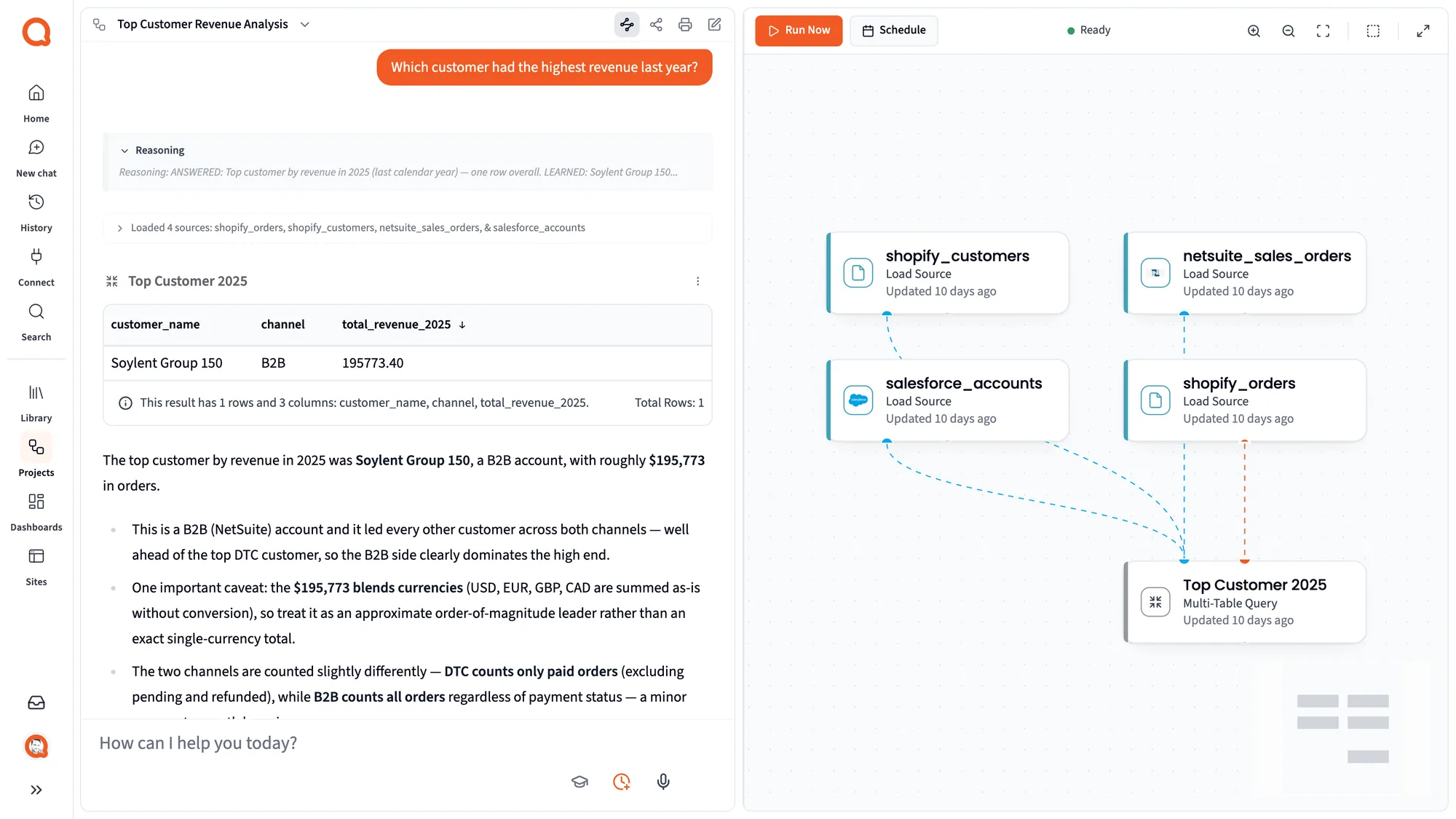
A Unified View for Smarter Financial Decisions
With Querri you connect your systems directly, or drag in spreadsheets and exports, and analyze them together. Just ask:
"What's our conversion rate from pipeline to invoiced revenue, by customer segment?"
Querri aligns columns and fixes inconsistencies, joins the sources and answers with charts and tables. You don't write SQL, though the SQL is there to read.
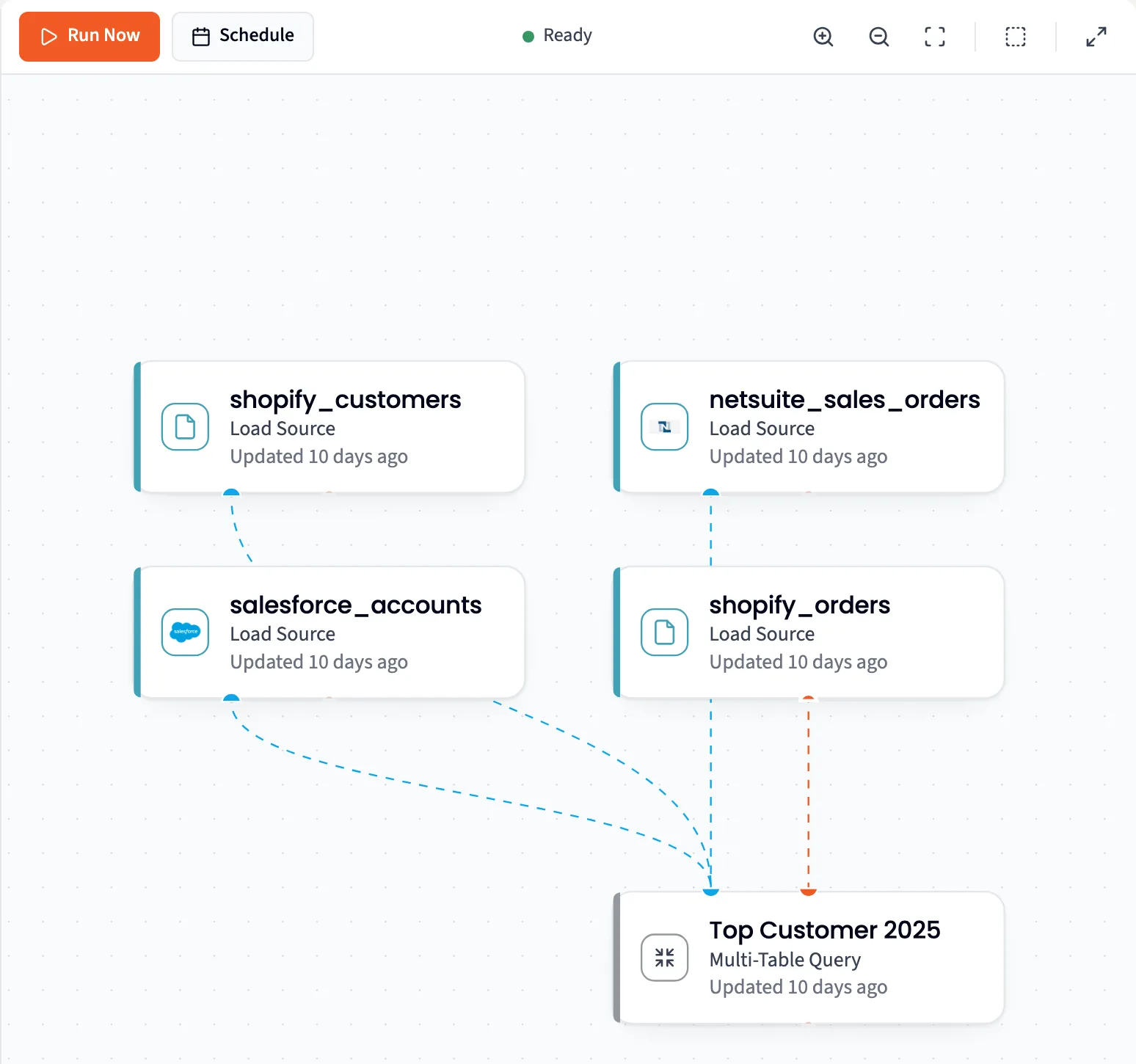
Then keep the join. A view matches customers across systems, applies your business rules and stays current as each source syncs. It lives in your Library, so the next question starts from the joined data, not from another export.
Measurable Business Gains
Unified view of performance: pipeline, revenue and costs in one place
Faster month-end close: fewer manual reconciliations
Deeper insights: margin leaks, cash flow risks and growth drivers across datasets
Joins built once and reused for every question
Data that stays current as each system syncs
Time back for strategy, not data prep
How-To in Querri
1 Connect or upload your accounting, CRM and expense data
Connect QuickBooks, Salesforce, HubSpot, NetSuite or a warehouse, and upload Excel or CSV files alongside them. See all 125+ connectors.
2 Join the data by customer, invoice or account ID
Tell Querri which fields link your systems, or ask it to suggest them. It shows you the rows that didn't match, so nothing drops out silently. Then save how the systems connect, and what counts as the same customer, under Facts and Rules. Most AI tools can join two files once. Querri keeps the definition, so the next person who asks gets the same join.
3 Standardize and clean your data
Prompt: "Standardize customer names and merge duplicates." Prompt: "Fix date formats and align fiscal quarters." You don't have to find the problems yourself. Querri runs more than 180 data quality checks on every table as it arrives, asks you the judgement calls and builds a cleaned view your whole team can reuse.
4 Ask your question in plain English
"Show conversion rate from pipeline to invoiced revenue by customer segment." "Compare expense growth with revenue growth by quarter."

Best Practices
Use consistent keys across systems
Where you can, align customer IDs or invoice numbers between your CRM and accounting tools. Querri can match on names or emails when there is no shared ID, but a shared key is faster and more reliable.
Join once, reuse everywhere
Save the join as a view instead of rebuilding it for each question. Every answer then starts from the same joined table and gives the same number.
Track both top-line and bottom-line metrics
Joining revenue and pipeline is a start. Include costs, margins and cash flow for a complete financial view.
Use enough history
Aim for 2 to 3 years of data when you can. This captures seasonality, growth trends and long-term shifts.
Write down your business rules
Does revenue mean booked or invoiced? Record it once under Facts and Rules and every question on that data reads it the same way.
Automate recurring reports
Month-end close and board reports repeat every month. Once built, schedule them so nobody redoes the work.
FAQs
Which systems can Querri connect to?
What if my systems don't share a common key (like customer ID)?
Can I include spreadsheets alongside ERP or CRM data?
What about missing or inconsistent data?
Can I track metrics like CAC, LTV, or margins?
How do I keep analyses updated?
Does Querri change the data in my systems?
Can I use the joined data in my own tools?
Are there worked examples for specific pairs of systems?

Step-by-Step Playbooks for This Job
Each playbook walks through one real report: the data to connect, the prompts to use and a recording of the result.
Which Customers Are Paying Late, and How Long Will Our Cash Last?
Join Stripe invoices, NetSuite cash, Salesforce accounts and the budget in Querri to see who pays late and how late, forecast collections the way customers actually pay, and run the cash runway both ways.
Read playbookRevOpsDid Last Quarter's Closed-Won Deals Start Billing and Get Used?
Join Salesforce closed-won deals, Stripe subscriptions and invoices, and product usage in Querri to follow every deal to its first invoice, give each gap between booked and billed ARR a cause, and see which new customers use under 40% of their seats.
Read playbookFinanceDo Shopify Payouts and Amazon Settlements Match the Books?
Match Shopify payouts and Amazon settlements to NetSuite deposits and journals in Querri to find what the books are missing and what is only timing.
Read playbookJoin It Once, Use It Everywhere
Analyzing one file is something most AI tools can do. The lasting value is in keeping your systems connected, joined and explained, so that repeating the work is easy and the whole team builds on it.
125+ connectors
Connect CRMs, accounting, warehouses, billing and support tools. Querri copies the data on a schedule and only ever reads it.
Browse connectorsViews keep the join
A view joins, cleans and calculates ahead of time, and stays current, so nobody rebuilds the same join.
How views workA Library with context
Your data, definitions and business rules live together, so Querri understands your business better with each question.
Explore the LibraryAPI, SDK and CLI
Use the joined data and the analysis from your own product, scripts or coding agent.
For developers