How do I connect Salesforce and NetSuite to Querri?
Ask the Connector Agent in Querri to connect both, or pick each from the catalog. Sign in to Salesforce in its own window, then enter NetSuite token-based authentication credentials in a secure form the agent never sees. Approve the objects, tables and schedules, and both land in your Library.
What Salesforce and NetSuite data does Querri sync?
From Salesforce, 20 standard objects are preselected, including Account, Opportunity, OpportunityLineItem, Contract and Order, plus any custom object the connected user can query. From NetSuite, 27 tables come over through SuiteQL, including customer, transaction, transactionline, transactionaccountingline, subsidiary, accountingperiod and currency.
How often do Salesforce and NetSuite sync?
Incremental syncs can run hourly, daily or weekly and pick up records changed since the last run on each side. A full refresh can run daily, weekly or monthly and also removes rows deleted at the source, which incremental syncs don't see. You can start a sync manually whenever you like.
Does Querri write to Salesforce or NetSuite?
No. Querri only reads from Salesforce and NetSuite. It never creates, updates or deletes a record, an opportunity, a transaction or anything else in either system. Your answers run on a copy of the data inside Querri.
How do Salesforce and NetSuite permissions carry over?
They don't carry over person by person. Querri can sync only what the connected Salesforce user and NetSuite role can see, so choose those accounts carefully. Inside Querri, sharing and row-level access decide who sees which rows, and a person's row filter follows them into chat, dashboards, Claude, ChatGPT and the API.
How do I match Salesforce accounts to NetSuite customers?
Querri does the matching and says how it matched each account, with a caveat where a pairing could be off. When one is wrong, or a parent account bills as several subsidiary customers, say the correct pairing once in Facts & rules and every answer, dashboard and report follows it.
How do I get a bookings vs. billings report from Salesforce and NetSuite?
Connect both, agree on what booked and billed mean, and say it once in Facts & rules. Querri follows each closed-won opportunity to its NetSuite invoices, lists deals that are unbilled or billed short, and can send the report on a schedule as email or a formatted Excel workbook.
How do I get a cash collected vs. closed-won report?
Ask for it. Querri reads closed-won deals from Salesforce and payments from NetSuite's transaction tables, matches them through your account mapping, and shows collected against booked by region, rep or subsidiary. Track the gap as a KPI and its history builds from the day you start.
How does Querri handle multiple currencies across Salesforce and NetSuite?
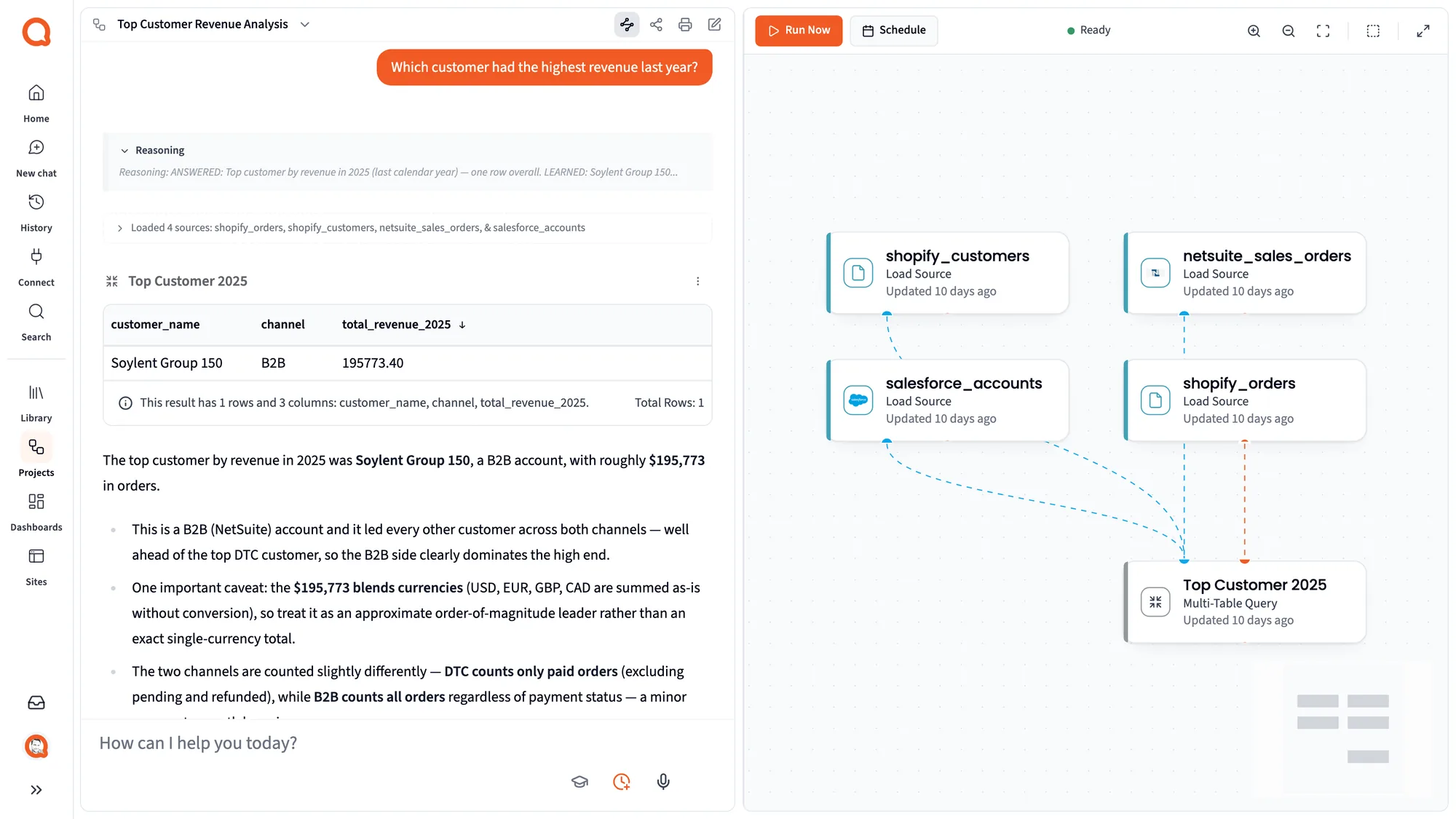
Querri checks currency columns before it totals anything. If an answer would add USD, EUR, GBP and CAD together without converting, it says so in a caveat rather than presenting the sum as fact. Tell it which rates to use, from NetSuite or a sheet, and the rule applies everywhere.
How do I combine Salesforce, NetSuite and Shopify data?
Connect all three and Querri joins them in the Library: accounts and opportunities from Salesforce, sales orders and invoices from NetSuite, customers and orders from Shopify. You can rank customers by revenue across every channel, with a warning wherever matching or currencies could skew the result.
How do I combine Salesforce, NetSuite and HubSpot data?
Add HubSpot as a third connection. Querri links HubSpot contacts and companies to Salesforce accounts and on to NetSuite customers, so you can follow a marketing channel all the way to collected cash. Where a match rests on a weak signal, such as a different email domain, the answer says so.
Can I build a custom Salesforce + NetSuite dashboard?
Yes. Ask for a bookings-to-cash view in plain words, or hand Querri a screenshot of the board pack you use today. Pipeline, invoices and collections share one screen and one set of definitions, later edits are requests in chat, and a regional VP can be limited to their region's rows.
Can I ask ChatGPT or Claude about Salesforce and NetSuite data?
Yes. Link Querri to Claude or ChatGPT a single time and the assistant answers from your Library, using the agreed definitions of booked and billed and your account-to-customer pairings. Each person gets only the rows their Querri access allows, so the CFO's answer in Claude matches the finance dashboard.
Can I export Salesforce + NetSuite reports to Excel automatically?
Yes. Save the bookings-to-billings analysis as a project and put it on a schedule. After each sync Querri can rerun it and send a formatted Excel workbook, an email or a deck, with a separate version for each region, rep or client if you want one.
Can I connect a Salesforce sandbox or a NetSuite sandbox?
NetSuite sandbox accounts are supported, so you can try Querri on sandbox data first. Salesforce sandbox orgs are not supported today: Querri connects to Salesforce through its standard sign-in at login.salesforce.com, which reaches production orgs.
Does Querri sync NetSuite custom records?
Not today. Querri syncs NetSuite's standard tables through SuiteQL, including customers, transactions, transaction lines, items, accounts and subsidiaries, but not custom records. On the Salesforce side, any custom object the connected user can query can be added to the sync.
Is my Salesforce and NetSuite data secure in Querri?
Querri is SOC 2 Type II, HIPAA and ISO 27001:2022 certified, and your data is never used to train a model. You sign in to Salesforce directly, NetSuite tokens go into a secure form the Connector Agent can't read, and Querri only ever reads from either system.
Do we still need our Salesforce-NetSuite integration?
Yes, if you run one. An integration keeps orders and customers moving between the two systems so operations run. Querri reads both and answers questions across them, such as which deals went unbilled or why sales and finance totals differ, without changing a record on either side.

 Salesforce + NetSuite