Skip to content

Amazon Ads + Querri

Analyze Amazon Ads performancenext to every sale, not only the ad-attributed ones.

Querri is advertising analytics for Amazon sellers, vendors and the agencies that run their Sponsored ads. Connect Amazon Ads, ask in plain words, and see ACOS, ROAS and TACoS by campaign, search term and ASIN, with Seller Central sales and your Meta and Google spend in the same answer.

Querri only reads your Amazon Ads data. It calls Amazon's reporting and export APIs and never edits a campaign, bid, budget or target. You sign in with Amazon, so Querri never sees a password. SOC 2 Type II, HIPAA and ISO 27001:2022 certified.

Why Amazon Ads reporting gets hard

The console answers one account at a time. The business question spans all of them.

Brand owners, Amazon managers and agency teams run into the same limits once the question is bigger than one campaign on one marketplace.

01

ACOS only counts sales an ad touched

ACOS divides spend by ad-attributed sales. It can't tell you how much of a product's total Amazon revenue goes to ads. That's TACoS, and it needs total sales from Seller Central.

02

Last week's numbers keep moving

Amazon credits a sale to an ad for days after the click and updates conversions for weeks. A report pulled on Monday doesn't match the same report pulled on Friday.

03

Every marketplace is its own profile

Each country has its own advertiser profile, currency and time zone. Totals across the US, UK and Germany mean exporting each one and stitching them together.

04

Wasted spend hides in the search terms

Search term reports run to thousands of rows. The terms that spend for weeks and never sell sit in the long tail, where nobody scrolls.

05

Amazon, Meta and Google each grade their own work

Every platform reports its own ROAS on its own rules. None of them adds up total spend against what the business actually sold.

What you can finally answer

Eight Amazon Ads questions that used to end in a spreadsheet

Each one is a question sellers, vendors and agencies ask every week, why it's hard in the console, and what Querri does with it.

How did ACOS and ROAS move by campaign, week over week?

Why it's hard

The console shows one date range at a time. A trend by campaign across Sponsored Products, Brands and Display means downloading reports and pivoting them.

With Querri

Querri reads daily performance for every campaign with spend, sales, ACOS and ROAS already on each row. Ask for the trend and get a chart; keep it on a dashboard that updates with each sync.

Which search terms spend money and never sell?

Why it's hard

The waste is spread over thousands of rows and many weeks. Finding it means sorting a large export and adding it up by term.

With Querri

Querri totals spend, clicks and orders for every search term over the window you choose and lists the ones with spend and no sales. You decide which to add as negatives in Amazon; Querri doesn't change your campaigns. Monitors can flag new ones each night.

What's TACoS by ASIN, and which products lean on ads?

Why it's hard

Ad spend lives in Amazon Ads. Total sales live in Seller Central. TACoS needs both, by product, for the same days.

With Querri

Connect Amazon Seller Central too, and Querri joins ad spend per ASIN to total sales per ASIN. Store TACoS as a KPI so every chart and answer uses the same formula.

Which advertised ASINs bring in the most, and at what cost?

Why it's hard

Product-level results sit in the advertised product report, split by ad and campaign. Ranking products means adding up across both.

With Querri

Querri adds up spend, ad sales, units and orders per ASIN across every campaign and profile, then ranks them. Ask a follow-up, like the same list for the UK only, and it reuses the work.

How does Amazon compare with Meta and Google this month?

Why it's hard

Each platform has its own console, its own currency settings and its own idea of a conversion. Side by side means three exports.

With Querri

Connect Meta Ads and Google Ads too, and Querri puts spend and each platform's reported revenue in one table. Add your store and Amazon sales for blended ROAS and MER. Querri shows each platform's own numbers; it doesn't reassign credit between them.

What did each product make after Amazon fees and ad spend?

Why it's hard

Fees are in Seller Central finance data, cost is in the ERP or the store, and ad spend is in Amazon Ads. Contribution after ads needs all three.

With Querri

Querri joins ad spend per ASIN with Seller Central fees and unit cost from NetSuite or Shopify. Tell it once in Facts & rules what contribution margin means for you.

Can an agency report on every client without a spreadsheet per client?

Why it's hard

Each client is a separate login, set of profiles and set of exports. The Monday report is a copy-paste job per account.

With Querri

Connect each client's Amazon login. Every row carries its profile and advertiser account, so one report covers all clients. Row-level access in Workspaces, on the Scale plan, lets each client see only their own rows, and scheduled reports send each one their numbers.

Can Claude or ChatGPT answer Amazon Ads questions with numbers I can trust?

Why it's hard

Paste an export into a chat and each prompt works out ACOS its own way. Two people get two answers.

With Querri

Link Querri to Claude or ChatGPT once. The assistant reads from your Library, uses your stored KPIs and respects each person's access.

Amazon Ads plus the rest

Ad spend means more next to every sale

Amazon Ads knows what the ads did. Seller Central knows everything that sold, ads or not. Your store and your ERP know cost and margin. With all of them in one Library, TACoS and contribution after ad spend come out of one question.

Amazon Ads pairs well with

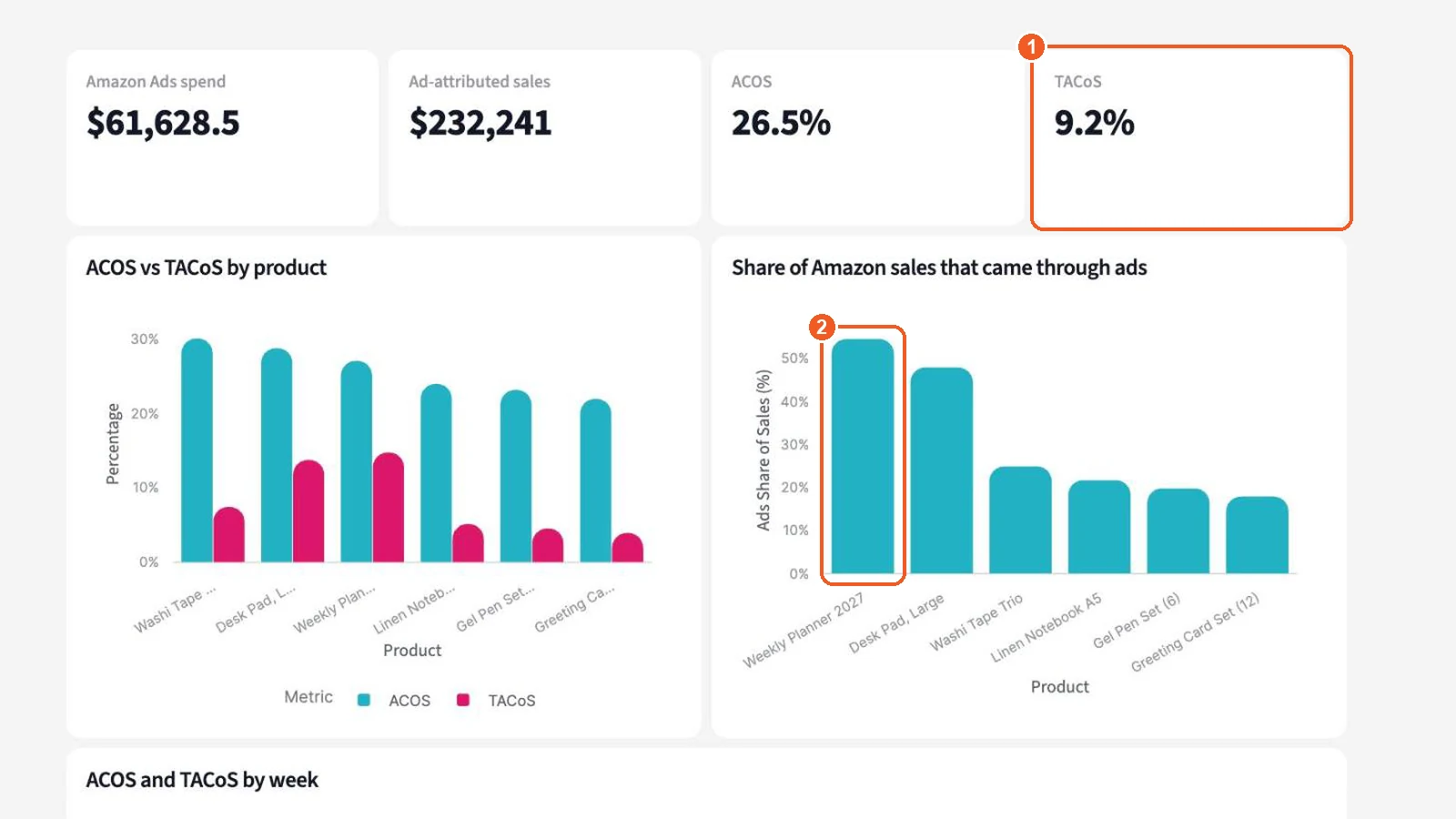
Querri dashboard comparing Amazon ACOS with TACoS for each product, built by joining Amazon Ads spend to Seller Central sales, using sample data for a fictional brand
ACOS against TACoS by product, from Amazon Ads joined to Seller Central. Sample data.

Answers you can stand behind

Last week's ROAS depends on when you ask. Querri says which numbers it used.

Amazon keeps crediting sales to ads for days after a click, so the most recent days look worse than they will end up. Querri notes where the data ends and which days the answer counts, and each sync reloads the whole window, so Amazon's restated numbers replace the old ones. See how answers work.

Wake up to what changed

Querri watches spend, ACOS and search terms overnight

Each night Querri compares your KPIs with their own history, by campaign, profile and product, and does the math rather than guessing. Anything worth a look is in your Inbox by morning. Querri never touches a bid or budget; you decide what to change in Amazon.

Cross-channel ad dashboards

Amazon, Meta and Google spend on one page, next to what the store sold

Ask for the dashboard in plain words, or paste a screenshot of the one your team uses now, and change it the same way. Spend by platform, each platform's reported revenue and the revenue your store recorded sit on the same page. With row-level access on the Scale plan, each client or channel manager sees only their rows.

  • Asked for in plain words, edited the same way
  • Platform-reported revenue beside store revenue
  • Row-level access per client on Scale
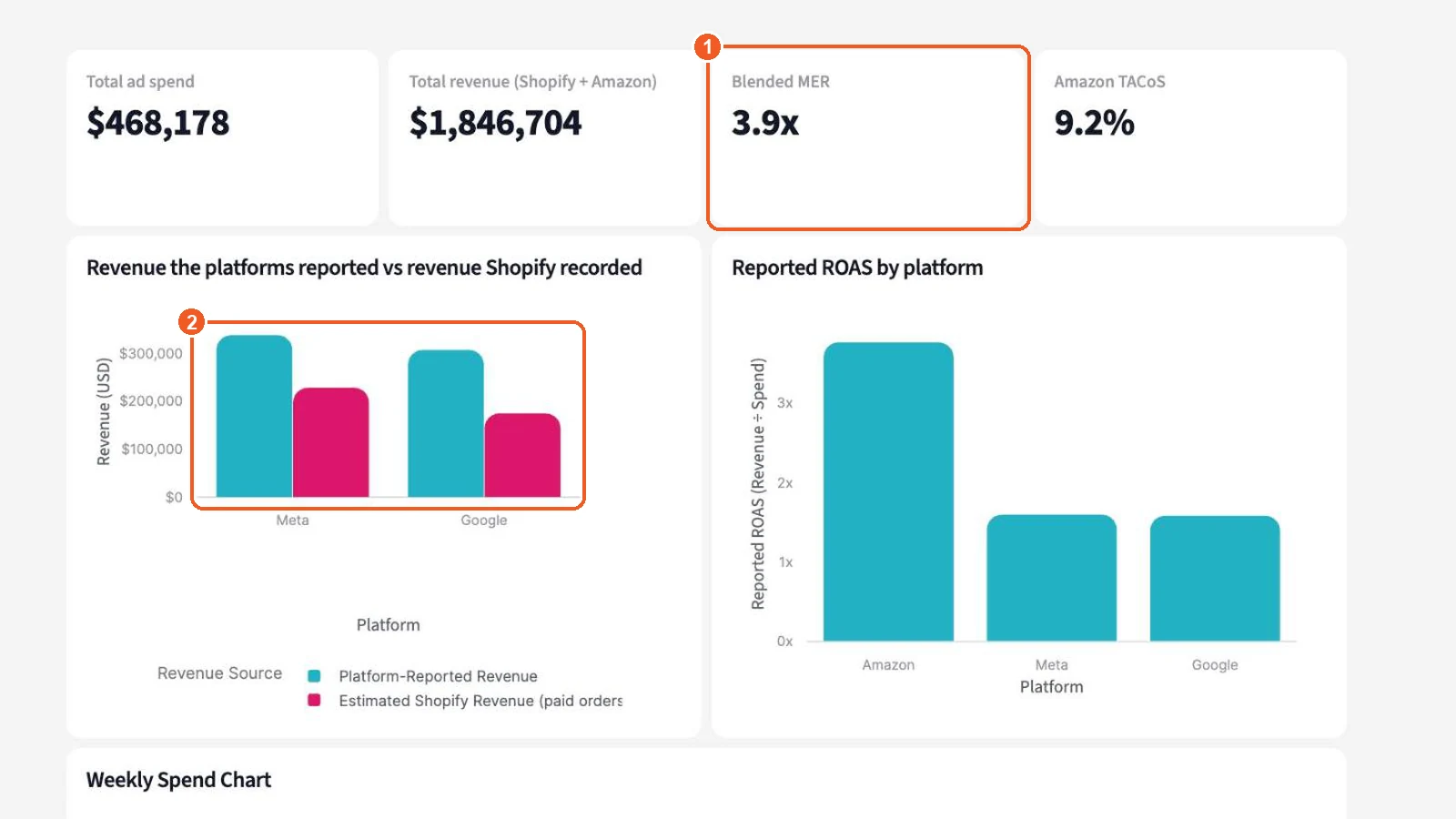
Querri dashboard with ad spend by platform for Meta, Google and Amazon, platform-reported revenue against revenue the store recorded, and blended MER and ROAS, using sample data for a fictional brand
Spend, platform-reported revenue and store revenue across Meta, Google and Amazon. Sample data.

Reports you can stop rebuilding

Six Amazon Ads reports, built once

What comes over

Accounts, campaigns and daily performance for Sponsored Products, Brands and Display

Querri reads the eleven tables below for every advertiser profile your Amazon login can see in the region you pick, or only the profiles you choose. Every row carries the profile and advertiser account it came from, and money comes over in each account's currency.

Tables Querri syncs

  • Profiles
  • Advertiser Accounts
  • Campaigns
  • Ad Groups
  • Ads
  • Targets
  • Campaign Performance (Daily)
  • Ad Group Performance (Daily)
  • Advertised Product Performance (Daily)
  • Targeting Performance (Daily)
  • Search Term Performance (Daily)
  • Covers Sponsored Products, Sponsored Brands and Sponsored Display

The last 90 days, refreshed in full

Daily tables hold the last 90 days by default, and you can widen that window. Every sync reloads the whole window, so when Amazon restates conversions the new numbers replace the old ones instead of being counted twice.

Settings as they are today

Campaigns, ad groups, ads and targets come over as a current snapshot: state, budget, bidding, match type and negatives. Daily performance tables carry impressions, clicks, spend, orders, sales and units, with CTR, CPC, ACOS and ROAS.

Read only

Querri calls only Amazon's reporting and export APIs. Campaigns, bids, budgets and targets stay exactly as your team left them.

Signed in with Amazon

You approve access with Login with Amazon. No password passes through Querri, and each connection covers one login in one region.

How to connect Amazon Ads

Connected in minutes; the Connector Agent handles setup

  1. 1

    Ask the Connector Agent

    Tell the Connector Agent "connect Amazon Ads," or choose Amazon Ads in the catalog.

  2. 2

    Choose a region

    Pick North America, Europe or Far East. Europe includes the Middle East and India. Connect each region you advertise in separately.

  3. 3

    Sign in with Amazon

    Sign in on Amazon's own page and approve access for the login that runs your ads. Querri never sees your password.

  4. 4

    Pick advertising profiles

    Keep every profile the login can see, or choose only the marketplaces and advertiser accounts you want. If your login manages client accounts, their profiles show up here too.

  5. 5

    Approve the load and ask

    The first load waits for your go-ahead. Pick a sync schedule, and campaigns, search terms and daily results are in the Library, ready for your first question.

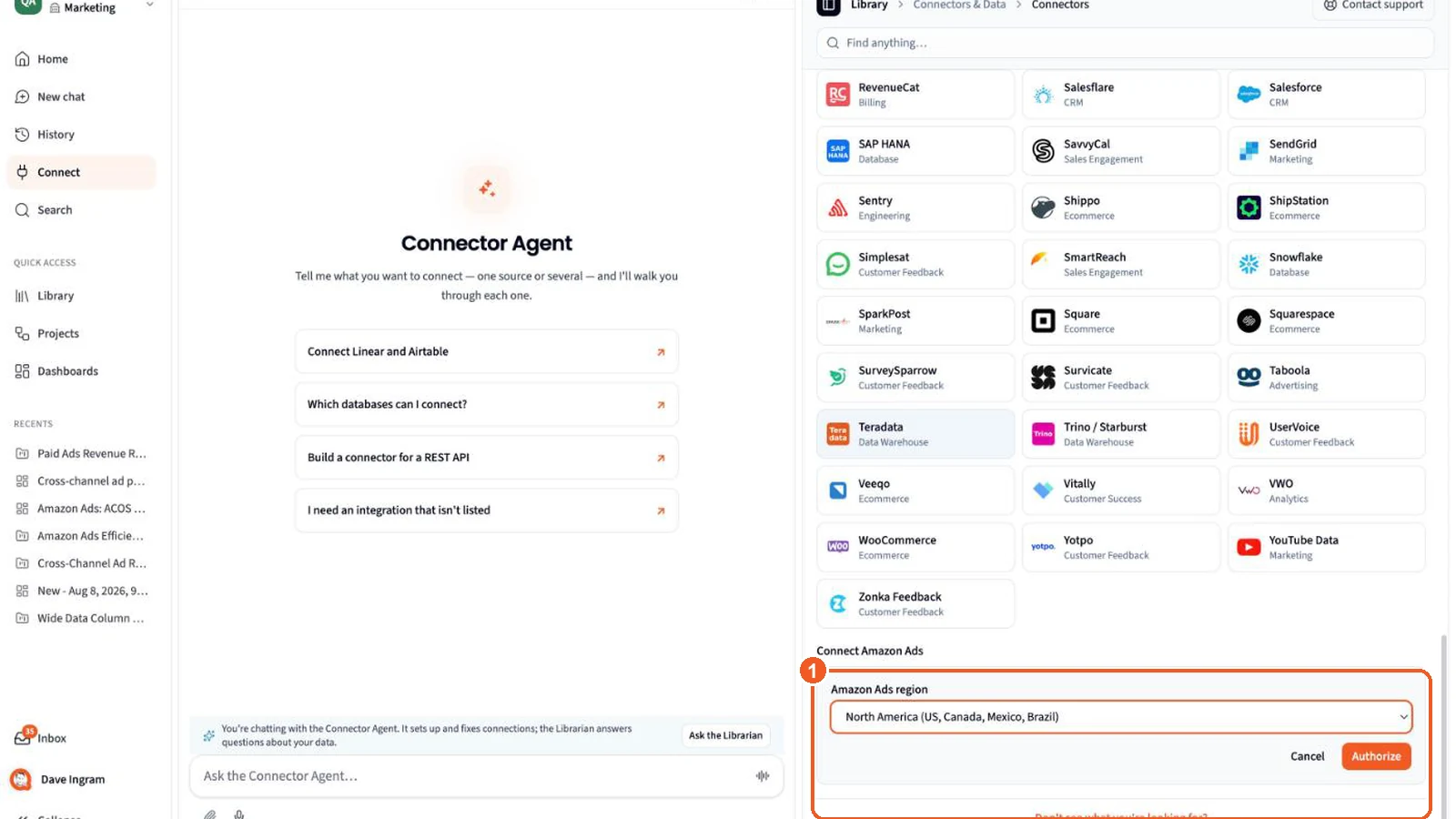
The Connect page in Querri with Amazon Ads selected: pick the Amazon Ads region, then Authorize to sign in with Amazon
Pick your region, then sign in with Amazon. Querri only reads reports and campaign settings.

Amazon Ads FAQ

Questions about Amazon Ads and Querri

What is Querri for Amazon Ads?

Querri is advertising analytics for Amazon sellers, vendors and agencies running Sponsored ads. It copies your Amazon Ads reporting data into one Library, so you can ask about ACOS, ROAS, TACoS, search terms and products in plain words, and put Amazon beside Seller Central, your store, Meta and Google.

How do I connect Amazon Ads to Querri?

Ask the Connector Agent to connect Amazon Ads, or choose it in the catalog. Pick your region (North America, Europe or Far East), sign in with Amazon, then keep all advertising profiles or choose the ones you want. Approve the first load and a schedule, and the data arrives.

Does Querri change my campaigns, bids or budgets?

No. Querri only reads. It calls Amazon's reporting and export APIs and never creates, edits, pauses or deletes a campaign, ad group, ad, bid, budget or target. When a report suggests a change, you make it in Amazon.

What Amazon Ads data does Querri sync?

Eleven tables: Profiles, Advertiser Accounts, Campaigns, Ad Groups, Ads and Targets, plus daily performance by campaign, ad group, advertised product (ASIN), target and search term. They cover Sponsored Products, Sponsored Brands and Sponsored Display. Search terms cover Sponsored Products and Sponsored Brands.

How much history does Querri load?

The last 90 days by default, ending yesterday in the account's time zone. You can widen the window to as much as two years of daily data. Each sync reloads the whole window.

Why reload the whole window each time?

Amazon keeps updating attributed sales and conversions for weeks after a click. Reloading the window in full means restated days replace the old numbers, so nothing is counted twice and recent ROAS catches up on its own.

Can I see TACoS, not just ACOS?

Yes. Connect Amazon Seller Central as well. Querri joins ad spend per ASIN from Amazon Ads to total sales per ASIN from Seller Central, so TACoS is ad spend over all sales, ads and organic. Store it as a KPI and every chart uses the same formula.

Does it work for vendors and agencies?

Yes. Querri reads the seller and vendor profiles your Amazon login can see, including client accounts an agency login has been given access to. Agencies can connect each client and, with row-level access on the Scale plan, let each client see only their own profiles.

Can I compare Amazon Ads with Meta and Google?

Yes. Connect Meta Ads and Google Ads too, and Querri puts spend and each platform's reported revenue side by side. Add your store and Seller Central sales for blended ROAS and MER across every channel.

Does Querri do attribution between Amazon, Meta and Google?

No. Querri doesn't run multi-touch attribution or media-mix models and doesn't reassign credit between platforms. It shows each platform's reported numbers next to the sales your store and Seller Central recorded, which gives you blended metrics like MER, TACoS and contribution after ad spend.

Does Querri include Amazon DSP?

No. The Amazon Ads connection covers Sponsored Products, Sponsored Brands and Sponsored Display. Profiles that only run DSP have no sponsored campaigns to sync.

Why do my search term counts differ from the console?

Amazon's reporting API includes only search terms that got at least one click, so the row count can be lower than the console's download.

Can I connect more than one marketplace or region?

Yes. One connection covers every profile your login can see in one region, such as the US, Canada and Mexico together. Add another connection for Europe or the Far East. All of them land in the same Library, with currency on every row.

Can I ask ChatGPT or Claude about my Amazon Ads data?

Yes. Link Querri to Claude or ChatGPT once. The assistant reads from your Querri Library, uses your stored KPIs and rules, and sees only what that person can see in Querri.

Is my Amazon Ads data secure in Querri?

Querri is SOC 2 Type II, HIPAA and ISO 27001:2022 certified. You approve access with Login with Amazon, so no password passes through Querri, and your data never trains a model. Sharing and row-level access set which rows each person sees.

See what your Amazon ads did for the whole business.

It takes a few minutes to connect, and Querri only reads your data.